Aframe: <audio> and <video> do not preload even with preload="auto"
With the code below, neither audio or video assets are preloading. When I change everything to a-asset-item I get progress reports for all the assets and the loading does not even timeout but functionality is buggy when using videos and audio through a-asset-item.
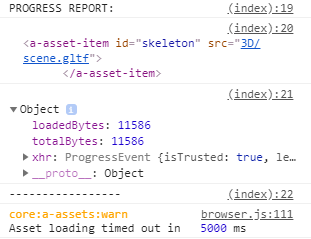
There are no error events being emitted either. It is as if the video and audio tags inside a-assets are being completely ignored by the asset management system. The sole a-asset-item is pre loading just fine as can be seen in the screenshot below (the event in the screenshot was the only one fired throughout the entire loading process, extending the timeout does not make any difference).
Console Output:
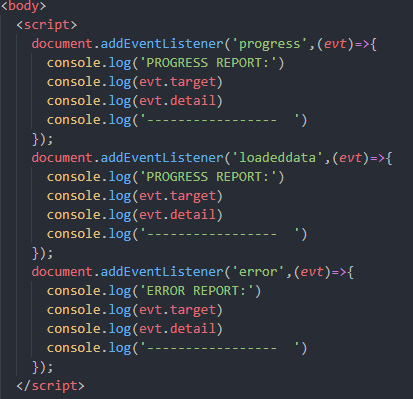
Code for listening to events:
The assets are being served through a generic local http server
- A-Frame Version: 0.9.0
- Platform / Device: Google Chrome 73.0.3683.75 / Laptop with Windows 10 (also tried on oculus browser on the oculus go)
Reproducible Code Snippet or URL:
UPDATE:
On further inspection by logging THREE.Cache every second, it seems that the video files are on the cache (but no loading events were fired) but the audio files are not and if I remove all the assets except for the audio files they still do not show up on the cache
UPDATE 2:
Found that it was just easier to load the assets directly through the html5 api for audio/video so closing this issue
 FranciscoPinho
All 3 comments
I'm having the same issue @FranciscoPinho with loading big videosphere files. How did you manage to get it work? Anywhere to check to code?
<a-assets>
<video id="videoEsfera_Eguzki" loop="false" src="video/Eguzki_Sistema.mp4" preload="auto">
<video id="videoEsfera_Animali" loop="false" src="video/Mundo_animal.mp4" preload="auto">
<video id="videoEsfera_Mirari" loop="false" src="video/Munduko_zazpi_mirariak.mp4" >
</a-assets>
<script>
document.addEventListener('progress',function(evt){
console.log('PROGRESO:');
console.log(evt.target);
console.log(evt.detail);
console.log('----------------');
});
document.addEventListener('loadeddata',function(evt){
console.log('PROGRESO:');
console.log(evt.target);
console.log(evt.detail);
console.log('----------------');
});
</script>
 iburguera
on 21 Mar 2019
iburguera
on 21 Mar 2019
I load the assets myself as I need them directly through the html5 api
See https://www.w3schools.com/tags/av_met_load.asp as an example of loading and https://www.w3schools.com/tags/ref_av_dom.asp for the general api to play/pause/etc.
Basically interface directly with the audio and video elements in a-assets (without preloading) instead of whatever aframe components or entities they are attached to.
Example code for loading a videosphere video from a component attached to the videosphere
this.video = document.querySelector(this.el.getAttribute('src'))
this.video.load()
If you want to play it only when it's fully loaded:
if ( this.video.readyState === 4 ) {
      this.video.play()
}
If you use the approach above you'll need to have a mechanism to guarantee that the code is called again in case the readyState isn't what you want it to be yet. Or simply use the dom events to know when the loading is done
FranciscoPinho
on 23 Mar 2019
Thank you very much @FranciscoPinho.
iburguera
on 26 Mar 2019
Related issues
 ghost
·
3Comments
ghost
·
3Comments
 RangerMauve
·
4Comments
RangerMauve
·
4Comments
 AdrienPoupa
·
6Comments
AdrienPoupa
·
6Comments
 micahnut
·
5Comments
micahnut
·
5Comments
 MrBokeh
·
5Comments
MrBokeh
·
5Comments
Most helpful comment
I load the assets myself as I need them directly through the html5 api
See https://www.w3schools.com/tags/av_met_load.asp as an example of loading and https://www.w3schools.com/tags/ref_av_dom.asp for the general api to play/pause/etc.
Basically interface directly with the audio and video elements in a-assets (without preloading) instead of whatever aframe components or entities they are attached to.
Example code for loading a videosphere video from a component attached to the videosphere
If you want to play it only when it's fully loaded:
if ( this.video.readyState === 4 ) {
      this.video.play()
}
If you use the approach above you'll need to have a mechanism to guarantee that the code is called again in case the readyState isn't what you want it to be yet. Or simply use the dom events to know when the loading is done