Aframe: Can't create a screenshot of scene (allow `preserveDrawingBuffer` to be toggled)
Proposal to add 'preserveDrawingBuffer' option to webgl renderer from a-scene.
Will need a good attribute name or any better suggestion?
 wizztjh
All 30 comments
Have you tried https://github.com/Jam3/threejs-generate-gif?
 cvan
on 4 Feb 2016
cvan
on 4 Feb 2016
not yet. Trying it now.
wizztjh
on 4 Feb 2016
by looking at the code.
https://github.com/Jam3/threejs-generate-gif/blob/master/test.js
It will need to run gifGenerator.addFrame(); in each frame and it will need start the requestAnimation. Might not be a good fit for aframe integration.
wizztjh
on 4 Feb 2016
I think we should create a renderer scene component that allows the user to set the flags that three.js exposes. preserveDrawingBuffer among them.
 dmarcos
on 4 Feb 2016
dmarcos
on 4 Feb 2016
I agree with let the user decide (the same as antialias for example) instead of add it by default, as preserveDrawingBuffer can impact the performance.
From the webgl spec (https://www.khronos.org/registry/webgl/specs/latest/1.0/):
On some hardware setting the preserveDrawingBuffer flag to true can have significant performance implications.
While it is sometimes desirable to preserve the drawing buffer, it can cause significant performance loss on some platforms. Whenever possible this flag should remain false and other techniques used. Techniques like synchronous drawing buffer access (e.g., calling readPixels or toDataURL in the same function that renders to the drawing buffer) can be used to get the contents of the drawing buffer. If the author needs to render to the same drawing buffer over a series of calls, a Framebuffer Object can be used.
Implementations may optimize away the required implicit clear operation of the Drawing Buffer as long as a guarantee can be made that the author cannot gain access to buffer contents from another process. For instance, if the author performs an explicit clear then the implicit clear is not needed.
 fernandojsg
on 4 Feb 2016
fernandojsg
on 4 Feb 2016
@dmarcos something like this?
<a-scene preserveDrawingBuffer='true'>
I would do a renderer component for the scene that let you do:
<a-scene renderer="antialias: true; preserveDrawingBuffer: true; …">…</a-scene>
@dmarcos Nice! +1
I don't see any test for antialias
https://github.com/aframevr/aframe/blob/dev/tests/core/a-scene.test.js#L185
Will create renderer component and test for antialias and preserveDrawingBuffer.
sidenote:
if the user changes
<a-scene renderer="antialias: true; preserveDrawingBuffer: true; ... ">...<a-scene>
to
<a-scene renderer="">...<a-scene>
on runtime.
The renderer still uses antialias and preserveDrawingBuffer right? Because it is only registered on init. The only way to make the antialias and preserveDrawingBuffer change on run time is to recreate the renderer. We don't want to do that right?
wizztjh
on 5 Feb 2016
you're right. It might be confusing. Could we reinitialize the renderer if one of the values changes?
dmarcos
on 5 Feb 2016
I created a small component for the a-scene in order to make a screenshot. But it does not seem to work and when creating a new WebGLRenderer the output of the scene is blurry and the generated image is black. What am I doing wrong?
AFRAME.registerComponent('renderer', {

    init: function () {
        this.el.renderer = new THREE.WebGLRenderer({ preserveDrawingBuffer: true });
    },
    remove: function () {
        this.el.renderer = new THREE.WebGLRenderer({ preserveDrawingBuffer: false });
    }

});
var scene = document.querySelector('a-scene');
var canvasData = scene.renderer.domElement.toDataURL('image/png');
 weddingdj
on 14 Oct 2016
weddingdj
on 14 Oct 2016
Uh oh.. I see: https://github.com/aframevr/aframe/blob/master/src/core/scene/a-scene.js#L301 - I think I should not just replace the WebGLRenderer as I did.
AFRAME.registerComponent('renderer', {

    init: function () {
        var antialias = this.el.getAttribute('antialias') === 'true';
        this.el.renderer = new THREE.WebGLRenderer({ canvas: this.el.canvas, antialias: antialias || window.hasNativeWebVRImplementation, alpha: true, preserveDrawingBuffer: true });
        this.el.renderer.setPixelRatio(window.devicePixelRatio);
        this.el.renderer.sortObjects = false;
        this.el.effect = new THREE.VREffect(this.el.renderer);
    },
    remove: function () {
        var antialias = this.el.getAttribute('antialias') === 'true';
        this.el.renderer = new THREE.WebGLRenderer({ canvas: this.el.canvas, antialias: antialias || window.hasNativeWebVRImplementation, alpha: true, preserveDrawingBuffer: false });
    }

});
Hm... still no luck. Image is white (at least not black like it was before ;-)).
weddingdj
on 14 Oct 2016
Interesting, if I set preserveDrawingBuffer: true directly in aframe.js when the WebGLRenderer is created, it works. I can take a screenshot of the scene. Looks like a-frame does not like swapping the renderer in the component as I did. Any ideas?
weddingdj
on 14 Oct 2016
Current version of aframe 0.3.2 / three.js 0.76.1 does not need to set preserveDrawingBuffer: true anymore in order to get a screenshot of the canvas by doing
var canvasData = scene.renderer.domElement.toDataURL('image/png');
I double checked and the screenshot is always taken and I tested a lot.
weddingdj
on 25 Oct 2016
@chriscar That's not working for me. Here's a Codepen example: http://codepen.io/fabricius/pen/KNNWVL
I get a blank png with the dimensions of the window, just as I do in any other way when preserveDrawingBuffer has not been set to true.
What _does_ work for me though, is the upcoming screenshot component in the next release of A-Frame. At least it works in this example (press Ctrl+Alt+S to take screenshot): http://codepen.io/fabricius/pen/aBBJwp
Slightly outdated documentation here: https://aframe.io/docs/master/components/screenshot.html
 RSpace
on 17 Nov 2016
RSpace
on 17 Nov 2016
@RSpace I have to update the docs. With <ctrl> + <alt> + <shift> + s you can take an equirectangular screenshot (aka 360 image)
dmarcos
on 17 Nov 2016
@RSpace I played with your Codepen and you're right. In my case manually taking a screenshot is not an option, I create one programmatically, after uploading a 3d model. It's wired, it still works in my code. When I got time I should check why it works...
weddingdj
on 18 Nov 2016
@chriscar you can take a screenshot programmatically if you do:
sceneEl.components.screenshot.capture() pass perspective as parameter if you want a normal screen capture sceneEl.components.screenshot.capture('perspective')
dmarcos
on 18 Nov 2016
@dmarcos Good tip about sceneEl.components.screenshot.capture('perspective'). I wish that method wouldn't initiate the download, as in my case I take the base64 image and submit to a server.
I might do a PR to change the behaviour or make it more configurable, but for now I also have had to comment out https://github.com/aframevr/aframe/blob/master/src/components/scene/screenshot.js#L65 and the following line, as those shaders results in WebGL shader compilation error. I don't get the compilation in the Codepen example I did, only in my own app.
It must be related to the fact that I use webpack and include A-Frame with require('aframe/src') to be able to debug into A-Frame. Does browserify do anything magic related to shaders when it produces the master dist file?
RSpace
on 18 Nov 2016
@demarcos Same here, thanks about the hint! In my use case I would need to submit the image data to the server as well.
weddingdj
on 18 Nov 2016
@RSpace - I did a little fix so you can now get a canvas object with the rendered screengrab, by doing sceneEl.components.screenshot.getCanvas() - from where you should be able to do a .toBlob() and send off to a server or whatever. :)
https://github.com/aframevr/aframe/pull/2316
 toychicken
on 27 Jan 2017
toychicken
on 27 Jan 2017
@toychicken Thanks, I did something along those lines in my local copy of the component to get it working - will be great have it in core.
However, I still have the WebGL shader compilation error in my webpack-based build, so for now the screenshot component is still not useable for me.
RSpace
on 27 Jan 2017
https://github.com/aframevr/aframe/pull/2316 should allow it now?
Shader should now compile since it's just string concat via array join. Let me know if that's still an issue.
 ngokevin
on 1 Apr 2017
ngokevin
on 1 Apr 2017
great job worked with
sceneEl.components.screenshot.getCanvas('perspective').toDataURL('image/png')
 jason90929
on 23 Oct 2017
jason90929
on 23 Oct 2017
Hi! Hi! I am trying to take a screenshot for contents in a-scene using A-frame. With the current screenshot method, it only takes the rendering of the 3D model in the scene and not the camera feed. Any ideas how I can take a whole screenshot?
 Jamolinesca
on 4 Jun 2018
Jamolinesca
on 4 Jun 2018
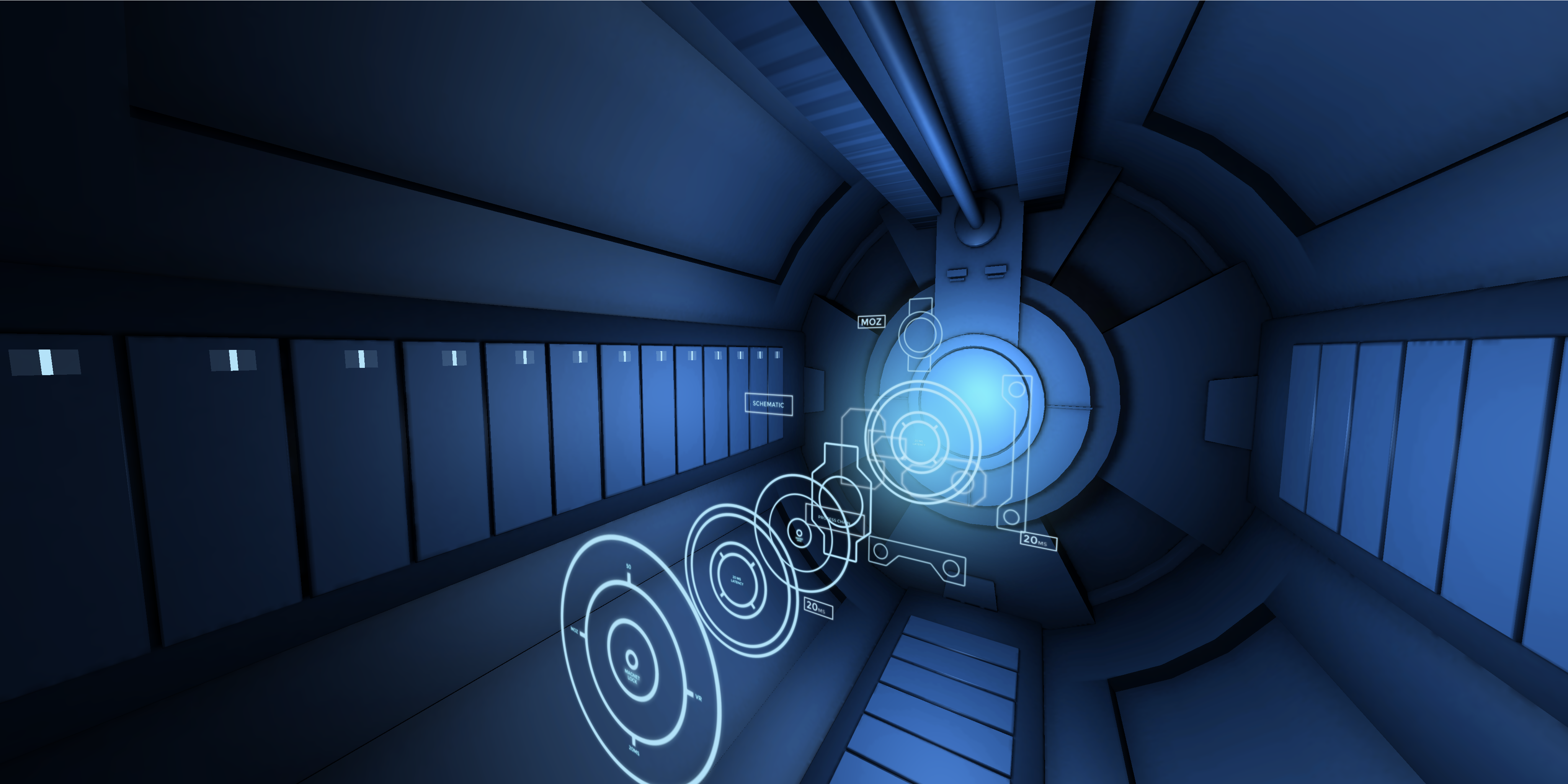
@Esmolan Can you provide a link? Not sure what you mean by camera feed. ctrl+alt+s takes the screenshot below in https://aframe.io/aframe/examples/showcase/anime-UI/ that it's what you would expect.
dmarcos
on 4 Jun 2018
@dmarcos Here is my website: https://esmolan.github.io/
I am building a AR project where when using A-Frame, I can project gTLF models, etc. However, I want to take a screen capture of them alongside the camera feed from the webcam.
Allow me to explain, even when using the ctrl+alt+s to trigger the screenshot, it only captures the 3D model with a white background, not the render of the webcam. Image link: https://ibb.co/hCudTT
Same issue: https://github.com/jeromeetienne/AR.js/issues/358
I just want a way to capture a screenshot with the webcam using A-Frame. I know that with three.js its possible, but its hard to play with custom markers and loading animations to gTLF models.
Jamolinesca
on 4 Jun 2018
I don't know how the camera feed is rendered in ar.js. It's probably not rendered in THREE and that's probably why it's not visible using the screenshot component. If you can bring that camera feed into THREE then it will be picked up automatically by the component.
dmarcos
on 4 Jun 2018
@dmarcos How can I bring the camera feed into THREE?
Jamolinesca
on 4 Jun 2018
Render the camera feed as a texture. That's more of a question for AR.js folks. It will probably not be worth since it will likely degrade performance. I would look for alternative ways to take screenshots in ar.js. There;s not much we can do on the A-Frame side
dmarcos
on 4 Jun 2018
@dmarcos I will still try! Thanks for the help :)
Jamolinesca
on 4 Jun 2018
Related issues
 jgbarah
·
4Comments
jgbarah
·
4Comments
 MrBokeh
·
5Comments
MrBokeh
·
5Comments
 greggman
·
4Comments
greggman
·
4Comments
 wlhm1984
·
5Comments
wlhm1984
·
5Comments
 beyerz
·
3Comments
beyerz
·
3Comments
Most helpful comment
great job worked with