Afnetworking: Building for iOS Simulator, but the linked and embedded framework 'AFNetworking.framework' was built for iOS
What did you do?
I updated my Xcode version to Xcode12.
I used Carthage to integrate the AFNetworking, everything was working fine until I updated my Xcode version from 11.7 to 12.
Now after updating to Xcode 12 when I am trying to run the Carthage update --platform iOS command it shows me an error(attached in screenshot).
What did you expect to happen?
I expected that everything will work fine
What happened instead?
I am not able to build my project and it shows me error(Building for iOS Simulator, but the linked and embedded framework 'AFNetworking.framework' was built for iOS) as shown in the screenshot.
AFNetworking Environment
AFNetworking version: 3.2.1 and 4.0
Xcode version: 12
Swift version: 5.3
Platform(s) running AFNetworking: iOS
macOS version running Xcode: 10.15.6


 SatishMavani
All 5 comments
One of the answers from dev forum's question says that it is something which needs to be fixed by 3rd party framework(AFNetworking)
SatishMavani
on 22 Sep 2020
@SatishMavani See https://github.com/Carthage/Carthage/issues/3019
 ElfSundae
on 28 Sep 2020
ElfSundae
on 28 Sep 2020
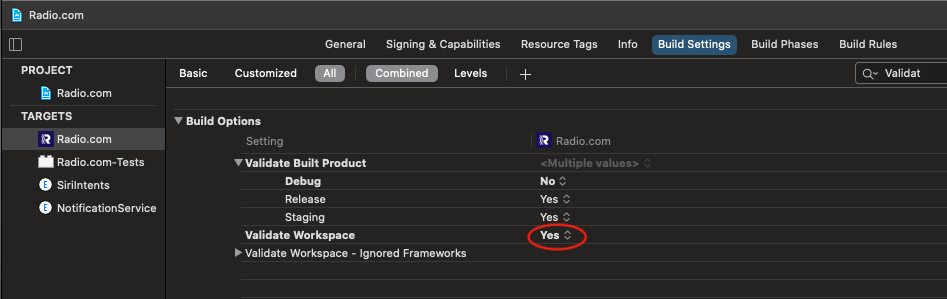
Did you try this?
Changing value of Validate Workspace to YES
 warisappify
on 15 Dec 2020
warisappify
on 15 Dec 2020
warisappify works!
Just curious - why this works?
 jugos654
on 17 Dec 2020
jugos654
on 17 Dec 2020
Here Is Already Solved with all possible solution added Solved Xcode 12.3: Building for iOS Simulator, but the linked and embedded framework was built for iOS + iOS Simulator
 exeptionerror
on 20 Jan 2021
exeptionerror
on 20 Jan 2021
Related issues
 appcelerate
·
5Comments
appcelerate
·
5Comments
 jinweizhao
·
4Comments
jinweizhao
·
4Comments
 VictorZhang2014
·
5Comments
VictorZhang2014
·
5Comments
 shantj
·
5Comments
shantj
·
5Comments
 bringel
·
5Comments
bringel
·
5Comments
Most helpful comment
Did you try this?
Changing value of Validate Workspace to YES