Aerial: Auto-update mechanism for macOS Catalina/Big Sur
Description of issue / Feature request
Fix auto-update mechanism for macOS Catalina. I know that this issue has been already reported in the README, but if it's ok I'd like to use this issue to get informed once it's solved as I don't check periodically the repository for updates.
 subesokun
All 44 comments
Good idea, there's some progress on Sparkle's side so hopefully I can fix that soon too. I'll update this when there's something new, thanks !
 glouel
on 31 Jan 2020
glouel
on 31 Jan 2020
Hey guys...is there an auto update issue with Mojave as well as I’m getting an error when I click on check for update. Thx!
 Pcar17
on 31 Jan 2020
Pcar17
on 31 Jan 2020
Hey guys...is there an auto update issue with Mojave as well as I’m getting an error when I click on check for update. Thx!
There shouldn't be, unless I broke something... Can you tell me what the error says exactly ?
I'll have a look this weekend and let you know, thanks for the heads up !
glouel
on 31 Jan 2020
Hey guys...is there an auto update issue with Mojave as well as I’m getting an error when I click on check for update. Thx!
There shouldn't be, unless I broke something... Can you tell me what the error says exactly ?
I'll have a look this weekend and let you know, thanks for the heads up !
I’m away from my Mac right now. But when I return tonight, I will retest and let you know exactly what it says. Also, I wanted to reboot my Mac as well and retry.
One thought is that I checked for new screensaver content downloads first and with Apple releasing new content this week, did the code up check I ran get screwed up by the content check? (Also, I had just installed yesterday’s 1.7.0 update.)
Stay tuned! I will update my testing.
Pcar17
on 31 Jan 2020
I’m away from my Mac right now. But when I return tonight, I will retest and let you know exactly what it says. Also, I wanted to reboot my Mac as well and retry.
One thought is that I checked for new screensaver content downloads first and with Apple releasing new content this week, did the code up check I ran get screwed up by the content check? (Also, I had just installed yesterday’s 1.7.0 update.)
Stay tuned! I will update my testing.
I messed up the appcast.xml update (I have to edit it manually and messed up, sorry !), so that's probably the issue. I think I fixed it but it will take a few mins to propagate. I'll confirm asap.
Thanks for reporting it !
Edit : I can confirm, I just pulled the new appcast.xml on my Mojave VM, it works ! Super sorry again !
glouel
on 31 Jan 2020
I’m away from my Mac right now. But when I return tonight, I will retest and let you know exactly what it says. Also, I wanted to reboot my Mac as well and retry.
One thought is that I checked for new screensaver content downloads first and with Apple releasing new content this week, did the code up check I ran get screwed up by the content check? (Also, I had just installed yesterday’s 1.7.0 update.)
Stay tuned! I will update my testing.I messed up the appcast.xml update (I have to edit it manually and messed up, sorry !), so that's probably the issue. I think I fixed it but it will take a few mins to propagate. I'll confirm asap.
Thanks for reporting it !
Edit : I can confirm, I just pulled the new appcast.xml on my Mojave VM, it works ! Super sorry again !
Hi,
1.7.0 is now working fine for me now on Mojave MacOS 10.14.6.
Thanks for the quick fix!
Pcar17
on 1 Feb 2020
I came to report this same update glitch with Sierra - thanks for fixing it so quickly. The only oddity I'm seeing now with it is new behavior with the right arrow. A right arrow click used to advance to another screensaver. Now it immediately drops out of screensaver mode upon clicking the right arrow. I tried disabling and re-enabling the "Allow right arrow key to skip" option in "Screen Saver Options," but it didn't seem to help.
 elliotttimothy
on 2 Feb 2020
elliotttimothy
on 2 Feb 2020
The only oddity I'm seeing now with it is new behavior with the right arrow. A right arrow click used to advance to another screensaver.
Whoops ! I had commented the code at some point during the beta and forgot to put it back, I'll make a new build tomorrow, sorry about that ! The code still won't work in Catalina but will in previous macOSes.
glouel
on 2 Feb 2020
@elliotttimothy please give this beta a shot : https://github.com/JohnCoates/Aerial/releases/download/v1.7.1beta1/Aerial.saver.zip
It should fix the right arrow key issue. No more progress on auto update for the time being, still waiting on Sparkle.
glouel
on 3 Feb 2020
I downloaded the beta and tried activating it a couple of times via system preferences. The 1.7.0 version is visible next to the 1.7.1 version. When I click on the 1.7.1 version, the system preferences pane crashes.
I have a crash report:
Process: System Preferences [1033]
Path: /Applications/System Preferences.app/Contents/MacOS/System Preferences
Identifier: com.apple.systempreferences
Version: 14.0 (14.0)
Build Info: SystemPrefsApp-349000000000000~1
Code Type: X86-64 (Native)
Parent Process: ??? [1]
Responsible: System Preferences [1033]
User ID: 501
PlugIn Path: /Library/Screen Savers/Aerial.saver/Contents/MacOS/Aerial
PlugIn Identifier: com.JohnCoates.Aerial
PlugIn Version: 1.7.0 (1.7.0)
Date/Time: 2020-02-03 07:21:56.590 -0800
OS Version: Mac OS X 10.12.6 (16G2136)
Report Version: 12
Anonymous UUID: E2EB428E-A21A-BB69-B014-03597A4811CE
Time Awake Since Boot: 94 seconds
System Integrity Protection: enabled
Crashed Thread: 0 Dispatch queue: com.apple.main-thread
Exception Type: EXC_BAD_INSTRUCTION (SIGILL)
Exception Codes: 0x0000000000000001, 0x0000000000000000
Exception Note: EXC_CORPSE_NOTIFY
Termination Signal: Illegal instruction: 4
Termination Reason: Namespace SIGNAL, Code 0x4
Terminating Process: exc handler [0]
Application Specific Information:
com.apple.preference.desktopscreeneffect v.5.1 (Desktop & Screen Saver)
Performing @selector(moduleConfigure:) from sender NSButton 0x61000014f570
Application Specific Signatures:
Aerial
Thread 0 Crashed:: Dispatch queue: com.apple.main-thread
0 com.JohnCoates.Aerial 0x00000001130d9a69 0x1130ca000 + 64105
1 com.JohnCoates.Aerial 0x00000001130da182 0x1130ca000 + 65922
2 com.JohnCoates.Aerial 0x0000000113108ec6 0x1130ca000 + 257734
3 com.JohnCoates.Aerial 0x00000001131097e8 0x1130ca000 + 260072
4 com.apple.AppKit 0x00007fff7e9b989f -[NSIBObjectData nibInstantiateWithOwner:options:topLevelObjects:] + 1494
5 com.apple.AppKit 0x00007fff7e9b0aa0 loadNib + 375
6 com.apple.AppKit 0x00007fff7e9affea +[NSBundle(NSNibLoading) _loadNibFile:nameTable:options:withZone:ownerBundle:] + 308
7 com.apple.AppKit 0x00007fff7ec09a46 +[NSBundle(NSNibLoadingInternal) _loadNibFile:externalNameTable:options:withZone:] + 150
8 com.apple.AppKit 0x00007fff7ec0981d -[NSWindowController loadWindow] + 323
9 com.apple.AppKit 0x00007fff7e9fbc79 -[NSWindowController window] + 84
10 com.JohnCoates.Aerial 0x00000001130e4c58 0x1130ca000 + 109656
11 com.JohnCoates.Aerial 0x00000001130e4b3b 0x1130ca000 + 109371
12 com.apple.preference.desktopscreeneffect.screeneffects 0x0000000110250d3a 0x11024c000 + 19770
13 libsystem_trace.dylib 0x00007fff96d723a7 _os_activity_initiate_impl + 53
14 com.apple.AppKit 0x00007fff7f169721 -[NSApplication(NSResponder) sendAction:to:from:] + 456
15 com.apple.AppKit 0x00007fff7ec4dcc4 -[NSControl sendAction:to:] + 86
16 com.apple.AppKit 0x00007fff7ec4dbec __26-[NSCell _sendActionFrom:]_block_invoke + 136
17 libsystem_trace.dylib 0x00007fff96d723a7 _os_activity_initiate_impl + 53
18 com.apple.AppKit 0x00007fff7ec4db44 -[NSCell _sendActionFrom:] + 128
19 com.apple.AppKit 0x00007fff7ec90539 -[NSButtonCell _sendActionFrom:] + 98
20 libsystem_trace.dylib 0x00007fff96d723a7 _os_activity_initiate_impl + 53
21 com.apple.AppKit 0x00007fff7ec4c426 -[NSCell trackMouse:inRect:ofView:untilMouseUp:] + 2481
22 com.apple.AppKit 0x00007fff7ec90272 -[NSButtonCell trackMouse:inRect:ofView:untilMouseUp:] + 798
23 com.apple.AppKit 0x00007fff7ec4addb -[NSControl mouseDown:] + 832
24 com.apple.AppKit 0x00007fff7f2e524f -[NSWindow(NSEventRouting) _handleMouseDownEvent:isDelayedEvent:] + 6341
25 com.apple.AppKit 0x00007fff7f2e1a6c -[NSWindow(NSEventRouting) _reallySendEvent:isDelayedEvent:] + 1942
26 com.apple.AppKit 0x00007fff7f2e0f0a -[NSWindow(NSEventRouting) sendEvent:] + 541
27 com.apple.systempreferences 0x0000000107604809 0x1075fb000 + 38921
28 com.apple.AppKit 0x00007fff7f165681 -[NSApplication(NSEvent) sendEvent:] + 1145
29 com.apple.systempreferences 0x0000000107603b45 0x1075fb000 + 35653
30 com.apple.AppKit 0x00007fff7e9e03d7 -[NSApplication run] + 1002
31 com.apple.AppKit 0x00007fff7e9aadbe NSApplicationMain + 1237
32 libdyld.dylib 0x00007fff96b40235 start + 1
elliotttimothy
on 3 Feb 2020
I downloaded the beta and tried activating it a couple of times via system preferences. The 1.7.0 version is visible next to the 1.7.1 version. When I click on the 1.7.1 version, the system preferences pane crashes.
I'm not sure I understand, can you clarify what you mean by "The 1.7.0 version is visible next to the 1.7.1 version." ?
When you double clicked on Aerial.saver, it should have prompted you to remplace your old version. Did you not do that ? Please remove both and install only the beta and let me know. Also, always close System Preferences before installing. Restarting System Preferences (by closing it fully) usually fix the issue though.
Can you try that and let me know ? Thanks !
(I took the liberty to edit some part of your crash log)
glouel
on 3 Feb 2020
@elliotttimothy one thing I can think of is, you had a "Aerial.saver" in your download folder and Safari renamed the beta you downloaded as "Aerial 2.saver". That would make you have 2 Aerial versions side by side (it just check the name).
So as I pointed above, delete both from your download folder, and remove both from syspref (right click each), just put the new beta (named correctly) and you will be fine. (and since you are on Sierra, you can use Sparkle auto updates, in Updates, there's a checkbox to get betas !)
glouel
on 3 Feb 2020
Thank you for the additional instructions. With 1.7.1beta1 installed, the right-arrow skip is working again - thank you!
elliotttimothy
on 3 Feb 2020
Thank you for the additional instructions. With 1.7.1beta1 installed, the right-arrow skip is working again - thank you!
Thanks to you as well from me for all the fixes and tweaks in the last few days...I just tested 1.7.1 and it’s working great on my Mac running MacOS 10.14.6.
Pcar17
on 3 Feb 2020
Hi @subesokun & all,
Just wanted to give all of you an update on the auto-update topic on Catalina. I spent the whole day yesterday moving Aerial to the new 2.x branch of Sparkle that has some new XPC mechanism to handle the auto-updates in a sandboxed environment (https://github.com/glouel/Aerial/tree/sparklexpc). While I had high hopes during the process, they were throughly crushed again by Catalina's sandboxing !
If you are interested in the technical details, I can refer you to this first issue (with the "classic" 1.x version of Sparkle : https://github.com/sparkle-project/Sparkle/issues/1476) and the one from yesterday : https://github.com/sparkle-project/Sparkle/issues/1544
The sad thing is, I don't think it's solvable with the current restrictions in Catalina to have a .saver auto-update itself anymore.
It's a bit of a last resort (quite frankly I think we're there), but at that point, I've decided to move on from the idea of doing self-updates and will try to make a separate updater, a separate (unsandboxed) app on your mac that will update itself (through Sparkle) and will be bundled with the latest .saver, and which will install the updates (copy to your user's/all users screensaver folder).
I'm reasonably confident that this should work fine, I'll still keep the self-update mechanism for pre-Catalina people, and hopefully I can bring it back someday (if for example Apple allows us to make our own screen savers in the .appex format, crossing fingers on 10.16 at that point), but in the meantime that solution will probably have to do.
I'll try to get something working this week and get back to you here for testing.
glouel
on 5 Feb 2020
@glouel, it might be a good middle ground to have the screen saver show with a text overlay that there is an update. So at least we proactively know and can go manually download/install the update. Just a thought. Thanks for the hard work!
 rubicon
on 11 Feb 2020
rubicon
on 11 Feb 2020
@rubicon that's a great idea, and should be pretty easy to do with the stuff I reworked for 1.7.0 ! I can add a "Updates" info in the "Infos" tab, probably enabled by default, that shows a message when a new version is available. People can then disabled it it they want.
I'll try to give it a shot as a stop-gap, thanks for the idea !
glouel
on 11 Feb 2020
@rubicon so here's what I got right now :
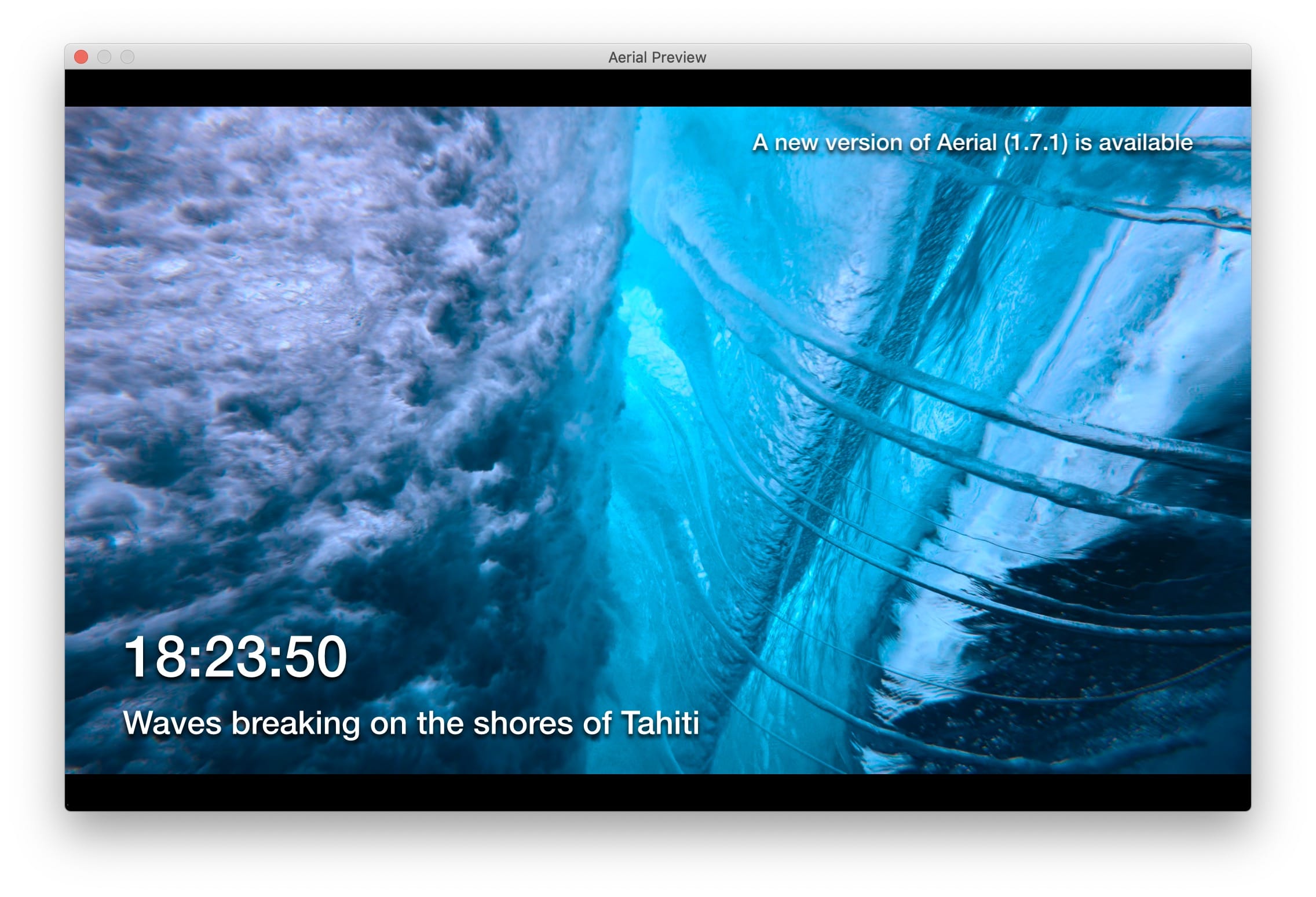
That message only shows if an update is available, and shows the version number of the new version. I struggled a bit with the text, I'm very much open to a better one !
Here's a test version for what would be 1.7.2beta1, but that I renamed 1.7.0beta4 just so it can trigger the update : https://github.com/glouel/Aerial/releases/download/v1.7.0beta4/Aerial.saver.zip
Let me know what you all think. Right now the check is enabled by default, and is independent of all the "old" settings. I'm not 100% happy with that one, it's a bit of a mess and I need to think a bit about it. On the one hand, adding the "Updates" in Infos tab lets people configure how/where it appears. On the other hand, I could probably "hide" that, and add a "simple" checkbox in the Updates tab (and removing the other ones that don't work in Catalina), that would mean that you couldn't configure where/how it appears, just if it appears or not (and it's definitely more work for a temporary workaround).
glouel
on 11 Feb 2020
I'm leaning on the second option that I mentionned above, hiding the Updates from Info, and putting a checkbox in the updates tab. I still haven't had the time to work on it though
https://github.com/JohnCoates/Aerial/releases/download/v1.7.2beta1/Aerial.saver.zip
I did release 1.7.2beta1 today with a better version of what was above, it will warn you of any incoming version. 1.7.0beta4 had a bug where the message would only show on the first video played, and not subsequent ones.
glouel
on 13 Feb 2020
1.7.0beta4 looks nice! Here's my 27" 2017 iMac 5K.
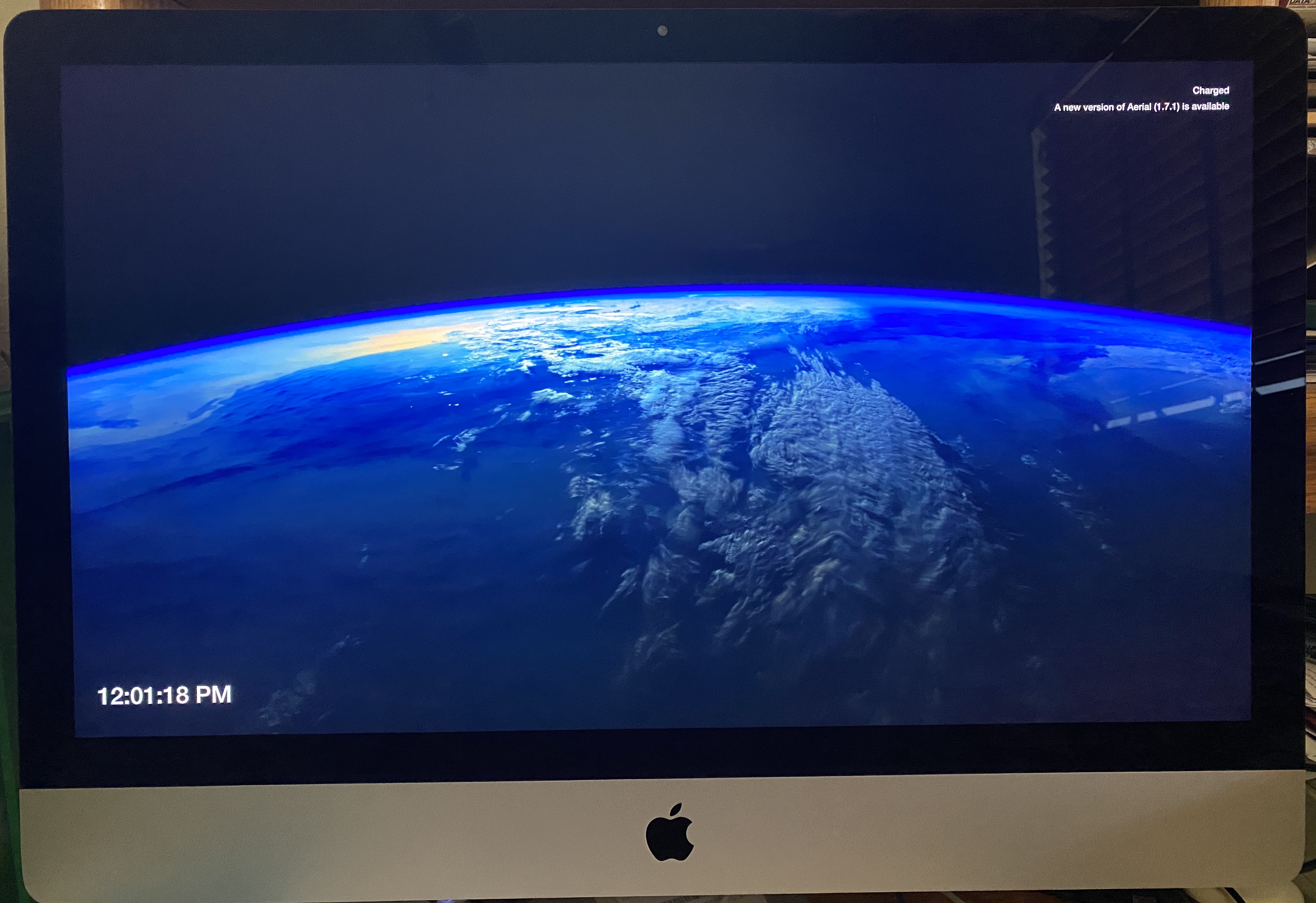
 r8ders2k
on 13 Feb 2020
r8ders2k
on 13 Feb 2020
Here's a couple of more screenshots of the update mechanism with 1.70.beta4.
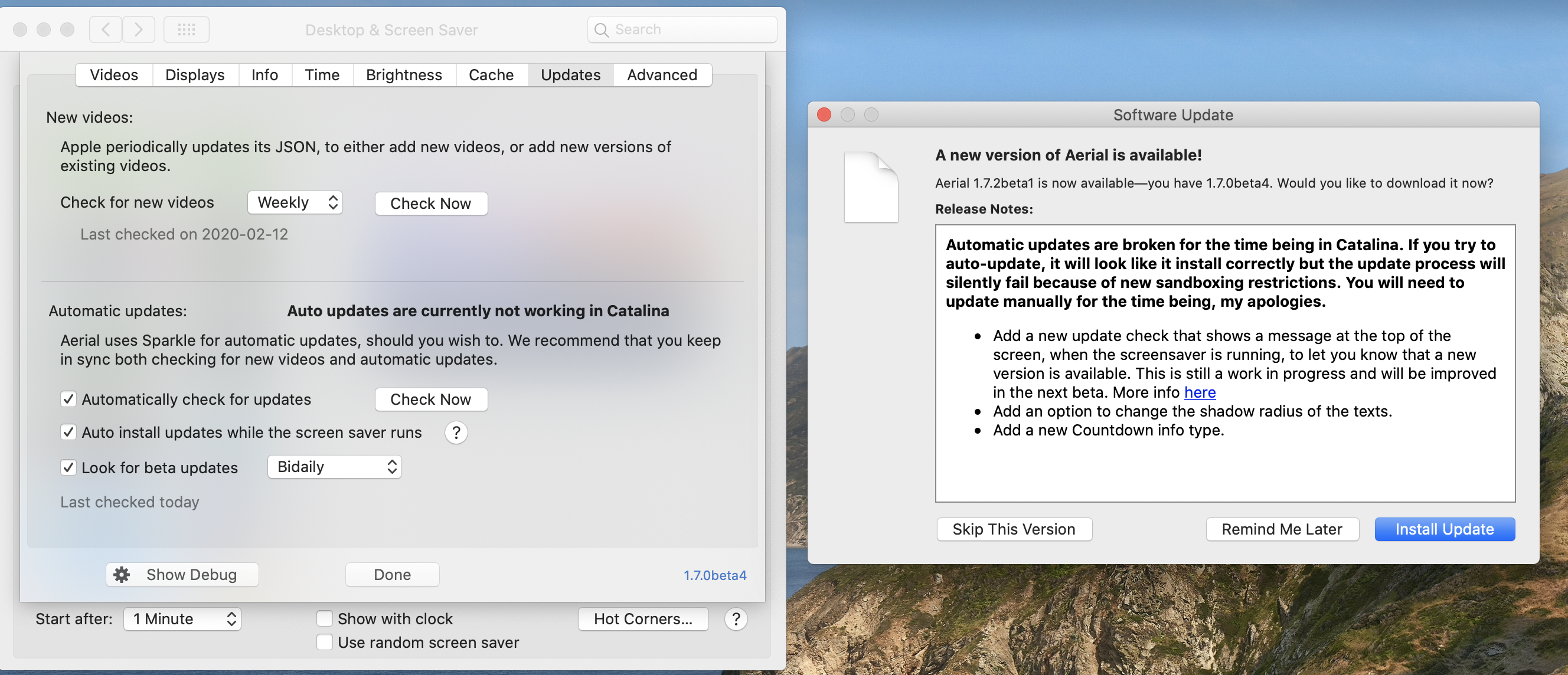
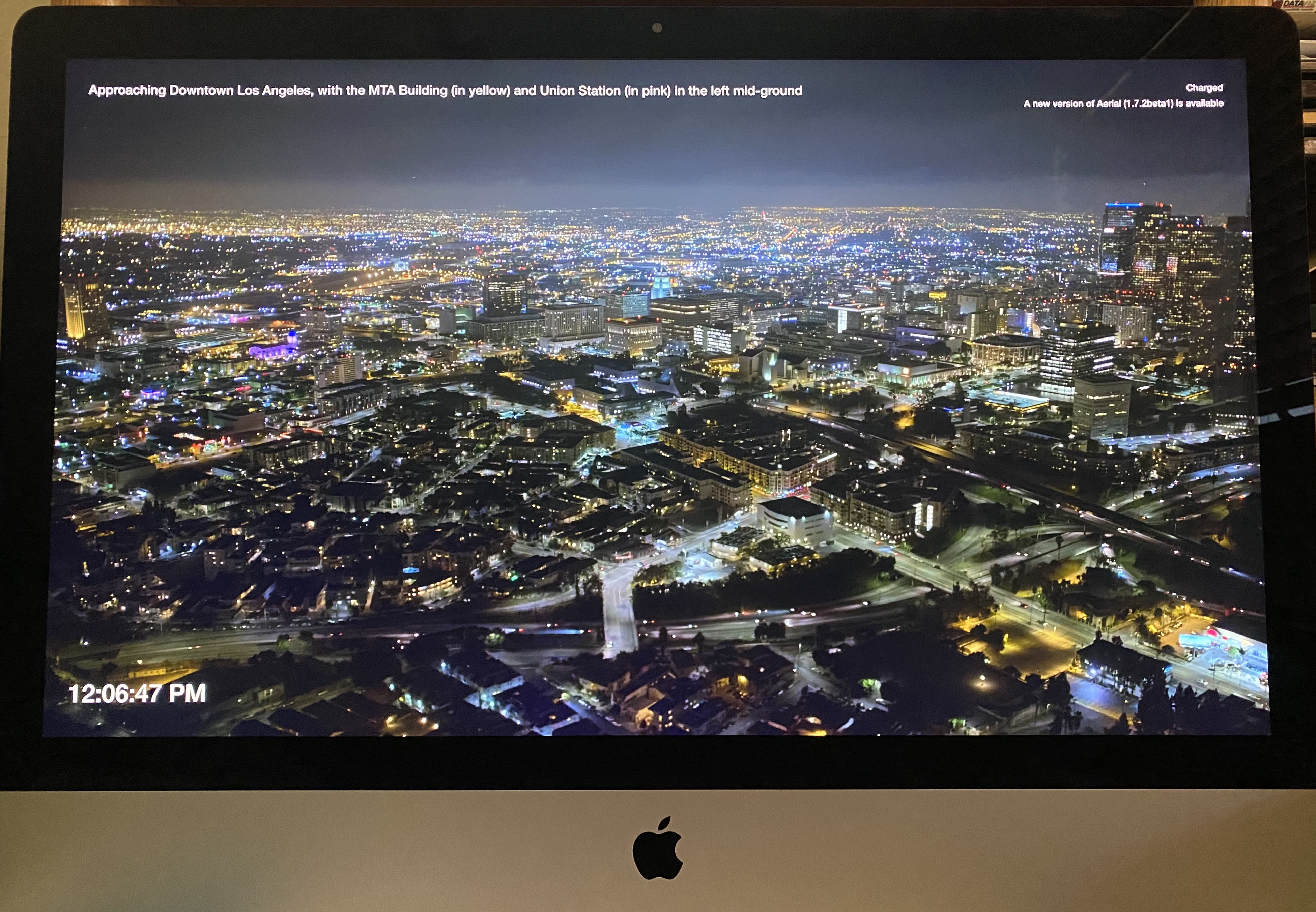
r8ders2k
on 13 Feb 2020
@r8ders2k thanks for reporting in, looks good from here !
In the next beta, I plan to replace what happens with the "Check now" button on Catalina, instead of launching the check/installer that fails, I'll put a direct link to the .zip some way or another, so that it's easier for everyone to download.
glouel
on 13 Feb 2020
👍🏼
And yes, I found the option to turn off the battery indicator.
r8ders2k
on 13 Feb 2020
Hi all, I finally have an update ! It took me a while but I have a temporary solution to Catalina, here's how it goes.
The first change is to the Updates tab :
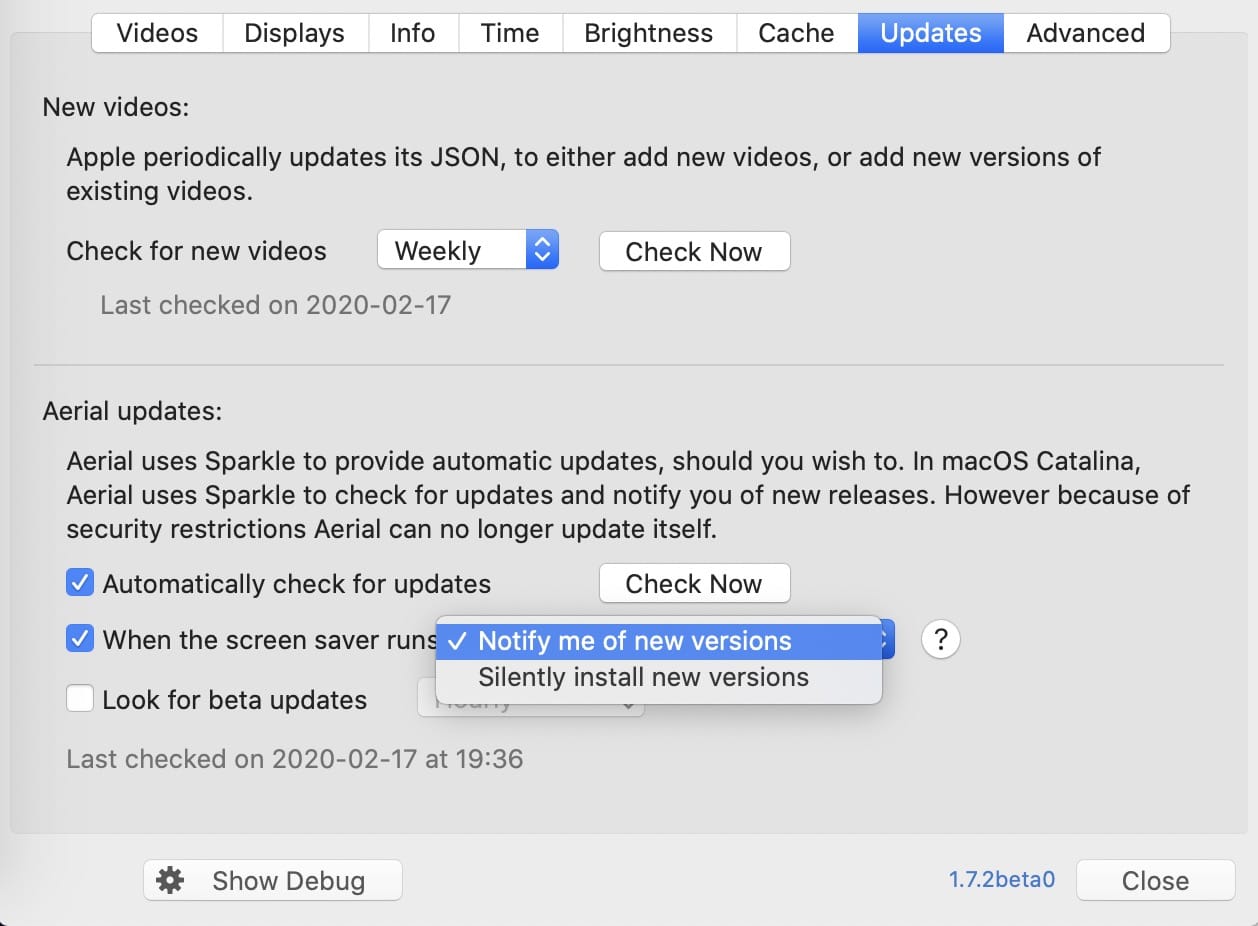
I updated the text to clearly state what it does/doesn't do right now. I'm very much open to improvement suggestion on that text. But what the options do is very much new:
-Automatically check for updates : Pre-Catalina, this works as it used to, popping the Sparkle auto-updater when the preference pane is open. Catalina, this triggers a new "probing" check that still uses Sparkle to detect if a new version is available (by default once per day), or not. If one is available, you'll see this window popping up:
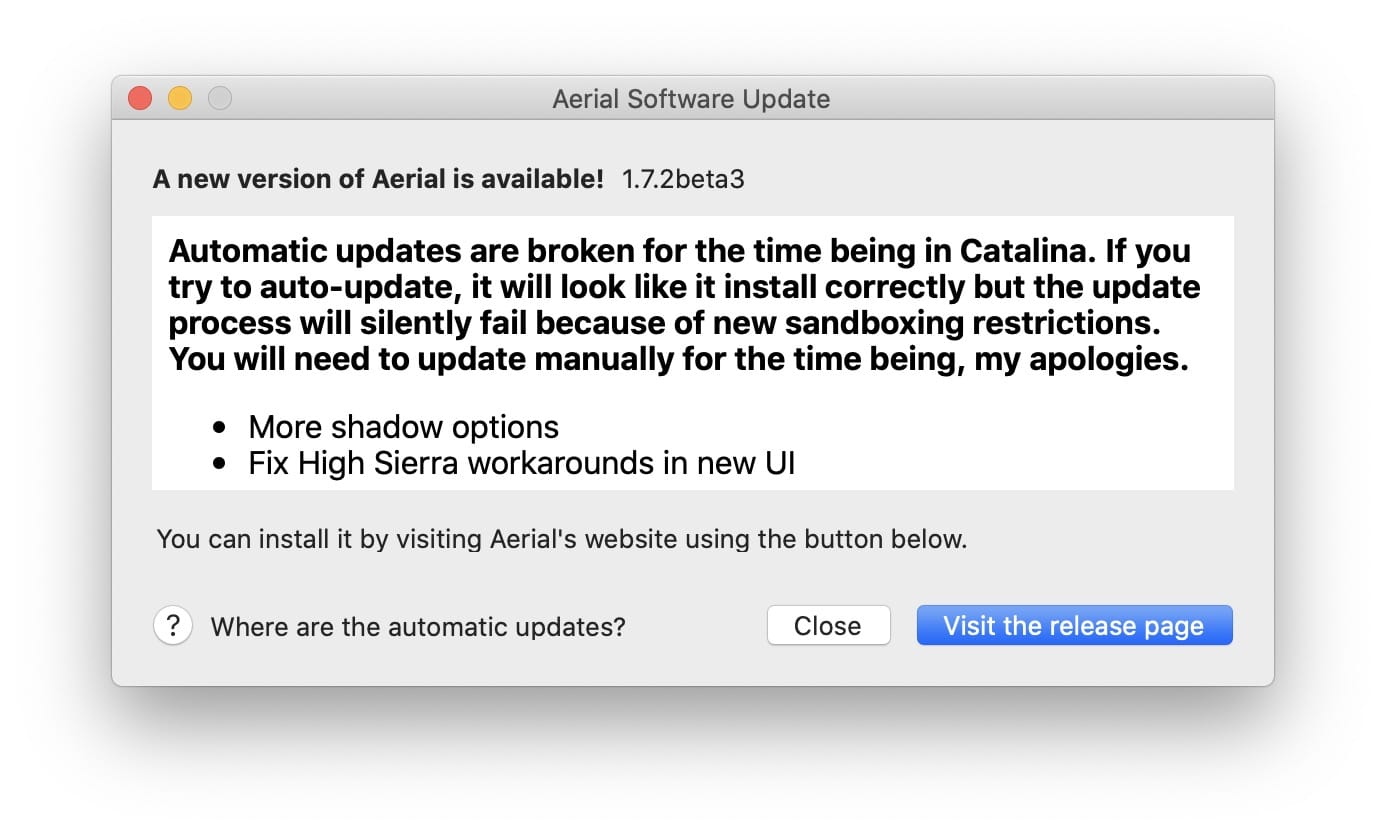
Again, the language is a bit different than what we used to. There's a help bubble with more info on why automatic updates are gone. If you click the "Visit the release page", it will send you to the release page where you can download the new version.
- Check now button : This is the same as above, except it will check right now. If an update is available, you'll see the window above. If no update is available, you'll see this :
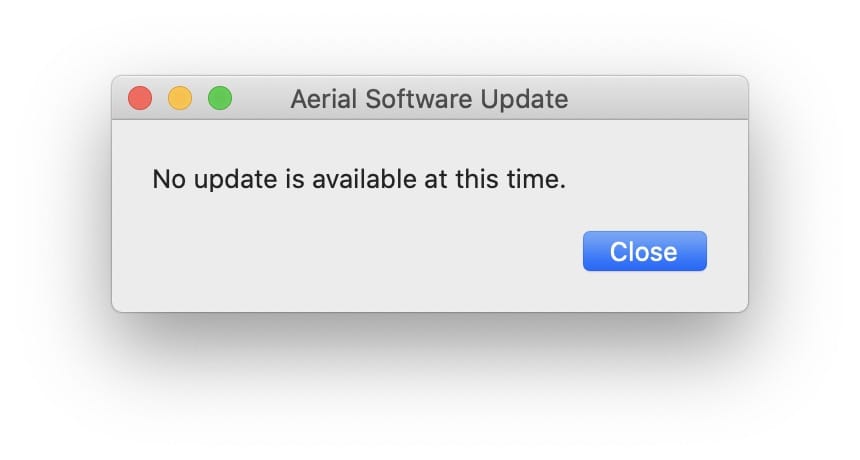
- When the screen saver runs: This is a bit new, there's a new option here, where you can either pick "Notify" or "Silent install". If you pick notify, you'll see this :
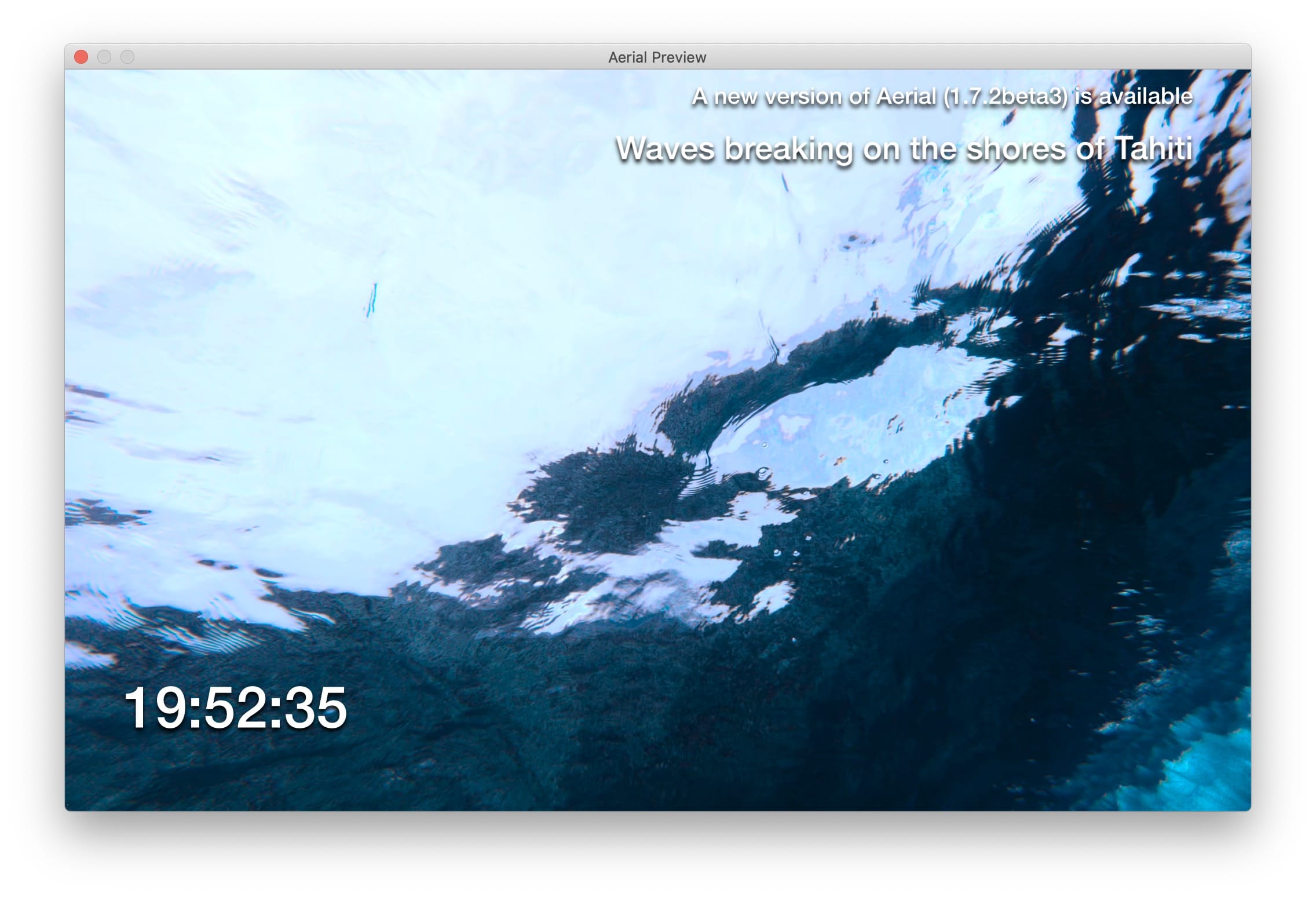
Now, there are a few changes to what I had in the previous build. There's no longer a "Updates" thing in Info, that was too confusing. The update notification has it's own special position, on the top of the screen "above" everything else. The position/appearance can't be change and I think that's best that way, this is supposed to be a utility.
You can pick notify pre-Catalina, and it's the default now for everyone (I think it's a better choice, since 99.9% of the crash logs I had last year were linked to the silent update and some firewall interaction).
Pre-Catalina, you can also pick silent install, obviously, and the option will be greyed out in Catalina (it's not in the build below).
I'm open to suggestions but I think it's a good short time comprimise. Internally, the checks still rely on Sparkle for security, and you should never see error/silent failed update in Catalina.
I put the beta here, it's renamed internally to 1.7.2beta0 so you can trigger the update prompts :
https://github.com/glouel/Aerial/releases/download/v1.7.2beta4/Aerial.saver.zip
Please let me know what you all think !
glouel
on 17 Feb 2020
These changes look great! Thank you so much for all of your efforts!
Pcar17
on 17 Feb 2020
Couple more things I didn't mention, I had to make two compromises:
- push up minimal support to macOS 10.12 (it used to be 10.9, but many things were broken, even simple things like the Clock wouldn't work in 10.11 so at that point, since I needed the webview to display the release note, I though that I might as well move up support)
- the probe check happens every time you launch the screensaver (in screensaver mode, not in control panel mode). I'm not super happy with this one, but that's the best solution I found to make sure you see the notification, and that it doesn't show after you updated
I think those compromises are ok but I'd rather explain them. I'm reconsidering not defaulting to silent update pre-Catalina too by the way. I may release 1.8.0 later today as I ended up fixing another major Catalina issue which I hadn't caught so far, localization was utterly broken and defaulted to english for everyone (if you didn't manually override to another language)...
glouel
on 18 Feb 2020
Here's 1.8.0 with all the changes : https://github.com/JohnCoates/Aerial/releases/download/v1.8.0/Aerial.saver.zip
glouel
on 18 Feb 2020
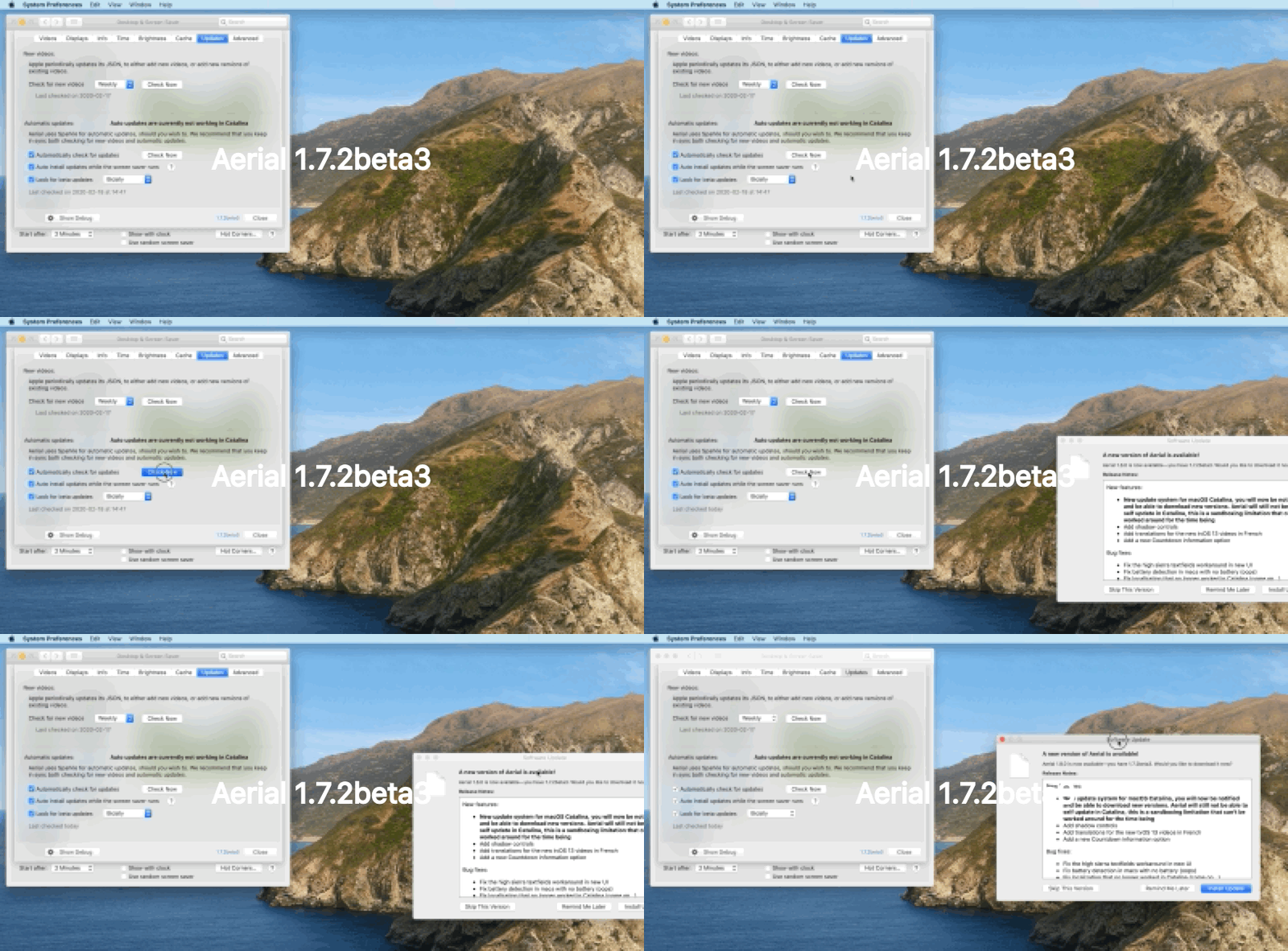
Okay, I get it that AUTO-update doesn't work in Catalina, but what about when I go to Updates, in Aerial, and check for updates and click on Install and Relaunch. See that attached screen recording. Other than downloading and the dialog disappears, it doesn't relaunch or update. Even quitting out of System Preference, the update doesn't happen. And this is with Catalina 10.15.3 (19D76).
r8ders2k
on 18 Feb 2020
@r8ders2k that's the same thing. Maybe I wasn't super clear in my explanations. The way Sparkle (the update system, whether auto or not) works is that it launches a process that downloads and update the app, here the plugin. That's the part that no longer works because of security exceptions. Aerial simply cannot update itself, whether automaticly, or if you initiate it yourself, is that clearer ?
That's why I had to change all that in 1.8.0, when you click the "Check Now" button, you'll get another window that points you to the download link.
So update to 1.8.0 manually, then the check now box will look like this :

Makes sense ? Self-updating is impossible for a screensaver in Catalina to make it short, it's not for lack of trying !
glouel
on 19 Feb 2020
Got it! Probably me, more so than you...
r8ders2k
on 19 Feb 2020
I have a shell script that I have written to download and install Aerial updates that I would be happy to share with others if there would be any interest in it. It would probably need a little "spit and polish" to be used by a wider audience but you can see what I have so far here: https://github.com/tjluoma/di/blob/master/di-aerial.sh
 tjluoma
on 9 Mar 2020
tjluoma
on 9 Mar 2020
To all, this has been a long time coming but I've finally made a side updater, it can be found here : https://github.com/glouel/AerialUpdater/releases/tag/0.3
Couple of things, before trying it, make sure Aerial is installed for your user and not for all users. To check, go into
/Library/Screen Savers/. If you see Aerial there, delete it then install the updater (just unzip and put it in /Applications or somewhere).

If you want the technical details of how it works, there's a manifest I maintain here : https://github.com/glouel/AerialUpdater/blob/main/manifest.json
It contains the latest versions for each release type (alpha/beta/release) and the sha256 of the zip files (generated by a script here on my machine).
When you do an update (automatic or manual) here's what happens:
- The zip is downloaded from the correct repository, (the url is not in the manifest, just the version number), so 1.9.2 will download https://github.com/JohnCoates/Aerial/releases/download/v1.9.2/Aerial.saver.zip (alphas are in my personal repo, as I usually don't publish those but 2.0 is right now in alpha testing).
- Once done, the sha256 of the downloaded file is compared to the one from the manifest
- The zip is unzipped (in Application Support), looking for Aerial.saver
- It verifies
Aerial.saveris using the correct bundle id (com.JohnCoates.Aerial) - It verifies
Aerial.saveris signed/notarized by my Team Apple ID
If all this checks out, then it gets copied to ~/Library/Screen Savers/. Nothing is perfect in terms of security, but I think it's at least as good as homebrew.
It's still early but it's pretty functional, you can easily switch from an alpha to the current release and back. Some things to notice:
- I know that not everyone wants to have one more icon up there, so yes I'll make sure it can run in the background hiding that icon
- If you switch release type, reopen the menu to find the install button, even if you are on automatic mode
- If you pick notify, you get a green circle around the icon. This will be improved to something better (maybe a notification in notification center, or a much better icon ;))
- Your System Preferences must be closed before install if you want it to properly load. If not, the new version of Aerial is installed "for the screensaver" but you won't see the new preferences panel.
This will be one of the two supported ways for auto updates, the other one being homebrew. Sparkle is gone from Aerial 2.0 as there are many reports of people being stuck and can't getting out of the screensaver when a check happens. It seems a lot more frequent on Big Sur too.
Last thing, if you want to check the alpha, I would very much suggest waiting for alpha4 which I'll put up in a bit, in the meantime feel free to check this comment here for some of what's new : https://github.com/JohnCoates/Aerial/issues/1006#issuecomment-661252125
Edit: Alpha4 is up : https://github.com/glouel/Aerial/releases/tag/v2.0.0alpha4
glouel
on 26 Jul 2020
So I just put Beta 1 of Aerial here, it's the first Aerial release without Sparkle : https://github.com/JohnCoates/Aerial/releases/download/v2.0.0beta1/Aerial.saver.zip
The new updater is here, no important change for now, if you installed 0.3 you're fine : https://github.com/glouel/AerialUpdater
glouel
on 29 Jul 2020
(found the bug in the updater, sorry about that, if you picked alpha it tried to get the file in the wrong repository, so just stick to beta and release for the moment, I may altogether remove alpha, we'll see)
Beta2 of Aerial is up in the meantime with a lot of UI fixes : https://github.com/JohnCoates/Aerial/releases/tag/v2.0.0beta2
glouel
on 31 Jul 2020
So haven't updated here in a while:
First I just released a new updater with many fixes and features.
Most importantly, you can now set it to run in the background or launch at login if you want. It will also warn you if you have Aerial installed for All Users to avoid that duplicate issue. It should be pretty stable, there are just two more things I want to add:
- Warn you if you install with System Preferences open (in that case, the new preference panel won't load until you relaunch System Preferences, but the screensaver itself is updated and will load when your mac goes to sleep)
- Warn you if you try to launch it from your download folder (that's fine, but if you set the updater to run in the background and then move it away to another folder, then it won't run in the background)
- A first launch quick setup
So I guess that's 3 things :) Background mode work both in automatic install mode and notify me mode. If you run it in the background, it launches for a few seconds, check for update, update if needed and quits. If you are in notify mode instead of installing the update if it's here, the menu will appear in your menubar to notify you.
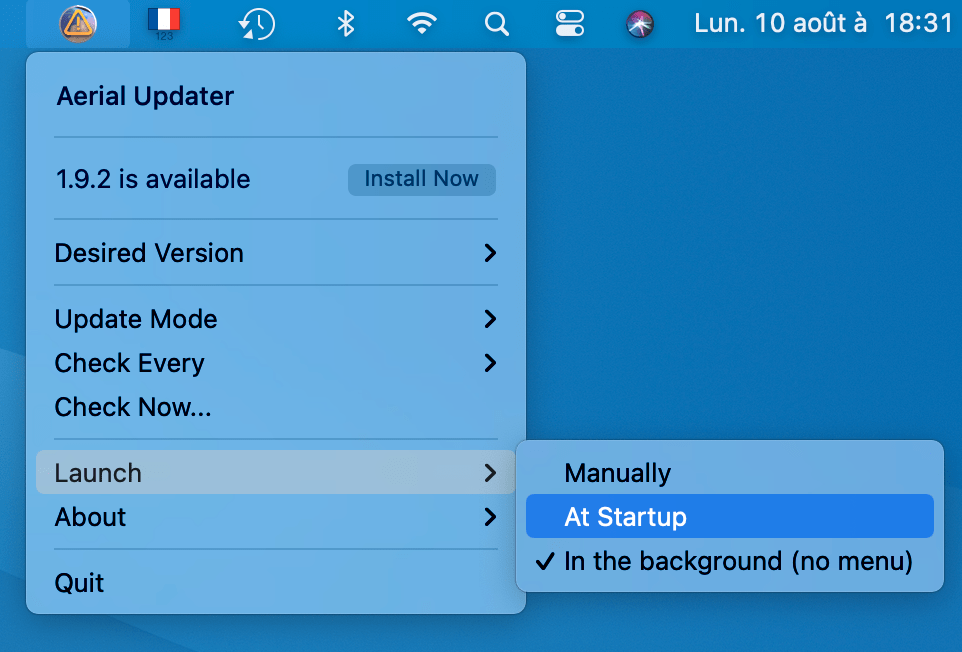
Get it here : https://github.com/glouel/AerialUpdater/releases/tag/0.5
Second, Aerial is itself in beta6, with a lot of tiny fixes, I will have another build either late tonight or tomorrow with more tweaks.
Last thing, both the updater and beta 6 now work as is on Apple Silicon, which is nice !
glouel
on 10 Aug 2020
Thanks so much for the update!
I do have one issue about the Updater...I don’t see the “Launch” option in my drop-down. I’ve tried both the 1.9.2 and 2.0.0beta 6 versions.
Thx.....John
On Aug 10, 2020, at 11:34 AM, Guillaume Louel notifications@github.com wrote:
So haven't updated here in a while:
First I just released a new updater with many fixes and features.
Most importantly, you can now set it to run in the background or launch at login if you want. It will also warn you if you have Aerial installed for All Users to avoid that duplicate issue. It should be pretty stable, there are just two more things I want to add:
Warn you if you install with System Preferences open (in that case, the new preference panel won't load until you relaunch System Preferences, but the screensaver itself is updated and will load when your mac goes to sleep)
Warn you if you try to launch it from your download folder (that's fine, but if you set the updater to run in the background and then move it away to another folder, then it won't run in the background)
A first launch quick setup
So I guess that's 3 things :) Background mode work both in automatic install mode and notify me mode. If you run it in the background, it launches for a few seconds, check for update, update if needed and quits. If you are in notify mode instead of installing the update if it's here, the menu will appear in your menubar to notify you.
Get it here : https://github.com/glouel/AerialUpdater/releases/tag/0.5
Second, Aerial is itself in beta6, with a lot of tiny fixes, I will have another build either late tonight or tomorrow with more tweaks.
Last thing, both the updater and beta 6 now work as is on Apple Silicon, which is nice !
—
You are receiving this because you commented.
Reply to this email directly, view it on GitHub, or unsubscribe.
Pcar17
on 10 Aug 2020
@Pcar17 you mean the launch > At startup etc from my screenshot ? Did you install this version of the updater ? : https://github.com/glouel/AerialUpdater/releases/download/0.5/AerialUpdater.app.zip
glouel
on 10 Aug 2020
Guillaume Louel,
Perfect…..that fixed it!
I also had to move Aerial to just my own user on my Mac which was nicely handled with your dialogue box and bringing up the Finder window to delete the old Aerial version.
From: Guillaume Louel notifications@github.com
Reply-To: JohnCoates/Aerial reply@reply.github.com
Date: Monday, August 10, 2020 at 3:12 PM
To: JohnCoates/Aerial Aerial@noreply.github.com
Cc: Pcar17 cordellj@gmail.com, Mention mention@noreply.github.com
Subject: Re: [JohnCoates/Aerial] Auto-update mechanism for macOS Catalina/Big Sur (#909)
@Pcar17 you mean the launch > At startup etc from my screenshot ? Did you install this version of the updater ? : https://github.com/glouel/AerialUpdater/releases/download/0.5/AerialUpdater.app.zip
—
You are receiving this because you were mentioned.
Reply to this email directly, view it on GitHub, or unsubscribe.
Pcar17
on 10 Aug 2020
Hey again everyone, so today I released the first "complete" version of the updater, which has been renamed Aerial Companion, it has a few new features like a shortcut to opening screen saver settings, and more. I plan to add more features to it over time, but for now it serves its main purpose as the new auto update/installer for Aerial. You can find it here : https://github.com/glouel/AerialCompanion/releases/tag/1.0
If you had installed a previous version, I suggest you trash it first (since I renamed everything, sorry about that !) and let me know if you hit issues. And enjoy the final 2.0.0 of the screen saver which is finally out !
glouel
on 20 Aug 2020
Hi, I installed the new updater, Aerial Companion, earlier today on a Mac running the latest Catalina release and it works great! 👍🏻👍🏻👍🏻
On Aug 19, 2020, at 5:48 PM, Guillaume Louel notifications@github.com wrote:
Hey again everyone, so today I released the first "complete" version of the updater, which has been renamed Aerial Companion, it has a few new features like a shortcut to opening screen saver settings, and more. I plan to add more features to it over time, but for now it serves its main purpose as the new auto update/installer for Aerial. You can find it here : https://github.com/glouel/AerialCompanion/releases/tag/1.0
If you had installed a previous version, I suggest you trash it first (since I renamed everything, sorry about that !) and let me know if you hit issues. And enjoy the final 2.0.0 of the screen saver which is finally out !
—
You are receiving this because you were mentioned.
Reply to this email directly, view it on GitHub, or unsubscribe.
Pcar17
on 21 Aug 2020
In intalled the Aerial Companion (2.0.9) today on the latest Catalina release. It looks great - thank you!
The only thing that doesn’t seem to be working is the “right arrow key to skip video.” That option is checked in the advanced settings, but it’s grayed out and the right arrow key does not skip to the next video.
On Aug 20, 2020, at 7:19 PM, Pcar17 notifications@github.com wrote:
Hi, I installed the new updater, Aerial Companion, earlier today on a Mac running the latest Catalina release and it works great! 👍🏻👍🏻👍🏻
On Aug 19, 2020, at 5:48 PM, Guillaume Louel notifications@github.com wrote:
Hey again everyone, so today I released the first "complete" version of the updater, which has been renamed Aerial Companion, it has a few new features like a shortcut to opening screen saver settings, and more. I plan to add more features to it over time, but for now it serves its main purpose as the new auto update/installer for Aerial. You can find it here : https://github.com/glouel/AerialCompanion/releases/tag/1.0If you had installed a previous version, I suggest you trash it first (since I renamed everything, sorry about that !) and let me know if you hit issues. And enjoy the final 2.0.0 of the screen saver which is finally out !
—
You are receiving this because you were mentioned.
Reply to this email directly, view it on GitHub, or unsubscribe.
—
You are receiving this because you were mentioned.
Reply to this email directly, view it on GitHub https://github.com/JohnCoates/Aerial/issues/909#issuecomment-678000332, or unsubscribe https://github.com/notifications/unsubscribe-auth/AG7Z4MOMTFQRGGKDVSXH5MDSBXKSVANCNFSM4KOHR4IQ.
elliotttimothy
on 18 Sep 2020
@elliotttimothy this is a limitation of Catalina and Big Sur, screensavers can no longer intercept the keyboard presses, that's why that feature is greyed out.
glouel
on 18 Sep 2020
Thank you for the explanation. I kept my mid-2012 MacBook Pro and Sierra for as long as I could. The shift to Catalina has been smoother than I had expected, but I do hate losing this functionality.
On Sep 18, 2020, at 2:47 PM, Guillaume Louel notifications@github.com wrote:
@elliotttimothy https://github.com/elliotttimothy this is a limitation of Catalina and Big Sur, screensavers can no longer intercept the keyboard presses, that's why that feature is greyed out.
—
You are receiving this because you were mentioned.
Reply to this email directly, view it on GitHub https://github.com/JohnCoates/Aerial/issues/909#issuecomment-695100872, or unsubscribe https://github.com/notifications/unsubscribe-auth/AG7Z4MLQPFEJUZBMPMPYLHTSGPIPRANCNFSM4KOHR4IQ.
elliotttimothy
on 19 Sep 2020
@elliotttimothy just to give you a complete picture, since last year I'm waiting for Apple's "new" screensaver API that they use on their own screensavers. That API will let Aerial do what it used to (you can no longer have your videos on an external drive either).
They didn't release it with Big Sur, so I'm still waiting.
glouel
on 19 Sep 2020
Related issues
 BerryJerry
·
8Comments
BerryJerry
·
8Comments
 tempusthales
·
4Comments
tempusthales
·
4Comments
 ghost
·
5Comments
ghost
·
5Comments
 NightRaider73
·
6Comments
NightRaider73
·
6Comments
 jbis9051
·
6Comments
jbis9051
·
6Comments
Most helpful comment
Hi @subesokun & all,
Just wanted to give all of you an update on the auto-update topic on Catalina. I spent the whole day yesterday moving Aerial to the new 2.x branch of Sparkle that has some new XPC mechanism to handle the auto-updates in a sandboxed environment (https://github.com/glouel/Aerial/tree/sparklexpc). While I had high hopes during the process, they were throughly crushed again by Catalina's sandboxing !
If you are interested in the technical details, I can refer you to this first issue (with the "classic" 1.x version of Sparkle : https://github.com/sparkle-project/Sparkle/issues/1476) and the one from yesterday : https://github.com/sparkle-project/Sparkle/issues/1544
The sad thing is, I don't think it's solvable with the current restrictions in Catalina to have a
.saverauto-update itself anymore.It's a bit of a last resort (quite frankly I think we're there), but at that point, I've decided to move on from the idea of doing self-updates and will try to make a separate updater, a separate (unsandboxed) app on your mac that will update itself (through Sparkle) and will be bundled with the latest
.saver, and which will install the updates (copy to your user's/all users screensaver folder).I'm reasonably confident that this should work fine, I'll still keep the self-update mechanism for pre-Catalina people, and hopefully I can bring it back someday (if for example Apple allows us to make our own screen savers in the
.appexformat, crossing fingers on 10.16 at that point), but in the meantime that solution will probably have to do.I'll try to get something working this week and get back to you here for testing.