Aerial: 1.4 & 1.4.1 "Space" descriptions
Starting with the betas of 1.4, the description on the space videos just says "Space". I have removed the screensaver, and the cache, the reinstalled, but still have the issue. I also have the issue on another Mac.
 benjaminbogdanovic
All 26 comments
You mean on the list on the left ? Can you post a screenshot of what you see ? It says space > space ??
Also, macOS version ?
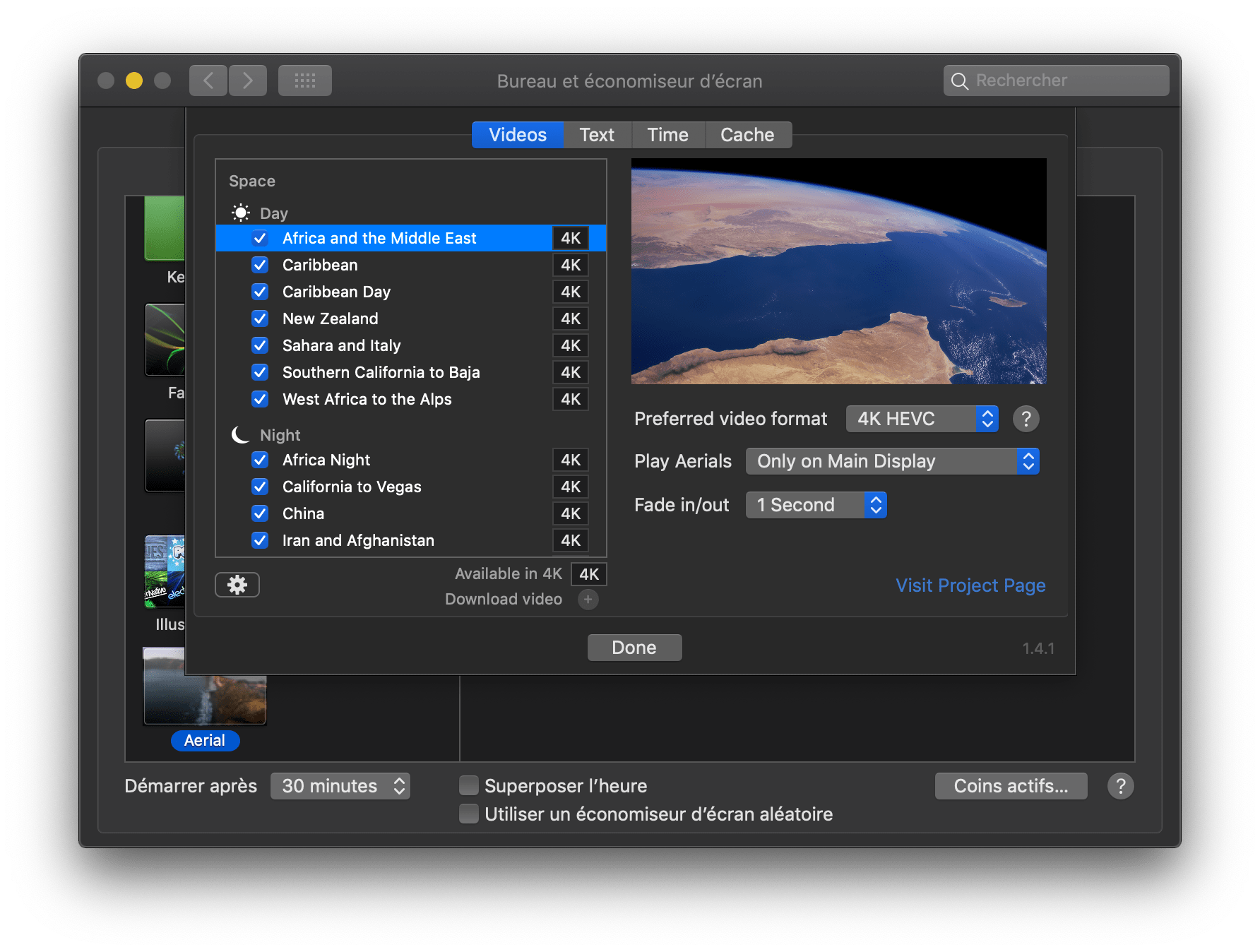
Here's what I have here FYI on 2 macs (10.13.6 and 10.14.1beta):
 glouel
on 16 Oct 2018
glouel
on 16 Oct 2018
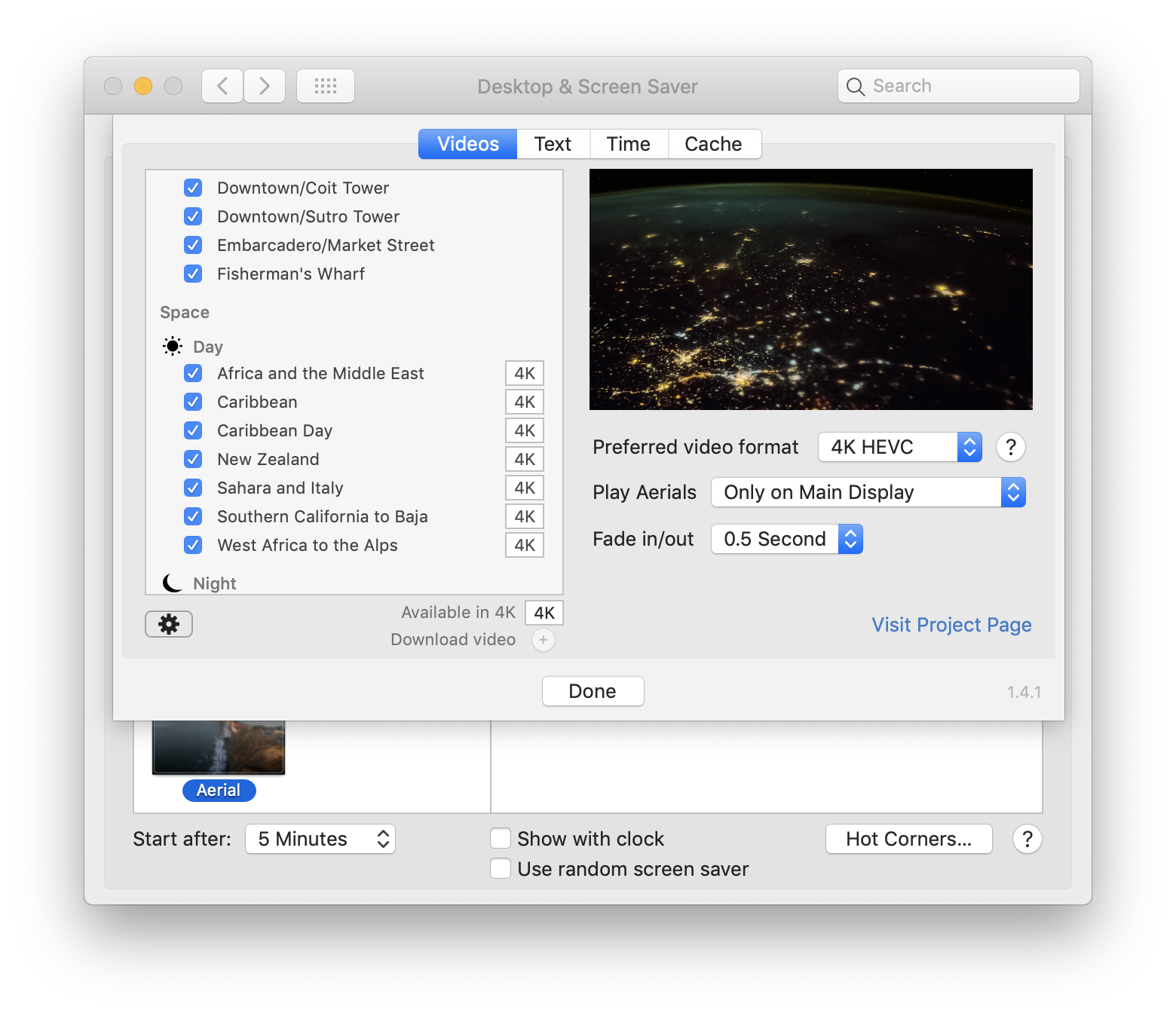
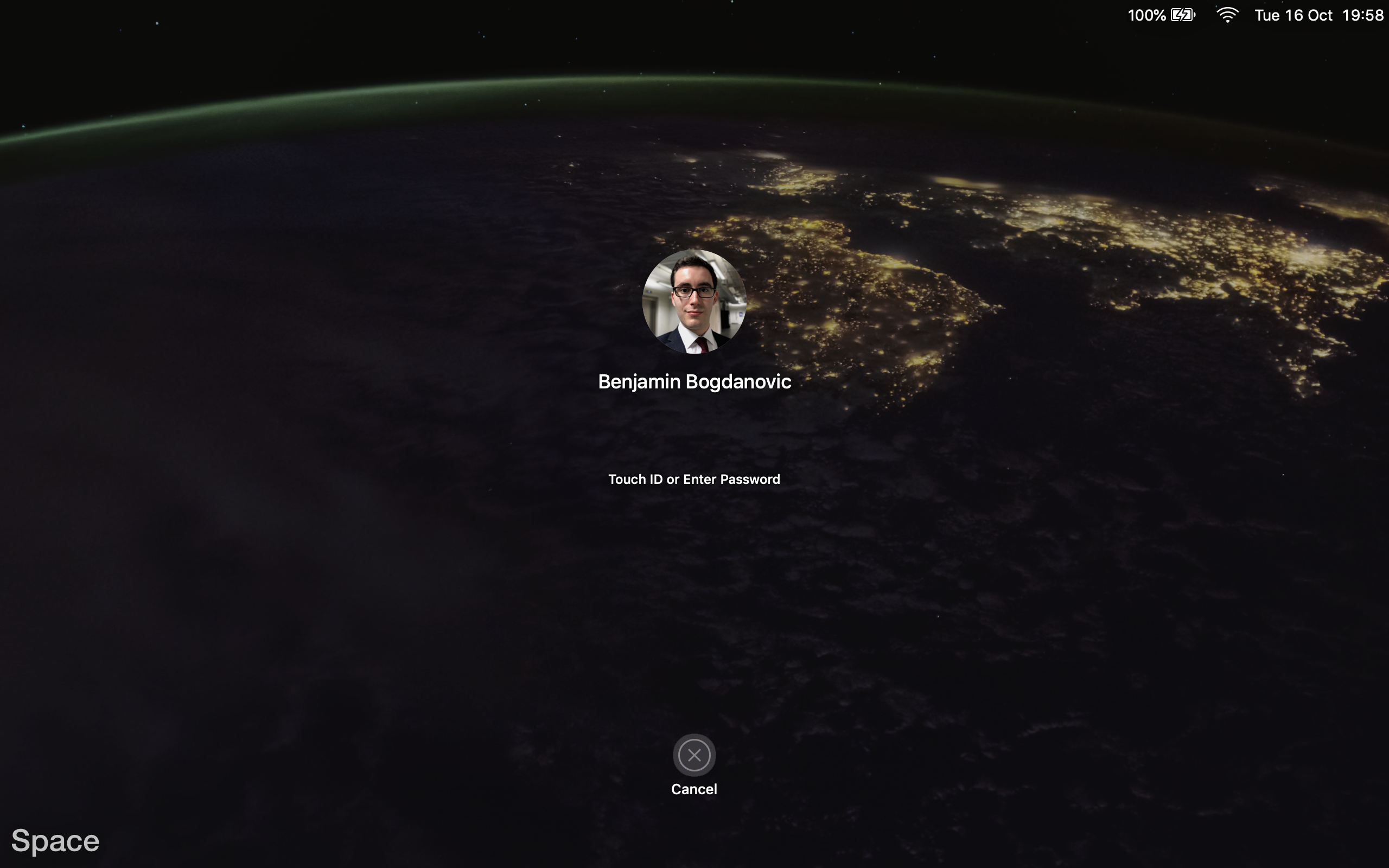
The list is okay, it is the deception when viewing the screensaver.
MacOS 10.14
benjaminbogdanovic
on 16 Oct 2018
Thanks for your quick reply. In the Text panel, do you have the "Display in preferred language when available" selected ? If so, what does the line just below says ?
Also, just to confirm, you don't see this in other videos ?
Thanks for reporting this, I'll have a look.
glouel
on 16 Oct 2018
No, it’s not checked. I have tried it with it checked, and I have the same issue. The line underneath says preferred language: English (United Kingdom).
On the other videos I’m only getting the city names, not the detailed descriptions that are visible in the sidebar.
Something to note; in the cached folder, there are only videos. There used to be JSON files and the like, with metadata about the videos. Have you moved these?
benjaminbogdanovic
on 16 Oct 2018
Ha that explains it ! I definitely haven't and they definitely should be there. Did you perhaps change the cache folder to another place ?
FYI, the extra strings are contained in the ~/Library/Caches/Aerial/TVIdleScreenStrings.bundle file
So since you don't have those, it fallbacks to the short name.
You still see Aerial working because the JSONs are saved in the preference files (something that remains of the old original version) and I use that if available and don't try to redownload the files. In your specific case though that's an issue.
Easy fix, delete ~/Library/Preferences/ByHost/com.JohnCoates.Aerial.(UUID).plist
This will reset all settings and redownload/reprocess the JSONs (it won't redownload videos) and gives you back the descriptions. You'll also see extended descriptions in the "old" videos like London as a bonus !
I'll try to add a better mechanism to redownload the .tar/jsons in the next version, sorry about that again !
glouel
on 16 Oct 2018
I did not move the cache folder. The issue must have arisen when I cleared the cache and removed the screensaver via the finder, but not the plist, before installing the first release you made.
I have done why you have suggested, and it has fixed it! Thanks!
I guess most people will not have this issue. I only cleared out the cache manually to remove excess videos from before, because it did not work through the screensaver preferences.
benjaminbogdanovic
on 16 Oct 2018
Makes sense, by removing the cache the files were gone but not the plist.
While unusual, still better to have a fix in a upcoming release. Thanks for your report on this !
glouel
on 16 Oct 2018
Also the flaw in removing screensavers on a Mac, I does not remove the associated files.
You're welcome!
benjaminbogdanovic
on 16 Oct 2018
I'm not sure we can cleanup anything at uninstall, I'll have a look ! But at startup I'll try and do some more sanity checks, there's a new error pane coming in 1.4.2 just for stuff like that.
glouel
on 16 Oct 2018
The error pane will be useful!
Do you have to remove the old version before installing a new version?
I understand when you are updating to a new versions, maintaining the plist is useful to ensure the settings stay them, but for people who want to fully remove it, an uninstall option may be nice.
On a related note; is it possible to have an update feature from the preferences pane?
benjaminbogdanovic
on 16 Oct 2018
Do you have to remove the old version before installing a new version?
You don't, but you probably need to restart the System Preferences (close and reopen) in order to properly reload the plist (ironically !) and the ressources (you may see the wrong version show up and an unresponsive UI). As far as we know, that's a bug with the way Swift plugins are loaded.
It fixes itself the next time you launch System Preferences and we have no workaround so far (apart from restarting system prefs which we suggest on the project readme). I'll try to make a sample project and submit a radar to Apple when I have a sec.
I understand when you are updating to a new versions, maintaining the plist is useful to ensure the settings stay them, but for people who want to fully remove it, an uninstall option may be nice.
The thing is, Aerial is not a standalone app, it's a "plugin" for System Preferences. So the install/uninstall mechanism is a bit more restricted. That's why when you double click the .saver, it starts System Preferences who then asks you if you want to install/replace existing version.
On a related note; is it possible to have an update feature from the preferences pane?
Same thing as above, we can't really do that for the same reason. We can probably do a new version check (and probably download the new version), but won't be able to install. I'm thinking about adding the version check in the new error pane and point people to the new version.
As of today, the supported mechanism for auto update is brew cask. It may lag a bit though (by a few hours usually). They seem to have a few issues right now with their integration server but hopefully 1.4.1 will be there ASAP, we have the pull request ready : https://github.com/Homebrew/homebrew-cask/pull/53694
glouel
on 16 Oct 2018
Do you have to remove the old version before installing a new version?
Good to know!
I understand when you are updating to a new versions, maintaining the plist is useful to ensure the settings stay them, but for people who want to fully remove it, an uninstall option may be nice.
That makes sense. Maybe some instructions would suffice?
On a related note; is it possible to have an update feature from the preferences pane?
A notification that there is a new version would be good. VirtualBox for example directs users to a website to download the latest version, which I find bizarre for a company as large as Oracle can not have a proper updater for a standalone app! Adobe does the same with the Flash updater in the System Preferences pane, but that is pretty much dead.
That lag would not be noticeable for most users to be fair.
I use coderelease.io to tell me about your releases.
benjaminbogdanovic
on 16 Oct 2018
That makes sense. Maybe some instructions would suffice?
We do have that !
https://github.com/JohnCoates/Aerial/blob/master/Readme.md#uninstallation
I've updated it with the location of the plist.
A notification that there is a new version would be good. VirtualBox for example directs users to a website to download the latest version, which I find bizarre for a company as large as Oracle can not have a proper updater for a standalone app! Adobe does the same with the Flash updater in the System Preferences pane, but that is pretty much dead.
That lag would not be noticeable for most users to be fair.
I use coderelease.io to tell me about your releases.
Marking as an enhancement for a future version.
glouel
on 16 Oct 2018
Still not working for me. The files are not there for me. Where else could they be?
 NightRaider73
on 16 Oct 2018
NightRaider73
on 16 Oct 2018
Still not working for me. The files are not there for me. Where else could they be?
You have the same issue of the titles not showing, that's right ?
First, go to the Cache panel, click "Show in Finder", that will open your current cache. This is where the missing files should go.
Or are you looking for the plist to delete it ?
/Users/YOURUSERNAME/Library/Preferences/ByHost/com.JohnCoates.Aerial.{UUID}.plist
Where YOURUSERNAME is your user name, and {UUID} is a series of numbers/letters.
Another place to look at, maybe, /Library/Preferences although I'm not sure it would go there. Maybe if you installed the screensaver for all users, although I'd think every users would have it's own plist.
glouel
on 16 Oct 2018
I already tried both places. Weird. Any other ideas?
NightRaider73
on 16 Oct 2018
Well, here's a workaround, download : https://sylvan.apple.com/Aerials/resources.tar
Put that file in the cache folder (look the Show in Finder button in my previous comment). Then untar the file and keep the tar too. If you need help untaring let me know.
glouel
on 16 Oct 2018
Put both in? Or just one?
NightRaider73
on 16 Oct 2018
Put the tar and untar in place.
You just need the TVIdleScreenStrings.bundle to solve the issue in practice. That file needs to be in the cache folder.
glouel
on 16 Oct 2018
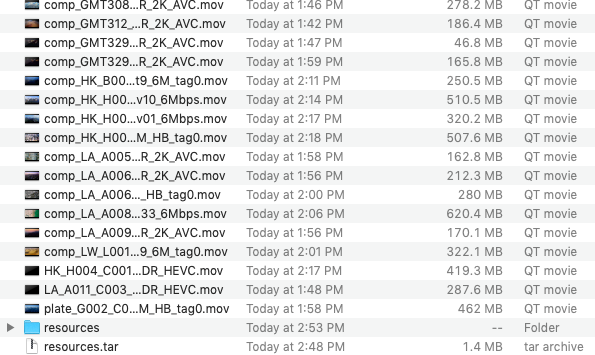
I did it and it still isn't working it this right:
NightRaider73
on 16 Oct 2018
nearly there. move the files from the resources folder in the main cache directory (copy them one level down if you see what I mean ?).
glouel
on 16 Oct 2018
Thank you so much it is working for me now!
Maybe put that guide in to the readme.md under troubleshooting.
NightRaider73
on 16 Oct 2018
You're welcome :)
glouel
on 16 Oct 2018
Maybe put that guide in to the readme doc.
I mean troubleshooting
Good idea, done : https://github.com/JohnCoates/Aerial/blob/master/Readme.md#troubleshooting
glouel
on 17 Oct 2018
I rewrote the loading management to make things much simpler, no more need to go hunt the plist. This will be in 1.4.2. For those who have this issue and don't want to hunt the missing files, try
https://github.com/glouel/Aerial/releases/download/v1.4.2test1/Aerial.saver.zip
glouel
on 17 Oct 2018
Closing as fixed in 1.4.2beta1 : https://github.com/JohnCoates/Aerial/releases/tag/v1.4.2beta1
glouel
on 20 Oct 2018
Related issues
 1st
·
6Comments
1st
·
6Comments
 arnsangra
·
3Comments
arnsangra
·
3Comments
 ryan-madrona
·
8Comments
ryan-madrona
·
8Comments
 jeffehobbs
·
6Comments
jeffehobbs
·
6Comments
 savraj
·
4Comments
savraj
·
4Comments
Most helpful comment
Good idea, done : https://github.com/JohnCoates/Aerial/blob/master/Readme.md#troubleshooting