Aerial: Graphical glitches in beta and GM macOS High Sierra 10.13
Had successfully running on Sierra, updated to High Sierra beta and screen saver no longer works. Will load up but images appears distorted. You can tell movement is occurring in the background, but the image itself does not correctly display. Attempted to uninstall and reinstall to no avail. Checked the logs and do not see any errors that have to do with the screen saver
I attempted taking a screenshot of the distortion so that you could see what I mean and the screen shot actually shows the correct image.
The image is displayed correctly very briefly prior to the image being distorted. It appears that when the image starts moving is when the distortion occurs.
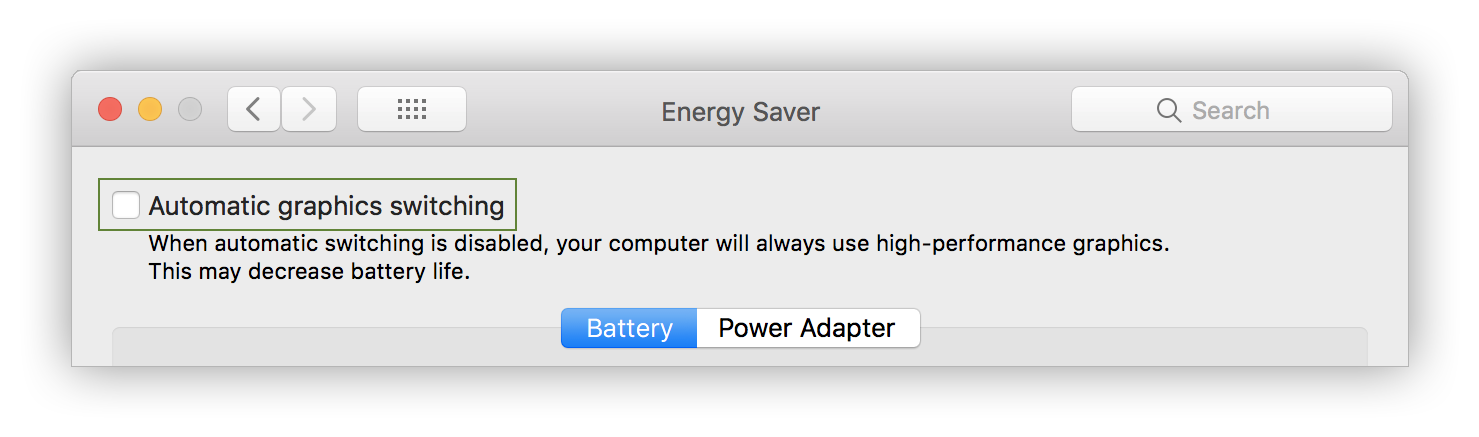
Disabling automatic graphic switching prevents the issue from occurring. This was not the case prior to High Sierra.
 ultiferrago
All 96 comments
I just want to add 👍 to @ultiferrago's 👆 comment.
To me it looks like the frames are playing out of order - or the video is being rendered twice?
👾 💜
 affrae
on 11 Sep 2017
affrae
on 11 Sep 2017
Duplicate of #365 .
They are rewriting the window manager to use Metal 2, so graphical glitches are to be expected while this work is ongoing. But please please please report these issues to Apple using the Feedback app.
 alistairmcmillan
on 11 Sep 2017
alistairmcmillan
on 11 Sep 2017
I was having problems with the videos playing weirdly too!
 sn0wyfall
on 12 Sep 2017
sn0wyfall
on 12 Sep 2017
Thanks, @alistairmcmillan!!
👾 💜
affrae
on 12 Sep 2017
I have witnessed the problem on a 16:10 display (MacBook Air MID 2013) but not on a 16:9 display (Mac Mini MID 2011 attached to a HD TV). Both running 10.13 GM. Hope it helps narrow it down.
 fgladu
on 19 Sep 2017
fgladu
on 19 Sep 2017
It is working on High Sierra (GM) for me on my iMac Retina and on a 2015 MacBook Pro. It is not working on a brand new MacBook Pro with Touch Bar.
 mhyatt18
on 21 Sep 2017
mhyatt18
on 21 Sep 2017
On my MacBook Pro (13-inch, Late 2016, Two Thunderbolt 3 ports) - the non-touchbar version - it generally works, but right at the start of the screensaver it appears to start frozen for a split second, then flicker as if it would try to rescale, then start playing normally (at what I believe is the correct aspect ratio). For what it's worth this is tested on internal screen only, running the new default resolution of what looks like 1440x900. Running the GM - 10.13 Beta (17A360a).
 jbozanowski
on 24 Sep 2017
jbozanowski
on 24 Sep 2017
@sn0wyfall @affrae @fgladu @mhyatt18 @jbozanowski I hope you're all using the Feedback app to report this to Apple. Not sure if there is much that John can do about glitches that Apple have introduced into their own drivers or frameworks.
alistairmcmillan
on 24 Sep 2017
Hi @alistairmcmillan I sure have. I can also report that with the GM of High Sierra the problem appears to have disappeared for me.
However that should not also preclude reporting here as sometimes software can break across upgrades. The number of apps updated shortly after a new OS release that list changes as "Now compatible with New Version of OS" or "Fix Issues with New Version of OS" are testament to that.
By notifying here as well as with Apple, the best chance exists for the right person to identify the issue. I did not assume the problem was with Aerial, or with Apple. I just reported on both fronts.
👾 💜
affrae
on 24 Sep 2017
I can confirm I have the same issue on my 2017 15in Touchbar MBP with the High Sierra GM only when running integrated graphics. Switching to discrete graphics works, and is my current work around.
 garrisoncarter
on 25 Sep 2017
garrisoncarter
on 25 Sep 2017
What do you mean by “discrete graphics”?
On Sep 24, 2017, at 10:10 PM, garrisoncarter notifications@github.com wrote:
I can confirm I have the same issue on my 2017 15in Touchbar MBP with the High Sierra GM only when running integrated graphics. Switching to discrete graphics works, and is my current work around.
—
You are receiving this because you were mentioned.
Reply to this email directly, view it on GitHub https://github.com/JohnCoates/Aerial/issues/377#issuecomment-331766581, or mute the thread https://github.com/notifications/unsubscribe-auth/AeqNPUeBjHLVCO80O4WFZ4xXA8jmdOkLks5slxmggaJpZM4PSjmM.
mhyatt18
on 25 Sep 2017
I can confirm that using discrete graphics works as a workaround on my 2017 15in Touchbar MBP.
By discrete graphics we mean the Radeon Pro chipset. The MBP switches automatically to the Intel HD Graphics chipset to save power and only turns on the Radeon Pro when it detects that it's needed.
You can force the MBP to use the Radeon Pro chipset in the Energy Saver panel in Settings.
 mayhew1955
on 25 Sep 2017
mayhew1955
on 25 Sep 2017
Getting this issue as well on my mid 2015 15" mbp using integrated graphics - discrete chip works fine.
 aamck
on 26 Sep 2017
aamck
on 26 Sep 2017
I have a 2017 MBP 13" w/o discreet graphics and I am encountering this issue
 curtisko
on 26 Sep 2017
curtisko
on 26 Sep 2017
Never used High Sierra beta, just updated to High Sierra public release on a 15" MacBook Pro 2017 and this screensaver doesn't work. Whenever it's triggered, it gives the same glitchy effect you see when you have GPU issues.
 tjkohli
on 27 Sep 2017
tjkohli
on 27 Sep 2017
I have the same problem when I'm playing Final Fantasy XIV or War Thunder in my MacBook Pro 13" 2016 without Touch Bar at the release version of macOS High Sierra.
 AmisadaiGlez
on 29 Sep 2017
AmisadaiGlez
on 29 Sep 2017
Also having flickering issues on my MacBook Pro 15" Mid2015 model after updating to HS
 vuklau
on 29 Sep 2017
vuklau
on 29 Sep 2017
I'm having the issue with MacBook Pro 15" Touch Bar 2017 - talked to Apple support and they don't seem to have a real solution yet. Turing off Automatic Graphics Switching does make the issue appear less often though.
 christopher-wong
on 29 Sep 2017
christopher-wong
on 29 Sep 2017
Adding my stats here to potentially help debugging. I am having this flickering issue on my MacBook Pro (Retina, 13-inch, Early 2015)
Processor 3.1 GHz Intel Core i7
Memory 16 GB 1867 MHz DDR3
Graphics Intel Iris Graphics 6100 1536 MB
 thisisjohnny
on 3 Oct 2017
thisisjohnny
on 3 Oct 2017
adding my specs and some more context...
I have a MacBook Pro w/Touchbar (13-inch, 2017)
when connected to a Samsung 23.5-inch monitor, the Aerial videos work fine (on both screens)
but without the external monitor connected, the video is distorted as described above.
This started happening after upgrading to High Sierra.
 creativitydifferent
on 3 Oct 2017
creativitydifferent
on 3 Oct 2017
Same issues here on a Macbook 13 inch 2014 after the update to HS
 eddeemurfy
on 5 Oct 2017
eddeemurfy
on 5 Oct 2017
Having similar issues on my 15" mid 2017 MBP. Switching the integrated Intel Iris graphics card off helped.
 tlaak
on 5 Oct 2017
tlaak
on 5 Oct 2017
I'm also seeing the issue on a 13" Retina MBP Early 2015 and 15" Retina MBP 2013. However, I suspect the graphic flickers are a general High Sierra issue rather than specific to Arial.
 gricha2380
on 5 Oct 2017
gricha2380
on 5 Oct 2017
Also seeing this on my MacBook Pro touch Bar (15-inch, 2017) running High Sierra (10.13 17A365) when trying to view on the built-in display. Worked fine when connected to external display, but think that the issue is battery vs. power supply. As as workaround, turning off Settings > Energy Saver > Automatic graphics switching allows the screensaver to display when running on battery.
 drewwilliams
on 5 Oct 2017
drewwilliams
on 5 Oct 2017
I've read through this thread twice, and I don't see a referenced Radar with Apple for High Sierra GM--am I missing it? Are we sure it's an Apple bug, and not a problem with how Aerial works?
 aanttila
on 6 Oct 2017
aanttila
on 6 Oct 2017
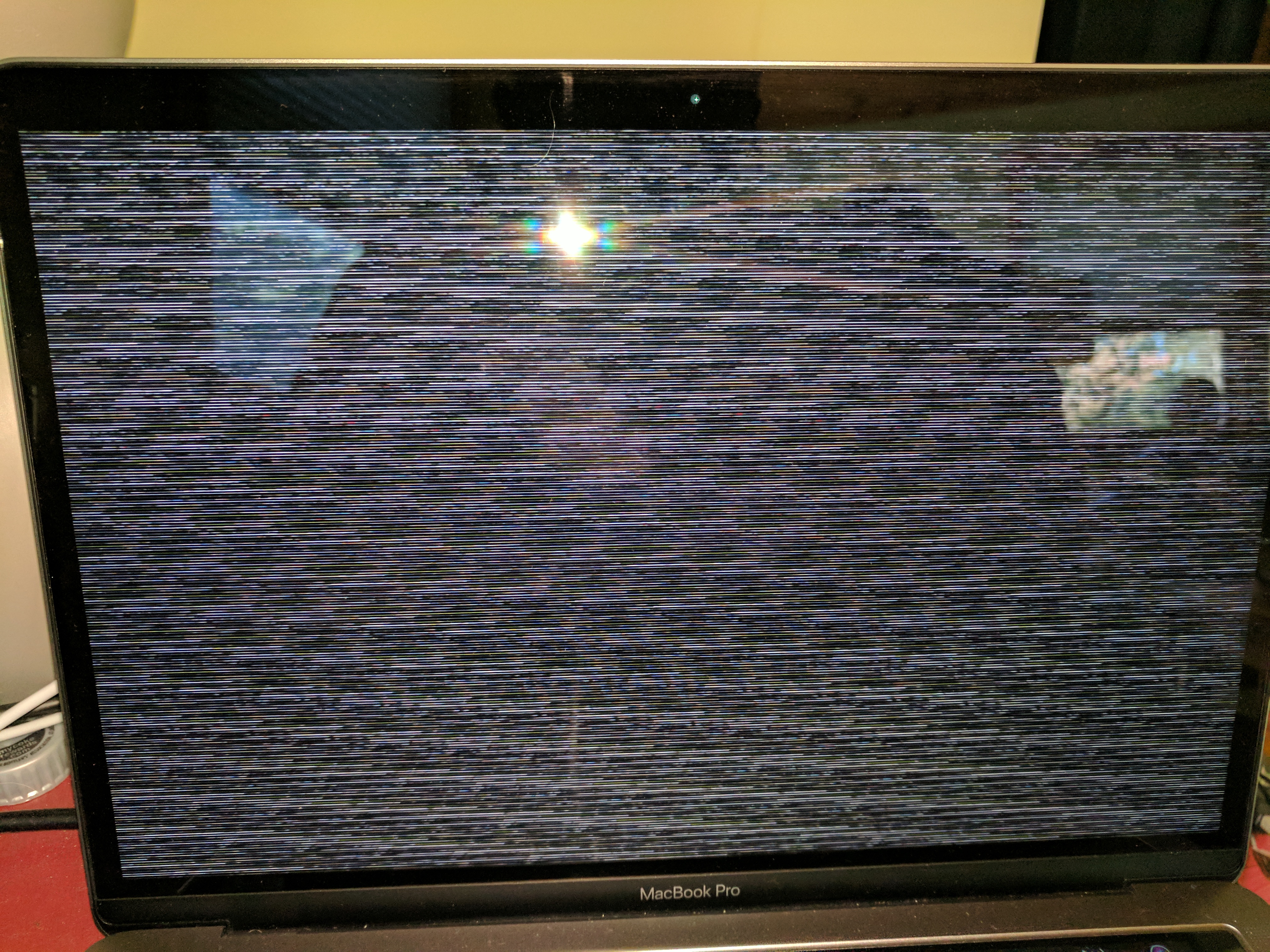
Here's what it looks like on my MBP 2017.
 AsydRayn
on 6 Oct 2017
AsydRayn
on 6 Oct 2017
@AsydRayn I have exactly the same screen like your photo. I also posted an issue (closed due to duplicate of this issue) #398
 Stevenfly
on 6 Oct 2017
Stevenfly
on 6 Oct 2017
@mayhew1955 Oddly, I don't have any of those options under "energy saver" on my MBP w/TB 2017. Under Displays setting, I have Default or Scaled.
You can force the MBP to use the Radeon Pro chipset in the Energy Saver panel in Settings.
AsydRayn
on 7 Oct 2017
apparently these options aren’t available on a 13” MBP. it doesn’t come with the alt chipset
creativitydifferent
on 7 Oct 2017
Just to confirm @drewwilliams' comment, on a 15" 2017 MacBook Pro running High Sierra 10.13, de-selecting "Automatic graphics switching" in System Preferences Energy Saver allows video playback in Aerial without problem. Re-enabling this setting and the graphics glitching returns.
 vicchi
on 7 Oct 2017
vicchi
on 7 Oct 2017
It appears the new supplemental high Sierra update that just dropped fixed the issue on my MBP15" in integrated gfx mode. So not likely an aerial bug. Spoke too soon. The problem does happen, just not quite as fast.
 darknater
on 7 Oct 2017
darknater
on 7 Oct 2017
Having the same issue on my 2017 13" MacBook Pro w TouchBar. It works fine on my 27" 4K Monitor. Do we know this happens on the internal display but not on an external?
 jackhcurtis
on 11 Oct 2017
jackhcurtis
on 11 Oct 2017
@jackhcurtis For me it's limited to the internal display; works fine on external displays.
vicchi
on 11 Oct 2017
Yeah, with external it works. Macbook 12inch 2017. Worked fine on the same OS version with 2015 macbook I think.
BTW the workaround "show with clock" works, but of course - it's with clock :)
 jstaubr
on 11 Oct 2017
jstaubr
on 11 Oct 2017
Thanks for the workaround "show with clock", it's better than nothing !
mayhew1955
on 11 Oct 2017
I have two MBP 15" with touchbar.. aerial is not working on the more recent one. Both have automatic graphics switching checked in the settings/energy saver stop screen.. I wonder whether this issue I am experiencing only on the latest MBP is due to differences in graphics cards..
The one that has no issue has Intel HD Graphics 530 (24-Bit Color).. the latest MBP has Intel HD Graphics 630 (30-Bit Color)
 mondher
on 12 Oct 2017
mondher
on 12 Oct 2017
I have a 2017 Macbook Pro 13" without touch bar; I consistently see the same screen as @AsydRayn. Graphics switching isn't an option in my Energy Saver preferences, so I don't know how to fix. I'm on the latest versions of Arial and of High Sierra. Perhaps worth noting: I have caching turned off to conserve the limited space on my MacBook.
 controversial
on 12 Oct 2017
controversial
on 12 Oct 2017
@Luke, there is no fix yet. But you can get it to work by turning on the clock.
On Oct 11, 2017, at 9:36 PM, Luke Deen Taylor <[email protected]notifications@github.com> wrote:
I have a 2017 Macbook Pro 13" without touch bar; I consistently see the same screen as @AsydRaynhttps://github.com/asydrayn. Graphics switching isn't an option in my Energy Saver preferences, so I don't know how to fix. I'm on the latest versions of Arial and of High Sierra.
—
You are receiving this because you were mentioned.
Reply to this email directly, view it on GitHubhttps://github.com/JohnCoates/Aerial/issues/377#issuecomment-335994965, or mute the threadhttps://github.com/notifications/unsubscribe-auth/AfEZ8ZkSiWCNmFm7uR1POdLpzIu7_hsRks5srW0wgaJpZM4PSjmM.
AsydRayn
on 12 Oct 2017
Do you think this has to do with Metal 1 vs Metal 2? If so, a rewrite/recompile might be needed.
tjkohli
on 14 Oct 2017
i have the same problem MacBook Pro 13.
 cybermaster69
on 15 Oct 2017
cybermaster69
on 15 Oct 2017
I'm curious how this works when the clock is enabled, yet it won't work when not. If it's a driver issue what is it that the clock toggle "patches" to make it work.
AsydRayn
on 15 Oct 2017
any update yet?
cybermaster69
on 17 Oct 2017
there are another problem like this even it works... when going back to desktop if the macbook are closed with an external montor
 sagitt
on 18 Oct 2017
sagitt
on 18 Oct 2017
Installing 10.13.1 seems to have fixed the problem for me. Is anyone still getting the glitches with 10.13.1 installed?
alistairmcmillan
on 4 Nov 2017
@alistairmcmillan Nope, mine still has the same picture as @AsydRayn posted, with 10.13.1 installed :( (still fine with "show with clock" toggle)
Stevenfly
on 4 Nov 2017
10.13.1 but same problem
sagitt
on 4 Nov 2017
I still have this problem on 10.13.1
On Sat, Nov 4, 2017 at 2:03 PM Sagitt notifications@github.com wrote:
10.13.1 but same problem
—
You are receiving this because you commented.
Reply to this email directly, view it on GitHub
https://github.com/JohnCoates/Aerial/issues/377#issuecomment-341917532,
or mute the thread
https://github.com/notifications/unsubscribe-auth/AJ5Yr7Lg3avTQStk0UJaTub2LQFcFB4lks5szKcDgaJpZM4PSjmM
.
controversial
on 5 Nov 2017
I still have this problem on 10.13.1
rMBP2017 with Touch Bar
 Rand01ph
on 5 Nov 2017
Rand01ph
on 5 Nov 2017
I'm having this problem, 15" touchbar MBP 2017 running 10.13.1. It's solved with discrete graphics mode.
 v8c3
on 8 Nov 2017
v8c3
on 8 Nov 2017
Same screensaver problem on MacBook Pro (Retina, 13-inch, Early 2015) macOS High Sierra(10.13.1)
 mastershaig
on 8 Nov 2017
mastershaig
on 8 Nov 2017
Same screensaver problem on MacBook Pro (Retina, 13-inch, Early 2015) macOS High Sierra(10.13.1)
 ghost
on 9 Nov 2017
ghost
on 9 Nov 2017
same problem on a 2017 macbook pro 13", high sierra 10.13.1. Strangely it works fine on all displays clock-free if any external display is connected, but looks like the display is dead if it's showing only on the internal display. Displaying the clock with just the internal display also works fine for whatever reason
 lparry
on 9 Nov 2017
lparry
on 9 Nov 2017
I'm running 10.13.1 macOS High Sierra on my MacBook Pro 17" with 2.8 GHz Intel Core 17 Processor and, following ultiferrago's suggestion, the graphical glitches I was getting in Safari (extreme pixellation, negative imaging on at least one e-newspaper site), I disabled Automatic Graphics Switching in Energy Saver in Preferences, and issues seems to be resolved.
 Telenova1919
on 11 Nov 2017
Telenova1919
on 11 Nov 2017
Thanks @ultiferrago, disabling "Automatic graphic switching" prevents the issue from occurring.
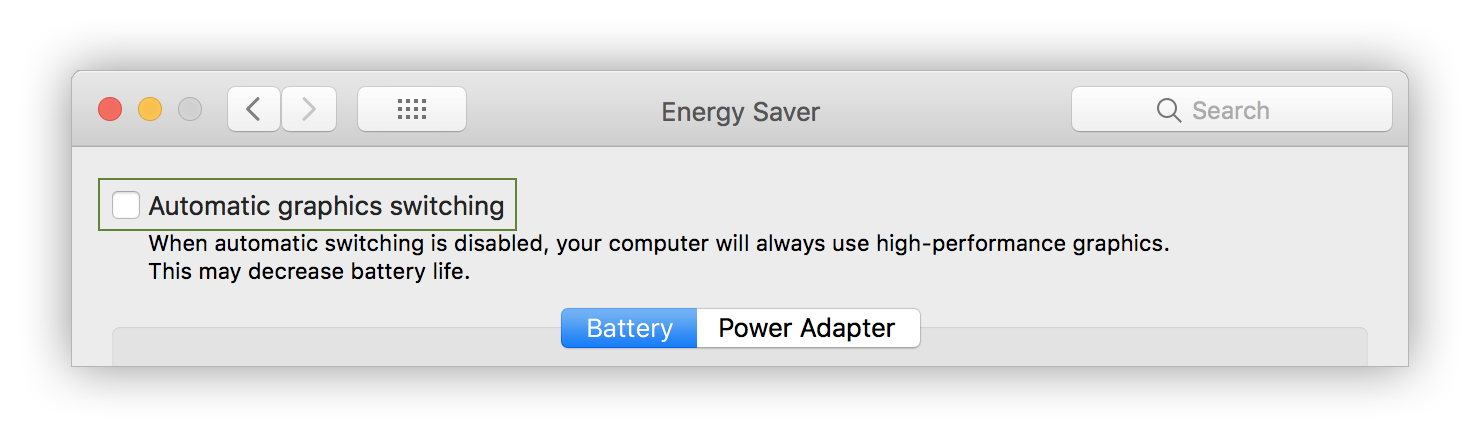
I'm on High Sierra (version 10.13.1), MacBook Pro 15" 2017
 BenSouchet
on 12 Nov 2017
BenSouchet
on 12 Nov 2017
I'm experiencing the same issue. Here's a rubbish video.
10.13.1 on MacBook Pro (15-inch, 2017)
When notifications appear, the image returns to normal before breaking again as soon as the notification disappears.
 atdr
on 19 Nov 2017
atdr
on 19 Nov 2017
Please test it on external display, it works on my mbp 13 with touchbar but when touch the mouse with closed display but external monitor I see glitches running
sagitt
on 19 Nov 2017
Same issue here on my MacBook Pro 2015. It seems related to the camera, as it only glitches when someone moves in front of the camera
 jordybulten
on 23 Nov 2017
jordybulten
on 23 Nov 2017
Same issue here. MacBook (Retina, 12-inch, 2017), 8 GB 1867 MHz LPDDR3, 1,3 GHz Intel Core i5, Intel HD Graphics 615 1536 MB running MaOS High Sierra (10.13.1 (17B48)) - with clock toggle it works.
 phosphatstange
on 27 Nov 2017
phosphatstange
on 27 Nov 2017
I observed that when I was working to document this bug using Quicktime to perform a screen capture appears to also resolve the issue. Anytime I was running a screen capture Aerial played back great. When I was not running a screen capture I ran into the same described interlacing issue.
 mountaineer20
on 2 Dec 2017
mountaineer20
on 2 Dec 2017
Hi folks,
just wanted to add to the thread how my MacBook Pro w/ touch bar is behaving
after upgrading to High Sierra. At first I got the same scrambled screen shown earlier in this thread by @AsydRayn
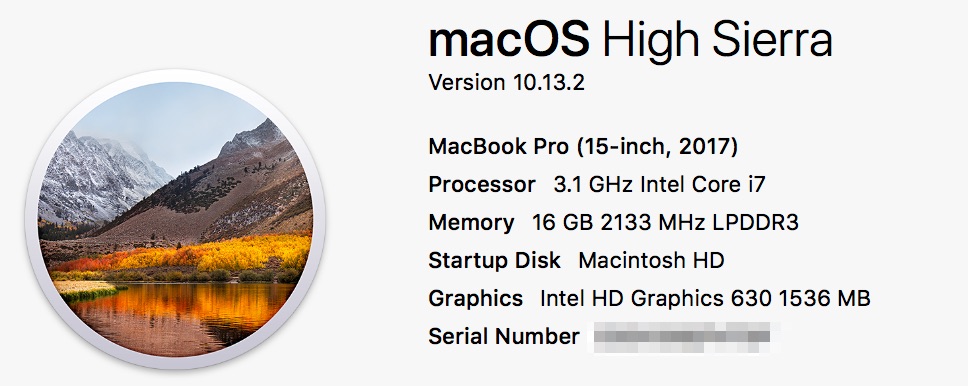
After forcing discrete graphics I get a static image from the video forever, nothing moving. Now switching back to integrated graphics (monitored by gfxCardStatus helper) I don't get the scrambled screen anymore but the static image as well. Not sure if this helps - hope this can be fixed soon as I love this screensaver! Thanks
!
 mpede
on 9 Jan 2018
mpede
on 9 Jan 2018
Hi Ryan just a note on the previous comment to help clarify things though it’s not my comment: on 13.2 about this mac no longer shows the Radeon card, so there is a good chance the guy’s computer does have a discrete graphics card. Cheers!
 whaaa
on 12 Jan 2018
whaaa
on 12 Jan 2018
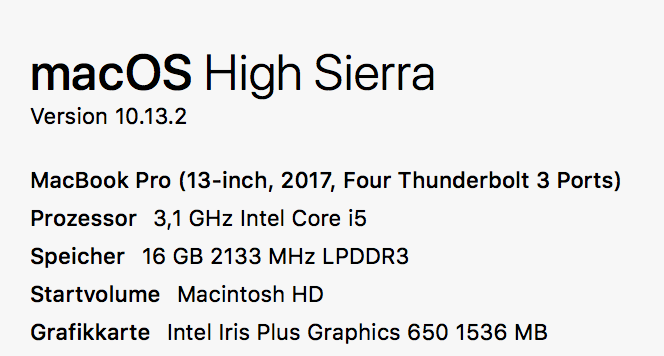
Same here.
 hardcore
on 17 Jan 2018
hardcore
on 17 Jan 2018
+1
 thomas-alrek
on 7 Feb 2018
thomas-alrek
on 7 Feb 2018
This is an ongoing issue in High Sierra. I hope a fix is forthcoming!
Here is a sample of the specific issue I'm experiencing; it looks like the video is not at the correct aspect ratio, resulting in horizontal gaps at the top and bottom of the screen. The image you see behind the video is the current desktop wallpaper.
Hardware: MacBook Pro (Retina, 15-inch, Mid 2015)
OS: 10.13.3
 darkobits
on 7 Feb 2018
darkobits
on 7 Feb 2018
Me too!
 lawonga
on 17 Feb 2018
lawonga
on 17 Feb 2018
same issue , its not fixed yet on latest HS 10.13.3
 ahmedelshinnawy
on 20 Feb 2018
ahmedelshinnawy
on 20 Feb 2018
Confirmed issue still appearing on 10.13.3. Using a 2017 Macbook, so no option to change graphics chipset.
 zacdavies
on 1 Mar 2018
zacdavies
on 1 Mar 2018
Is it me or turns out I fixed it by enabling "Show with clock" in the screen saver settings?
Config:
MacBook Pro (13-inch, 2017, Two Thunderbolt 3 ports)
macOS High Sierra 10.13.3
 buzzb0x
on 2 Mar 2018
buzzb0x
on 2 Mar 2018
@buzzb0x : Yes, when you enabling "Show with clock" this prevent you macbook to switch from your graphic card to the integrated graphics. If you don't want the clock on your screensaver just disable "Automatic graphic switching" on your macbook settings ("Energy Saver" tab)
BenSouchet
on 2 Mar 2018
I found some weird behavior. When I only use internal display of my MBP 13 2017, It glitches. but when I use my iMac as target display mode, It's working. even in MBP display. Hope this will helps for fixing issues..
 draupnir45
on 3 Mar 2018
draupnir45
on 3 Mar 2018
@BenjaminSouchet I don't even have that option, my config doesn't have a dedicated GCU.
buzzb0x
on 3 Mar 2018
I have a MacBook Pro 13" (MacBook Pro (13-inch, 2017, Four Thunderbolt 3 Ports) with integrated graphics, running 10.13.3. Enabling the clock feature results i smooth video; without the clock option, I get the zigzag garbled video. So for me this is a workaround for the moment as also noticed by @buzzb0x
 gwynnebaer
on 7 Mar 2018
gwynnebaer
on 7 Mar 2018
2017 MBP with touch bar. Showing clock also fixes the problem for me. I do think though this might be a problem with the hardware and not necessarily the software. Im going to head into an apple store and show them this thread. I actually already had the display replaced because of this issue but it seems its still happening to me.
 muzzah
on 11 Mar 2018
muzzah
on 11 Mar 2018
There is no such a problem on earlier macOS versions with the same hardware, so it's definitely software problem.
 robert-cody
on 11 Mar 2018
robert-cody
on 11 Mar 2018
Ah ok. Didnt noticed that in this thread. Ill go over it again, thanks.
muzzah
on 11 Mar 2018
Didn't read the whole thread - but I have a brand new Macbook Pro 13" 2017 model, and the issue is reproducible as long as I _don't_ select Show with clock. If I _do_ select that setting, the screensaver works fine. There is only integrated graphics on this laptop as well, no discrete chip.
 diranged
on 27 Mar 2018
diranged
on 27 Mar 2018
Just installed on a MBP 13 w/o Touch Bar and can replicate diranged's test.
 newtonuk
on 29 Mar 2018
newtonuk
on 29 Mar 2018
It looks like this is resolved with 10.13.4. I just updated, and tried the screen saver, removing the show with clock option, and after an initial video stutter the playback is smooth.
 ttyS0
on 30 Mar 2018
ttyS0
on 30 Mar 2018
Mine isn't :-(
newtonuk
on 30 Mar 2018
I suppose I should mention that my hardware is MacBookPro14,3 w/ Intel HD Graphics 630 & Radeon Pro 560. (i.e. MBP 15" 2017 w/TouchBar)
ttyS0
on 30 Mar 2018
I can also confirm that the clock workaround is no longer needed for my setup with 10.13.4:
MacBook Pro (13-inch, 2017, Four Thunderbolt 3 Ports)
Intel Iris Plus Graphics 650 1536 MB
gwynnebaer
on 30 Mar 2018
Just noticed that when I received a notification about a received email, the screensaver started playing correctly, but as soon as the notification faded it distorted again.
newtonuk
on 30 Mar 2018
This has resolved for me with 10.13.4 on a MacBook Pro Touch Bar (15-inch, 2017).
drewwilliams
on 5 Apr 2018
This has resolved for me with 10.13.4 on a MacBook Pro (13-inch, Early 2015).
ghost
on 8 Apr 2018
I can also confirm that the clock workaround is no longer needed for my setup with 10.13.4:
MacBook Pro (15-inch, 2017, 2.9 GHz, Intel HD Graphics 630)
mayhew1955
on 8 Apr 2018
@gwynnebaer I have the same setup as you and it's still not fixed for me when I untick clock. @newtonuk, your experience is exactly the same as mine...clock unticked, I get screen scramble until a notification arrives. Once the notification disappears, it's back to the garbled screen again.
AsydRayn
on 8 Apr 2018
While macOS 10.13.4 may have resolved this issue for those of you using a MacBook Pro it is definitely still crashing on my new 2017 MacBook. Interestingly enough, it was never an issue on my 2015 MacBook that was running the screen saver on the same version of macOS. I'm not sure if the problem is with the screensaver or with macOS but I've submitted detailed feedback to Apple just in case it's on their end. In the meantime I still have to use the "Show with clock" option to get it to work.
 owellsjr
on 12 Apr 2018
owellsjr
on 12 Apr 2018
This issue was resolved for my 2017 MacBook in the macOS 10.13.5 public beta. I no longer have to use the "Show with clock" option to get the screen saver to work.
UPDATE: Apparently I spoke too soon. This seems to be resolved when my MacBook is hooked up to an external monitor. Still crashing otherwise.
owellsjr
on 10 May 2018
Still a problem for me with 10.13.4 when "show with clock" is off or integrated graphics is on. I'm getting the version with a cropped, zoomed in central video and a second zoomed-out copy playing behind it, visible above and below.
 gsbernstein
on 23 May 2018
gsbernstein
on 23 May 2018
I'm getting a horizontally-stretched version of the video flickering across the screen whilst the brightness of the monitor changes—at all other times it's back to normal in 10.13.4.
Another rubbish video. Auto-brightness response triggered with a torch.
atdr
on 23 May 2018
OSX 10.13.4, 15" 2017 MBP (w/touch bar)
Issue resolves by disabling graphics switching in energy saver settings.
Issue appears to be with integrated graphics solution (drivers?! what is this, a PC?), but not with the discrete graphics chip on systems w/touch bar.
I do not have this issue (same OS version) on my other MBP (13" 2015) or Air (2015).
 El-Capitan
on 1 Jun 2018
El-Capitan
on 1 Jun 2018
I have a 2017 15-in MacBook Pro. I see the same scrambled images and have now twice seen spontaneous reboots, which I attribute to Aerial.
 DominikHoffmann
on 25 Jul 2018
DominikHoffmann
on 25 Jul 2018
Fixed in Mojave Developer Beta 6 for me
controversial
on 7 Aug 2018
Works for me in this iteration, even without the clock, on a 2017 13" MB Pro w/Touchpad that doesn't have an "automatic graphics switching" option.
AsydRayn
on 8 Aug 2018
Fixed in macOS Mojave 10.14 Beta (18A353d)
ghost
on 8 Aug 2018
So this is the same as https://github.com/JohnCoates/Aerial/issues/487, I'll close this one and keep the other one open.
Afaik Mojave fixes those issues, and our version 1.4 may fix the issue with 10.13 with the new show description option.
 glouel
on 11 Oct 2018
glouel
on 11 Oct 2018
Related issues
 adri430
·
7Comments
ghost
·
5Comments
adri430
·
7Comments
ghost
·
5Comments
 arnsangra
·
3Comments
arnsangra
·
3Comments
 1st
·
6Comments
1st
·
6Comments
 Pingren
·
7Comments
Pingren
·
7Comments
Most helpful comment
Here's what it looks like on my MBP 2017.