Aegis: Google Drive does not initially appear on Export
Info
- __Version__: 1.2
- __Source__: Google Play
- __Vault encrypted:__ Yes (with biometric unlock)
- __Device:__ Google Pixel 3a (sargo)
- __Android version and ROM:__ 10 (QQ3A.200605.002)
Steps to reproduce
Open Settings » Export » OK » Menu
What do you expect to happen?
Show all Storage Access Framework providers, including Google Drive.
What happens instead?
Initially, Google Drive did _not_ appear.
It only appeared after I had played with Export/Import a number of times.
 JNavas2
All 23 comments
It looks like OneDrive just doesn't support the ACTION_CREATE_DOCUMENT intent for some reason. Reading files is possible, but creating files is not. Are there any other cloud providers that you would have expected to see on export that don't show up? In your screenshot, Google Drive does show up as an option in both cases.
 alexbakker
on 5 Jul 2020
alexbakker
on 5 Jul 2020
OneDrive is essential to me, and many other apps _are_ able to save files to OneDrive, including:
JNavas2
on 5 Jul 2020
The apps listed seem to either use the OneDrive API directly or expose files to OneDrive through the sharing mechanism in Android. If they were using the Storage Access Framework, OneDrive would also not appear there. If you want, we can consider using the sharing mechanism as a way to export the vault as a new feature request.
alexbakker
on 5 Jul 2020
I confirm that Authenticator Pro has the same behavior as your app.
Some of my other examples are using the Share mechanism, but I don't think that's true of FolderSync.
Regardless, I'll open a Feature Request for Share (not just for OneDrive),
and I'll change this Issue to just the problem of Google Drive not appearing initially.
Thank you.
JNavas2
on 5 Jul 2020
Thanks for following up and creating a proposal for that.
The fact that Google Drive did not appear initially for you is not something we would be able to fix, unfortunately. Aegis only makes simple calls to the Storage Access Framework. The system DocumentsUi handles listing all of the DocumentProviders (in your case, that's be the cloud providers), so that's out of our hands.
alexbakker
on 5 Jul 2020
With respect, I've never seen that issue with any other app,
and that it initially did not appear, and then spontaneously started appearing,
suggests some sort of initialization issue.
JNavas2
on 5 Jul 2020
This is all we do when asking the user the pick a location to export to: https://github.com/beemdevelopment/Aegis/blob/94ebc0809746b44bfab5d6fcfbb9b9dc35820ca6/app/src/main/java/com/beemdevelopment/aegis/ui/PreferencesFragment.java#L642-L647
Android takes care of the rest.
alexbakker
on 5 Jul 2020
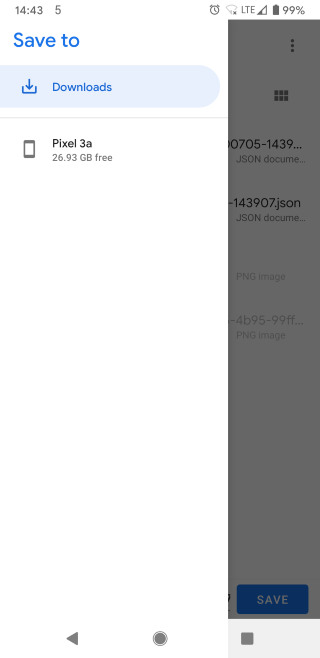
You may need to do something else, because it's definitely a bug.
How I reproduced it:
- Uninstall the app.
- Reinstall the app.
- Add an entry.
- Try to Export.
- Google Drive does _not_ appear.
JNavas2
on 5 Jul 2020
I'm using Pixel 2a XL and the same issue occurs for me. I can see Google Drive and Dropbox when trying to import a file, but not when I'm trying to setup auto export with an encrypted vault. Attached are the screenshots for importing a file and exporting a vault respectively:
Importing file:

Exporting vault:

Does Google Drive and Dropbox both not support the creating file intent, and only allow read only?
 chenningg
on 23 Jul 2020
chenningg
on 23 Jul 2020
That's a different issue. Google Drive just doesn't support picking a folder (i.e. the ACTION_OPEN_DOCUMENT_TREE intent). When exporting the vault once with the option at the bottom (ACTION_CREATE_DOCUMENT), Google Drive should appear.
alexbakker
on 23 Jul 2020
Hmm. Not sure if I understand this - so manual exports are able to write into the Google Drive folder but the automated ones (export backup on change) cannot save automatically to the folder?
chenningg
on 29 Jul 2020
Please reopen this Issue, because the bug remains, and _does not affect other apps_. There's something specific to this app that causes the problem.
JNavas2
on 29 Jul 2020
@chenningg Your understanding is correct. For exporting, we make the user select a file location, but when configuring backups, we make the user select a folder location. The latter is not yet supported by Google Drive, unfortunately.
@JNavas2 Which apps did you test?
alexbakker
on 30 Jul 2020
@alexbakker
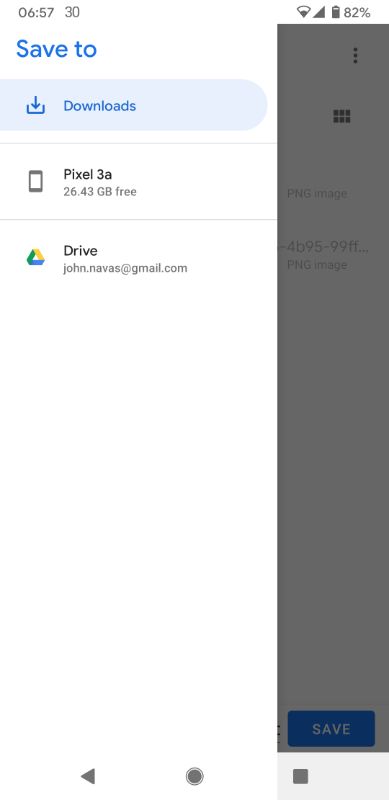
I just tested Authenticator Pro.
Installed it, added an entry, then Menu > Backup > Menu, and Google Drive appears immediately.
Source is available on GitHub, so you can see how they are doing it.
Thank you.
JNavas2
on 30 Jul 2020
Previously, you reported that Authenticator Pro has the same behavior as Aegis. Was that also about Google Drive not appearing initially? If so, has that now been fixed in Authenticator Pro according to you?
They're doing basically the same thing we are: https://github.com/jamie-mh/AuthenticatorPro/blob/e201789e7d448cf8a278df9167e8c9315991c38b/AuthenticatorPro/Source/Activity/MainActivity.cs#L441-L449. Looking at their commit history, this code has not changed since they first introduced support for the Storage Access Framework. The only difference between our code and theirs is the MIME type that's sent along. If that turns out to make a difference, I'll figuratively eat my hat.
Are you still able to reliably reproduce the issue in Aegis? I can build a debug APK that sets application/octet-stream as the MIME type for you to test.
alexbakker
on 30 Jul 2020
@alexbakker
I meant that Authenticator Pro exhibits the same cloud provider behavior on Backup, not that it had the same bug. Apology for not being more clear.
But no matter, as I'm not now able to reproduce this issue, not even with a different Google account, so this issue should remain Closed. Apology for not checking before whining.
Thank you.
p.s. It's embarrassing to start the day with two apologies. And fortunate that you won't have to eat your hat. :blush:
JNavas2
on 30 Jul 2020
@alexbakker Thanks for clarifying, however the problem remains, how should I enable automatic backups to a cloud folder of some sort? Neither Google Drive nor Dropbox appear to support said folder choosing, and they are two of the largest cloud providers around.
chenningg
on 31 Jul 2020
@chenningg Yeah, it's a real bummer that the large cloud providers don't support is. Especially Google, as they're forcing the Storage Access Framework on everyone, but then don't implement support for it in their own apps. Personally, I configured Aegis to backup the vault to local storage and have Syncthing watch that folder to sync the backups to my PC and laptop. There are also apps that can watch folders and sync them to one of the large providers, but I'm not sure if any of them are open source.
alexbakker
on 31 Jul 2020
@chenningg
This issue is about Export, not Auto Backup.
@alexbakker
Yes, but if you enable Auto Backup of an encrypted vault, as I suggest here in Issue #544, then the Drive problem is solved, no?
JNavas2
on 31 Jul 2020
@JNavas2 Woops, read it wrongly, I guess my issue is about auto backup instead. Guess I'll go with @alexbakker suggestion and just do manual backups on change.
chenningg
on 1 Aug 2020
@alexbakker Same problem here. Both in export and autobackup.
setup is brand new (first time user migrating from authy)
In both case I can only save to my "Download" folder by default. I can enable "show internal memory" and then save anywhere but Google drive doesn't show up.
Version: 1.4.2
Source: Google Play
Vault encrypted: Yes (with biometric unlock)
Android : 10.1.0
 ThomasBlt
on 22 Jan 2021
ThomasBlt
on 22 Jan 2021
Google Drive not showing up when configuring automatic backup is expected, because Google Drive doesn't fully participate in Android's Storage Access framework. As for it not showing up when exporting, do you have the Google Drive app installed?
alexbakker
on 22 Jan 2021
Yes I have Google drive and it was installed before Aegis.
ThomasBlt
on 22 Jan 2021
Related issues
 Stefan1200-de
·
5Comments
Stefan1200-de
·
5Comments
 3xploiton3
·
3Comments
3xploiton3
·
3Comments
 naoliv
·
3Comments
naoliv
·
3Comments
 DaVoodoo
·
3Comments
DaVoodoo
·
3Comments
 iammexan
·
4Comments
iammexan
·
4Comments
Most helpful comment
@alexbakker
I meant that Authenticator Pro exhibits the same cloud provider behavior on Backup, not that it had the same bug. Apology for not being more clear.
But no matter, as I'm not now able to reproduce this issue, not even with a different Google account, so this issue should remain Closed. Apology for not checking before whining.
Thank you.
p.s. It's embarrassing to start the day with two apologies. And fortunate that you won't have to eat your hat. :blush: