Adminlte: Nav Sidebar Text got truncated
Describe the bug
I am using AdminLTE v3.x for a project. I observed that the some text on the left sidebar got truncated when its too long, and I see a scrollbar which I can't even click upon.
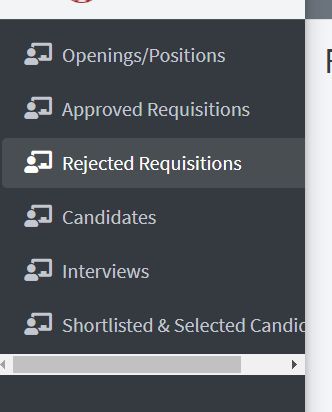
Expected behavior
When the length of the text is much, I want it to wrap the text or make the remaining text to come under the other text. I don't want the scrollbar.
<li class="nav-item">
                <a href="" class="nav-link">
                  <i class="nav-icon fas fa-chalkboard-teacher"></i>
                  <p>
                    Shortlisted & Selected Candidates
                  </p>
                </a>
              </li>
How do I achieve this?
Environment (please complete the following information):
- AdminLTE Version: [v3.0.0]
- Operating System: [Windows]
- Browser (Version): [Chrome (Latest)]
 noblemfd
All 2 comments
There are three options, you can use a real truncate with ellipsis like this:
<li class="nav-item">
  <a href="pages/calendar.html" class="nav-link">
    <i class="nav-icon far fa-calendar-alt"></i>
    <p class="d-inline-flex">
      <span class="text-truncate d-inline-block" style="max-width: 150px">
        Calendar Calendar Calendar Calendar
      </span>
    </p>
    <span class="badge badge-info right">2</span>
  </a>
</li>
<li class="nav-item">
  <a href="pages/gallery.html" class="nav-link">
    <i class="nav-icon far fa-image"></i>
    <p class="d-inline-flex">
      <span class="text-truncate d-block" style="max-width: 170px">
        Gallery Gallery Gallery Gallery
      </span>
    </p>
  </a>
</li>
or change the sidebar text size with .text-sm on .nav-sidebar
or change the sidebar menu item text size with .text-sm on p.
 REJack
on 26 Nov 2019
REJack
on 26 Nov 2019
Issue resolved. Thanks
noblemfd
on 27 Nov 2019
Related issues
 acacha
·
4Comments
acacha
·
4Comments
 jrandhawa09
·
3Comments
jrandhawa09
·
3Comments
 fromberg100
·
4Comments
fromberg100
·
4Comments
 tester10
·
3Comments
tester10
·
3Comments
 GuxMartin
·
3Comments
GuxMartin
·
3Comments
Most helpful comment
There are three options, you can use a real truncate with ellipsis like this:
or change the sidebar text size with
.text-smon.nav-sidebaror change the sidebar menu item text size with
.text-smonp.