Issue type:
- [x] Feature request
- [ ] Bug report
- [ ] Documentation
Environment:
- AdminLTE Version: v3
- Operating System: Any
- Browser (Version): Any
Description:
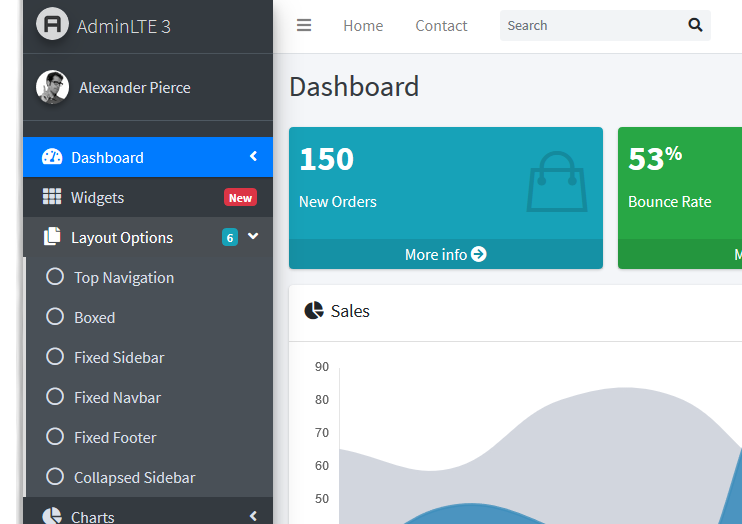
I like the traditional 2.4 flat menu style over the new "button" menu style.
I managed to modify it, but i'm not so good in css to make it swappable.
 andcarpi
👍1
All 5 comments
That's a nice idea, could you provide me your changes that you created?
 REJack
on 6 Sep 2019
REJack
on 6 Sep 2019
Sure i can provide you the changes!
There it is, bsase on v3-dev RC1:
variables.scss:
- Line 34
$sidebar-padding-x: 0 !default; /* was 0.5rem */*
main-sidebar.scss:
-Line 60 to 65
// Sidebar navigation menu
.nav-sidebar {
  // All levels
  .nav-item {
    > .nav-link {
      margin-bottom: 0rem;  /* was 0.2rem */
      border-radius: 0px; /* Added */
- Line 134
    > .nav-item {
      > .nav-link {
        border-left: 0.2rem solid; /* Added, could be moved to dark/light styles for better color choices */
-Line 279 (Light style)
  // All submenus
  .nav-treeview {
    > .nav-item {
      > .nav-link {
        color: $sidebar-light-submenu-color;
        background-color: $gray-100; /* Added */
-Line 379 (Dark style)
  // All submenus
  .nav-treeview {
    > .nav-item {
      > .nav-link {
        color: $sidebar-dark-submenu-color;
        background-color: $gray-700; /* Added */
That's what i changed.
andcarpi
on 8 Sep 2019
I added a flat style with child-indent support, you can check out my PR #2256.
I've also updated the demo.js to easily test nav flat, compact & small text.
REJack
on 11 Sep 2019
❤1
🎉1
What should I need to do for flat style menu ? I can't see it.
 cataclysmuprising
on 13 Sep 2019
cataclysmuprising
on 13 Sep 2019
@cataclysmuprising Just add .nav-flat to .nav-sidebar, if you use the dist files from my PR #2256.
REJack
on 13 Sep 2019
❤1
Was this page helpful?
0 / 5 - 0 ratings
Related issues
 RaruRv
·
3Comments
RaruRv
·
3Comments
 LeoYong95
·
4Comments
LeoYong95
·
4Comments
 lenamtl
·
3Comments
lenamtl
·
3Comments
 tester10
·
3Comments
tester10
·
3Comments
 esaesa
·
3Comments
esaesa
·
3Comments
Most helpful comment
I added a flat style with child-indent support, you can check out my PR #2256.
I've also updated the demo.js to easily test nav flat, compact & small text.