Adminlte: select2 dropdown styles not showing properly
Hi, I'm new working with AdminLTE the same than Angular2 (I'm a backend developer more than frontend one).
I was able to properly configure AdminLTE components but I'm facing the following issue trying to make select2 work as expected.
First of all I installed _select2_ by running:
npm install select2 --save
I also noted by researching through the web, that I need to add the following script into my ._angular-cli.json_ file:
"../node_modules/admin-lte/plugins/select2/select2.full.js",
Then, in my _component.ts_ file I added the following line to initialize my select2 control:
$(".select2").select2();
Finally, my _component.html_ file has the following dropdown which should be working with the select2 behavior:
<select class="form-control select2" style="width: 100%;" id="addressCityId" name="addressCityId" [(ngModel)]="client.addressCityId ">
        <option *ngFor="let city of cities" [value]="city.cityId">{{city.description}}</option
</select>
Expected behavior: The dropwdown should be displaying with the same style than the _AdminLTE Advanced Forms_ example page.
Current behavior: The dropdown works with select2 behavior by adding the search box, however the styles are broken and showing with no styles at all.
I even tried to fix this by adding the followinng line in the _variales.less_ file but this didn't work though.
@import "../node_modules/admin-lte/build/less/select2";
I know this will probably be a stupid question but I swear I really tried to fix it by searching everywhere :p
Would somebody please provide any guidelines to resolve this?.
Thanks in advance!.
 JuanAzar
All 7 comments
Hola @JuanAzar si quieres tener unas bases para implementar AdminLTE en Angular, puedes revisar https://github.com/csotomon/Angular2-AdminLTE , No está implementado la parte de select2, pero te puede dar una idea de como organizar tu proyecto.
En esta rama https://github.com/csotomon/Angular2-AdminLTE/tree/v3.0.0 se está trabajando la versión 3.0.0 de AdminLTE.
Espero que te sirva de algo.
No estoy trabajando en la versión 2.4.x de AdminLTE porque me estoy centrando en la versión 3.0.0, pero si necesitas ayuda con la versión 2.4.x que usa select2, lo podemos mirar juntos.
 csotomon
on 13 Aug 2018
csotomon
on 13 Aug 2018
Muchas gracias @csotomon por la pronta respuesta!. Justamente esta rama es la que me bajé para comenzar a trabajar en mi proyecto usando AdminLTE.
Hasta ahora todo funcionó perfectamente, incluso logré hacer funcionar el _bootstrap-datepicker_ y para el caso del _select2_ también está funcionando, solo que el issue específico es que el estilo no se muestra correctamente.
Me sería de mucha utilidad tu ayuda para ver si puedo solucionarlo.
Gracias!.
JuanAzar
on 13 Aug 2018
¿Podrías ser más específico cual es la rama y el repositorio que estás usándola? Porque select2 no veo dónde está siendo usado en la v3
csotomon
on 13 Aug 2018
@csotomon, hace un par de semanas bajé el AdminLTE de: _https://github.com/csotomon/Angular2-AdminLTE_
Y chequeando en mi _package.json_ la versión que tengo es:
"admin-lte": "2.3.11",
Como comentaba en el primer post, realicé varios pasos para incluir select2 al proyecto y finalmente logré que funcione, pero el problema está en los estilos _css_ que no quedan de forma correcta.
Avisame si necesitas algún dato adicional y gracias por el seguimiento.
JuanAzar
on 13 Aug 2018
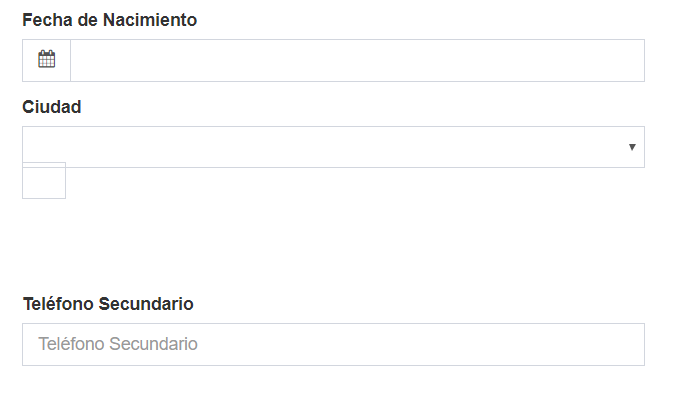
Este es un screenshot de la sección donde debería mostrarse el select2 (Dropdown Ciudad) y la forma en la que se ve actualmente.
JuanAzar
on 13 Aug 2018
cover the style on your page.
<style>
        .select2-container--default .select2-selection--single, .select2-selection .select2-selection--single {
            border: 1px solid #d2d6de;
            border-radius: 0;
            padding: 6px 12px;
            height: 34px;
        }
        .select2-container .select2-selection--single .select2-selection__rendered {
            padding-right: 10px;
        }
        .select2-container .select2-selection--single .select2-selection__rendered {
            padding-left: 0;
        }
        .select2-container--default .select2-selection--single .select2-selection__arrow b {
            margin-top: 0;
        }
        .select2-container--default .select2-selection--single .select2-selection__arrow {
            height: 28px;
            right: 3px;
        }
    </style>
 sunny-kevin
on 15 Aug 2018
sunny-kevin
on 15 Aug 2018
Thanks @sunny-kevin .
I just add this to remove rounded corner in dropdown .select2-dropdown {border-radius: 0 }
 gugatxr
on 5 Nov 2018
gugatxr
on 5 Nov 2018
Related issues
 akbajwaakgec
·
3Comments
akbajwaakgec
·
3Comments
 tester10
·
3Comments
tester10
·
3Comments
 REJack
·
3Comments
REJack
·
3Comments
 acacha
·
4Comments
acacha
·
4Comments
 andyhughes73
·
3Comments
andyhughes73
·
3Comments
Most helpful comment
cover the style on your page.
<style>
        .select2-container--default .select2-selection--single, .select2-selection .select2-selection--single {
            border: 1px solid #d2d6de;
            border-radius: 0;
            padding: 6px 12px;
            height: 34px;
        }
        .select2-container .select2-selection--single .select2-selection__rendered {
            padding-right: 10px;
        }
        .select2-container .select2-selection--single .select2-selection__rendered {
            padding-left: 0;
        }
        .select2-container--default .select2-selection--single .select2-selection__arrow b {
            margin-top: 0;
        }
        .select2-container--default .select2-selection--single .select2-selection__arrow {
            height: 28px;
            right: 3px;
        }
    </style>