Adminlte: Upgrade Font Awesome (to 5.0.8)
Issue type:
- [x] Feature request
- [ ] Bug report
- [ ] Documentation
Environment:
- AdminLTE Version: 2.4.3
- Operating System: all
- Browser (Version): all
Description:
Upgrade Font-awesome (to 5.0.8).
The current version integrated into AdminLTE is 4.7.0. This is also the latest version hosted by the Cloudflare CDN. Font Awesome have their own CDN which could possible be used but I'm not sure if their licensing is compatible: https://cdn.fontawesome.com.
 siemensikkema
All 14 comments
+1
 B0bbyD0llar
on 18 Mar 2018
B0bbyD0llar
on 18 Mar 2018
Please stop adding "+1" as comments, it only adds spam, use the reaction button to the original post. Thank you!
 daniele-athome
on 18 Mar 2018
daniele-athome
on 18 Mar 2018
@daniele-athome i dont think so.
B0bbyD0llar
on 19 Mar 2018
I haven't tested FA5 yet but it seems reasonable to support. This will be available in v3.
 almasaeed2010
on 8 Apr 2018
almasaeed2010
on 8 Apr 2018
The way they use svg sometimes make it hard to add custom styles, because svg is generated after document complete load, but there is an option to use webfont like the v4.x
 dels07
on 11 Apr 2018
dels07
on 11 Apr 2018
I've added a CDN reference for FA5 to my project but the hamburger menu icon no longer displays. It renders as the square / invalid character symbol. Anyone know how I can resolve this?
 egmfrs
on 26 Jul 2018
egmfrs
on 26 Jul 2018
I've been working with FontAwesome 5 with AdminLTE v2.4(.x), CSS-based package of FA requires little updates on the styling.
Besides that, the "easy" way to get them working, is to use the SVG-based package. Most icon's positioning can be fixed by giving them a transform of left-8, left-9 or left-10.
Also, there are some other icons in elements which appear in a higher position than they should be, a transform of down-1 is enough most of the time to fix them, or you can use a CSS rule in the icon itself: top: 0.2em.
 iksaku
on 30 Jul 2018
iksaku
on 30 Jul 2018
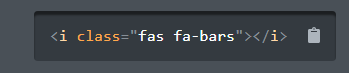
@egmfrs notice that in version 5 they change class fa to fas, it may be your issue.
Version 4

Version 5
 rgomez90
on 7 Aug 2018
rgomez90
on 7 Aug 2018
@rgomez90 as stated in the Upgrading from Version 4 part of the documentation, the fa prefix fallsback to the new fas prefix. It shouldn't be an issue, unless the specific icon name changed.
And for @egmfrs's issue, the problem is that the bars icon in the template is referenced directly in the LESS as a Unicode character, instead of being referenced with a <span> or <I> tag. You can actually override it with some custom CSS:
.sidebar-toggle:before {
    content: none !important;
}
I actually had to add a font-weight with the bars icon in order for it to display, which is a bug with fa 5
egmfrs
on 8 Aug 2018
@iksaku, thank you. It works for me after I try integrate AdmintLTE 2.4.5 with fontAwesome 5.
 maohieng
on 9 Sep 2018
maohieng
on 9 Sep 2018
I was able to use AdminLTE4 with FontAwesome 5.6.3 by only adding the following line to my custom CSS:
.sidebar-toggle:before {
    font-weight: 900;
    font-family: "Font Awesome 5 Free";
}
 DL6ER
on 28 Dec 2018
DL6ER
on 28 Dec 2018
I was able to use AdminLTE4 with FontAwesome 5.6.3 by only adding the following line to my custom CSS:
.sidebar-toggle:before {
    font-weight: 900;
    font-family: "Font Awesome 5 Free";
}
Worked for AdminLTE v2 and FontAwesome V5.7.1
 mmucino1
on 6 Feb 2019
mmucino1
on 6 Feb 2019
I'v updated FontAwesome to v5.8.2 in AdminLTE v3-dev with #2110.
 REJack
on 28 May 2019
REJack
on 28 May 2019
Related issues
 gaea44
·
3Comments
gaea44
·
3Comments
 LeoYong95
·
4Comments
LeoYong95
·
4Comments
 vbetancourt
·
3Comments
vbetancourt
·
3Comments
 lenamtl
·
3Comments
lenamtl
·
3Comments
 EliuTimana
·
4Comments
EliuTimana
·
4Comments
Most helpful comment
Please stop adding "+1" as comments, it only adds spam, use the reaction button to the original post. Thank you!