Adminlte: Dont expand to full sidebar on hover when using fixed and sidebar-mini
I have taken a look at #336 and #840, however, neither were acceptable solutions at this time...
I am attempting to have a fixed layout with a sidebar-mini and sidebar-collapse
On hover, I want the menu to look like

Not like the following
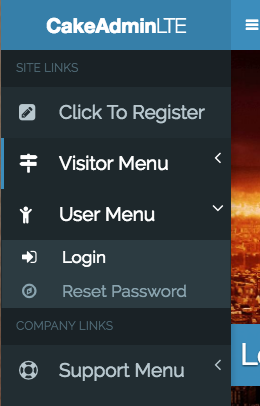
Any ideas on how I can use a fixed layout with sidebar mini and have the menus open like the first screenshot in this post?
 jeffreyroberts
All 6 comments
I also found
Because AdminLTE uses SlimScroll for the fixed layout, it is not possible to mix sidebar-mini and the fixed layout. However, there is a simple solution that AdminLTE automatically applies in case the two configurations were found active, which is expand on hover. The gif bellow shows the behavior of the sidebar when a user hovers over it and the option expand on hover is enabled. Of course, if you like this effect and prefer to use it with the normal layout, you can always enable it from the javascript options.
and I have to say, thats a great solution, however, i really could use the other solution...
jeffreyroberts
on 16 Jul 2017
found some more #660 and #420 and #451
jeffreyroberts
on 16 Jul 2017
ok, so from what I understand, the issue is, slimScroll will not display anything over the content area that it scrolls... i saw someone else say, challenge accepted, with this issue going back so many years, i am going to take a crack at it, there is a way to display over that content area, the fixed layout does that... so here we go
jeffreyroberts
on 16 Jul 2017
this works as most want with adminlte.js, app.js, and demo.js removed, so there is a solution here, we just gotta find it =]
jeffreyroberts
on 17 Jul 2017
I think i got it!
body.lte-fixed {
    header.main-header {
        position: fixed;
        width: 100%;
    }
    div.content-wrapper {
        margin-top: 50px;
    }
}
 islandblaze
on 18 Jul 2017
islandblaze
on 18 Jul 2017
Quick fix
i guess this solve the problem just add this maybe
PushMenu.prototype.UnExpandOnHover = function () {
    $(Selector.mainSidebar).off();
  };
and call the function to the app.js or demo.js to disable the hover
 Choy-lingling
on 20 Jun 2019
Choy-lingling
on 20 Jun 2019
Related issues
 vbetancourt
·
3Comments
vbetancourt
·
3Comments
 riklaunim
·
3Comments
riklaunim
·
3Comments
 REJack
·
3Comments
REJack
·
3Comments
 kgoedert
·
4Comments
kgoedert
·
4Comments
 acacha
·
4Comments
acacha
·
4Comments