Adminlte: Sidebar menu treeview not working after redirection in Angular 4
Hi,
I'm using AdminLTE theme (2.4.0-rc) in Angular4 project. Dashboard with the sidebar menu is on url "http://host/". When I enter this address in browser address field, everything is working correct.
Problem is when app is on other url, i.e. "http://host/login" and there is link to main page or redirection in code used one of methods:
this.router.navigateByUrl('/') or <a routerLink="/">.
After redirection to the Dashboard by one of these methods, sidebar menu "treeview" option does not open. Therefore after redirection by <a href="/"> everything works correct. There isn't any errors in dev console. It seems like some AdminLTE js function not see "treeview" element after redirection by Angular 4 methods. Is it any solution to make Angular 4 works as expected?
 mb00110101
All 28 comments
Hi i have same problem in using vue2.
Refreshing page fixes this but this its not a solution.
 XpamAmAdEuS
on 4 Aug 2017
XpamAmAdEuS
on 4 Aug 2017
I replaced $(window).on('load', function () with $( document ).ready(function() in // Tree Data API and now all good.
// $(window).on('load', function () {
// $(Selector.data).each(function () {
// Plugin.call($(this))
// })
// })
$( document ).ready(function() {
$(Selector.data).each(function () {
Plugin.call($(this))
})
});
XpamAmAdEuS
on 4 Aug 2017
Hello @mb00110101, i had the same problem in a Angular 4 application.
In my case, i have the loginPage

and the homePage
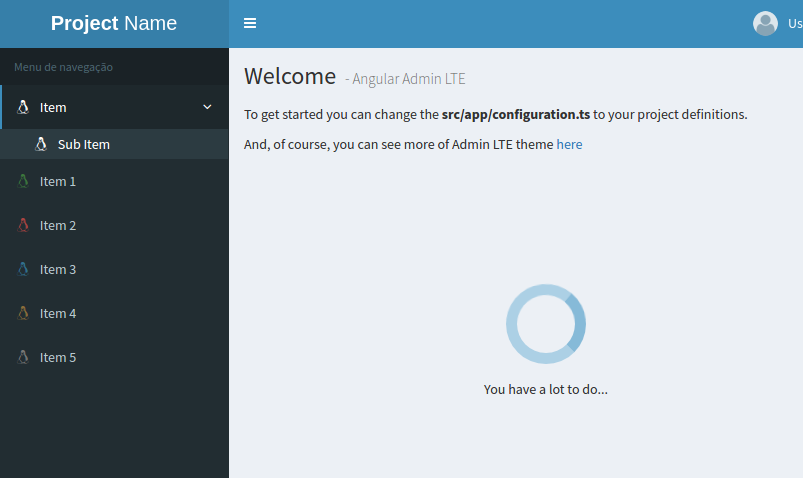
When i reload the homePage, everything is ok.
But, if i navigate from loginPage to "homePage" the treeview menu was not working.
In my analysis i see that adminlte.js file initializes treeview plugin in the document.load function, but, in this momment, the DOM will not have the treeview elements.
So, in the homePage ngOnInit method i put a code to initialize the treeview.
ngOnInit() {
$(document).ready(() => {
const trees: any = $('[data-widget="tree"]');
trees.tree();
});
}
and, of course my treeview in HTML has the attribute data-widget=tree like the following
<ul class="sidebar-menu" data-widget="tree">
<li class="header">Menu</li>
<li class="treeview link-pointer" routerLinkActive="active menu-open">
<a>
<i class="fa fa-linux"></i> <span>Item</span>
<span class="pull-right-container">
<i class="fa fa-angle-left pull-right"></i>
</span>
</a>
<ul class="treeview-menu">
<li class="" routerLinkActive="active"><a [routerLink]="['/main']"><i class="fa fa-linux"></i> Sub Item</a></li>
</ul>
</li>
</ul>
I hope it can help you.
Bye
 mateusduraes
on 8 Nov 2017
mateusduraes
on 8 Nov 2017
Thanks, I can close this issue.
mb00110101
on 16 Nov 2017
Hi,
the solution by @mateusduraes did not work.
Error:
tree is not a function
 thiagoreis
on 17 Nov 2017
thiagoreis
on 17 Nov 2017
Hello @thiagoreis, your HTML and TSC looks like mine?
Do you have the [data-widget="tree"] in HTML of the component? And. please make sure of call this code below
ngOnInit() {
$(document).ready(() => {
const trees: any = $('[data-widget="tree"]');
trees.tree();
});
}
in the component that has the HTML properties.
If you can share the code, i can try to help you.
What version of AdminLTE you're using?
You can see my solution working in this project if you want
mateusduraes
on 17 Nov 2017
Thanks @mateusduraes!
when check you project i found my problem.
I was import the files adminlte.js and AdminLTE.css in my index.html file.
changing the import for angular-cli.json work fine:
"styles": [
"styles.css",
"../node_modules/admin-lte/dist/css/AdminLTE.css",
"../node_modules/admin-lte/dist/css/skins/_all-skins.css"
],
"scripts": [
"../node_modules/admin-lte/dist/js/adminlte.js"
],
Thank you! Your solution works and the sidebar turns normal.
 cxz13250
on 20 Feb 2018
cxz13250
on 20 Feb 2018
This problem in Angular 6 and AdminLTE 3 was solved as follows:
Note: I have a Sidebar component that contains the treeview.
Import jquery and AdminLTE
import * as $ from 'jquery';
import * as AdminLte from 'admin-lte';
...
In ngAfterViewInit:
ngAfterViewInit() {
    $('[data-widget="treeview"]').each(function() {
        AdminLte.Treeview._jQueryInterface.call($(this), 'init');
    });
}
I do not know if this is the best solution, but it worked.
 viniciuslj
on 30 Jul 2018
viniciuslj
on 30 Jul 2018
I tried @mateusduraes solution but I can't seem to get it to work. It always tells me that trees() is not a function. I included all the styles and scripts as @thiagoreis suggested.
When trying @viniciuslj suggestion I get the error that _jQueryInterface can't be found.
Any idea?
 lterfloth
on 9 Aug 2018
lterfloth
on 9 Aug 2018
I got it working. You have to make sure to install and import jquery-ui-dist.
"scripts": [
"../node_modules/jquery-ui-dist/jquery-ui.js"
],
More Information on the topic: https://stackoverflow.com/questions/45512475/angular4-cant-find-jquery-ui-functions
lterfloth
on 10 Aug 2018
Hi @mateusduraes , thanks for sharing your source code with us. It worked for me. But now i have another problem that maybe you can help me with. I try to implement dynamically generated tree menu. I'm about to finish it but i have an annoying problem which took my hours.
Tree menu nodes which have childs keep opened when they should be closed/collapsed after i click another nodes in the tree menu. There is also an open issue here but i'm not sure if my code is correct. I also tried it on your code but it produces the same unwanted result. Have you ever tried to create three/multi level menu?
Here are screenshots.
Yours.

Mine.

 iyilm4z
on 29 Nov 2018
iyilm4z
on 29 Nov 2018
@mb00110101 I facing same issue after redirection from login page to dashboard page, left side bar tree menu not working.
I am not using Angular template of Admin LTE. I have used latest bootstrap Admin LTE template to Angular 7 project. I added required css and scripts files in assets folder.
Please let me know how this issue can resolve.
I tried solution of @XpamAmAdEuS and @mateusduraes But its still not working for me.
 nileshsonkusare-SQT
on 1 Apr 2019
nileshsonkusare-SQT
on 1 Apr 2019
z-index
 LuisAlfonsoPonce
on 17 Jul 2019
LuisAlfonsoPonce
on 17 Jul 2019
$(document).ready(() => { const trees: any = $('[data-widget="tree"]'); trees.tree(); });
worked for me thanks..
my issue is : after login i ll redirect to dashboard. when clicking first time the menu (some page url). it will reloead the page.. but
const trees: any = $('[data-widget="tree"]'); trees.tree();
this solution solved my problem
 jazeemkhan
on 23 Sep 2019
jazeemkhan
on 23 Sep 2019
I facing same issue after redirection from login page to dashboard page, left side bar tree menu not working.
I am not using Angular, i use react and i added require css and js script on the html, Please let me know how to fix this issue
 xrnze
on 23 Oct 2019
xrnze
on 23 Oct 2019
Hello @mb00110101, i had the same problem in a Angular 4 application.
In my case, i have the loginPage
and the homePage
When i reload the homePage, everything is ok.
But, if i navigate from loginPage to "homePage" the treeview menu was not working.In my analysis i see that adminlte.js file initializes treeview plugin in the
document.loadfunction, but, in this momment, the DOM will not have the treeview elements.
So, in the homePagengOnInitmethod i put a code to initialize the treeview.ngOnInit() { $(document).ready(() => { const trees: any = $('[data-widget="tree"]'); trees.tree(); }); }and, of course my treeview in HTML has the attribute
data-widget=treelike the following<ul class="sidebar-menu" data-widget="tree"> <li class="header">Menu</li> <li class="treeview link-pointer" routerLinkActive="active menu-open"> <a> <i class="fa fa-linux"></i> <span>Item</span> <span class="pull-right-container"> <i class="fa fa-angle-left pull-right"></i> </span> </a> <ul class="treeview-menu"> <li class="" routerLinkActive="active"><a [routerLink]="['/main']"><i class="fa fa-linux"></i> Sub Item</a></li> </ul> </li> </ul>I hope it can help you.
Bye
how to do it in admin lte 3
 siddhesh0081
on 11 Feb 2020
siddhesh0081
on 11 Feb 2020
Hello @mb00110101, i had the same problem in a Angular 4 application.
In my case, i have the loginPage
and the homePage
When i reload the homePage, everything is ok.
But, if i navigate from loginPage to "homePage" the treeview menu was not working.
In my analysis i see that adminlte.js file initializes treeview plugin in thedocument.loadfunction, but, in this momment, the DOM will not have the treeview elements.
So, in the homePagengOnInitmethod i put a code to initialize the treeview.ngOnInit() { $(document).ready(() => { const trees: any = $('[data-widget="tree"]'); trees.tree(); }); }and, of course my treeview in HTML has the attribute
data-widget=treelike the following<ul class="sidebar-menu" data-widget="tree"> <li class="header">Menu</li> <li class="treeview link-pointer" routerLinkActive="active menu-open"> <a> <i class="fa fa-linux"></i> <span>Item</span> <span class="pull-right-container"> <i class="fa fa-angle-left pull-right"></i> </span> </a> <ul class="treeview-menu"> <li class="" routerLinkActive="active"><a [routerLink]="['/main']"><i class="fa fa-linux"></i> Sub Item</a></li> </ul> </li> </ul>I hope it can help you.
Byehow to do it in admin lte 3
You got it?
 julio25frantz
on 31 Mar 2020
julio25frantz
on 31 Mar 2020
Hello,
I faced the same problem on AdminLTE 3 with React. This is how I solved it.
Create a JavaScript file with the content below :
const $ = window.$;
export function loadTree() {
const trees: any = $('[data-widget="treeview"]');
trees.Treeview('init');
}
And on the react component which contains the menu items invoke this function inside componentDidMount()
import { loadTree } from "./js/MenuTreeHelper.js";
export default class Menu extends Component {
componentDidMount() {
loadTree();
}
 dnzbrkyrk
on 18 Apr 2020
dnzbrkyrk
on 18 Apr 2020
Thank you dnzbrkyrk it's work correctly
 azedine--taha
on 13 May 2020
azedine--taha
on 13 May 2020
For anyone who is struggling with this. I'm using AdminLTE 3.0 with React. Same situation, redirecting user from Login to Dashboard.
useEffect(() => {
const trees = window.$('[data-widget="treeview"]');
trees.Treeview('init');
}, []);
or you can set in componentDidMount() if you are using class-based component. Spend 2 days investigating this.
Hope it helps.
 mh7777777
on 7 Jun 2020
mh7777777
on 7 Jun 2020
@mh7777777
At what level are you adding this effect? I've been struggling with this for some time but I keep getting TypeError: window.$ is not a function no matter what level I add it, it seems.
My project is heavily based on the erdkse/adminlte-3-react repo, could it be a version problem?
With that said, I am very new at working with React, so I may very well be missing something obvious.
 oscarlofwenhamn
on 1 Jul 2020
oscarlofwenhamn
on 1 Jul 2020
@mh7777777
At what level are you adding this effect? I've been struggling with this for some time but I keep gettingTypeError: window.$ is not a functionno matter what level I add it, it seems.
My project is heavily based on the erdkse/adminlte-3-react repo, could it be a version problem?
With that said, I am very new at working with React, so I may very well be missing something obvious.
Make sure you add it on top level component where your children or JSX from that component contain Sidebar menu and all of these features from Dashboard. useEffect will be called after everything is rendered. With that said, that's the right moment when this snippet of code needs to run because everything is in DOM right now.
TypeError: window.$ is not a function is simple. You are missing jQuery in project. Make sure you insert it since AdminLTE is using it.
mh7777777
on 1 Jul 2020
Edit: I missed it before, but now saw the import * as $ from 'jquery'; line above, I will give it a try.
Thanks for the explanation, it is much appreciated.
I seem to be stuck on what I'm guessing is another low level issue - I still can't get the window.$ right. I've added jquery via npm install jquery --save, and tried import $ from 'jquery;, but it doesn't connect $ to window.$.
I found an SO-page where the following snippet could be found, do I need to "initialize" it in this way, in lack of a better word, or am i way off?
import $ from 'jquery';
window.jQuery = $;
window.$ = $;
global.jQuery = $;
I suspect something is off with my project; I either keep getting TypeError: window.$ is not a function or (when trying it with just $ instead of window.$): TypeError: trees.Treeview is not a function.
Are jQuery and admin-lte required to be devDependencies or regular dependencies?
Any tips on how you correctly insert jQuery would be greatly appreciated, and if you have a guess as to why the Treeview function isn't present (though I understand that might be a tough guess without knowing the project).
oscarlofwenhamn
on 2 Jul 2020
This problem in Angular 6 and AdminLTE 3 was solved as follows:
Note: I have a Sidebar component that contains the treeview.
Import jquery and AdminLTE
import * as $ from 'jquery';
import * as AdminLte from 'admin-lte';
...
In
ngAfterViewInit:ngAfterViewInit() { $('[data-widget="treeview"]').each(function() { AdminLte.Treeview._jQueryInterface.call($(this), 'init'); }); }I do not know if this is the best solution, but it worked.
Thank you brother, it worked here for me. I'm using angular 8.0.3 and admin lte 3.0.5
 iurycardoso
on 9 Jul 2020
iurycardoso
on 9 Jul 2020
I believe it is a problem of the circle of life, as @mateusduraes said.
The solution proposed by @viniciuslj worked fine with me, in my case i are using vuejs.
i imported the AdminLte in script's area how to global
window.AdminLte = require('admin-lte');
in mounted() i cloned the code
mounted() {
            $('[data-widget="treeview"]').each(() => {
                AdminLte.Treeview._jQueryInterface.call($(this), 'init');
            });
        }
Sorry for the mistakes in my english, I'm learning.
 danielsa97
on 19 Jul 2020
danielsa97
on 19 Jul 2020
For anyone who is struggling with this. I'm using AdminLTE 3.0 with React. Same situation, redirecting user from Login to Dashboard.
useEffect(() => {
const trees = window.$('[data-widget="treeview"]');
trees.Treeview('init');
}, []);or you can set in componentDidMount() if you are using class-based component. Spend 2 days investigating this.
Hope it helps.
this really worked for me thanks a lot. one other thing make sure you call useEffect in the component which has the navbar HTML or has the data-widget otherwise calling it in another component wont work unless the component with the widget is in the rendered component tree.
 nabeelhussainshah
on 17 Sep 2020
nabeelhussainshah
on 17 Sep 2020
Related issues
 esaesa
·
3Comments
esaesa
·
3Comments
 fromberg100
·
4Comments
fromberg100
·
4Comments
 andyhughes73
·
3Comments
andyhughes73
·
3Comments
 GuxMartin
·
3Comments
GuxMartin
·
3Comments
 LeoYong95
·
4Comments
LeoYong95
·
4Comments
Most helpful comment
This problem in Angular 6 and AdminLTE 3 was solved as follows:
Note: I have a Sidebar component that contains the treeview.
Import jquery and AdminLTE
...
In
ngAfterViewInit:I do not know if this is the best solution, but it worked.