Adminlte: Active menu item with multi level submenus
Hi, I'm using this code to add active class depending of the page.
This is working ok except for multi level submenus any clue how to fix this
/** add active class and stay opened when selected */
var url = window.location;

// for sidebar menu entirely but not cover treeview
$('ul.sidebar-menu a').filter(function() {
     return this.href == url;
}).parent().addClass('active');

// for treeview
$('ul.treeview-menu a').filter(function() {
     return this.href == url;
}).closest('.treeview').addClass('active');
<li class="treeview">
    <a href="#">
          <i class="fa fa-gears"></i>
          <span>Settings</span>
        <i class="fa fa-angle-left pull-right"></i>
    </a>
        <ul class="treeview-menu">
            <li>
                <a href="#">
                      <i class="fa fa-bars"></i>
                    Specials Settings
                </a>
                <ul class="treeview-menu">
                    <li><a href="setting1.php">Setting 1</a></li>
                </ul>
            </li>
        </ul>
</li>
 lenamtl
All 32 comments
I have fixed it by replacing the latest line.
I have not test all possibles case so if there is an issue with a case let me know
/** add active class and stay opened when selected */
var url = window.location;
// for sidebar menu entirely but not cover treeview
$('ul.sidebar-menu a').filter(function() {
return this.href == url;
}).parent().addClass('active');
// for treeview
$('ul.treeview-menu a').filter(function() {
return this.href == url;
.parentsUntil( $( "ul.level-1" ) ).addClass('active');
- nice script but it is not valid
- where you took the class
ul.level-1from? 😄 AdminLTE doesn't use something like this.
i fixed it to get it work on AdminLTE
/** add active class and stay opened when selected */
var url = window.location;

// for sidebar menu entirely but not cover treeview
$('ul.sidebar-menu a').filter(function() {
     return this.href == url;
}).parent().addClass('active');

// for treeview
$('ul.treeview-menu a').filter(function() {
     return this.href == url;
}).parentsUntil(".sidebar-menu > .treeview-menu").addClass('active');
i tested all variations till level 3 (all items) 😃
 REJack
on 10 May 2017
REJack
on 10 May 2017
Thanks, I didn't realized as it was working ... :)
That could be great to have a label for 'snippet' so it's will be easier to search into the issue list.
lenamtl
on 11 May 2017
Note:
The only problem with this solution is that only one page per menu / submenu item will work which is espected but I have a case that a page is opened by a click of a button on a page (not from the menu)
when this occurred I loose active on the menu which is espected.
So I will need to use a PHP solution instead of JS solution to add active class to the menu depending of the URL so I can check more than one url...
This is maybe possible with JS too I will do some test and let you know.
lenamtl
on 25 Aug 2017
It's not hard JS, you can use hash for this.
REJack
on 26 Sep 2017
Thanks for sharing this code @lenamtl. The modified code by @REJack works well. There are two issues though:
- There is flicker when I click on a new sub-menu. I think it closes & reopens the whole sub-menu. Is there a way to avoid that.
- How can I keep the left sidebar menu in its current state all the time (sub-menu open and active highlighted) till the user clicks something else on the menu. The moment I click something in the content area, the menu collapses. Were you able to get it working when a page is opened using a button etc @lenamtl.
Thanks
 amsharma9
on 12 Oct 2017
amsharma9
on 12 Oct 2017
@amsharma9 Same problem here. The flicker is visually annoying
I have noticed that there is no flicker on official website so i suppose they find a way to manage that
https://adminlte.io/themes/AdminLTE/
 legreco
on 16 Oct 2017
legreco
on 16 Oct 2017
I think the reason official Live Preview website & document website doesn't have this issue is that it is made of HTML & Javascript. The left sidebar HTML code doesn't get refreshed. I use a MVC based PHP framework, that probably refreshes the whole page. I could be wrong in my understanding. I requested @almasaeed2010 to share the code of the website in #1661 but they haven't yet. He just pointed me to AdminLTE code, which I obviously have. I studied the website code using page sources of official website but didn't find any javascript to avoid the flicker.
amsharma9
on 16 Oct 2017
I think they managed it in the backend see
https://github.com/almasaeed2010/AdminLTE/issues/315
almasaeed2010 commented ;
Hello,
Although this might sound like a front-end job but it isn't. This should be implement as a back-end mechanism. This is because when the user loads a new page, the default setting will be applied and javascript will deal with the saved state after the page loads. Thus, causing unwanted transitions and animations (i.e., the sidebar would appear in its regular state for a moment before javascript applies the collapsed mode). This could be a front-end job if we were using Ajax or AngularJS since the only change is in the content page not the sidebar nor the navbar
legreco
on 16 Oct 2017
Hi @amsharma9
1- I'm using a older version with PHP (and savestate for sidebar and box) and lot of custom code, so maybe this is the reason I don't have the flicker issue.
2- Yes because the code is looking for the page url
var url = window.location;
this is a problem if the page is not in the menu or submenu link
(that can be an edit page for example) we loose the menu active class when this occurred.
The only way I have found to fix this is to use PHP check page then add the active class to a menu,
this way you can have a menu active for any page (different pages can set a menu active not only one)...
If there is another way using Javascript I will be happy to test it...
lenamtl
on 17 Oct 2017
I have fixed it now it will show only matching url as active rest as inactive
##### add active class and stay opened when selected
        var url = window.location;
        // for sidebar menu entirely but not cover treeview
        $('ul.sidebar-menu a').filter(function() {
            return this.href != url;
        }).parent().removeClass('active');

        // for sidebar menu entirely but not cover treeview
        $('ul.sidebar-menu a').filter(function() {
            return this.href == url;
        }).parent().addClass('active');

        // for treeview
        $('ul.treeview-menu a').filter(function() {
            return this.href == url;
        }).parentsUntil(".sidebar-menu > .treeview-menu").addClass('active');
 apexcipher
on 5 Dec 2017
apexcipher
on 5 Dec 2017
Thank you REJack.
 jackthailand
on 7 Dec 2017
jackthailand
on 7 Dec 2017
Hi,
I just tested your code modification and I don't see any difference, on my install it's acting the same ....
Anyhow the important is that you have fixed your problem :)
lenamtl
on 8 Dec 2017
I was face same issue and i solve it by this solution
      $('#mainMenu ul li').find('a').each(function () {
            if (document.location.href == $(this).attr('href')) {
                $(this).parents().addClass("active");
                $(this).addClass("active");
                // add class as you need ul or li or a
            }
        });
 ashikjs
on 26 Dec 2017
ashikjs
on 26 Dec 2017
I resolved it like this:
$('.sidebar-menu ul li').find('a').each(function () {
            var link = new RegExp($(this).attr('href')); //Check if some menu compares inside your the browsers link
            if (link.test(document.location.href)) {
                if(!$(this).parents().hasClass('active')){
                    $(this).parents('li').addClass('menu-open');
                    $(this).parents().addClass("active");
                    $(this).addClass("active"); //Add this too
                }
            }
        });
 NGjata
on 28 Mar 2018
NGjata
on 28 Mar 2018
@NGjata .. your script not work in single menu, than i add more line for works in both single menu and multiple menu. With this i resolved my menu..
// ----------------------------------------------------------------
var a = window.location.pathname;
$('.sidebar-menu > li > a[href="http://localhost' + a + '"').parent().addClass("active");
/* ----------------------------------------------------------------
 * just replace "http://localhost" with your server
 */ ----------------------------------------------------------------

$('.sidebar-menu ul li').find('a').each(function () {
            var link = new RegExp($(this).attr('href')); //Check if some menu compares inside your the browsers link
            if (link.test(document.location.href)) {
                if(!$(this).parents().hasClass('active')){
                    $(this).parents('li').addClass('menu-open');
                    $(this).parents().addClass("active");
                    $(this).addClass("active"); //Add this too
                }
            }
        });
 cikal
on 10 Apr 2018
cikal
on 10 Apr 2018
Hi @cikal could you explain your script please
lenamtl
on 10 Apr 2018
How about sidebar and topbar? (In case you put most used itens at top):
This code is just an complement from a previous solution in this page
/** add active class and stay opened when selected */
  var url = window.location;

  // for sidebar menu entirely but not cover treeview
  $('ul.sidebar-menu a').filter(function() {
     return this.href == url;
  }).parent().addClass('active');
  //Top bar
  $('ul.navbar-nav a').filter(function() {
     return this.href == url;
  }).parent().addClass('active');

  // for treeview
  $('ul.treeview-menu a').filter(function() {
     return this.href == url;
  }).parentsUntil(".sidebar-menu > .treeview-menu").addClass('active');
 marceloagil
on 7 May 2018
marceloagil
on 7 May 2018
Thank you @Agimovel your code is workly perfect !
 AlifAbhiesa
on 7 Aug 2018
AlifAbhiesa
on 7 Aug 2018
Hi @cikal. for me don't work single menu???
 Ali12K
on 20 Oct 2018
Ali12K
on 20 Oct 2018
@Ali12K You can follow my solution
ashikjs
on 20 Oct 2018
hello

their i ma facing this issue please help me how can i handle this solution.
the issue is when the first time page load the bottom menu still active
 NasirHussainAbbasi
on 25 Aug 2019
NasirHussainAbbasi
on 25 Aug 2019
Can you post the code?
NGjata
on 25 Aug 2019
Your code helped a lot @apexcipher !!!! Thank you! :)
 Ecstacies
on 16 Oct 2019
Ecstacies
on 16 Oct 2019
NOTE: This code for new AdminLTE 3 dev with bootstrap 4
var url = window.location;
const allLinks = document.querySelectorAll('.nav-item a');
const currentLink = [...allLinks].filter(e => {
  return e.href == url;
});

currentLink[0].classList.add("active")
currentLink[0].closest(".nav-treeview").style.display="block";
currentLink[0].closest(".has-treeview").classList.add("active");
 gmkhussain
on 29 Oct 2019
gmkhussain
on 29 Oct 2019
I have added menu-open class to @apexcipher 's solution
use following for better result. (not for AdminLTE 3)
var url = window.location;
// for sidebar menu entirely but not cover treeview
$('ul.sidebar-menu a').filter(function() {
      return this.href != url;
}).parent().removeClass('active');

// for sidebar menu entirely but not cover treeview
$('ul.sidebar-menu a').filter(function() {
      return this.href == url;
}).parent().addClass('active');

// for treeview
$('ul.treeview-menu a').filter(function() {
      return this.href == url;
}).parentsUntil(".sidebar-menu > .treeview-menu").addClass('active menu-open');
 SumonT2
on 28 Nov 2019
SumonT2
on 28 Nov 2019
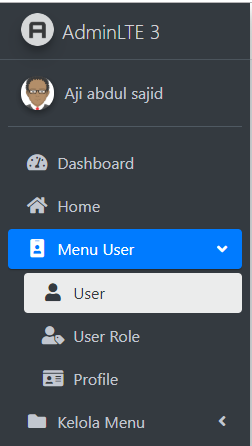
var url = window.location;
const allLinks = document.querySelectorAll('.nav-item a');
const currentLink = [...allLinks].filter(e => {
    return e.href == url;
});

currentLink[0].classList.add("active");
currentLink[0].closest(".nav-treeview").style.display = "block ";
currentLink[0].closest(".has-treeview").classList.add("menu-open");
$('.menu-open').find('a').each(function() {
    if (!$(this).parents().hasClass('active')) {
        $(this).parents().addClass("active");
        $(this).addClass("active");
    }
});
 devideots
on 15 Dec 2019
devideots
on 15 Dec 2019
var url = window.location;
const allLinks = document.querySelectorAll('.nav-item a');
const currentLink = [...allLinks].filter(e => {
    return e.href == url;
});

currentLink[0].classList.add("active");
currentLink[0].closest(".nav-treeview").style.display = "block ";
currentLink[0].closest(".has-treeview").classList.add("menu-open");
$('.menu-open').find('a').each(function() {
    if (!$(this).parents().hasClass('active')) {
        $(this).parents().addClass("active");
        $(this).addClass("active");
    }
});
its work for me but its remove my css from the menu
 abasina333
on 12 Feb 2020
abasina333
on 12 Feb 2020
I have added
menu-openclass to @apexcipher 's solution
use following for better result. (not for AdminLTE 3)var url = window.location; // for sidebar menu entirely but not cover treeview $('ul.sidebar-menu a').filter(function() { return this.href != url; }).parent().removeClass('active'); // for sidebar menu entirely but not cover treeview $('ul.sidebar-menu a').filter(function() { return this.href == url; }).parent().addClass('active'); // for treeview $('ul.treeview-menu a').filter(function() { return this.href == url; }).parentsUntil(".sidebar-menu > .treeview-menu").addClass('active menu-open');
it is not working when URL contains Query String like e.g
localhost:10001/Payroll/PayrollRecord?id=2058
--Need help to resolve this
 ilyas5
on 4 Mar 2020
ilyas5
on 4 Mar 2020
var url = window.location;
const allLinks = document.querySelectorAll('.nav-item a');
const currentLink = [...allLinks].filter(e => {
    return e.href == url;
});

currentLink[0].classList.add("active");
currentLink[0].closest(".nav-treeview").style.display = "block ";
currentLink[0].closest(".has-treeview").classList.add("menu-open");
$('.menu-open').find('a').each(function() {
    if (!$(this).parents().hasClass('active')) {
        $(this).parents().addClass("active");
        $(this).addClass("active");
    }
});
its work for me but it removes my CSS from the menu
I have updated the above code and it is working 100% for AdminLTE 3
var url = window.location;
const allLinks = document.querySelectorAll('.nav-item a');
const currentLink = [...allLinks].filter(e => {
    return e.href == url;
});

currentLink[0].classList.add("active");
currentLink[0].closest(".nav-treeview").style.display = "block ";
currentLink[0].closest("ul.nav-treeview").closest('li').classList.add('menu-open');
$('.menu-open').find('a').each(function() {
    if (!$(this).parents().hasClass('active')) {
        $(this).parents().addClass("active");
        $(this).addClass("active");
    }
});
 ashrafulgit
on 29 Dec 2020
ashrafulgit
on 29 Dec 2020
Related issues
 fromberg100
·
4Comments
fromberg100
·
4Comments
 jrlooney
·
3Comments
jrlooney
·
3Comments
 frlinw
·
3Comments
lenamtl
·
3Comments
frlinw
·
3Comments
lenamtl
·
3Comments
 noblemfd
·
3Comments
noblemfd
·
3Comments
Most helpful comment
ul.level-1from? 😄 AdminLTE doesn't use something like this.i fixed it to get it work on AdminLTE
i tested all variations till level 3 (all items) 😃