Administrate: fields: Checkbox field with >2 options?
I have multiple checkboxes for one of my fields. I'm trying to reproduce this in the edit view of the dashboard but haven't figured it out after reading through the docs.
The form view I was trying to reproduce shows a series of checkboxes and the user can select multiple options. The selected options are stored as an array.
I'm new to administrate and not a very experienced programmer. I assume there's something I'm missing? Also checked Stackoverflow and didn't find anything.
 conwayanderson
All 4 comments
Hello @conwayanderson. Would you be able to create a question for this on StackOverflow, providing the following details?
- Type of the field. For example, the migration introducing it, or the relevant table description from the
config/schema.rbfile. - A screenshot of the field (if shown anywhere else in your application), or a mockup of what you expect to see.
(Asking for StackOverflow because it's a more appropriate place for this question, and other people may benefit better from the answer there).
Leave a link to the question here and I'll have a look.
Thank you!
 pablobm
on 5 Jan 2020
pablobm
on 5 Jan 2020
Of course! Thanks for looking into this. Here's a link to the SO question:
https://stackoverflow.com/questions/59603937/how-do-you-display-multiple-checkbox-fields-in-the-edit-view-of-the-administrate
conwayanderson
on 5 Jan 2020
hi @conwayanderson ,
In order to make the checkbox fields accessible in your edit form, you will have to create a Custom Field type for your checkboxes. in this case, mine is employment type.

step 1) run rails generate administrate:field employment_type
that will create these files: app/fields/employment_types_field.rb
app/views/fields/employment_types_field/_show.html.erb
app/views/fields/employment_types_field/_index.html.erb
app/views/fields/employment_types_field_field/_form.html.erb
step 2) edit the custom field class in the newly generated folder, fields/employment_types_field like this:
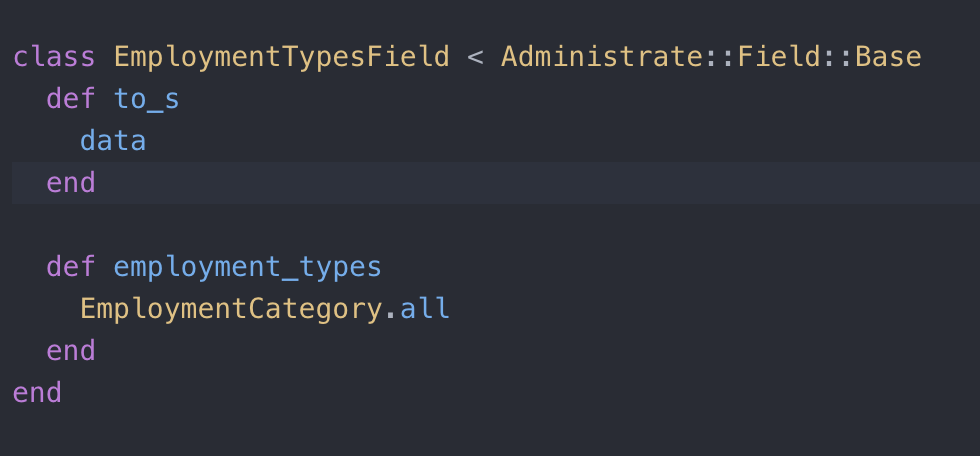
(I opted to create a db table + model for holding Employment Categories and return all categories)
step 3) go to app/views/fields/employment_types_field_field/_form.html.erb
and create the checkboxes using the field.employment_types in this form partial.
(field is an object of type(EmploymentTypesField))
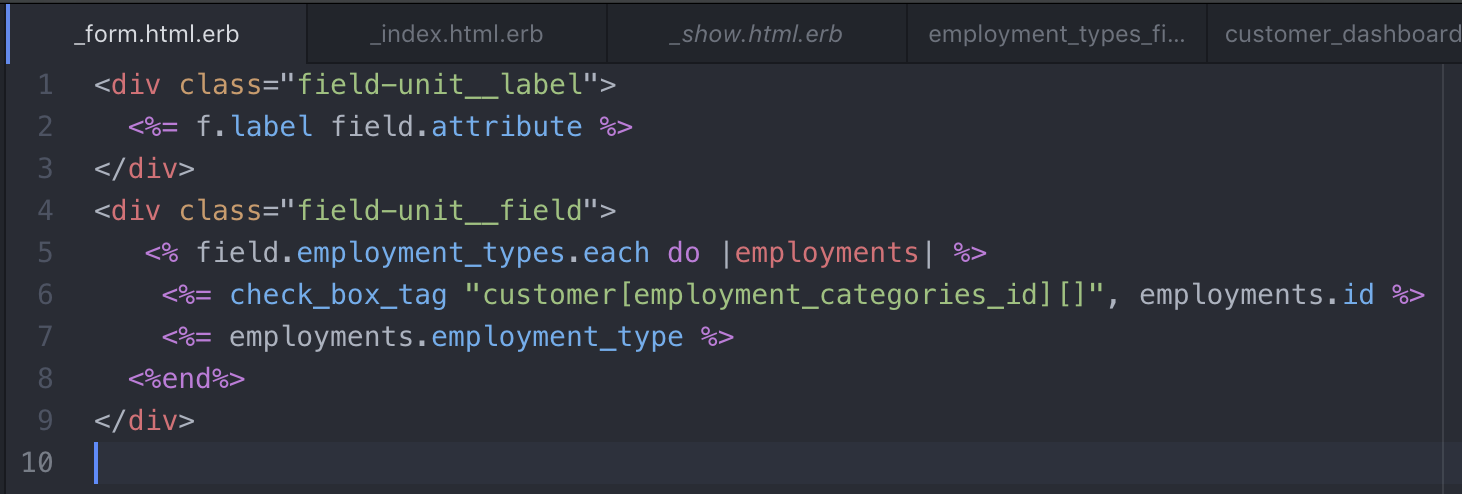
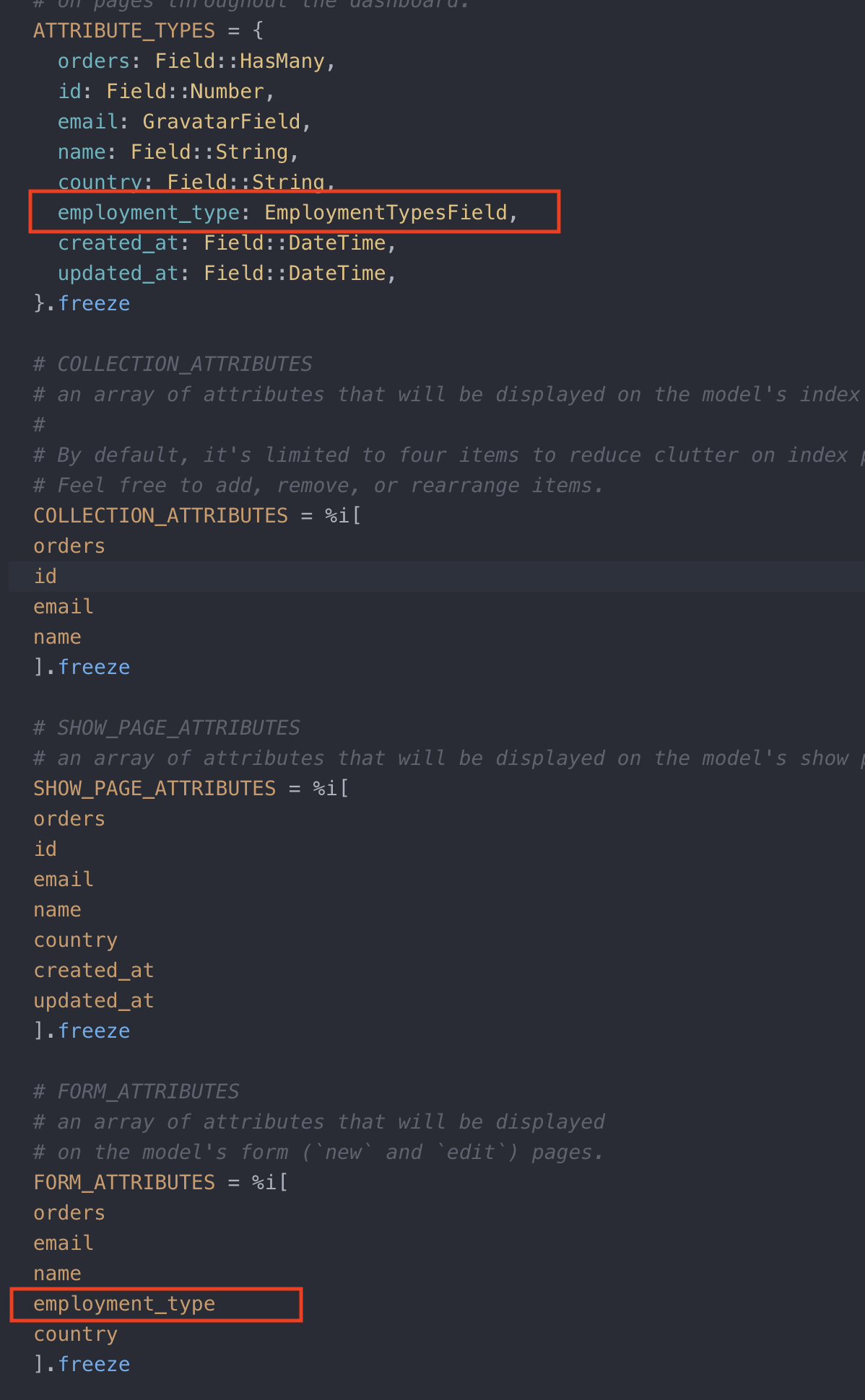
step 4) next include the custom field type in the dashboard file you want to show the field at.
For me, I wanted to show it in customer_dashboard.rb. You will have to add the field type in 2
places, in the ATTRIBUTE_TYPES constant hash and then also in the FORM_ATTRIBUTES array.
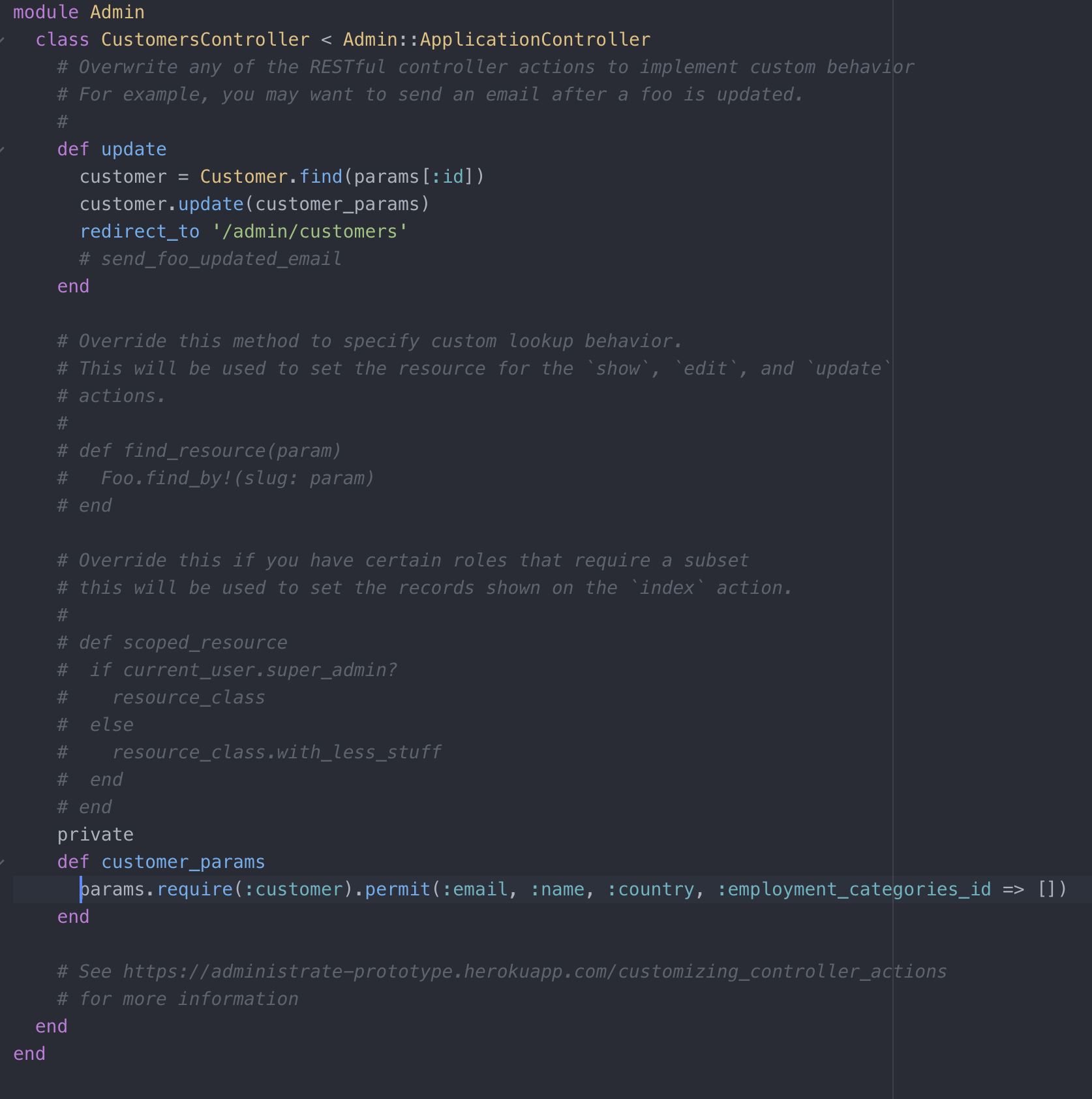
step 5) Last step you will have to go to the admin controller for the dashboard whose form you just modified. you will have to override the Update action in the controller. In this case, you will simply need to modify the strong params being passed to the update action to account for the checkbox input.
that should be it.
 b4thestorm
on 7 Jan 2020
b4thestorm
on 7 Jan 2020
That's two answers now 😄 (one here and another one on Stack Overflow). I hope that helps!
pablobm
on 7 Jan 2020
Related issues
 preist
·
4Comments
preist
·
4Comments
 ghost
·
4Comments
ghost
·
4Comments
 ACPK
·
4Comments
ACPK
·
4Comments
 drewtunney
·
3Comments
drewtunney
·
3Comments
 trandoanhung1991
·
3Comments
trandoanhung1991
·
3Comments
Most helpful comment
hi @conwayanderson ,
In order to make the checkbox fields accessible in your edit form, you will have to create a Custom Field type for your checkboxes. in this case, mine is employment type.
step 1) run rails generate administrate:field employment_type
that will create these files: app/fields/employment_types_field.rb
app/views/fields/employment_types_field/_show.html.erb
app/views/fields/employment_types_field/_index.html.erb
app/views/fields/employment_types_field_field/_form.html.erb
step 2) edit the custom field class in the newly generated folder, fields/employment_types_field like this:

(I opted to create a db table + model for holding Employment Categories and return all categories)
step 3) go to app/views/fields/employment_types_field_field/_form.html.erb

and create the checkboxes using the field.employment_types in this form partial.
(field is an object of type(EmploymentTypesField))
step 4) next include the custom field type in the dashboard file you want to show the field at.

For me, I wanted to show it in customer_dashboard.rb. You will have to add the field type in 2
places, in the ATTRIBUTE_TYPES constant hash and then also in the FORM_ATTRIBUTES array.
step 5) Last step you will have to go to the admin controller for the dashboard whose form you just modified. you will have to override the Update action in the controller. In this case, you will simply need to modify the strong params being passed to the update action to account for the checkbox input.

that should be it.