Administrate: No possibility to override stylesheets and javascripts through Webpacker assets
Hi, I have created a rails 5.1 app, however I want to use vue to manage my front end assets, I noticed that I can override them through a generator but they get generated in the assets folder that should be loaded through sprockets.
Is there any way to get the css and js to be loaded (and overridden) from webpacker folder? It is very nice to have hot page reloading and I don't see any dependency over sprockets when using this gem, so what about being able to set the path in a config from which reloading the assets or find a way to load them through webpacker if available or even, what about both?
I started by forking this repo and maybe will also try to find a solution myself, but any help or suggestion would be highly appreciated.
Thanks!!
 JacopoGobbi
All 7 comments
I would also appreciate a way to configure it so we could use our own assets. I've closed off the admin section with a routes constraint and right now this is hitting the users table just to serve the same asset files that my app has.
Update:
I believe this would also massively speed up testing. Administrate pages are the only slow example in my app:
Top 10 slowest example groups:
  Administrate Dashboards
    2.36 seconds average (23.62 seconds / 10 examples) ./spec/requests/admin/dashboard_spec.rb:3
  SubscriptionsController
    0.58431 seconds average (3.51 seconds / 6 examples) ./spec/requests/subscriptions_spec.rb:4
  UserMailer
    0.45752 seconds average (2.75 seconds / 6 examples) ./spec/mailers/user_mailer_spec.rb:3
  InvoicesController
    0.44715 seconds average (0.44715 seconds / 1 example) ./spec/requests/invoices_spec.rb:4
  UserInvitationService
    0.3563 seconds average (2.14 seconds / 6 examples) ./spec/services/user_invitation_service_spec.rb:3
  Users::InvitationsController
    0.33361 seconds average (1 seconds / 3 examples) ./spec/requests/users/invitations_spec.rb:3
  AccountsController
    0.30282 seconds average (2.42 seconds / 8 examples) ./spec/requests/accounts_spec.rb:4
  StripeWebhookService
    0.27204 seconds average (5.98 seconds / 22 examples) ./spec/services/stripe_webhook_service_spec.rb:4
  CreateAdminService
    0.27116 seconds average (0.27116 seconds / 1 example) ./spec/services/create_admin_service_spec.rb:4
  IconHelper
    0.08381 seconds average (0.41907 seconds / 5 examples) ./spec/helpers/icon_spec.rb:3
It's no test in particular but the administrate stylesheet:
[www] [ea8ba952-e635-4cf9-86be-ef7e5577f6c0] Rendered /usr/local/bundle/gems/administrate-0.9.0views/administrate/application/_stylesheet.html.erb (21547.1ms)
 archonic
on 20 Mar 2018
archonic
on 20 Mar 2018
I'd definitely be open to anything you can come up with regarding this! I've not personally had a chance to try out webpacker and administrate.
 nickcharlton
on 27 Apr 2018
nickcharlton
on 27 Apr 2018
@nickcharlton I've added a wiki page how to set this up with Rails 6, but should also work for Rails 5!
We're using it in production :)
 SleeplessByte
on 22 Feb 2019
SleeplessByte
on 22 Feb 2019
Since this is now documented, I think it can be closed. Thank you @SleeplessByte!
 pablobm
on 30 Jan 2020
pablobm
on 30 Jan 2020
You're welcome!
SleeplessByte
on 30 Jan 2020
@SleeplessByte Thank you for the guide!
I'm currently trying to make webpacker happily compile the CSS too, but my issue is that my scss pack doesn't have visibility of the required administrate CSS. Given you've got this running, could you clarify what you used to import the CSS please?
I've tried about 50 variants of
@import '~administrate/app/assets/stylesheets/administrate/application';
I've tried various ways of adding administrate to my webpacker resolved_paths. No matter what I try I always end up with some variant of:
File to import not found or unreadable: ~administrate/app/assets/stylesheets/administrate/application.
Your help would be massively appreciated 🙏
 dansteele
on 12 Mar 2020
dansteele
on 12 Mar 2020
@dansteele it won't work this way. The steps to make this work with webpacker are the same as described in my Wiki Page.
- use the generator to generate the stylesheets.
- open
app/assets/stylesheets/administrate/application.scss - follow the wiki
- create a new css pack, and move over the entire administrate directory. Same steps as above but then for the stylesheet 💯
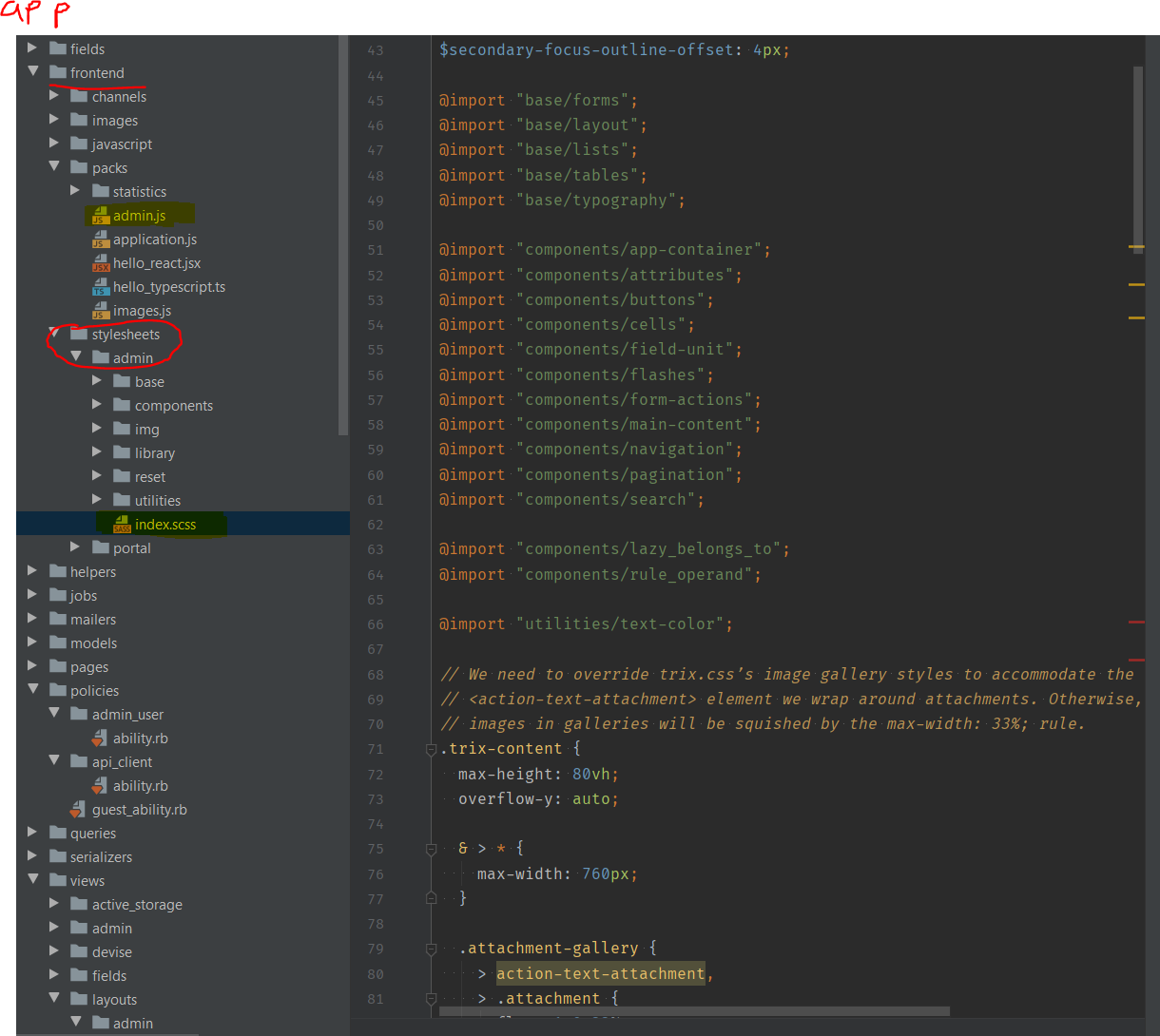
Here is how we have it set-up:
app/frontendis our webpacker dir- in
packsthere is a fileadmin.js - The first line is
import '../stylesheets/admin/index.scss' app/stylesheets/admin/index.scssis the file mentioned under step 2 above.
SleeplessByte
on 13 Mar 2020
Related issues
 migu0
·
3Comments
migu0
·
3Comments
 dbryand
·
3Comments
dbryand
·
3Comments
 trandoanhung1991
·
3Comments
trandoanhung1991
·
3Comments
 brynmrk
·
3Comments
brynmrk
·
3Comments
 steffenix
·
4Comments
steffenix
·
4Comments
Most helpful comment
@nickcharlton I've added a wiki page how to set this up with Rails 6, but should also work for Rails 5!
We're using it in production :)