Adguardhome: Log spam after upgrade to v0.102.0
Prerequisites
Please answer the following questions for yourself before submitting an issue. YOU MAY DELETE THE PREREQUISITES SECTION.
- [x] I am running the latest version
- [x] I checked the documentation and found no answer
- [x] I checked to make sure that this issue has not already been filed
Issue Details
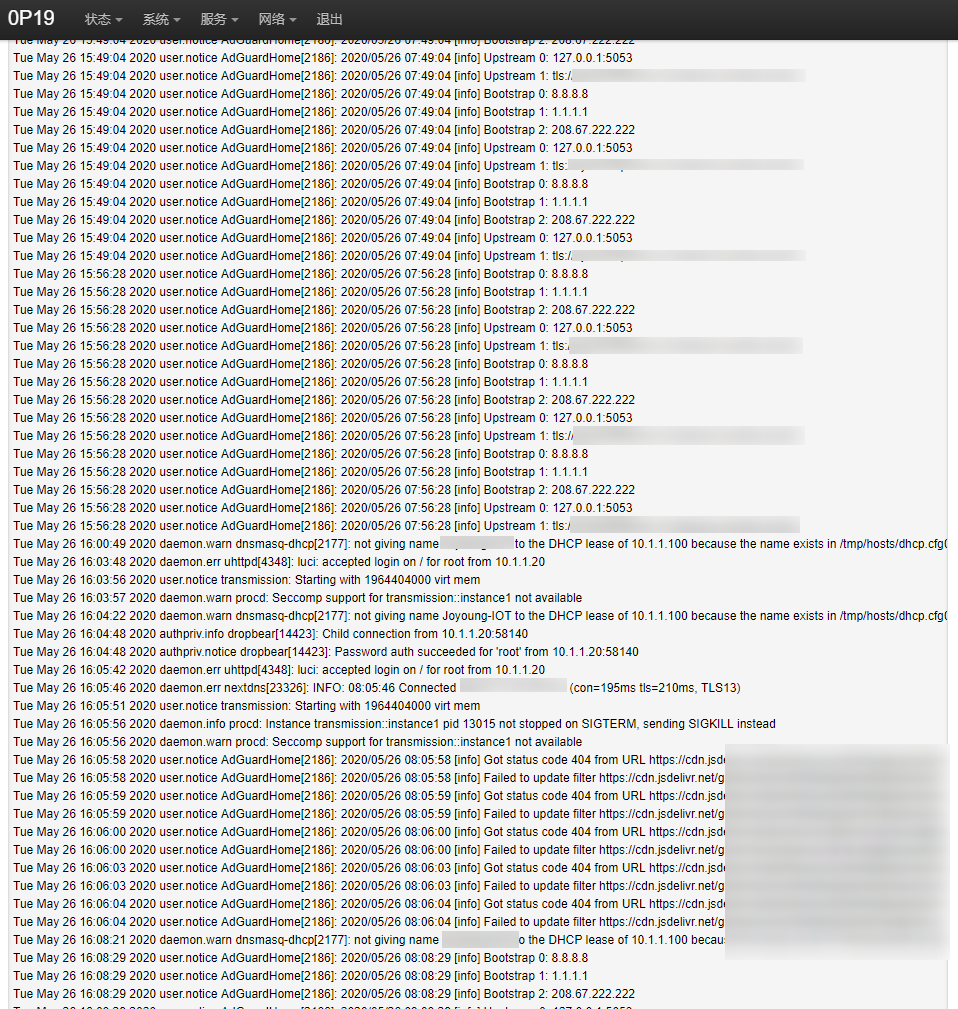
Too many irrelevant logs, looks like it always repeat some upstream DNS, I remember the past version don't like this.
 Mosney
All 8 comments
@Mosney could you please also share your upstreams configuration?
How many upstreams? Do you use parallel queries or fastest IP?
 ameshkov
on 26 May 2020
ameshkov
on 26 May 2020
Upstream DNS servers:
127.0.0.1:5053
Bootstrap DNS servers
8.8.8.8
1.1.1.1
208.67.222.222
And 2 child devices use an additional upstream:
tls://xxxx.dns.nextdns.io
Do you use parallel queries or fastest IP?
Use parallel queries now and before.
Fastest IP: Not use.
Mosney
on 26 May 2020
Looks good for now, I don't know what changes I did.
Mosney
on 3 Jun 2020
I also get these blown up logs after this same release. Same messages as well. Some days it fills up much of the space on the router. My personal assumption on what is happening is that the ISP is having some sort of connection issues during these times because I know that they were doing work in the area during the past week and we had many connection issues which the ISP confirmed at the time.
Would frequent disconnections at ISP cause AGH to log like this?
 WildByDesign
on 3 Jun 2020
WildByDesign
on 3 Jun 2020
Same messages as well
"bootstrap" "upstream" lines?
ameshkov
on 3 Jun 2020
Same messages as well
"bootstrap" "upstream" lines?
Correct, yes. Those are the two lines that get spammed thousands of times over and over in the logs when this occurs.
WildByDesign
on 3 Jun 2020
I should correct myself, it does not seem to have anything to do with loss of connectivity or work being done by ISP causing these logs. It seems to be happening all the time. My AdGuardHome.log file was nearly 2,000KB after just two days. There has been no connection issues or ISP work during the last few days. I can see the log file grow simply by refreshing it every 10 minutes or so.
Example:
2020/06/04 14:44:37 [info] Bootstrap 0: 1.1.1.1
2020/06/04 14:44:37 [info] Bootstrap 1: 1.0.0.1
2020/06/04 14:44:37 [info] Upstream 0: 208.67.222.123:53
2020/06/04 14:44:37 [info] Upstream 1: 208.67.220.123:53
2020/06/04 14:44:42 [info] Bootstrap 0: 1.1.1.1
2020/06/04 14:44:42 [info] Bootstrap 1: 1.0.0.1
2020/06/04 14:44:42 [info] Upstream 0: 208.67.222.123:53
2020/06/04 14:44:42 [info] Upstream 1: 208.67.220.123:53
2020/06/04 14:44:42 [info] Bootstrap 0: 1.1.1.1
2020/06/04 14:44:42 [info] Bootstrap 1: 1.0.0.1
2020/06/04 14:44:42 [info] Upstream 0: 208.67.222.123:53
2020/06/04 14:44:42 [info] Upstream 1: 208.67.220.123:53
2020/06/04 14:45:11 [info] Bootstrap 0: 1.1.1.1
2020/06/04 14:45:11 [info] Bootstrap 1: 1.0.0.1
2020/06/04 14:45:11 [info] Upstream 0: 208.67.222.123:53
2020/06/04 14:45:11 [info] Upstream 1: 208.67.220.123:53
2020/06/04 14:45:15 [info] Bootstrap 0: 1.1.1.1
2020/06/04 14:45:15 [info] Bootstrap 1: 1.0.0.1
2020/06/04 14:45:15 [info] Upstream 0: 208.67.222.123:53
2020/06/04 14:45:15 [info] Upstream 1: 208.67.220.123:53
2020/06/04 14:45:34 [info] Bootstrap 0: 1.1.1.1
2020/06/04 14:45:34 [info] Bootstrap 1: 1.0.0.1
2020/06/04 14:45:34 [info] Upstream 0: 208.67.222.123:53
2020/06/04 14:45:34 [info] Upstream 1: 208.67.220.123:53
2020/06/04 14:45:40 [info] Bootstrap 0: 1.1.1.1
2020/06/04 14:45:40 [info] Bootstrap 1: 1.0.0.1
2020/06/04 14:45:40 [info] Upstream 0: 208.67.222.123:53
2020/06/04 14:45:40 [info] Upstream 1: 208.67.220.123:53
That seems like several times per second or something crazy. It does this all 24 hours of the day. I'll have to dig into this some more and figure out a reason because I am out of ideas at the moment.
WildByDesign
on 4 Jun 2020
Nvm, we know what causes this and this will soon be fixed
ameshkov
on 4 Jun 2020
Related issues
 xenio
·
4Comments
xenio
·
4Comments
 hl2guide
·
3Comments
hl2guide
·
3Comments
 yanniedog
·
3Comments
yanniedog
·
3Comments
 ajongsma
·
3Comments
ajongsma
·
3Comments
 AnthonyBe
·
3Comments
AnthonyBe
·
3Comments
Most helpful comment
Nvm, we know what causes this and this will soon be fixed