Adguardhome: Cannot add Tspprs filter lists.
Steps to reproduce
- Go to Filters>Add filter
- Enter a name
- Type https://tspprs.com/dl/cl1 in url box and click add filter.
Expected behavior
The filter should be added to AG home.
Actual behavior
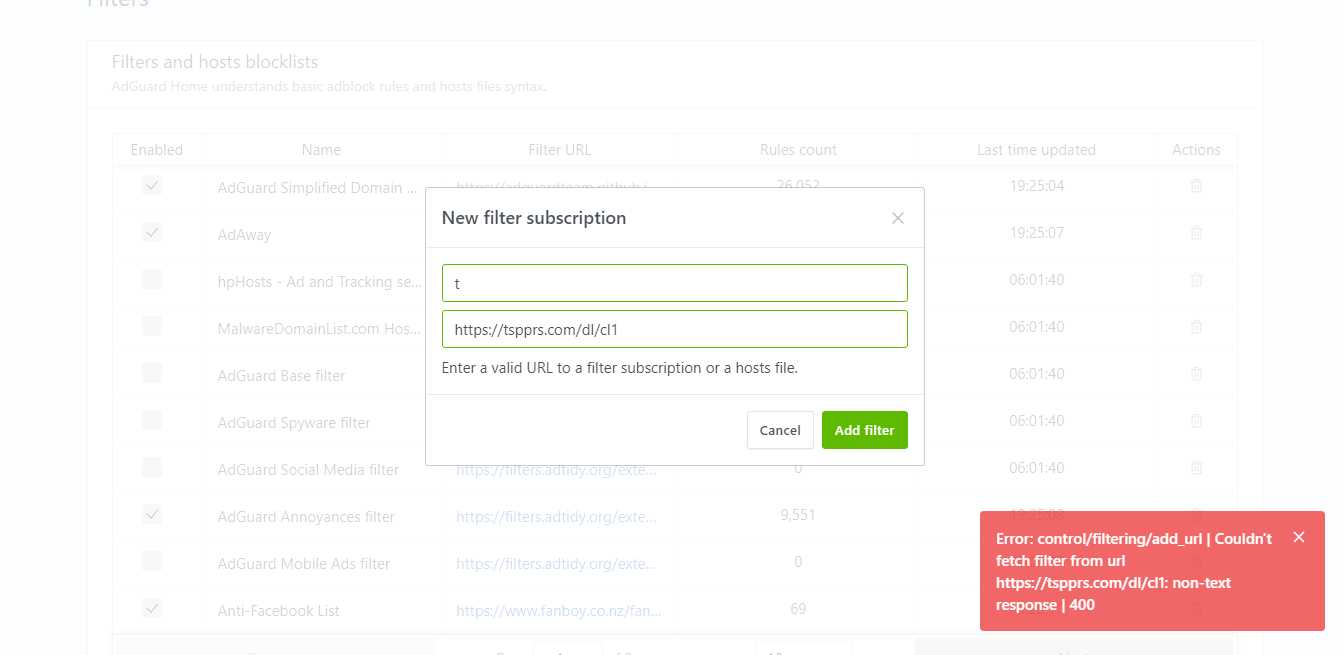
Adding the filter fails with the following message "Error: control/filtering/add_url | Couldn't fetch filter from url https://tspprs.com/dl/cl1: non-text response | 400"
Screenshot:
Your environment
| Description | Value |
| -------------- | ------------ |
| Version of AdGuard Home server:| v0.92
| How did you setup DNS configuration:|
| If it's a router or IoT, please write device model:|
| Operating system and version:|
 ugaugabuga
All 5 comments
AG Home validates the content-type response header and checks that it starts with text/plain
This header is missing in this case so that's why. In order to fix this issue, we'll have to come up with another way of checking the filter list content.
 ameshkov
on 4 Jan 2019
ameshkov
on 4 Jan 2019
This header is missing in this case so that's why. In order to fix this issue, we'll have to come up with another way of checking the filter list content.
Would be good, currently unable to add Disconnect, MinimalHostsBlocker, and others due to this.
 ghost
on 13 Jan 2019
ghost
on 13 Jan 2019
Yeah, v0.94 still have this issue, i hope fix soon :D
 rapdodge
on 19 Apr 2019
rapdodge
on 19 Apr 2019
A bunch of filters from https://firebog.net suffer from this issue
 miwagner1
on 17 May 2019
miwagner1
on 17 May 2019
Just adding that this is also an issue for me, having recently migrated to AGH from Pi-hole.
Looking forward to a fix.
 jamieshaw
on 2 Jul 2019
jamieshaw
on 2 Jul 2019
Related issues
 Iconology
·
3Comments
Iconology
·
3Comments
 xenio
·
4Comments
xenio
·
4Comments
 ammnt
·
3Comments
ammnt
·
3Comments
 s-timm
·
4Comments
s-timm
·
4Comments
 alexpovel
·
3Comments
alexpovel
·
3Comments
Most helpful comment
AG Home validates the
content-typeresponse header and checks that it starts withtext/plainThis header is missing in this case so that's why. In order to fix this issue, we'll have to come up with another way of checking the filter list content.