Adguardhome: v0.92 | Windows 2012 R2 | Cannot connect to tls://1.1.1.1
v0.92 Windows binary
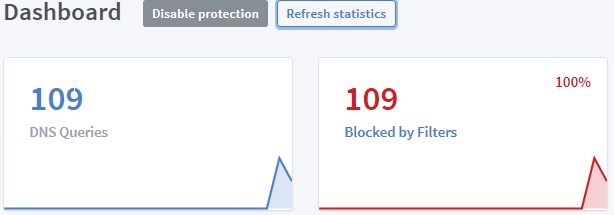
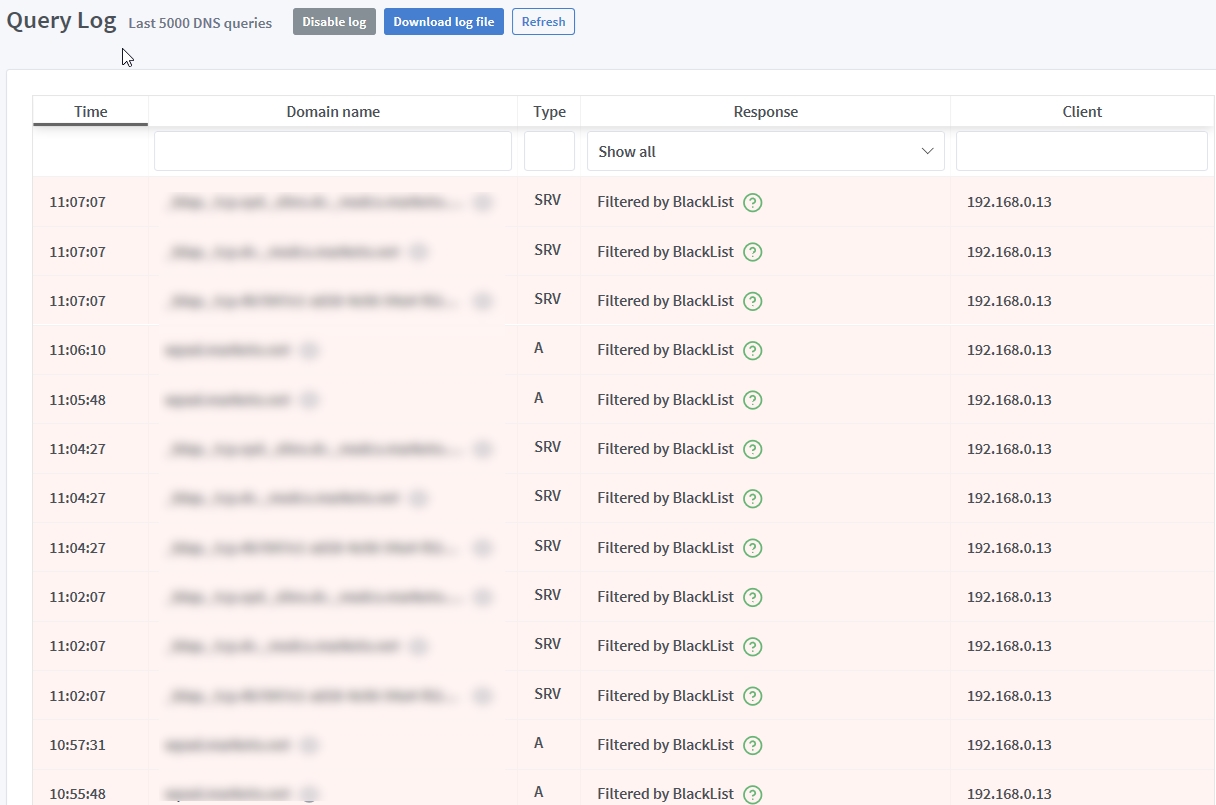
AGH working fine, but UI is ONLY showing blocked traffic stats and data.
Steps to reproduce
- unpack and run v0.92 Windows binary
Expected behavior
Main page UI and Query Log should show ALL DNS traffic
Actual behavior
Main page UI and Query Log ONLY shownig filtered traffic
Screenshot:
Your environment
| Description | Value |
| -------------- | ------------ |
| Version of AdGuard Home server:| v0.92
| How did you setup DNS configuration:| DHCP on Windows Server 2012 R2
| If it's a router or IoT, please write device model:| n/a
| Operating system and version:| Windows Server 2012 R2
 AnthonyBe
All 16 comments
Please run AdGuardHome.exe -v so that it printed the debug output and show what's there.
Also, could you please look hover the (?) icon to see what rule/filter blocks the request?
 ameshkov
on 31 Dec 2018
ameshkov
on 31 Dec 2018
Verbose console output here - https://pastebin.com/i8wWF1uD
Blocks are being performed by the AdGuard and hpHosts filters.
AnthonyBe
on 31 Dec 2018
hmm... actually, my initial testing was flawed.
Now that I've set the AGH Windows box as the ONLY DNS server on my testing PC nothing is working. The above verbose log seems to show that AGH is blocking as per filters, but all remaining good DNS requests are failing on upstream.
AnthonyBe
on 31 Dec 2018
Yeah, for some reason it fails to establish an encrypted connection with Cloudflare:
https://github.com/AdguardTeam/dnsproxy/issues/2
ameshkov
on 31 Dec 2018
I can't reproduce it on my Windows VM though, that's weird
ameshkov
on 31 Dec 2018
What if you use some other upstreams?
For instance:
tls://one.one.one.one
tls://dns.adguard.com
Yep - they work!
AnthonyBe
on 31 Dec 2018
I must say this is super-weird:) You're on Windows Server 2012 R2 right?
ameshkov
on 31 Dec 2018
Correct.
With all Windows Updates installed (currently 2018-12 security updates)
AnthonyBe
on 31 Dec 2018
Got it, thank you! We'll try to reproduce it on this Windows version then. It might be a known golang bug, though.
ameshkov
on 31 Dec 2018
Well, good thing is that we have a workaround that doesn't compromise performance, security, or capability!
AnthonyBe
on 31 Dec 2018
Also confirming that
tls://1dot1dot1dot1.cloudflare-dns.com
works fine.
AnthonyBe
on 31 Dec 2018
This is very likely because your ISP blocks packets to 1.1.1.1.
You can confirm this by running ping 1.1.1.1. You should be getting ping replies but if your ISP blocks, you won't get any.
If that's the case, please contact your ISP to fix routing to 1.1.1.1.
You will also be unable to open https://1.1.1.1 in your browser as well, regardless of AdGuardHome running or not.
EDIT: Using cloudflare dns by hostname works because every hostname resolves to both 1.1.1.1 and 1.0.0.1. Your ISP doesn't block 1.0.0.1 so it gets chosen.
 hmage
on 31 Dec 2018
hmage
on 31 Dec 2018
Nothing to do with ISP blocking.
I have another Windows box running AGH v0.91 for Linux under WSL on Win10 using tls://1.1.1.1:853 and tls://1.0.0.1:853 just fine.
AnthonyBe
on 31 Dec 2018
Alright. My apologies for jumping to conclusions.
It really does seem like a bug that can be fixed.
hmage
on 31 Dec 2018
This is a bug of golang and there's no easy way to fix it from our side. @admitrevskiy has filed it to golang repo: https://github.com/golang/go/issues/30985
ameshkov
on 21 Mar 2019
Related issues
 thb007
·
3Comments
thb007
·
3Comments
 xiaofengcod
·
3Comments
xiaofengcod
·
3Comments
 ammnt
·
3Comments
ammnt
·
4Comments
ammnt
·
3Comments
ammnt
·
4Comments
 xenio
·
4Comments
xenio
·
4Comments