Adguardhome: Can't connect to AdGuard Home Web Interface
I flashed the latest 2018-10-09-raspbian-stretch-lite.img to the SD card and started the headless setup. Then I followed the instruction from this page:
https://github.com/AdguardTeam/AdGuardHome/wiki/Raspberry-Pi
Expected behavior
I should be able to see the AdGuard Home web interface by using that address or using the address using the IP if my raspberry pi.
Actual behavior
When I try to connect to the http://localhost:3000/ I get "This site can't be reached"
 ihrubab
All 20 comments
Hi! Replace localhost with your Pi's IP address
 ameshkov
on 18 Oct 2018
ameshkov
on 18 Oct 2018
I did and I still get
"This site can’t be reached
192.168.10.200 refused to connect."
When I used PiHole on the same RPi3 I didn't have any problem.
Initially I uninstalled PiHole and installed Adguard on the same SD card.
When it didn't work, I flashed raspbian lite again and faced the same problem in this fresh setup.
I don't know what I am doing wrong.
ihrubab
on 18 Oct 2018
Does the port 3000 already opened? Maybe your firewall blocked it.
 dfmcvn
on 19 Oct 2018
dfmcvn
on 19 Oct 2018
Does the port 3000 already opened? Maybe your firewall blocked it.
Do I need to manually open it? I mean I haven't change the default settings found in Raspbian.
ihrubab
on 19 Oct 2018
Do I need to manually open it? I mean I haven't change the default settings found in Raspbian.
Try sudo iptables -L
If output looks like
[root@vps192261 AdGuardHome.wiki]# iptables -L
Chain INPUT (policy ACCEPT)
target     prot opt source               destination

Chain FORWARD (policy ACCEPT)
target     prot opt source               destination

Chain OUTPUT (policy ACCEPT)
target     prot opt source               destination
[root@vps192261 AdGuardHome.wiki]#
that mean iptables doesn't block any port, firewall is not the problem :P
dfmcvn
on 19 Oct 2018
Do I need to manually open it? I mean I haven't change the default settings found in Raspbian.
Try
sudo iptables -LIf output looks like
[root@vps192261 AdGuardHome.wiki]# iptables -L
Chain INPUT (policy ACCEPT)
target     prot opt source               destination

Chain FORWARD (policy ACCEPT)
target     prot opt source               destination

Chain OUTPUT (policy ACCEPT)
target     prot opt source               destination
[root@vps192261 AdGuardHome.wiki]#
that mean iptables doesn't block any port, firewall is not the problem :P
I got the same results, so Firewall isn't the problem. What else could be doing this?
ihrubab
on 19 Oct 2018
I ran sudo systemctl daemon-reload after I ran sudo systemctl enable adguard-home and
sudo systemctl start adguard-home and it is working. I still didn't manage to figure out why it wasn't working in the first place.
ihrubab
on 20 Oct 2018
Maybe daemon-reload already listening on port 53, so coredns (AdGuardHome) couldn't lauch :P
dfmcvn
on 20 Oct 2018
I dunno but it looks like this issue.
https://github.com/AdguardTeam/AdGuardHome/issues/402
dfmcvn
on 20 Oct 2018
I dunno but it looks like this issue.
402
Is this supposed to be normal when I run host doubleclick.net 127.0.0.1:
Using domain server:
Name: 127.0.0.1
Address: 127.0.0.1#53
Aliases:doubleclick.net has address 127.0.0.1
doubleclick.net has address 127.0.0.1
doubleclick.net has address 127.0.0.1
I mean does it mean the AdGuard Home is working?
ihrubab
on 20 Oct 2018
Look strange, but Yes.
dfmcvn
on 20 Oct 2018
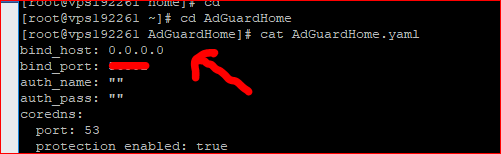
change bind_host to 0.0.0.0.
 evansan
on 21 Oct 2018
evansan
on 21 Oct 2018
change bind_host to 0.0.0.0.
Can you tell me how to change bind_host to 0.0.0.0. on rpi3 running raspbian?
ihrubab
on 21 Oct 2018
change bind_host to 0.0.0.0.
Can you tell me how to change bind_host to 0.0.0.0. on rpi3 running raspbian?
dfmcvn
on 21 Oct 2018
change bind_host to 0.0.0.0.
Can you tell me how to change bind_host to 0.0.0.0. on rpi3 running raspbian?
Thanks. Everything is working the way it should.
ihrubab
on 22 Oct 2018
I guess it can be closed now
@dfmcvn @evansan thank you so much!
ameshkov
on 22 Oct 2018
using latest 0.92 hotfix arm.zip on RPI 2
Hello, facing same issue. Cannot connect on static IP 192.168.1.XXX:3000 using port DNS port 53. If i change to like 1027 in adguardhome.yaml i am able to open the page but its not connecting.
host doubleclick.net 127.0.0.1 results in connection time out, no servers could be reached.
sudo ./adguardhome says command not found.
tried the solution - I ran sudo systemctl daemon-reload after I ran sudo systemctl enable adguard-home and sudo systemctl start adguard-home and it is NOT working for me.
IP table command shows same results
sudo iptables -L
If output looks like
[root@vps192261 AdGuardHome.wiki]# iptables -L
Chain INPUT (policy ACCEPT)
target prot opt source destination
Chain FORWARD (policy ACCEPT)
target prot opt source destination
Chain OUTPUT (policy ACCEPT)
target prot opt source destination
 lifesux0369
on 5 Jan 2019
lifesux0369
on 5 Jan 2019
Had same issue on pi4b. Any suggestion?
 edchuchuchu
on 20 Jun 2020
edchuchuchu
on 20 Jun 2020
I've exactly the same issue. I could initially access it to setup, but since I made it my DHCP and reset my devices, I can no longer connect.
Status via pi says it's running, but I can't access the web interface.
 chrisuk82
on 4 Jul 2020
chrisuk82
on 4 Jul 2020
Have you tried installing Adguard on a fresh Rpi setup? My problems resolved when I formatted my SD Card and tried the whole process again. Also make sure that your VPN is OFF when connecting to Adguard home.
ihrubab
on 5 Jul 2020
Related issues
 ammnt
·
28Comments
ameshkov
·
27Comments
ammnt
·
28Comments
ameshkov
·
27Comments
 bestpika
·
48Comments
bestpika
·
48Comments
 fonix232
·
29Comments
fonix232
·
29Comments
 rashidjehangir
·
38Comments
rashidjehangir
·
38Comments