Adguardforsafari: Compilation error message on AdGuard for Safari
@FaresKi commented on Sun Nov 15 2020
Compilation error message on AdGuard for Safari:
- Not blocking everything it's supposed to:
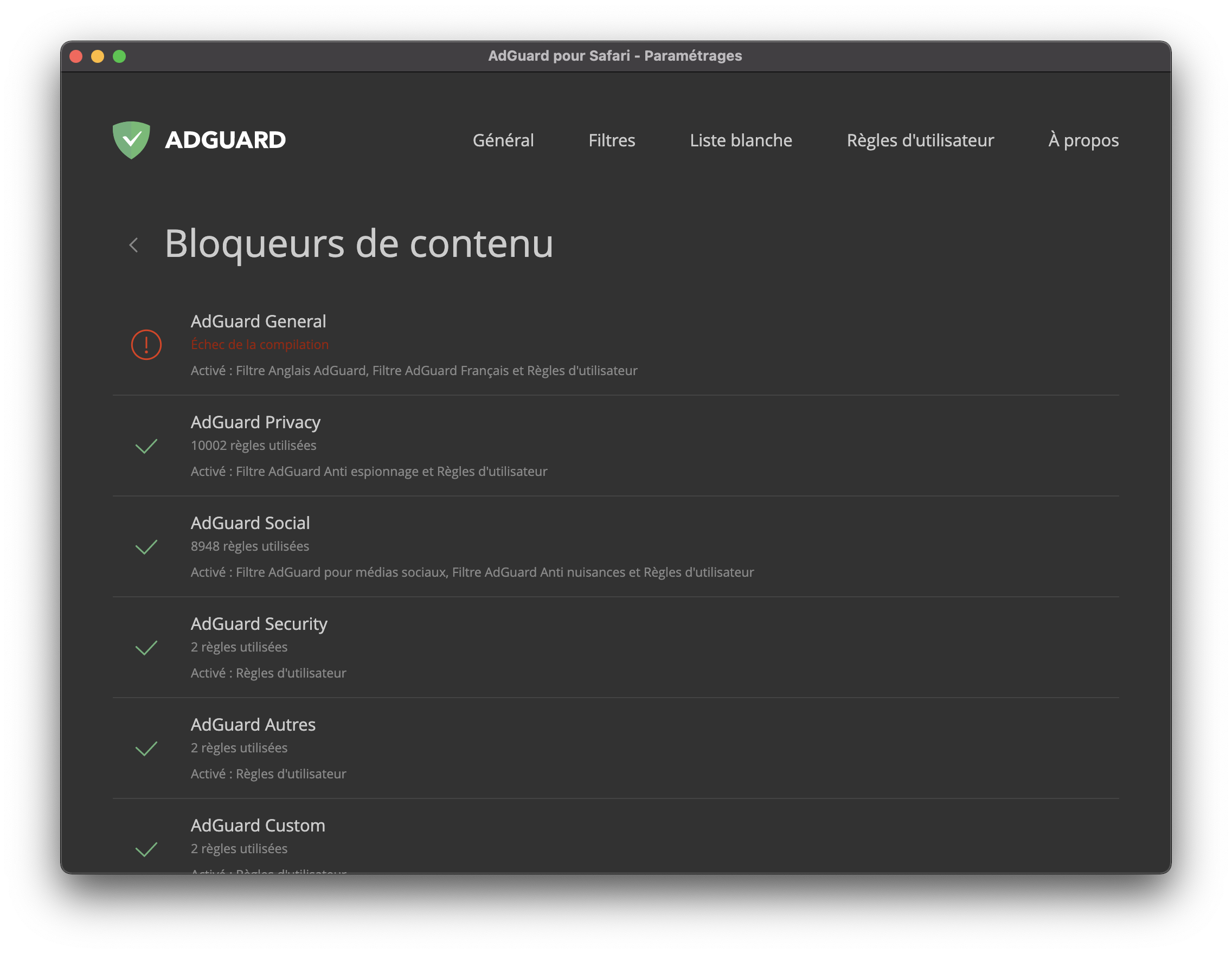
Installed AdGuard for Safari, and went to see "content blockers", and noticed that "AdGuard General" was displaying a red error "Compilation error/failure")
Screenshot:
- Expected behaviour:
I suppose it's expected to be green.
Screenshot: I don't have a "expected behavior" screenshot
Steps to reproduce the problem:
- Install AdGuard for Safari on App Store
- Enable all features.
System configuration
Filters:
Information | Value
--- | ---
Operating system: | MacOS
Operating system version (Android/iOS) | Big Sur 11.0
Browser: | Safari
AdGuard version: | 1.8.5
Filters enabled: | General, Advanced Blocking, Custom, Privacy, Security, Social, Others
AdGuard mode (Android only): | VPN / Proxy (manual/auto)
Filtering quality (Android only): | High-quality / High-speed / Simplified
HTTPS filtering (Android only): | On (Default/Blacklist mode) / Off
Simplified filters (iOS only) | On / Off
AdGuard DNS: | None
Stealth mode options (Windows only) | ?
Helpdesk ID (if exists): | ?
 Alex-302
All 20 comments
@FaresKi Please check your user filter rules, there is something wrong probably.
Something there caused the compilation error, we are interested aswell.
 Mizzick
on 16 Nov 2020
Mizzick
on 16 Nov 2020
@FaresKi Please check your user filter rules, there is something wrong probably.
Something there caused the compilation error, we are interested aswell.
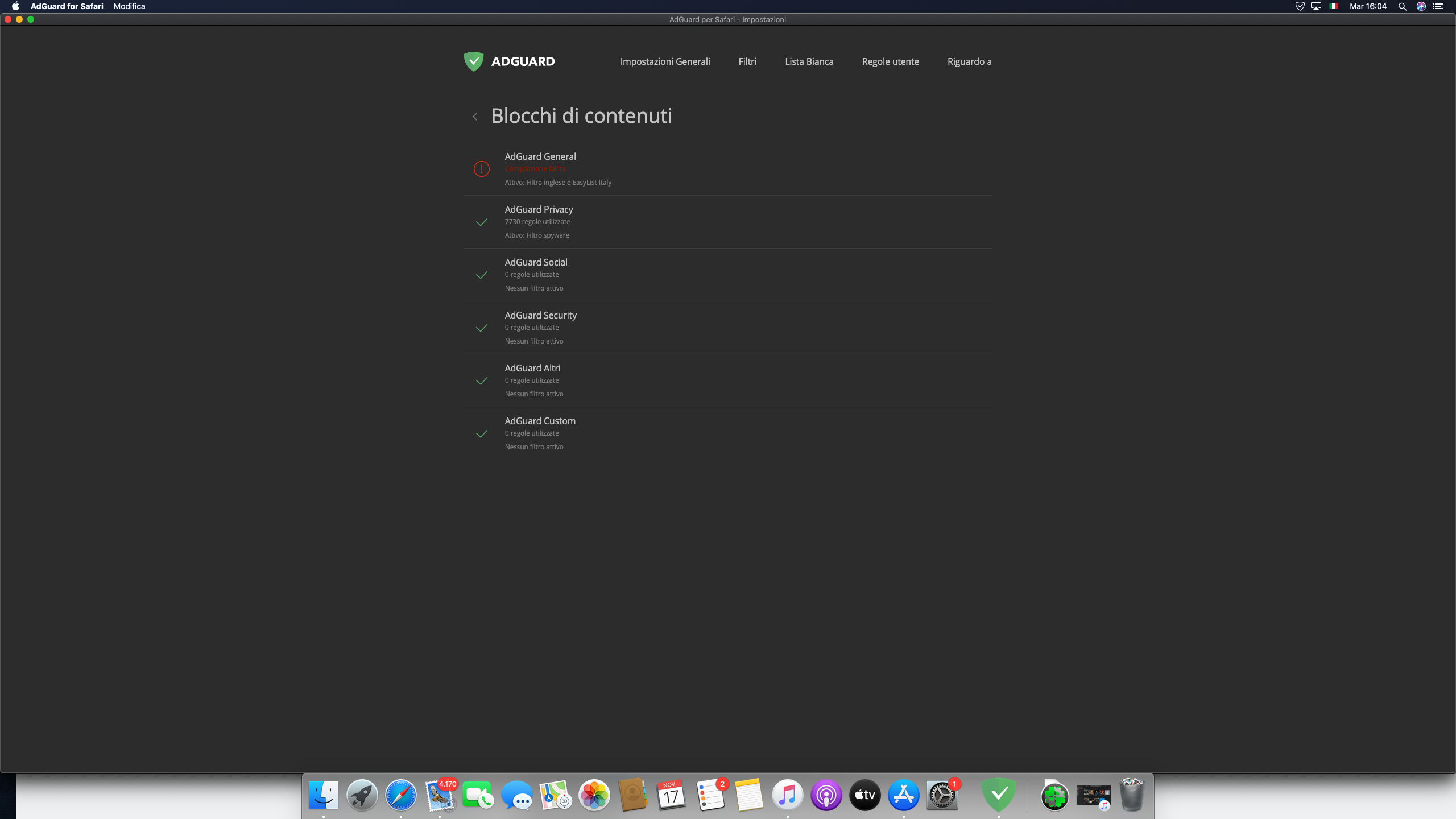
This is also happening to me with Safari 14 on 10.15.7
 JakoDel
on 17 Nov 2020
JakoDel
on 17 Nov 2020
@JakoDel what filter lists do you have enabled?
Do you have any rules in the user filter?
 ameshkov
on 17 Nov 2020
ameshkov
on 17 Nov 2020
@JakoDel what filter lists do you have enabled?
Do you have any rules in the user filter?
JakoDel
on 17 Nov 2020
@JakoDel could you please export settings and attach here?
ameshkov
on 17 Nov 2020
@JakoDel could you please export settings and attach here?
JakoDel
on 17 Nov 2020
@JakoDel
We still cannot reproduce it, might we ask for .json files in
~/Library/Group\ Containers/TC3Q7MAJXF.com.adguard.safari.AdGuard/?
Mizzick
on 17 Nov 2020
@JakoDel
We still cannot reproduce it, might we ask for.jsonfiles in
~/Library/Group\ Containers/TC3Q7MAJXF.com.adguard.safari.AdGuard/?
jsonfiles.zip
JakoDel
on 17 Nov 2020
@JakoDel we're close to figuring it out, thank you for the JSON files. Hopefully, tomorrow we'll publish a hotfix, but it may take Apple some time to review it.
@Mizzick once we have a build with a fix, please post it here so that people could try it.
ameshkov
on 17 Nov 2020
@FaresKi @JakoDel
Dears, probably we fixed the issue with a compilation error. Please, try this build from the link and left a reply if it helps.
 TheHasagi
on 17 Nov 2020
TheHasagi
on 17 Nov 2020
@FaresKi @JakoDel
Dears, probably we fixed the issue with a compilation error. Please, try this build from the link and left a reply if it helps.
Tried the new version, same error.
 FaresKi
on 17 Nov 2020
FaresKi
on 17 Nov 2020
@JakoDel we're close to figuring it out, thank you for the JSON files. Hopefully, tomorrow we'll publish a hotfix, but it may take Apple some time to review it.
@Mizzick once we have a build with a fix, please post it here so that people could try it.
I FOUND OUT. I disabled the specific language filter and it seemed to fix the issue.
FaresKi
on 17 Nov 2020
@FaresKi
- Which one was the issue?
- Could you please enable it back (temporary) so that the issue was reproduced and get us the JSON files from
~/Library/Group\ Containers/TC3Q7MAJXF.com.adguard.safari.AdGuard/?
ameshkov
on 17 Nov 2020
I think I found a fix. I unchecked the ads filter and language-specific in the filters tab and checked them again. I now have every filter working
JakoDel
on 17 Nov 2020
Oh wow he found it too lol
JakoDel
on 17 Nov 2020
Oh wow he found it too lol
sorry, I was faster
FaresKi
on 17 Nov 2020
Ah, the thing is that unchecking/checking a filter triggers re-building the content blocker.
ameshkov
on 17 Nov 2020
Oh wow he found it too lol
sorry, I was faster
Actually, I fixed it like 3 hrs ago so I was faster:)))))
Jokes aside, here are the json files if needed @ameshkov
jsonfiles2.zip
JakoDel
on 17 Nov 2020
@FaresKi
- Which one was the issue?
- Could you please enable it back (temporary) so that the issue was reproduced and get us the JSON files from
~/Library/Group\ Containers/TC3Q7MAJXF.com.adguard.safari.AdGuard/?
- Seems the language filter is creating compilation errors.
_Edit : never mind - I enabled it again and it seemed to not crash._
FaresKi
on 17 Nov 2020
@Mizzick let's prepare a hotfix
ameshkov
on 18 Nov 2020
Related issues
 Oleg-Chashko
·
4Comments
ameshkov
·
4Comments
Oleg-Chashko
·
4Comments
ameshkov
·
4Comments
 fareastenders
·
8Comments
fareastenders
·
8Comments
 justinlovesmen
·
4Comments
Oleg-Chashko
·
4Comments
justinlovesmen
·
4Comments
Oleg-Chashko
·
4Comments