Issue URL (Anti Adblock Script)
https://www.viafree.dk/programmer/reality/politistyrken/saeson-2/episode-5
Comment
Username: @hundo123
I did not fill the issue through this format. The issue is the same regardless. I have been using former scripts that I've received and I included the previous link in the thread aswell.
Screenshots
Screenshot 1

System configuration
Information | value
--- | ---
AdGuard product: | AdGuard Browser extension v3.5.20
Browser: | Chrome
Filters: | Ad Blocking:
AdGuard Base
Other:
Filter unblocking search ads and self-promotion
Language-specific:
AdGuard Russian,
AdGuard Dutch,
AdGuard Spanish/Portuguese,
List-KR,
Dandelion Sprout's Nordic Filters
Other extensions used: | ublock origen
 adguard-bot
All 21 comments
The breakage seems to be caused by AdGuard Base Filter. It seems to me to be due to either ||v.fwmrm.net/ad/g/1?resp=$xmlhttprequest,redirect=noopvmap-1.0,domain=viafree.dk,important, @@||viafree.dk$generichide, or both.
 DandelionSprout
on 19 Nov 2020
DandelionSprout
on 19 Nov 2020
Yeah, I briefly looked at this yesterday, and adding ,badfilter to that first rule seemed to fix the problem, at my end.
 THEtomaso
on 20 Nov 2020
THEtomaso
on 20 Nov 2020
Unfortunately I can't reproduce this anti-adblock notice with AdGuard app or extension for Chrome/Firefox.
@AdguardTeam/filters-maintainers Could you please take a look?
Yeah, I briefly looked at this yesterday, and adding ,badfilter to that first rule seemed to fix the problem, at my end.
Hmm, as far as I know you are using uBO and if I'm not wrong, this redirect rule is not compatible with uBlock Origin, so I think that it should be ignored.
 AdamWr
on 20 Nov 2020
AdamWr
on 20 Nov 2020
@DandelionSprout:
The ads seems to be blocked by a wide range of different blocking rules, located in multiple filters.
Even after disabling most of them, I was still unable to trigger any ads @ viafree.dk.
Therefore, I think that you can safely badfilter the previously mentioned problem rule in your Nordic list, for now.
THEtomaso
on 21 Nov 2020
It deserves mention that I was not originally able to truly identify the exact entry that was causing the breakage, but neverthelesss I'm now in the process of adding THEtomaso's suggestion.
DandelionSprout
on 22 Nov 2020
@AdamWr I could've sworn that I could also reproduce the breakage on Vivaldi with an 'AdGuard for Windows'-only setup 2 days ago, but now I seemingly can't.
I've now submitted an issue report about your redirect explanation at https://github.com/AdguardTeam/FiltersCompiler/issues/96, while in the meantime it seems I have to modify the list fix I added 15min ago.
DandelionSprout
on 22 Nov 2020
@DandelionSprout:
Were's that second rule that you badfilter'ed located?
I can't find it anywhere.
THEtomaso
on 22 Nov 2020
In uBO's logger, I'd variably get log entries for both with and without ,redirect=noopvmap-1.0, even though I acknowledge that there are no list entries without it.
DandelionSprout
on 22 Nov 2020
Badfiltering rules based on how they're displayed in uBO's logger doesn't have any effect.
Anything in front of $badfilterhas to be written exactly as it appears in the list itself!
THEtomaso
on 22 Nov 2020
Maybe uBO translate these into two filters in latest version, for my is visible redirect-rule in uBO logger.
That would even coincide with the logic that was added to the uBO:
||v.fwmrm.net/ad/g/1?resp=$xmlhttprequest,redirect=noopvmap-1.0,domain=viafree.dk,important
show as:
||v.fwmrm.net/ad/g/1?resp=$xmlhttprequest,domain=viafree.dk,important
||v.fwmrm.net/ad/g/1?resp=$xmlhttprequest,redirect-rule=noopvmap-1.0,domain=viafree.dk
PS. redirect-rule no support important (so is moved into simple network filter).
 krystian3w
on 24 Nov 2020
krystian3w
on 24 Nov 2020
@AdamWr I could've sworn that I could also reproduce the breakage on Vivaldi with an 'AdGuard for Windows'-only setup 2 days ago, but now I seemingly can't.
Okay, I checked it once again and I still can't reproduce it with AdGuard app (checked with Chrome and Firefox) and AdGuard extension for Chrome, but I was able to reproduce it with extension for Firefox (it seems that in case of extension for Firefox, the redirection is blocked by CORS).
Added exclusion for noopvmap-1.0 rule for uBO and AdGuard extension for Firefox.
AdamWr
on 24 Nov 2020
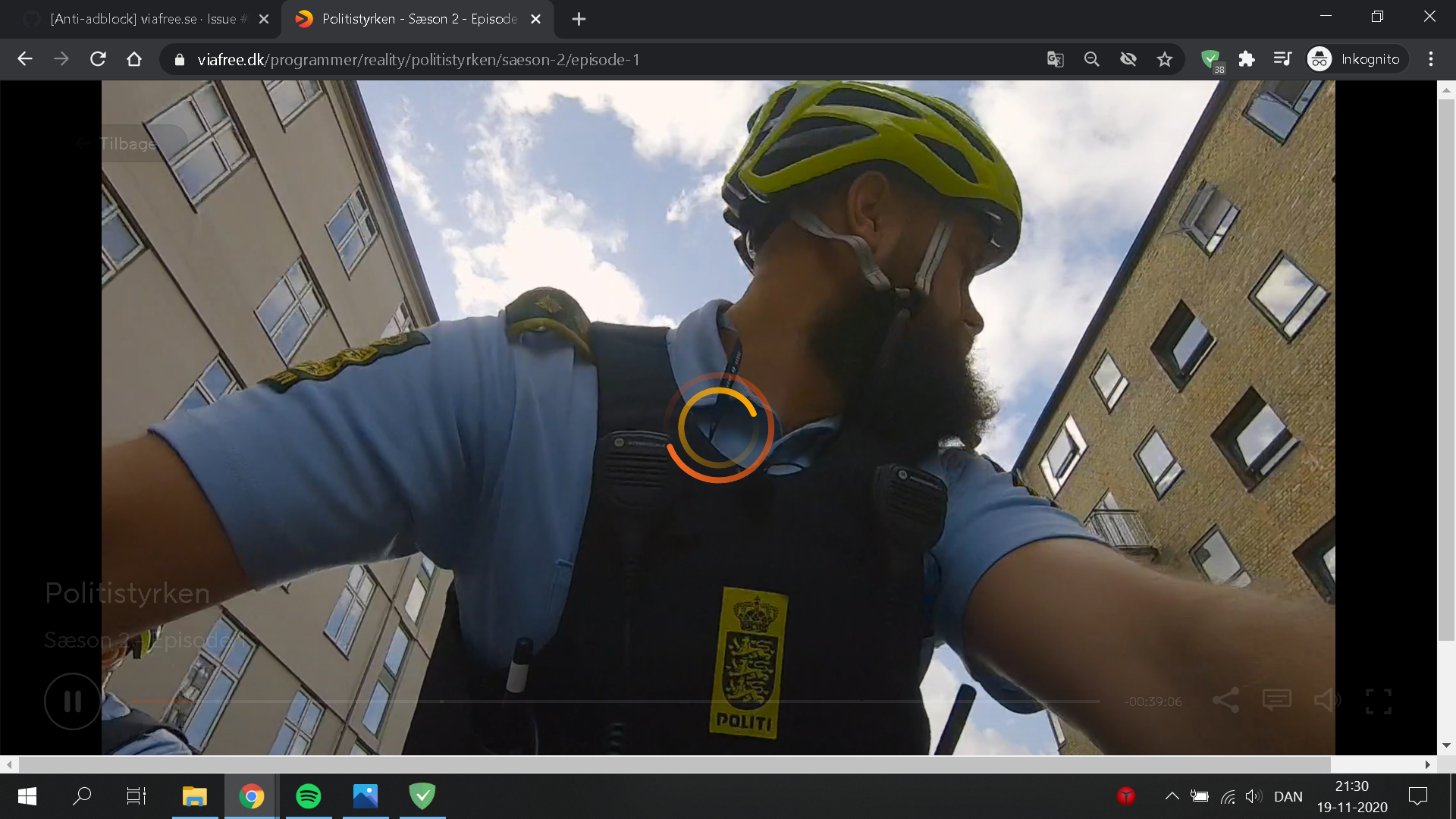
When I watch a show for a few minutes it starts freezing on a reloading screen and I can't continue watching. I can't fast forward or press the play/pause button. I think my explaining of the issue was misleading. Should I create a new post instead?
I have tried google chrome incognito and only with adguard enabled.
 HUNDO123
on 24 Nov 2020
HUNDO123
on 24 Nov 2020
It looks like a different issue than a reported one (anti-adblock), but anyway, I can't reproduce it (checked with AdGuard extension for Chrome and watched a video about 10 minutes).
Does this problem occur if you disable all filter lists and enable only AdGuard Base filter?
@AdguardTeam/filters-maintainers Could you please check it?
AdamWr
on 24 Nov 2020
Yes it still occurs after I've disabled all filter lists and only enabled AdGuard Base filter.
If I let the tv-shows run in the background they play smoothly, but as soon as I click onto the page and set the video on full screen the problem with the reloading screen occurs..
HUNDO123
on 24 Nov 2020
Does this issue occur if you disable all filters and leave just AdGuard protection enabled?
AdamWr
on 24 Nov 2020
If I disable Adblock -> Adguard Base filter and all other filters and only enable Privacy -> AdGuard Tracking Protection filter, I will start receiving ads on the page.
Under user rules I have these pasted:
https://userscripts.adtidy.org/release/popup-blocker/2.5/popupblocker.user.js
https://userscripts.adtidy.org/release/assistant/4.3/assistant.user.js
https://userscripts.adtidy.org/release/adguard-extra/1.0/adguard-extra.user.js
HUNDO123
on 25 Nov 2020
I will start receiving ads on the page
I know, I just wondering if this issue occurs even with all filter lists disabled and AdGuard extension enabled.
Under user rules I have these pasted:
https://userscripts.adtidy.org/release/popup-blocker/2.5/popupblocker.user.js
https://userscripts.adtidy.org/release/assistant/4.3/assistant.user.js
https://userscripts.adtidy.org/release/adguard-extra/1.0/adguard-extra.user.js
These are not rules, but userscripts, you need AdGuard app or some kind of userscript manager like Tampermonkey to use them.
You can remove them from user rules.
AdamWr
on 25 Nov 2020
Yes it still occurs even with all filter lists disabled.
I press play on a video then the video works for a short amount of time. Then its stuck on reloading screen. I can not press the play/pause button. My only choice is to reload the page. And the same thing happens again and again.
I have now removed the usercripts from userrules.
HUNDO123
on 25 Nov 2020
Thank you for your answer.
So maybe it's not related to AdGuard if it happens even with all filters disabled.
Could you please check if you can still reproduce this issue with AdGuard disabled?
AdamWr
on 26 Nov 2020
Yes you are right. I don't think it is AdGuard related either. I have disabled AdGuard and the problem still occurs.
HUNDO123
on 26 Nov 2020
Okay, so I think that the best option would be to contact with viafree.dk technical supports.
AdamWr
on 26 Nov 2020
Related issues
adguard-bot
·
3Comments
adguard-bot
·
3Comments
adguard-bot
·
3Comments
adguard-bot
·
3Comments
adguard-bot
·
4Comments