Addons: deCONZ addon stops itself randomly
The problem
The deCONZ addon seems to randomly stop itself without warning. It can be started again normally and work just fine, but then will stop again some indeterminate time later. It's happened to me twice so far, 7 days apart. However there are many other reports of this behaviour on the community forum.
Environment
- Add-on with the issue: deCONZ
- Add-on release with the issue: Version 6.2.3
- Last working add-on release (if known): 6.2.2 (?)
- Operating environment (OS/Supervised): Supervised
arch | x86_64
-- | --
chassis | vm
dev | false
docker | true
docker_version | 19.03.8
hassio | true
host_os | Ubuntu 18.04.4 LTS
installation_type | Home Assistant Supervised
os_name | Linux
os_version | 5.4.0-42-generic
python_version | 3.8.3
supervisor | 235
timezone | America/New_York
version | 0.114.1
virtualenv | false
Problem-relevant configuration
N/A
Traceback/Error logs
Photo of log output., I unfortunately did not copy out the text before starting the addon again.
Additional information
 SiliconAvatar
All 107 comments
Hi, here is the log, allthough not much to see, I face the same issue...
12:07:48:277 don't close database yet, keep open for 900 seconds
12:07:51:274 skip binding for attribute reporting of ep: 0x00 cluster 0x1000 (end-device might sleep)
12:07:52:274 skip binding for attribute reporting of ep: 0x00 cluster 0x1000 (end-device might sleep)
12:07:53:274 skip binding for attribute reporting of ep: 0x00 cluster 0x1000 (end-device might sleep)
12:07:54:274 skip binding for attribute reporting of ep: 0x00 cluster 0x1000 (end-device might sleep)
12:07:55:274 skip binding for attribute reporting of ep: 0x00 cluster 0x1000 (end-device might sleep)
12:07:56:232 don't close database yet, keep open for 900 seconds
12:07:59:274 skip binding for attribute reporting of ep: 0x00 cluster 0x1000 (end-device might sleep)
12:07:59:286 GW firmware version: 0x26330500
12:07:59:286 GW firmware version shall be updated to: 0x26350500
12:08:00:275 skip binding for attribute reporting of ep: 0x00 cluster 0x1000 (end-device might sleep)
12:08:01:274 skip binding for attribute reporting of ep: 0x00 cluster 0x1000 (end-device might sleep)
12:08:01:464 don't close database yet, keep open for 900 seconds
12:08:02:274 skip binding for attribute reporting of ep: 0x00 cluster 0x1000 (end-device might sleep)
12:08:03:275 skip binding for attribute reporting of ep: 0x00 cluster 0x1000 (end-device might sleep)
12:08:03:341 Current channel 11
12:08:03:373 Device TTL 2400 s flags: 0x7
12:08:04:275 skip binding for attribute reporting of ep: 0x00 cluster 0x1000 (end-device might sleep)
[12:08:04] WARNING: Your direct VNC access is not protected!
[12:08:04] INFO: Starting VNC server (local/no)...
2020/08/14 10:08:04 [notice] 323#323: signal 15 (SIGTERM) received from 313, exiting
In exit
Closing socket listening at 127.0.0.1:5901
2020/08/14 10:08:04 [notice] 1851#1851: exiting
2020/08/14 10:08:04 [notice] 1851#1851: exit
2020/08/14 10:08:04 [notice] 323#323: signal 17 (SIGCHLD) received from 1851
2020/08/14 10:08:04 [notice] 323#323: worker process 1851 exited with code 0
2020/08/14 10:08:04 [notice] 323#323: exit
[cont-finish.d] executing container finish scripts...
[cont-finish.d] done.
[s6-finish] waiting for services.
[s6-finish] sending all processes the TERM signal.
[s6-finish] sending all processes the KILL signal and exiting.
 pergolafabio
on 21 Aug 2020
pergolafabio
on 21 Aug 2020
Same problem. In the last week, id wake up and the container has stopped running. Im running the .qcow2 Home Assistant image on proxmox.
 mkono87
on 22 Aug 2020
mkono87
on 22 Aug 2020
Lots of users are impacted , though I have no idea to troubleshoot this? Is there a way to enable somekind of debug on the add-on container? To see what it just stops? Mine was stable for last week now, it happened once to me
pergolafabio
on 22 Aug 2020
Same problem:
_raise_on_error(response)
File "/usr/local/lib/python3.8/site-packages/pydeconz/gateway.py", line 220, in _raise_on_error
raise_error(data["error"])
File "/usr/local/lib/python3.8/site-packages/pydeconz/errors.py", line 58, in raise_error
raise cls("{} {}".format(error["address"], error["description"]))
pydeconz.errors.ResourceNotFound: /lights/26 resource, /lights/26, not available
2020-08-21 17:55:09 ERROR (MainThread) [homeassistant.components.websocket_api.http.connection.139881477912800] /lights/25 resource, /lights/25, not available
Traceback (most recent call last):
File "/usr/src/homeassistant/homeassistant/components/websocket_api/commands.py", line 125, in handle_call_service
await hass.services.async_call(
File "/usr/src/homeassistant/homeassistant/core.py", line 1308, in async_call
task.result()
File "/usr/src/homeassistant/homeassistant/core.py", line 1343, in _execute_service
await handler.func(service_call)
File "/usr/src/homeassistant/homeassistant/helpers/entity_component.py", line 208, in handle_service
await self.hass.helpers.service.entity_service_call(
File "/usr/src/homeassistant/homeassistant/helpers/service.py", line 454, in entity_service_call
future.result() # pop exception if have
File "/usr/src/homeassistant/homeassistant/helpers/entity.py", line 583, in async_request_call
await coro
File "/usr/src/homeassistant/homeassistant/helpers/service.py", line 485, in _handle_entity_call
await result
File "/usr/src/homeassistant/homeassistant/components/deconz/switch.py", line 62, in async_turn_off
await self._device.async_set_state(data)
File "/usr/local/lib/python3.8/site-packages/pydeconz/deconzdevice.py", line 35, in async_set_state
await self.async_set(field, data)
File "/usr/local/lib/python3.8/site-packages/pydeconz/api.py", line 112, in async_set
await self._request("put", field, json=data)
File "/usr/local/lib/python3.8/site-packages/pydeconz/gateway.py", line 106, in request
_raise_on_error(response)
File "/usr/local/lib/python3.8/site-packages/pydeconz/gateway.py", line 220, in _raise_on_error
raise_error(data["error"])
File "/usr/local/lib/python3.8/site-packages/pydeconz/errors.py", line 58, in raise_error
raise cls("{} {}".format(error["address"], error["description"]))
pydeconz.errors.ResourceNotFound: /lights/25 resource, /lights/25, not available
2020-08-21 17:57:29 ERROR (MainThread) [homeassistant.components.binary_sensor] Platform deconz does not generate unique IDs. ID 00:17:88:01:08:62:fe:31-02-0406 already exists - ignoring binary_sensor.movimiento_estudio
2020-08-21 17:57:29 ERROR (MainThread) [homeassistant.components.sensor] Platform deconz does not generate unique IDs. ID 00:17:88:01:08:62:fe:31-02-0402 already exists - ignoring sensor.hue_temperatura_estudio
2020-08-21 18:00:09 WARNING (MainThread) [homeassistant.helpers.service] Unable to find referenced entities media_player.echo_dot_de_cllatser
[cont-finish.d] executing container finish scripts...
[cont-finish.d] done.
 cllatser
on 22 Aug 2020
cllatser
on 22 Aug 2020
This has been happening for me as well since upgrading to Home Assistant 0.114.
Latest deCONZ add-on (no updates available)
It seems to be a bit random, but is happening at least once a day.
I'll try to grab some logs next time if I can catch it, but for now I have had to setup an automation to restart Home Assistant when it crashes as just restarting the addon doesn't bring the bulbs back online, needs a full refresh of the integration as well, so it is just as easy to just do a full restart for me.
 austwhite
on 22 Aug 2020
austwhite
on 22 Aug 2020
For me starting the add-on was enough to bring back my sensors/switches to HA ... No lights here
pergolafabio
on 22 Aug 2020
My bulbs and sensors also continue to work but I don't know the deconz is down until I realize a bulb or switch isn't working. Usually every morning. I guess there is an automation I can create to get notified the addon has gone down?
mkono87
on 22 Aug 2020
On community forum, in deconz thread, there is an example sensor, this will tell you when an add-on is stopped
pergolafabio
on 22 Aug 2020
On community forum, in deconz thread, there is an example sensor, this will tell you when an add-on is stopped
Terrific, il check it now thanks.
mkono87
on 22 Aug 2020
This happened to me for the first time this morning. I've had a few random times when the deConz addon didn't start on boot, but this is the first time it has just randomly stopped for no reason. Up until now, it has been working flawlessly. System information: HA 0.113.3 running in a VM on Proxmox (HA OS installed using the Whiskerz script), deConz addon version 6.1.2. I had purposely not updated the addon to avoid this issue after reading reports in the forum. I am using a Conbee I with firmware 26330500 (it does need to be updated to 26350500).
arch | x86_64
-- | --
chassis | vm
dev | false
docker | true
docker_version | 19.03.11
hassio | true
host_os | HassOS 4.12
installation_type | Home Assistant OS
os_name | Linux
os_version | 5.4.56
python_version | 3.8.3
supervisor | 235
timezone | America/New_York
version | 0.113.3
virtualenv | false
This is as much of the deConz log as I could see - I have an Ikea outlet that did turn on via an automation at 9:00 AM, and shortly after that is when the addon shut down.
08:58:40:741    03 temperature 30 °C
08:58:40:741    04 unknown 5032 (0x13A8)
08:58:40:741    05 RSSI dB (?) 146 (0x0092)
08:58:40:741    06 LQI (?) 4294967296 (0x0100000000)
08:58:40:741    08 unknown 516 (0x0204)
08:58:40:741    0a unknown 0 (0x0000)
08:58:40:741    64 on/off 0
08:58:40:850 don't close database yet, keep open for 900 seconds
08:58:44:758 Current channel 25
08:58:44:789 Device TTL 720 s flags: 0x7
08:58:45:696 don't close database yet, keep open for 900 seconds
08:58:51:700 don't close database yet, keep open for 900 seconds
08:58:57:616 don't close database yet, keep open for 900 seconds
08:58:57:617 no button handler for: button ep: 0x01 cl: 0x0402 cmd: 0x0A pl[0]: 0x00
08:58:57:617 ZCL attribute report 0x286D9700010A4A01 for cluster: 0x0402, ep: 0x01, frame control: 0x08, mfcode: 0x0000
08:58:57:913 Bind response success for 0x286d9700010a4a01 ep: 0x01 cluster: 0x0500
08:58:58:201 no button handler for: button ep: 0x01 cl: 0x0500 cmd: 0x07 pl[0]: 0x00
08:58:58:202 ZCL configure reporting rsp seq: 25 0x286D9700010A4A01 for ep: 0x01 cluster: 0x0500 attr: 0x0002 status: 0x00
08:59:02:871 don't close database yet, keep open for 900 seconds
08:59:08:698 don't close database yet, keep open for 900 seconds
08:59:14:697 don't close database yet, keep open for 900 seconds
08:59:21:680 don't close database yet, keep open for 900 seconds
08:59:28:775 don't close database yet, keep open for 900 seconds
08:59:34:702 don't close database yet, keep open for 900 seconds
08:59:40:700 don't close database yet, keep open for 900 seconds
08:59:44:758 Current channel 25
08:59:44:791 Device TTL 660 s flags: 0x7
08:59:46:568 don't close database yet, keep open for 900 seconds
08:59:51:823 don't close database yet, keep open for 900 seconds
08:59:59:708 GW firmware version: 0x26330500
08:59:59:708 GW firmware version shall be updated to: 0x26350500
09:00:00:234    0x000D6FFFFEA5C37F force poll (2)
09:00:00:266 ZCL attribute report 0x000D6FFFFEA5C37F for cluster: 0x0006, ep: 0x01, frame control: 0x08, mfcode: 0x0000
09:00:01:700 don't close database yet, keep open for 900 seconds
09:00:03:755 no button handler for: button ep: 0x01 cl: 0x0500 cmd: 0x0A pl[0]: 0x02
09:00:03:756 ZCL attribute report 0x286D9700010A1354 for cluster: 0x0500, ep: 0x01, frame control: 0x08, mfcode: 0x0000
09:00:09:608 don't close database yet, keep open for 900 seconds
09:00:11:485 APS-DATA.confirm id: 95 status: transaction expired (8 seconds)
09:00:11:517 APS-DATA.confirm id: 96 status: transaction expired (8 seconds)
09:00:14:880 don't close database yet, keep open for 900 seconds
09:00:20:701 don't close database yet, keep open for 900 seconds
09:00:26:701 don't close database yet, keep open for 900 seconds
09:00:32:659 don't close database yet, keep open for 900 seconds
09:00:32:932 no button handler for: button ep: 0x01 cl: 0x0500 cmd: 0x0A pl[0]: 0x02
09:00:32:932 ZCL attribute report 0x286D9700010A4A01 for cluster: 0x0500, ep: 0x01, frame control: 0x08, mfcode: 0x0000
09:00:40:566 Bind response success for 0x286d9700010a4a01 ep: 0x01 cluster: 0x0500
09:00:40:599 Bind response success for 0x286d9700010a4a01 ep: 0x01 cluster: 0x0500
09:00:40:855 no button handler for: button ep: 0x01 cl: 0x0500 cmd: 0x07 pl[0]: 0x00
09:00:40:919 no button handler for: button ep: 0x01 cl: 0x0500 cmd: 0x07 pl[0]: 0x00
09:00:40:919 ZCL configure reporting rsp seq: 28 0x286D9700010A4A01 for ep: 0x01 cluster: 0x0500 attr: 0x0002 status: 0x00
09:00:41:805 don't close database yet, keep open for 900 seconds
09:00:44:760 Current channel 25
09:00:44:793 Device TTL 600 s flags: 0x7
09:00:49:702 don't close database yet, keep open for 900 seconds
09:00:55:691 don't close database yet, keep open for 900 seconds
09:01:01:449 don't close database yet, keep open for 900 seconds
09:01:06:713 don't close database yet, keep open for 900 seconds
09:01:12:708 don't close database yet, keep open for 900 seconds
09:01:22:639 don't close database yet, keep open for 900 seconds
09:01:29:740 don't close database yet, keep open for 900 seconds
09:01:34:504 no button map for: 3320-L ep: 0x01 cl: 0x0402 cmd: 0x0A pl[0]: 000
09:01:34:504 ZCL attribute report 0x000D6F0005984761 for cluster: 0x0402, ep: 0x01, frame control: 0x08, mfcode: 0x0000
09:01:34:504 discard double entry in binding queue (size: 3) for for 0x000D6F0005984761, cluster 0x0001
09:01:35:708 don't close database yet, keep open for 900 seconds
09:01:37:545 Bind response success for 0x000d6f0005984761 ep: 0x01 cluster: 0x0001
09:01:39:593 ZCL configure reporting rsp seq: 29 0x000D6F0005984761 for ep: 0x01 cluster: 0x0001 attr: 0x0021 status: 0x86
09:01:41:699 don't close database yet, keep open for 900 seconds
09:01:42:665 no button handler for: button ep: 0x01 cl: 0x0402 cmd: 0x0A pl[0]: 0x00
09:01:42:666 ZCL attribute report 0x286D9700010A1354 for cluster: 0x0402, ep: 0x01, frame control: 0x08, mfcode: 0x0000
09:01:44:762 Current channel 25
09:01:44:794 Device TTL 540 s flags: 0x7
09:01:44:794 Device reset watchdog 7200 s
09:01:47:530 don't close database yet, keep open for 900 seconds
09:01:50:413 APS-DATA.confirm id: 102 status: transaction expired (8 seconds)
09:01:52:795 don't close database yet, keep open for 900 seconds
09:01:56:302 ZCL attribute report 0x000D6F0005984761 for cluster: 0x0500, ep: 0x01, frame control: 0x08, mfcode: 0x0000
09:02:02:703 don't close database yet, keep open for 900 seconds
09:02:09:707 GW firmware version: 0x26330500
09:02:09:707 GW firmware version shall be updated to: 0x26350500
09:02:10:571 don't close database yet, keep open for 900 seconds
09:02:15:826 don't close database yet, keep open for 900 seconds
09:02:21:701 don't close database yet, keep open for 900 seconds
09:02:27:696 don't close database yet, keep open for 900 seconds
09:02:33:605 don't close database yet, keep open for 900 seconds
09:02:42:776 don't close database yet, keep open for 900 seconds
09:02:44:748 Current channel 25
09:02:44:779 Device TTL 7140 s flags: 0x7
[09:02:45] INFO: Waiting for device...
[09:02:45] INFO: Starting VNC server...
2020/08/22 13:02:45 [notice] 346#346: signal 15 (SIGTERM) received from 344, exiting
2020/08/22 13:02:45 [notice] 1894#1894: exiting
2020/08/22 13:02:45 [notice] 1894#1894: exit
2020/08/22 13:02:45 [notice] 346#346: signal 17 (SIGCHLD) received from 1894
2020/08/22 13:02:45 [notice] 346#346: worker process 1894 exited with code 0
2020/08/22 13:02:45 [notice] 346#346: exit
[cont-finish.d] executing container finish scripts...
[cont-finish.d] done.
[s6-finish] waiting for services.
[s6-finish] sending all processes the TERM signal.
[s6-finish] sending all processes the KILL signal and exiting.
The HA log has no errors prior to deConz stopping but is full of websocket errors once the addon shuts down:
Log Details (ERROR)
Logger: pydeconz.websocket
Source: runner.py:119
First occurred: 9:03:18 AM (87 occurrences)
Last logged: 9:29:16 AM

Client connection error
Restarting the addon restored my sensors and switches. I don't have any lights - although deConz sees the Ikea outlet as a light. The outlet is also working after restarting the addon.
 Anwen747
on 22 Aug 2020
Anwen747
on 22 Aug 2020
Same story here... in the middle of nowhere goes down and not recovering.
Need to start Addon manually again.
In the log see the following:
[15:07:51] INFO: Starting VNC server (local/yes)...
2020/08/22 13:07:51 [notice] 337#337: signal 15 (SIGTERM) received from 323, exiting
2020/08/22 13:07:51 [notice] 1651#1651: exiting
2020/08/22 13:07:51 [notice] 1651#1651: exit
2020/08/22 13:07:51 [notice] 337#337: signal 17 (SIGCHLD) received from 1651
2020/08/22 13:07:51 [notice] 337#337: worker process 1651 exited with code 0
2020/08/22 13:07:51 [notice] 337#337: exit
[cont-finish.d] executing container finish scripts...
[cont-finish.d] done.
[s6-finish] waiting for services.
In exit
Closing socket listening at 127.0.0.1:5901
[s6-finish] sending all processes the TERM signal.
[s6-finish] sending all processes the KILL signal and exiting.
 stickpin
on 22 Aug 2020
stickpin
on 22 Aug 2020
I face the same problem in 2 of my 3 instances. All instances are supervised. The 2 problematic ones are installed on intel nucs. The one that does not have a problem is installed on rpi4
 vassilis-panos
on 22 Aug 2020
vassilis-panos
on 22 Aug 2020
I think I'm seeing this same issue as well. The add-on drops off at least once per day.
- Add-on with the issue: deCONZ
- Add-on release with the issue: Version 6.2.3
- Last working add-on release (if known):
- Operating environment (OS/Supervised):
I reinstalled Home Assistant from scratch, and re-built my Zigbee network from the ground up by re-pairing all my devices. Did not seem to make a difference.
I'm tried with two of my Conbee II sticks but both exhibit the same problem. Both are flashed with firmware 26580700.
arch | x86_64
-- | --
chassis | embedded
dev | false
docker | true
docker_version | 19.03.11
hassio | true
host_os | HassOS 4.12
installation_type | Home Assistant OS
os_name | Linux
os_version | 5.4.56
python_version | 3.8.3
supervisor | 235
timezone | Australia/Melbourne
version | 0.114.3
virtualenv | false
23:08:40:242 no button map for: multi ep: 0x01 cl: 0xFC02 cmd: 0x0A pl[0]: 014
23:08:40:242 ZCL attribute report 0x286D970001037EFA for cluster: 0xFC02, ep: 0x01, frame control: 0x0C, mfcode: 0x1241
23:08:41:140 ZCL attribute report 0x286D97000103A19A for cluster: 0x0500, ep: 0x01, frame control: 0x08, mfcode: 0x0000
23:08:45:094 don't close database yet, keep open for 900 seconds
23:08:45:886 no button handler for: button ep: 0x01 cl: 0x0500 cmd: 0x07 pl[0]: 0x00
23:08:45:886 ZCL configure reporting rsp seq: 38 0x286D970001042F2C for ep: 0x01 cluster: 0x0500 attr: 0x0002 status: 0x00
23:08:52:841 don't close database yet, keep open for 900 seconds
23:08:59:841 don't close database yet, keep open for 900 seconds
23:09:02:568 ZCL attribute report 0x286D970001034AD8 for cluster: 0x0500, ep: 0x01, frame control: 0x08, mfcode: 0x0000
23:09:05:752 don't close database yet, keep open for 900 seconds
23:09:06:152 no button handler for: button ep: 0x01 cl: 0x0001 cmd: 0x0A pl[0]: 0x21
23:09:06:152 ZCL attribute report 0x286D970001042F2C for cluster: 0x0001, ep: 0x01, frame control: 0x08, mfcode: 0x0000
23:09:11:003 don't close database yet, keep open for 900 seconds
23:09:15:852 Current channel 15
23:09:15:860 Device TTL 5400 s flags: 0x7
[23:09:16] WARNING: Your direct VNC access is not protected!
[23:09:16] INFO: Starting VNC server (local/no)...
2020/08/22 13:09:16 [notice] 323#323: signal 15 (SIGTERM) received from 317, exiting
2020/08/22 13:09:16 [notice] 1964#1964: exiting
2020/08/22 13:09:16 [notice] 1964#1964: exit
In exit
Closing socket listening at 127.0.0.1:5901
2020/08/22 13:09:16 [notice] 323#323: signal 17 (SIGCHLD) received from 1964
2020/08/22 13:09:16 [notice] 323#323: worker process 1964 exited with code 0
2020/08/22 13:09:16 [notice] 323#323: exit
[cont-finish.d] executing container finish scripts...
[cont-finish.d] done.
[s6-finish] waiting for services.
[s6-finish] sending all processes the TERM signal.
[s6-finish] sending all processes the KILL signal and exiting.
 qtjupsrkb
on 22 Aug 2020
qtjupsrkb
on 22 Aug 2020
Same thing here. One thing that seems odd is that deconz stopped on 22.8. at 13:02, which is almost the same time as other people reported here...
 NateLogan
on 23 Aug 2020
NateLogan
on 23 Aug 2020
As an additional note, seems to affect x86/x64 build. Raspberry Pi build is not affected .
My primary system is a VM on ProxMox and it is affected by the issue.
A secondary build on a Raspberry Pi3 (32bit) doesn't seem to crash.
Both are built using HassOS not in Venv
austwhite
on 23 Aug 2020
@austwhite Unfortunately I got the same issue on my RPi4.
 JcBernack
on 23 Aug 2020
JcBernack
on 23 Aug 2020
As an additional note, seems to affect x86/x64 build. Raspberry Pi build is not affected .
My primary system is a VM on ProxMox and it is affected by the issue.
A secondary build on a Raspberry Pi3 (32bit) doesn't seem to crash.
Both are built using HassOS not in Venv
Got the same issue with Raspberry Pi 4
 it-guy92
on 23 Aug 2020
it-guy92
on 23 Aug 2020
I too have the same issue on Intel NUC with 0.114.3 with deCONZ 6.2.3 and firmware 0x26580700 on a Conbee II. My only anomaly is that I've recently added a 2nd Conbee and ZHA so I've removed both this evening to see if things settle down. N.B I also run a Aeon Z-stick on another USB port if that could be a factor.
 xbmcnut
on 24 Aug 2020
xbmcnut
on 24 Aug 2020
Look like a bug in deCONZ. It crash some times. I think the solution will be a watchdog wich restart the add-on if they crash
 pvizeli
on 25 Aug 2020
pvizeli
on 25 Aug 2020
Look like a bug in deCONZ. It crash some times. I think the solution will be a watchdog wich restart the add-on if they crash
Extra container installed outside through something like portainer?
mkono87
on 25 Aug 2020
pvizeli
on 25 Aug 2020
Unfortunately restarting the addon in case it crashes will create more problems for me. Assuming we have activated the security alarm and restarted the addon then the state of the sensors will change and activate it.
Does anyone know what was the latest stable version of the addon to restore it? Thanks.
vassilis-panos
on 26 Aug 2020
I guess the .75 was very stable - otherwise, you can also look into the internal ZHA integration of home assistant.
pvizeli
on 26 Aug 2020
Unfortunately restarting the addon in case it crashes will create more problems for me. Assuming we have activated the security alarm and restarted the addon then the state of the sensors will change and activate it.
Does anyone know what was the latest stable version of the addon to restore it? Thanks.
My DeConz was stable under 0.112.x. Maybe try that one.
I only experienced crashes in 0.114.x. I don't recall 0.113.x as I wasn't on that version for long
austwhite
on 26 Aug 2020
Just an update that this issue is ongoing, it just crashed again today.
18:31:36:214 Current channel 25
18:31:36:227 Device TTL 1554 s flags: 0x7
[18:31:36] WARNING: Your direct VNC access is not protected!
[18:31:36] INFO: Starting VNC server (local/no)...
2020/08/31 22:31:36 [notice] 320#320: signal 15 (SIGTERM) received from 314, exiting
2020/08/31 22:31:36 [notice] 1734#1734: exiting
2020/08/31 22:31:36 [notice] 1734#1734: exit
2020/08/31 22:31:36 [notice] 320#320: signal 17 (SIGCHLD) received from 1734
2020/08/31 22:31:36 [notice] 320#320: worker process 1734 exited with code 0
2020/08/31 22:31:36 [notice] 320#320: exit
In exit
Closing socket listening at 127.0.0.1:5901
[cont-finish.d] executing container finish scripts...
[cont-finish.d] done.
[s6-finish] waiting for services.
[s6-finish] sending all processes the TERM signal.
[s6-finish] sending all processes the KILL signal and exiting.
Weirdly, it hadn't happened to me for a few days until today.
05:13:21:999 don't close database yet, keep open for 900 seconds
[05:13:25] WARNING: Your direct VNC access is not protected!
[05:13:25] INFO: Starting VNC server (local/no)...
2020/08/31 19:13:25 [notice] 325#325: signal 15 (SIGTERM) received from 317, exiting
2020/08/31 19:13:25 [notice] 1676#1676: exiting
2020/08/31 19:13:25 [notice] 1676#1676: exit
In exit
Closing socket listening at 127.0.0.1:5901
2020/08/31 19:13:25 [notice] 325#325: signal 17 (SIGCHLD) received from 1676
2020/08/31 19:13:25 [notice] 325#325: worker process 1676 exited with code 0
2020/08/31 19:13:25 [notice] 325#325: exit
[cont-finish.d] executing container finish scripts...
[cont-finish.d] done.
[s6-finish] waiting for services.
[s6-finish] sending all processes the TERM signal.
[s6-finish] sending all processes the KILL signal and exiting
Did the most recent crash happen just after updating Home Assistant?
Mine had been stable for a week but then crashed three times after updating
austwhite
on 1 Sep 2020
Did the most recent crash happen just after updating Home Assistant?
Not really, I last updated when 0.114.4 was released on the 26th, and deCONZ had been running since the 21st until the crash tonight.
SiliconAvatar
on 1 Sep 2020
Same here , happened again today after uptime of 6 days, 114.4. Frustrating
pergolafabio
on 1 Sep 2020
Deconz suddenly stopped on my tinkerboard after running fine for 10 days: happened at 23:45 last night (GMT+1). 114.3. Never happened before. Deconz firmware up to date on conbee II.
Is it a coincidence that a lot of users saw this mysterious issue at around the same time last night?
 jdbrookes
on 1 Sep 2020
jdbrookes
on 1 Sep 2020
Same timestamp here..., Also about 10 days, and indeed around 23.45
pergolafabio
on 1 Sep 2020
I have the same issue and my log looks like most here, nothing that indicates a reason for shutting down.
 Qpernicus
on 1 Sep 2020
Qpernicus
on 1 Sep 2020
Same issue here. Running HA in a Proxmox VM (Intel x86 host). This has happened twice now. I did abruptly disconnect three devices yesterday, possibly disrupting the Zigbee network. That could just be a coincidence though.
Edit: the shutdown seems remarkably clean to my eyes (it logs the shutdown and closes down in an orderly fashion).
 aerodinamica
on 1 Sep 2020
aerodinamica
on 1 Sep 2020
Same issue happened here. This started happening in August for me but the first two times I never really thought that it could be an issue as I didn't check the logs but just started the add-on to keep the house going.
I'm running HA Supervised on Ubuntu 20.04 LTS with a DeConz and Z-Wave stick.
Happened 23:43 as you could see from logs screenshot below


 falcon2k16
on 1 Sep 2020
falcon2k16
on 1 Sep 2020
After 10 days it has stopped again. The last thing the addon did was something related to the VCN server. Leave the VCN connection as it was before, separate. Whoever wants to enter through VCN to install the client program. Thank you so much.
00:33:39:874 don't close database yet, keep open for 900 seconds
00:33:43:917 Bind response success for 0x842e14fffe51c5d5 ep: 0x01 cluster: 0x0B04
00:33:46:893 don't close database yet, keep open for 900 seconds
00:33:46:920 ZCL attribute report 0x680AE2FFFE7240CF for cluster: 0x0008, ep: 0x01, frame control: 0x08, mfcode: 0x0000
00:33:47:947 no button map for: SML001 ep: 0x02 cl: 0x0402 cmd: 0x0A pl[0]: 000
00:33:47:947 ZCL attribute report 0x001788010862E71F for cluster: 0x0402, ep: 0x02, frame control: 0x08, mfcode: 0x0000
00:33:51:965 don't close database yet, keep open for 900 seconds
00:33:57:914 don't close database yet, keep open for 900 seconds
00:34:02:971 don't close database yet, keep open for 900 seconds
00:34:04:461 Set sensor check interval to 1000 milliseconds
00:34:07:876 Current channel 15
00:34:07:884 Device TTL 6180 s flags: 0x7
[00:34:08] WARNING: Your direct VNC access is not protected!
[00:34:08] INFO: Starting VNC server (local/no)...
In exit
Closing socket listening at 127.0.0.1:5901
2020/08/31 22:34:08 [notice] 325#325: signal 15 (SIGTERM) received from 316, exiting
2020/08/31 22:34:08 [notice] 1560#1560: exiting
2020/08/31 22:34:08 [notice] 1560#1560: exit
2020/08/31 22:34:08 [notice] 325#325: signal 17 (SIGCHLD) received from 1560
2020/08/31 22:34:08 [notice] 325#325: worker process 1560 exited with code 0
2020/08/31 22:34:08 [notice] 325#325: exit
[cont-finish.d] executing container finish scripts...
[cont-finish.d] done.
[s6-finish] waiting for services.
[s6-finish] sending all processes the TERM signal.
[s6-finish] sending all processes the KILL signal and exiting.
cllatser
on 1 Sep 2020
My guess it's indeed the new vnc server, that was added in last release, gonna disable it
pergolafabio
on 1 Sep 2020
It did not die to me last night as it has done before, but I did _not_ have a open VNC connection to it this time as I usually do
 gribber
on 1 Sep 2020
gribber
on 1 Sep 2020
But last add-on version included a web bases vnc server, maybe that one is the culprit
pergolafabio
on 1 Sep 2020
The same problem
2020/08/31 22:38:39 [notice] 320#320: signal 15 (SIGTERM) received from 317, exiting
In exit
Closing socket listening at 127.0.0.1:5901
2020/08/31 22:38:39 [notice] 1825#1825: exiting
2020/08/31 22:38:39 [notice] 1825#1825: exit
2020/08/31 22:38:39 [notice] 320#320: signal 17 (SIGCHLD) received from 1825
2020/08/31 22:38:39 [notice] 320#320: worker process 1825 exited with code 0
2020/08/31 22:38:39 [notice] 320#320: exit
[cont-finish.d] executing container finish scripts...
[cont-finish.d] done.
[s6-finish] waiting for services.
[s6-finish] sending all processes the TERM signal.
[s6-finish] sending all processes the KILL signal and exiting.
 AlexSanti
on 1 Sep 2020
AlexSanti
on 1 Sep 2020
Hmm , seems its not possible to disable ingress VNC only, this was last added, maybe caused by that
pergolafabio
on 1 Sep 2020
Funny enough, yesterday it crashed for me around 23.45 too
 Dinth
on 1 Sep 2020
Dinth
on 1 Sep 2020
You can update to beta (channel beta) and use the new function watchdog on the add-on
pvizeli
on 1 Sep 2020
yeah, already have my own automation now, that checks if deconz is runnng, if not => restart
but it shouldt happen, there is clearly something wrong witrh the addon, it stopped for a lot of users around 23.45
pergolafabio
on 1 Sep 2020
It did not stop for me this time.. The only change I made was to delete the VNC port
vassilis-panos
on 1 Sep 2020
yeah, i think its caused by VNC with ingress
if you disable VNC port, can you still use VNC with the tool? like it was before? or if you disable VNC, is it for both ingress and tool ?
pergolafabio
on 1 Sep 2020
You can update to beta (channel beta) and use the new function
watchdogon the add-on
Does this actually fix the cause of the crashing or does it just introduce a bandaid?
austwhite
on 1 Sep 2020
no, it doenst fix, its just a watchdog, that will restart when stopped, a temp workaround, not a solution yet
pergolafabio
on 1 Sep 2020
yeah, already have my own automation now, that checks if deconz is runnng, if not => restart
but it shouldt happen, there is clearly something wrong witrh the addon, it stopped for a lot of users around 23.45
Can you share this automation? Tonight My Deconz stop working...
 pierinho
on 1 Sep 2020
pierinho
on 1 Sep 2020
offcourse
here is my sensor :
  - platform: command_line
    name: deCONZ
    command: 'curl http://supervisor/addons/core_deconz/info -H "Authorization: Bearer $(printenv SUPERVISOR_TOKEN)" | jq ''{"state":.data.state,"newest_version":.data.version_latest,"current_version":.data.version,"available":.data.available}'''
    value_template: '{{ value_json.state }}'
    json_attributes:
    - available
    - newest_version
    - current_version
and here is my automation :
- alias: Deconz Addon Stopped
  initial_state: 'on'
  trigger:
    platform: state
    entity_id:
      - sensor.deconz
    from: started
    to: stopped
  action:
    - service: hassio.addon_start
      data:
        addon: "core_deconz"
@pergolafabio if you disable VNC port, can you still use VNC with the tool? like it was before? or if you disable VNC, is it for both ingress and tool ?
You can still access through the new web vnc. This does only disable the "old" vnc. I had the port removed ever since the one update where the addon couldn't start with a port in vnc. This night at 00:31 (CEST) my addon stopped for the first time - so also around the same time (~15 min) as yours and some of the other guys.
 migo-dev
on 1 Sep 2020
migo-dev
on 1 Sep 2020
@pergolafabio if you disable VNC port, can you still use VNC with the tool? like it was before? or if you disable VNC, is it for both ingress and tool ?
You can still access through the new web vnc. This does only disable the "old" vnc. I had the port removed ever since the one update where the addon couldn't start with a port in vnc. This night at 00:31 (CEST) my addon stopped for the first time - so also around the same time (~15 min) as yours and some of the other guys.
My addon stopped working at 00:33 Italian Time
pierinho
on 1 Sep 2020
offcourse
here is my sensor :
Thanks for sharing your code.
Ive improved your automation a little bit:
automation:
  - alias: DeCONZ Addon Stopped
    initial_state: on
    trigger:
      platform: state
      entity_id:
      - sensor.deconz
      from: 'started'
      to: 'stopped'
    action:
    - service: notify.notifier_telegram
      data:
        title: 'DeCONZ addon'
        message: 'DeCONZ addon crashed - attempting restart...'
    - service: hassio.addon_start
      data:
        addon: "core_deconz"
        action:
    - delay:
        minutes: 2
    - service: notify.notifier_telegram
      data_template:
        title: 'DeCONZ addon'
        message: >-
          {% if is_state('sensor.deconz', 'started') %}
          DeCONZ restarted successfully!
          {% else %}
          DeCONZ failed to restart!
          {% endif %}
yeah, i also have some notifications, i dropped that part , also i have some popups :)
just posted the necesary :)
pergolafabio
on 1 Sep 2020
yeah, i also have some notifications, i dropped that part , also i have some popups :)
just posted the necesary :)
The only thing it's missing is saving Deconz log upon crash, maybe someone is willing to improve it further, as ive got no idea how to do that? :)
Dinth
on 1 Sep 2020
we all know the log report, its always the same :) ,
pergolafabio
on 1 Sep 2020
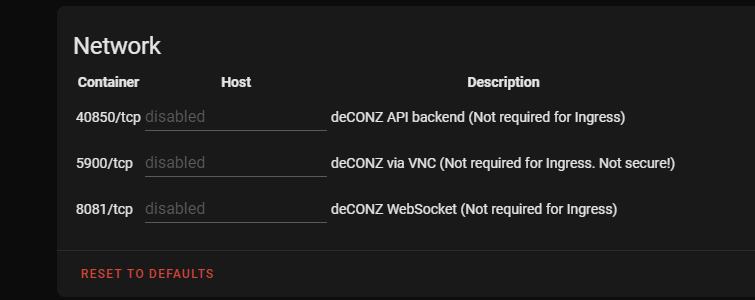
How exactly do you disable it? I have been using ingress so I never entered a port number.
mkono87
on 1 Sep 2020
Not sure, I have the same question actually, mine is also different, I only see the 5900 line, not the 8081
pergolafabio
on 1 Sep 2020
offcourse
here is my sensor :Thanks for sharing your code.
Ive improved your automation a little bit:automation: - alias: DeCONZ Addon Stopped initial_state: on trigger: platform: state entity_id: - sensor.deconz from: 'started' to: 'stopped' action: - service: notify.notifier_telegram data: title: 'DeCONZ addon' message: 'DeCONZ addon crashed - attempting restart...' - delay: minutes: 2 - service: hassio.addon_start data: addon: "core_deconz" action: - service: notify.notifier_telegram data_template: title: 'DeCONZ addon' message: >- {% if is_state('sensor.deconz', 'started') %} DeCONZ restarted successfully! {% else %} DeCONZ failed to restart! {% endif %}
BTW delay should be after the restarting the addon, not before. right?
 arifroni
on 1 Sep 2020
arifroni
on 1 Sep 2020
no, delay is not needed at all i think
he just wants a delay between stop and start , you dont need it actually
pergolafabio
on 1 Sep 2020
no, delay is not needed at all i think
he just wants a delay between stop and start , you dont need it actually
No, actually @arifroni is right here, i wanted to make a delay after restart and before the check if service is running.
Im going to edit my post
Dinth
on 1 Sep 2020
ah ok
good workaround for now, but still, needs to be look at , i hope a dev can look into it, or how can we see a more detailed log report of this addon ?
pergolafabio
on 1 Sep 2020
Exact same thing has been happening rather haphazardly. The Deconz addon got murdered again just a day ago.
 dedepene
on 12 Sep 2020
dedepene
on 12 Sep 2020
Same thing happening to me. Nothing else in the logs indicates an issue.
[s6-finish] waiting for services.
[s6-finish] sending all processes the TERM signal.
[s6-finish] sending all processes the KILL signal and exiting
Shutdown happens immediately after starting the container, consistently, I've had to revert deCONZ from a snapshot.
 brisketfingers
on 13 Sep 2020
brisketfingers
on 13 Sep 2020
Today I had the same issue. The line 03:06:09] WARNING: Your direct VNC access is not protected! got me scared. I was under the assumption someone must have gotten access to the VNC and shut it down.
On community forum, in deconz thread, there is an example sensor, this will tell you when an add-on is stopped
Can you provide a link?
 megawubs
on 17 Sep 2020
megawubs
on 17 Sep 2020
That's not needed anymore, watchdog is now released in supervisor... Or scroll up
pergolafabio
on 17 Sep 2020
crashed again, now getting lot's of these. Before, after the crash, and even after a successful addon restart
07:18:38 ERROR (MainThread) [pydeconz.websocket] Client connection error
dedepene
on 17 Sep 2020
Just another piece of info for this issue.
I have two HA NUC image setups 200 km apart from each other. Another one has had this issue 4 times (maybe in around a month or so including last night) another had this first time last night. Weird is that timing is within two minutes. I have watchdog enabled now.


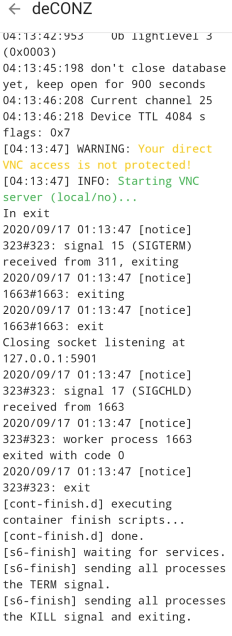
 tosion
on 17 Sep 2020
tosion
on 17 Sep 2020
I also had another crash. Seems like a strange coincidence that this always happens around the same moment for a lot of people.
 bmesuere
on 17 Sep 2020
bmesuere
on 17 Sep 2020
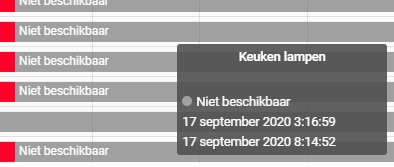
Didn't know this was an issue, I thought it was related to my setup. But for me it also crashed this night (03:16 NL):
 HammerNL89
on 17 Sep 2020
HammerNL89
on 17 Sep 2020
Here in Belgium, my zigbee lights became unavailable at 3:10:52
bmesuere
on 17 Sep 2020
And I am located in Finland so it happened at same time ...
tosion
on 17 Sep 2020
i normally have this issue also, except this time, but its because i did a complete reboot of my Hassos system, so the deconz addon was also restarted
so i think if its has an uptime for like several days, i think 7 , it crashes ...
maybe its because of the builtin vnc server ? maybe its a trial :)
pergolafabio
on 17 Sep 2020
Well I'm back 16 days later to report that deconz again mysteriously stopped last night, this time at 02:07 IST, so there's definitely an issue with some aspect of this addon that impacts a number of users at a common time.
Thanks to @pergolafabio for his excellent code snippets that monitored the addon, realised it had stopped, started it again, and sent me a notification to tip me off. I realise there is now a watchdog feature builtin to hassio, but I like this particular solution for keeping the show on the road. Otherwise there would have been no lights coming on automatically when the family got up this morning, which hurts the WAF.
jdbrookes
on 17 Sep 2020
If it is critical for it to keep running for WAF remember to turn on the watchdog function.
It's not a fix, but at least it automatically restarts the service if it crashes.
That will keep the waf points up until a permanent fix is found
austwhite
on 17 Sep 2020
is someone actually looking into this issue?
pergolafabio
on 17 Sep 2020
@frenck as the one who generally looks after these add-ons so I expect he would be looking. He is usually pretty good like that
austwhite
on 17 Sep 2020
We wait of the manufacture (deconz) to make an release which we can use. That is not an issue which we can solve by us.
pvizeli
on 17 Sep 2020
But do you know the root cause?
pergolafabio
on 17 Sep 2020
Well how do I see that they did not solve it. I have switched to Deconz in Docker and this time it has not stopped me. The Addon is not maintained by Deconz, so you always depend on having someone from HA fix it.
cllatser
on 17 Sep 2020
Running 6.3.0, my deconz container stopped twice an hour ago...
Does anyone know already the cause? Is someone working on a fix?
pergolafabio
on 24 Sep 2020
Mine crashed without restocking of plug in our even HA restart. Plug and unplug conbee helped.
 vukisz
on 24 Sep 2020
vukisz
on 24 Sep 2020
When this addon stops scenario happens, I usually noticed that my conbee 2 stick (fw 26580700 to 2665I0700) has reconnection logs on dmesg/syslog. I'm on NUC running proxmox 6.2 with hassos but I also saw this when I was on pi4.
 accelle17
on 24 Sep 2020
accelle17
on 24 Sep 2020
This night it stopped 3 times in a row, anyone else too? Is this issue actually under investigation?
pergolafabio
on 4 Oct 2020
This night it stopped 3 times in a row, anyone else too? Is this issue actually under investigation?
Crashed for me last night again at 10:48pm EST.
Only once that I'm aware of. I'm using an automation now to log that it's crashed and try to restart it, so I don't have the logs previous to the crash, but it's a safe bet it's the same as it was every other time, and the same as all the logs already posted here.
I'm not using the watchdog because that provides no indication (AFAIK) that it crashed, and I fear that people using it now are going to reduce the number of reports of this issue. The watchdog only hides the issue, not fix it.
SiliconAvatar
on 4 Oct 2020
Big warning to all users having this 'problem'!!!
I lost all my 'light' nodes for the Conbee 2 stick and it looks like it is not repairable and I need to go over and repair every single node in my house again.
I updated 1 week ago, before, it was running for more than 18 months stable with no issues. After the latests updates (both hassio and conbee plugin / firmware), I noticed that the plugin stopped randomly about 2 times a day. Everytime I pressed start again without investigating due lack of time.
Today, I did the same but now when the plugin was loaded, I noticed that all of the 'light' switches were gone inside phoscon.
I went back to the old backup of hassio, but apparently hassio doesn't backup the data on the conbee 2 stick itself. So my old backup isn't working anymore too with the conbee 2 usb stick. Also more recent versions of the last days are reverted, but still all the 'lights' are gone.
 EmbeddedDevver
on 4 Oct 2020
EmbeddedDevver
on 4 Oct 2020
That's not related at all to this issue, please create a new issue... This issue is just about the container that's stops randomly ;)
pergolafabio
on 4 Oct 2020
That's not related at all to this issue, please create a new issue... This issue is just about the container that's stops randomly ;)
I think this is exactly the same issue. The container / plugin inside hassio stops every day randomly. I have to press start there again to run it. Isnt this the same where your issue is about.
And I am posting this, to warn other people to make a backup of your conbee setup, just in case you're stick is crashing as well.
EmbeddedDevver
on 4 Oct 2020
I still think it's something else you describe, we are facing the stops not randomly, it's for most users always on same day/timestamp .... Not randomly every day
For me it's once a week, I think always on Sunday
pergolafabio
on 4 Oct 2020
We wait of the manufacture (deconz) to make an release which we can use. That is not an issue which we can solve by us.
So are you aware of what the issue is, which is causing this? Is it something being tracked on their issue repo?
Why are you sure it's the deCONZ software causing the issue, and not the way the application is being used/built inside the docker container, containing VNC components, etc.
I'm not being augmentative, just wondering what that conclusion is based on.
From what I hear from other people running the deCONZ software on bare metal, they are not having this problem; which may indicate that it's not a problem with the application, but with this addon.
SiliconAvatar
on 5 Oct 2020
We wait of the manufacture (deconz) to make an release which we can use. That is not an issue which we can solve by us.
So are you aware of what the issue is, which is causing this? Is it something being tracked on their issue repo?
Why are you sure it's the deCONZ software causing the issue, and not the way the application is being used/built inside the docker container, containing VNC components, etc.
I'm not being augmentative, just wondering what that conclusion is based on.From what I hear from other people running the deCONZ software on bare metal, they are not having this problem; which may indicate that it's not a problem with the application, but with this addon.
wondering the same too, i dont see any issues posted at all on deconz github website about stopping of the deamon
pergolafabio
on 5 Oct 2020
If this is an upstream issue/known issue please give github issue number and link.
The guys that maintain the DeConz/phoscon apps are very quick to fix bugs like this usually and there have now been 4 updates to deConz/Phoscon since this bug was first reported on home assistant.
This is ridiculous for a system which is pretty much the core functionality of an automation system.
Stop bouncing the blame and fix it. If you can't, then roll back the add-on to the last working version. That has been done before. This is an official add-on, not just some community add-on
@frenck is the maintainer of the HA add-on I believe. Maybe he has more insight to this issue.
At least can someone from HA team be assigned to look at this issue?
austwhite
on 5 Oct 2020
for those on proxmox, mind looking on your syslog if the conbee 2 is getting reconnected? This issue happened to me before on pi 4. Moved to proxmox and NUC and it got escalated to hassos crashing after updating it to 4.13 and upgrading the addon to 6.3.0. It turned out that it was an existing proxmox issue, see links on 870. It has been 10 days since I reinstalled the addon and replaced my conbee 2 stick, no crash yet.
accelle17
on 5 Oct 2020
the add-on should crash if the conbee is disconnected
i can just plug the conbee out, and the container doesnt stop/crash
so i think you are describing another issue, not related to this
pergolafabio
on 5 Oct 2020
for those on proxmox, mind looking on your syslog if the conbee 2 is getting reconnected? This issue happened to me before on pi 4. Moved to proxmox and NUC and it got escalated to hassos crashing after updating it to 4.13 and upgrading the addon to 6.3.0. It turned out that it was an existing proxmox issue, see links on 870. It has been 10 days since I reinstalled the addon and replaced my conbee 2 stick, no crash yet.
I use to have this happen a lot and fixed it by getting a powered USB Hub for the Conbee II. I found connecting it directly to the PC would continuously disconnect. I have not had a single disconnect of the Conbee stick since connecting to a powered hub.
austwhite
on 5 Oct 2020
this issue is not about disconnecting, please create another thread
pergolafabio
on 5 Oct 2020
this issue is not about disconnecting, please create another thread
I can confirm this as well. I have had many crashes, but no disconnects of the Conbee stick
austwhite
on 5 Oct 2020
Hi. Are there any news on this? Just got another stop. And heating season is starting. My heating system sensors and switches is zigbee controlled.
Or just ignore and Toggle watchdog on the deconz add-on?
vukisz
on 21 Oct 2020
Just for you to double check, I noticed with the recent OS update from HASSIO, that the COM port of the Conbee 2 stick was duplicated.
- /dev/ttyACM0 (this was normally the good one)
- /dev/ttyACM1 (Only this now is working well
- >-
/dev/serial/by-id/usb-dresden_elektronik_ingenieurtechnik_GmbH_ConBee_II_DE1964682-if00 (this also was normally working well, but now not anymore)
While starting the plugin of deconz, I also noticed that there were mulitple Conbee sticks detected despite I only have 1 stick.
EmbeddedDevver
on 21 Oct 2020
@EmbeddedDevver
I have not had that issue on my system at all. My Conbee II only shows up once as one device.
I am running HA as a VM on ProxMox.
I do have a Raspberry Pi in a different location and I haven't had that problem on that System either.
The crashing of the DeConz Plugin seems to have stopped for me as of 0.115.0 though and 0.116.x it seems stable too
austwhite
on 21 Oct 2020
Pls stay on topic, it has nothing todo with the stick, it's the container that's stops random
pergolafabio
on 21 Oct 2020
Pls stay on topic, it has nothing todo with the stick, it's the container that's stops random
Please stay open for all causes. You cannot be sure that the stick is 100% not the problem as long as the problem is not resolved. The stick is part of entire system.
Anyway, I have the same setup and no problem whatsoever. Now running stable ever since. Maybe something wrong with your setup after the upgrade? Try a re-install of the system?
EmbeddedDevver
on 21 Oct 2020
There are different issues, this issue thread is about the container that's stops, the stick is connected while it happend
It's a problem in the container, so reinstall doesn't work/help resolve the issue
Stick related issues should have a seperate thread
pergolafabio
on 21 Oct 2020
There are different issues, this issue thread is about the container that's stops, the stick is connected while it happend
It's a problem in the container, so reinstall doesn't work/help resolve the issueStick related issues should have a seperate thread
The stick, or something to do with recognising the stick, could cause the add-on to crash, so it could very well be part of the problem.
It is worth keeping an open mind.
That said, if multiple copies of your stick are showing up, but the app/container/plugin is not crashing, that should be considered as a different issue.
🙂
austwhite
on 21 Oct 2020
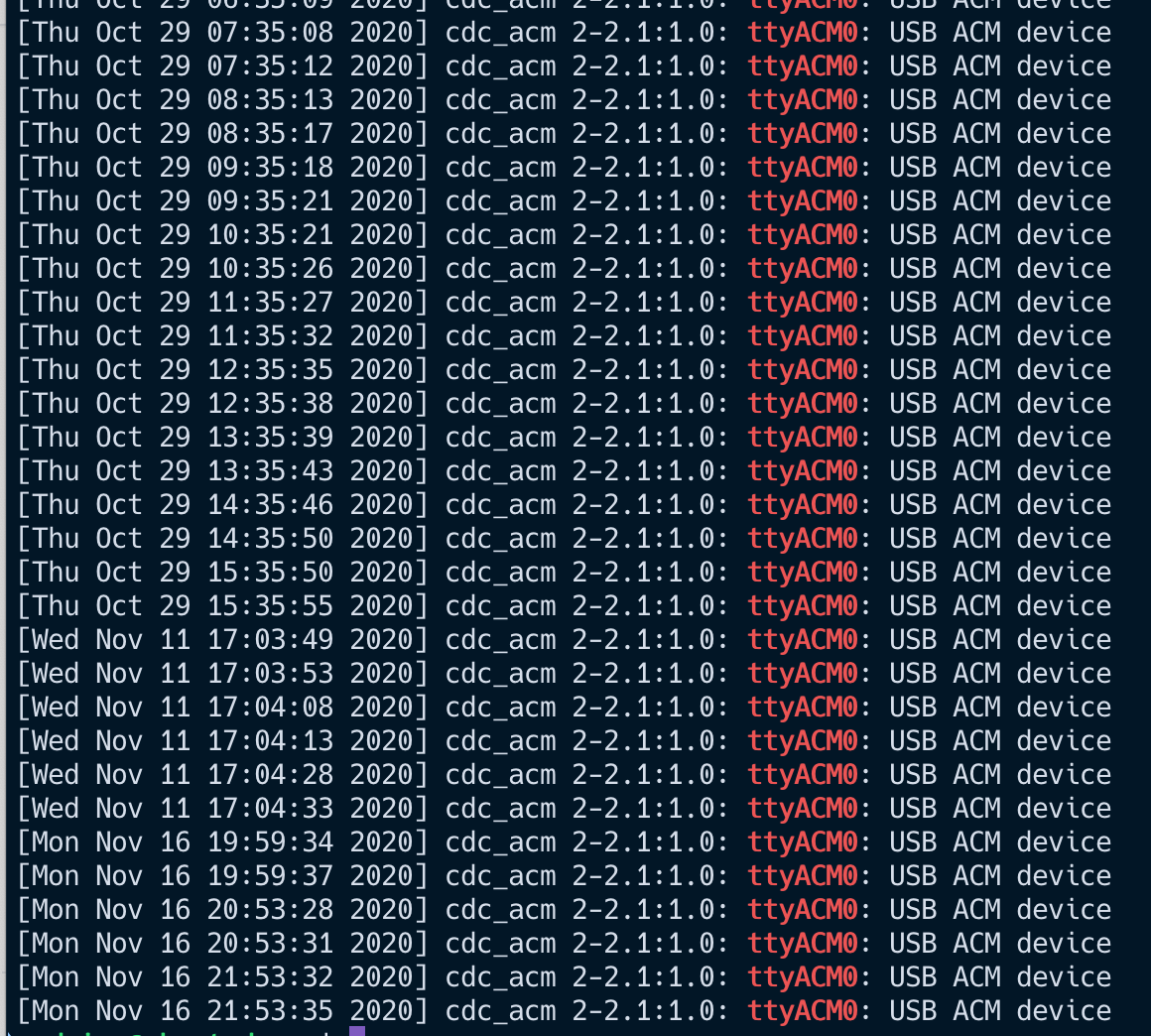
Same problem here. I am experiencing random disconnect and crash of the addon.
 hpapagaj
on 16 Nov 2020
hpapagaj
on 16 Nov 2020
This issue has been automatically marked as stale because it has not had recent activity. It will be closed if no further activity occurs. Thank you for your contributions.
![stale[bot] picture](https://avatars.githubusercontent.com/in/1724?v=4&s=40) stale[bot]
on 25 Dec 2020
stale[bot]
on 25 Dec 2020
Don't stale, still not resolved
pergolafabio
on 25 Dec 2020
Started having random Deconz crashes a couple of days back on rpi 3b+. I'm running supervised Home Assistant with Deconz from the addon store. Here's what's in my log file
Logger: pydeconz.websocket
Source: /usr/local/lib/python3.8/site-packages/pydeconz/websocket.py:81
First occurred: 7:04:06 PM (2 occurrences)
When this happens Deconz seems to be running. When I open the webserver motion is not being detected. A restart of Deconz seems to fix the problem. The Deconz logs have many repeats of this:
19:16:24:339 Device TTL 2968 s flags: 0x7
19:16:46:281 [INFO] - No button handler for: SML001 endpoint: 0x02 cluster: 0x0400 command: 0x0A payload[0]: 000
19:16:46:283 ZCL attribute report 0x001788010203DC17 for cluster: 0x0400, ep: 0x02, frame control: 0x08, mfcode: 0x0000
19:16:51:094 [INFO] - No button handler for: SML001 endpoint: 0x02 cluster: 0x0406 command: 0x0A payload[0]: 000
19:16:51:095 ZCL attribute report 0x0017880104B7A284 for cluster: 0x0406, ep: 0x02, frame control: 0x08, mfcode: 0x0000
19:16:54:242 [INFO] - No button handler for: SML001 endpoint: 0x02 cluster: 0x0406 command: 0x0A payload[0]: 000
19:16:54:244 ZCL attribute report 0x0017880104B7A284 for cluster: 0x0406, ep: 0x02, frame control: 0x08, mfcode: 0x0000
19:17:16:016 [INFO] - No button handler for: RWL020 endpoint: 0x02 cluster: 0x0001 command: 0x0A payload[0]: 021
19:17:16:018 ZCL attribute report 0x00178801021AD017 for cluster: 0x0001, ep: 0x02, frame control: 0x18, mfcode: 0x0000
 bturrie
on 30 Dec 2020
bturrie
on 30 Dec 2020
Related issues
 LongDono
·
13Comments
LongDono
·
13Comments
 willidh74
·
6Comments
willidh74
·
6Comments
 jybi89
·
10Comments
pergolafabio
·
13Comments
jybi89
·
10Comments
pergolafabio
·
13Comments
 nealeydee
·
7Comments
nealeydee
·
7Comments
Most helpful comment
@austwhite Unfortunately I got the same issue on my RPi4.