Addons: Terminal & SSH add-on doc issues - network access via ssh.
I noticed some where around version 8.4 of the newly renamed "Terminal & SSH" add-on, I lost network ssh access. I now get "connection refused".
It looks like there is a new “Network” dialog box that needs to be updated and is not mentioned in the docs. By default it says 22/tcp, with “disabled” in the input field (greyed out). The Column header is “Host”. This is a bit ambiguous, since I thought it wanted to know what host interface to listen on (127.0.0.1 vs 0.0.0.0).
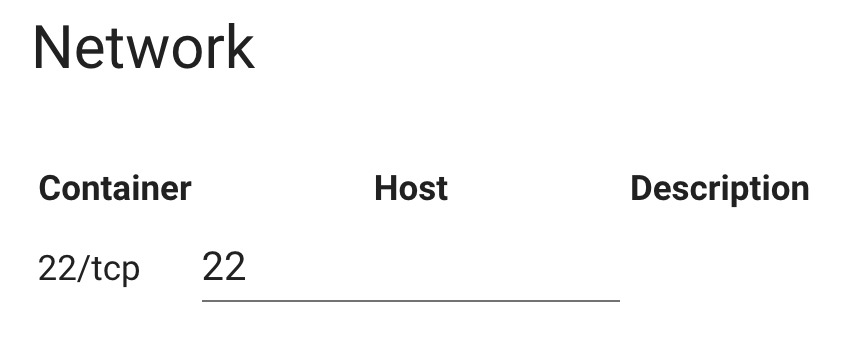
To (re)enable ssh access via the network, you need to enter the port number ‘22’ or what ever port you want to use. This will map that port from the hassio host into the running “Terminal & SSH” container. I believe a restart of the add-on is then needed so the container can get restarted with the docker -p equivalent.
Suggestions:
- If the intended default config is that out of the box there is only terminal access from within the web browser than than should be very explicitly documented. (It seems to me I installed an ssh add-on, not a web terminal add-on, so no longer having ssh access from the network was surprising.)
- The doc/readme for the add-on should have an easy to find section on "Enabling SSH access from the network".
- The "Network" dialog box, should have more information about what its purpose is:
- Title could be something less ambiguous than "Network", like "SSH Network Access"
- The column heading
Hostshould be changed toHost Portin my opinion to be clearer about what's needed. - Ideally it should indicate that a restart of the add-on is required after changing the Host Port.
The updated official "Terminal & SSH" add-on looks like a nice enhancement. Thank you for all your work on this. (It was disconcerting to no longer have any ssh access and not have any clues in the docs.)
 rct
rct
All 24 comments
If the intended default config is that out of the box there is only terminal access from within the web browser than than should be very explicitly documented.
Feel free to improve the documentation by opening up a PR.
It seems to me I installed an ssh add-on, not a web terminal add-on, so no longer having ssh access from the network was surprising.
Things change from time to time, sorry to hear you don't agree, nevertheless, in general, this is received as an improvement by the community.
The doc/readme for the add-on should have an easy to find section on "Enabling SSH access from the network".
That is kinda the same thing as you pointed out in your first suggestion. Feel free to open up a PR to help us to improve it.
The "Network" dialog box, should have more information about what its purpose is
That I agree on, we should add the ports_description configuration parameter to the add-on configuration.
The column heading Host should be changed to Host Port in my opinion to be clearer about what's needed.
That is not a suggestion for this repository. Feel free to open up a suggestion on our frontend repository: https://github.com/home-assistant/home-assistant-polymer.
Ideally it should indicate that a restart of the add-on is required after changing the Host Port.
Every change in the add-on frontend requires a restart...
 frenck
on 22 Feb 2020
frenck
on 22 Feb 2020
If the intended default config is that out of the box there is only terminal access from within the web browser than than should be very explicitly documented.
Feel free to improve the documentation by opening up a PR.
He really shouldn't have to. Whoever had the idea to make such a big change to the default behavior to the addon really should take a few minutes to update the documentation, as well. I agree with rct, this really is a breaking change.
It seems to me I installed an ssh add-on, not a web terminal add-on, so no longer having ssh access from the network was surprising.
Things change from time to time, sorry to hear you don't agree, nevertheless, in general, this is received as an improvement by the community.
He's not saying that he necessarily disagrees with the change, just that it came as a surprise when he went to use his normal setup and SSH all-of-a-sudden stopped working for him. Changing the default access to a web terminal-only interface likely is inherently safer for users, and may be a good direction to go. However, it should be listed described in the changelog, as well as documentation. The current latest entry in the changelog (which is not currently under a version number) states only "Support to use only web terminal without SSH server", but nothing that states that this is going to be the _default setup_ and that your existing configuration will be broken by updating to 8.4.
 seandop
on 22 Feb 2020
seandop
on 22 Feb 2020
OMG. I lose one hour to figure it out that is the port number :(
Change the desc.
Thank you rct for help
 fr3sh
on 22 Feb 2020
fr3sh
on 22 Feb 2020
I just submitted #1126 that simply re-enables network ssh access until this change can be better considered.
Please consider merging this soon so that more people don't lose time on this.
@frenck - This wasn't a small change. If you consider the case that someone who installed the 'SSH server' add-on, updates it and then find without any warning they've lost ssh access then that's a big breaking change. This change disabled the functionality that this add-on was advertised to provide,
Note: I'm not disagreeing with (or even entering into the discussion) as to whether web terminal only is more secure, better default configuration. I take issue with the way that this was done.
rct
on 22 Feb 2020
@rct Thanks for the PR, it was considered and discussed carefully, so that statement is a bit condescending.
Hence, your PR should not be merged IMHO.
I agree the documentation could be better, which I encouraged.
frenck
on 22 Feb 2020
Finally understood why this was not working anymore, should have been documented without any doubt. Thank you @rct for raising this issue, without it I was probably still searching.
 groenmarsmannetje
on 23 Feb 2020
groenmarsmannetje
on 23 Feb 2020
thank you! I spent half an hour scratching my head of why this had stopped working
 jambuu
on 24 Feb 2020
jambuu
on 24 Feb 2020
thanks, at least I'm not the only one who spent an hour to understand why I can't connect :)
 tjedrak
on 25 Feb 2020
tjedrak
on 25 Feb 2020
I had the same problem but managed to get it working
 JoHa-git
on 25 Feb 2020
JoHa-git
on 25 Feb 2020
I had no idea why my ssh attemps were refused after updating and the meaning of that 22/tcp field wasn't clear (at least it did not explain the issue).
Headed here and found the solution so no extra hair loss.. ;)
The idea of transferring old users settings is great, hope a fixed version will come out soon so people won't be hit with that.
 akasma74
on 26 Feb 2020
akasma74
on 26 Feb 2020
@rct many thanks for taking the time to respond to the SSH issue (including on the other place).
I've just caught up on the comments having been away for a few days, but I can see you've helped me and several others by taking the time to post. Thank you for your time and support.
 Geoff571
on 26 Feb 2020
Geoff571
on 26 Feb 2020
A BIG thank you also from me, nowhere it was explain this breaking change.
Thank you @rct !
 teocannata
on 27 Feb 2020
teocannata
on 27 Feb 2020
@rct Thank you so much to arise and solve the problem.
I was going crazy with nmap scans, changing keys... I have been spending hours just trying to solve this.
If the intended default config is that out of the box there is only terminal access from within the web browser than than should be very explicitly documented. (It seems to me I installed an ssh add-on, not a web terminal add-on, so no longer having ssh access from the network was surprising.)
I completely agree with this, changes like this one must be explicit to the user base.
The column heading Host should be changed to Host Port in my opinion to be clearer about what's needed.
Again I agree.
 uxdesignerhector
on 28 Feb 2020
uxdesignerhector
on 28 Feb 2020
@pvizeli - I'm sorry but this issue should not have gotten closed. This issue is able the doc for the add-on. As far as I can tell the docs have not been fixed.
I see you are logging a message now which gives a clue. Though the message isn't very clear. The tense is wrong.
I think the log message might be clearer if instead of
SSH port is disabled. Prevent start of SSH server.
It reads:
SSH host network port not set. SSH network access is disabled.
As far as the docs for this add-on they no longer match the functionality of the add-on
Home Assistant Add-on: SSH server
Allow logging in remotely to Home Assistant using SSH or just the web terminal with Ingress.
I think it should be something like:
Home Assistant Add-on: SSH server
Allow logging in to Home Assistant via a web terminal built in to the UI. Optionally, an SSH server can be enabled which allows logging in over the network via SSH.
rct
on 3 Mar 2020
SSH port is disabled. Prevent start of SSH server.
is must give users a clue how to enable it.
akasma74
on 3 Mar 2020
Yes! I have no clue how to enable it. The UI only allows me to change the value of the field, currently set to 'disabled', but if I set it to 'enabled', and hit save, the UI changes the field back to 'disabled'.
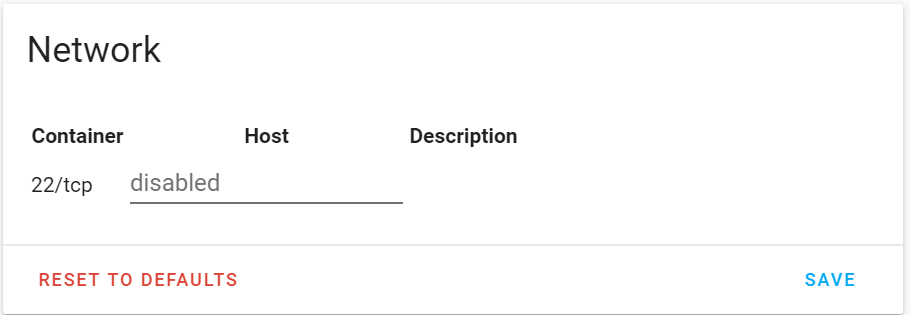
How am I meant to enable the port?
 anachronox99
on 7 Mar 2020
anachronox99
on 7 Mar 2020
Yes! I have no clue how to enable it. The UI only allows me to change the value of the field, currently set to 'disabled', but if I set it to 'enabled', and hit save, the UI changes the field back to 'disabled'.
How am I meant to enable the port?
@anachronox99 Enter the port number that you'd like to have the SSH server listen on in that line, then click Save, and finally restart the addon.
seandop
on 7 Mar 2020
Yes! I have no clue how to enable it. The UI only allows me to change the value of the field, currently set to 'disabled', but if I set it to 'enabled', and hit save, the UI changes the field back to 'disabled'.
How am I meant to enable the port?@anachronox99 Enter the port number that you'd like to have the SSH server listen on in that line, then click Save, and finally restart the addon.
Thanks! I now understand that the field is meant for entering the port number to be enabled. This is not obvious. I notice the original ticket has been closed by #1156 , which simply logs a warning message to the console. IMHO that's not a sufficient fix for this issue, a breaking change like this also requires an update to the installation documentation, and preferably an improvement to this UI
anachronox99
on 7 Mar 2020
@anachronox99 I totally agree.
seandop
on 7 Mar 2020
Just spent 30 minutes getting this SSH thing to work. Google brought me here and then it got clear i need to enter a port number. Makes sense now i think about it, but should be clearly stated in the docs or just default to 22 and leave it configurable for those who need it.
 Fluxlicious
on 15 Mar 2020
Fluxlicious
on 15 Mar 2020
I've upgraded the SSH add-on and had no clue how to make it work again. I'd never ever think I was supposed to set "host" field to 22. Terrible UX. https://github.com/home-assistant/hassio-addons/pull/1156 is just a crutch, not a fix.
 Nowaker
on 22 Mar 2020
Nowaker
on 22 Mar 2020
I too was very confused by this. Thanks @rct for clearing it up.
 nickelnine
on 6 Apr 2020
nickelnine
on 6 Apr 2020
&?*! Just got a corrupted SD card on my RPi3 because I had to pull the plug to reboot it (frontend was not accessible and SSH too)... I always check the changelog before updating addons, but I clearly missed this one.
 zetvio
on 22 Apr 2020
zetvio
on 22 Apr 2020
thank you VERY much @rct
 NickSee
on 6 May 2020
NickSee
on 6 May 2020
Related issues
 ludeeus
·
5Comments
ludeeus
·
5Comments
 pergolafabio
·
13Comments
pergolafabio
·
13Comments
![move[bot] picture](https://avatars.githubusercontent.com/in/6673?v=4&s=40) move[bot]
·
7Comments
move[bot]
·
7Comments
 lordfiSh
·
11Comments
lordfiSh
·
11Comments
 thisisme
·
10Comments
thisisme
·
10Comments
Most helpful comment
He really shouldn't have to. Whoever had the idea to make such a big change to the default behavior to the addon really should take a few minutes to update the documentation, as well. I agree with rct, this really is a breaking change.
He's not saying that he necessarily disagrees with the change, just that it came as a surprise when he went to use his normal setup and SSH all-of-a-sudden stopped working for him. Changing the default access to a web terminal-only interface likely is inherently safer for users, and may be a good direction to go. However, it should be listed described in the changelog, as well as documentation. The current latest entry in the changelog (which is not currently under a version number) states only "Support to use only web terminal without SSH server", but nothing that states that this is going to be the _default setup_ and that your existing configuration will be broken by updating to 8.4.