Adaway: Ad-Blocker VPN mode stops working when switching connection type
Describe the bug
Switching from wifi to mobile internet or vice versa by turning off the other connection type makes the VPN not load anything anymore. Simply pausing and unpausing from the notification to restart the VPN quickly solves it, but it would be nice if the connection change could possible detected and have this happen automatically.
It doesn't break entirely rather than just not switching networks it seems, as switching to back to the previously working connection works without restarting the VPN in-between.
To Reproduce
Using AdAway in VPN mode:
- Start VPN
- Turn off Wifi and enable mobile data if it's not on yet
- Try to load anything from the web
- Restart the VPN to fix the issue manually
Expected behavior
The VPN should switch connections automatically if possible.
Device
- AdAway version: 5.0.6
- Device: F(x)tec Pro1
- Android version: 9
- Root version: Unrooted
Additional context
This seems like a weird thing to miss, so I'm wondering if there's some kind of limitation about implementing this or if there's some kind of bug in the OS of my phone (wouldn't be surprised, tbh).
I can provide logs if there's something I should be looking out for. ConnectivyService and the likes seem to log the connection change fine at least, but otherwise there's nothing standing out to me (and nothing from AdAway for that matter).
I'd also like to say: When VPN mode is working, it really works just fine. Like, multiple days without issues. As long as I don't need to access anything a different connection as described. So nice work there!
 elvissteinjr
All 19 comments
Hi @elvissteinjr
Thanks for the report. I was asking some feedback about VPN ad blocking method lately so it's perfect.
In fact, I am only testing the VPN method on my test device which does not have a sim card. So I do never disable wifi otherwise I do no more have internet access.
It's the kind of the bug I want to fix quickly before moving the beta to stable 😉
 PerfectSlayer
on 13 Aug 2020
PerfectSlayer
on 13 Aug 2020
I tried to reproduce on my device and I can't trigger the issue.
I tried from mobile network to wifi, wifi to mobile network, mobile network to airplane mode and airplane mode to mobile network.
If you can provide me some logcat, I think it would be helpful 👍
In the mean time, I will keep using as a daily ad-blocker and see if it happens on my device.
PerfectSlayer
on 20 Aug 2020
I've recorded some logs, but since I don't know exactly what to look for (the few lines that do mention AdAway are not interesting at least), there's a lot of noise in there.
What I did when recording the log was: Turn off wifi -> turn on mobile internet -> try to access google.com (failed) -> restart AdAway VPN from the notification -> try to access google.com (success).
Now what got me stumped is that right after recording the first attempt, which went as expected, I could not reproduce my issue again. I were suddenly able to clearly observe the notification updating the VPN state right when a connection got changed too.
Yet, after about 10 minutes the previous behavior returned.
I had been running AdAway behaving as described in the first post for more than a month with no significant changes so it's odd and this was the first time I've observed it working as intended like this.
So is this power-saving related? My phone's OS doesn't do anything special and is pretty much stock Android in that regard to my knowledge. Other apps keeping a notification to stay active don't seem to have any issues though, so I'm just guessing around here.
Typing this up I'm getting the feeling this might be out of your hands and the log may not provide much useful information either. I apologize for wasting your time if that's the case.
Either way, thanks for looking at this.
elvissteinjr
on 23 Aug 2020
I have the same bug on OnePlus 8 Android 10 no root.
AdAway 5.0.9
 fawkes15
on 24 Sep 2020
fawkes15
on 24 Sep 2020
Totally random for me.
I will go days without it happening and then it will happen once or multiple times in one day.
Sometimes adaway appears to be running (red background).
Other times adaway is paused (grey background).
Simple pause and start (or just start) will solve the issue.
Not currently reproducible at will.
Is it related to adaway starting paused on my device?
(AdAway starts on boot but, it starts paused not active.
Reproducible but, the issue might still be on my side.
It has been a few weeks since it last happened.
Today it happened twice. A few hours after I got to work and again when I got home.
Prior logs did not show much. Today's look like they might be some help.
Log_2020-9-26_09-53-08 - Taken with LogcatExtream when I noticed it this morning.
adblogcat - When I got home and noticed it was not connecting again.
bugreport - Accidentally killed it before it was done.
Did not think about running bugreport this morning.
Next time it happens, I will run it from terminal.
Sorry for full logs, since I can not reproduce at will, I can not clear the log before hand.
Cheers.
 ipdev99
on 27 Sep 2020
ipdev99
on 27 Sep 2020
I'm regularly experiencing the same issue. The VPN appears to not detect or manage the network switch, and remains "active" on the non-existent network.
Pause/unpause, connect/disconnect, flight mode on/off, ... Any action will restore connectivity.
Happens often for me when leaving home. Move out of range of WiFi (switches to mobile ok), drive to destination, reconnect to different WiFi (fails & VPN blocks all traffic).
Pixel 5, non-root, latest updates.
Maybe something as simple as on repeated traffic failure (for DNS lookup) to perform a check of active networks and reconnect?
Otherwise the ad blocking is working very well. Have not noticed any overhead, battery drain or slowdown - only the loss of connectivity on network change.
 BearTM
on 25 Nov 2020
BearTM
on 25 Nov 2020
Hi, I have the same issue on my Fairphone2 with /e/OS. I could not find any workaround, except switching off the VPN and on again. Phone is not routed.
 pxcask
on 19 Jan 2021
pxcask
on 19 Jan 2021
This issue has been open for a long time, I'd recommend DNS66 until it's solved.
 abdulocracy
on 19 Jan 2021
abdulocracy
on 19 Jan 2021
I thought I'd *ping* this issue again since there's been some more traction with others and error reporting ...
The issue happens ONLY when changing from one network to another. I've had it happen even for Wifi to Wifi, but more often/reliably with Wifi to 4G/5G or the reverse.
For some reason the network change is not detected, and the VPN stays active, routing to the prior network. Turning off & on the VPN resolves it immediately, without any future or further issues. (no crash, no memory issues, no lockup, nothing - runs great without any restart)
Can something "simple?" be implemented which monitors the current active connection?
- Check the active (physical) connection IP address and/or gateway information for any changes?
- Unfortunate if you change to the same IP address on the new connection, but that's insanely unlikely to happen!
- Attempting a "ping" to an endpoint every minute?
- Add config options: time and host to ping? or just ping the connection gateway? Keep-alive?
- Assuming a 32 byte ping packet every minute, this would cost at most 48k traffic in a day, which I'd happily afford for 99%+ reliability.
- Restart the VPN on repeated DNS lookup failures for valid hosts?
- On the 3rd DNS lookup timeout failure, attempt a restart of the VPN and/or provide warning/notification of error/issue?
There are probably other possibilities, but anything which can detect failure and simply restart the VPN would be preferred to having the VPN "dead" to traffic, and only noticing the issue a few hours later.
Cheers!
 RobBeyer
on 19 Jan 2021
RobBeyer
on 19 Jan 2021
@abdulocracy Yes, and I still had struggle to find the issue. As you can see, I am alone on the project on my spare time and I still deliver update. I just didn't had the time to find the workaround yet.
Thanks @RobBeyer There is some good ideas here. I will also have a look to what DNS66 does in order to handle this case.
There is so much more I want to do with VNP ad-blocking method (like private DNS client, VPN chaining, etc...) but again, I still lake time in my personal life.
PerfectSlayer
on 21 Jan 2021
Let's try something!
I just build a 5.3.0 based version where you can enable the VPN monitor (watchdog).
It is a mechanism that will send an empty DNS request to your resolver to check the network state if there is no network activity.
If the request fails, it will restart the VPN and keep trying to send a DNS request.
If the requests keep failing, it will restart later with a greater delay each time so it won't spam your network and should be battery friendly.

_This build is signed with the same key the GitHub releases use. You can install over a GitHub release and it will be updated like any other build when a new update comes._
PerfectSlayer
on 21 Jan 2021
I just tried it. I switched several times wifi <> LTE and no issue.
Thanks a lot!
fawkes15
on 21 Jan 2021
Awesome and a super fast implementation! I will test over the next week and report back if I encounter any issues.
I understand the "time pressure issue" for any side projects, and I greatly appreciate the time you've taken to resolve this issue. I myself still have a hardware project (automatic time-based fish-tank RGB lighting with "weather" and power control for pumps, air, and UV sterilizer) which is 75%+ done, and never manage to "create" the additional time I need to complete it. I just might do that now. :)
Cheers! and thank you.
RobBeyer
on 21 Jan 2021
You are welcome. I already work on it but never found the time to complete it.
I am really interested to have your feedback in few days to know if I must ship it in a stable build.
Oh, and I also have a small hardware (mainly to keep practicing iron and 3D model/printing): a small Cyberpunk logo lamp based on an esp88266 and a ws2812 rgb led. I am still on prototyping but spending few hours to iron leds relaxes me 😄
PerfectSlayer
on 21 Jan 2021
Well, I've run through a few tests and while they all worked, I went on a drive to pick up some takeaway food. While the switch to 4G went perfectly, the switch back to my WiFi at home was not detected. The DNS polling did not appear to solve the VPN lockup. All traffic was dead - no apps worked - Chrome, GMail, etc. ... including attempting to update the Blocklists in AdAway.
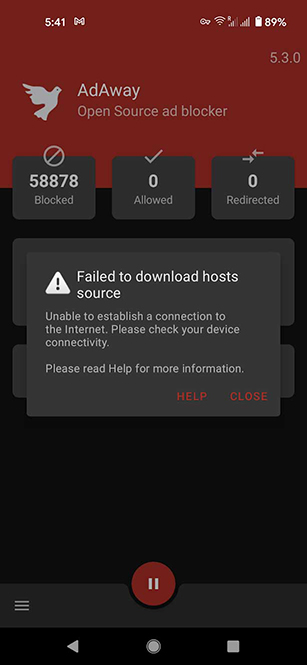
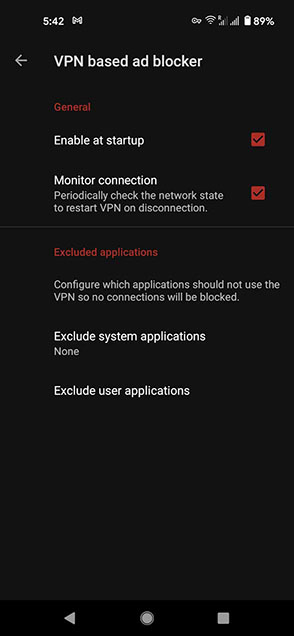
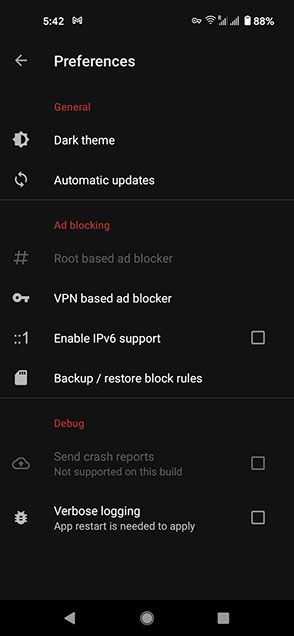
I'm ready to help debug this issue, as it appears I can repeat the issue "somewhat" reliably ... even though I have no idea what I need to do to trigger it.
I've enabled the "Verbose Logging" flag in the app, which I hope might help track down the issue.
I've also installed a (non-root) Logcat and enabled the adb tcpip server on my phone. Since a logcat would be capturing an untold number of messages, can you give me a filter list (tag/keyword) of likely messages that I can use, and leave the log running on my phone until the problem happens.
I hope we can track down the source of this issue.
I know exactly what you mean about "practicing iron and 3D model/printing". My current project is the Tardis from Dr. Who - I'm just printing the 4th and last transparent window now.
I have to THANK YOU for the idea of using an ESP8226 and a WS2812 RGB!!! I was just going to use a few white LEDs, but I've got a few ESP8266-01S boards lying around, and having a "WiFi / web-controlled Tardis" just sounds so much cooler!

My project just became a little bit bigger ... 👍
RobBeyer
on 22 Jan 2021
Good to know it improves the overall behavior. Did you wait few minutes after switching back to your home wifi?
About logging, if the logcat app allows you to filter by application, you can filter the org.adaway package name.
If not, you can log the following tags: VpnWatchDog, VpnWorker, DnsMapper, DnsPacketProxy.
You're welcome! And if you want an easy-to-use but advanced control about your led, have a look to the wled project 😉 Nice setup by the way, I am sort of jealous of your oscilloscope 😅
PerfectSlayer
on 22 Jan 2021
I've had the issue happen again - VPN lockup when returning home and having WiFi re-enable. NOTE: I also have 2 sim cards in my phone - so there are 3 potentially active connections, but a maximum of 2 data connections at any time (Wifi & 4G).
For some reason the adb server was closed on the logcat app (no idea why!?!), so I have no log yet. I'll try again and add in the filtering suggestions and see what is recorded. I probably just ran out of log space leaving it running continuously.
Thanks for the link to the WLED project ... I will definitely use that for the Tardis. 👍
For the scope, I have a Hantek DSO5102P purchased through AliExpress from the Hantek Official Store. Excellent store, no issues with purchase or shipping - very well packed. They've got a new DSO2D15 with built-in RS232/UART, I2C, SPI, CAN, LIN decoding with an 8M capture buffer instead of the 40K on mine, which I think is pretty sweet. The review from a German purchaser indicates that the firmware is still being worked on (the future is in beta!), but otherwise it looks like the 'perfect' MCU/embedded hobby-level DSO ... if you're considering one.
RobBeyer
on 23 Jan 2021
Something odd to check into ...
VpnWatchDog: handleTimeout is reporting very odd elapsed times:
"Milliseconds elapsed between last receive and sent: 1611366365245"
"Milliseconds elapsed between last receive and sent: 8973"
"Milliseconds elapsed between last receive and sent: -16019"
"Milliseconds elapsed between last receive and sent: -6473645"
Also, a Warning message: handleTimeout(VpnWatchdog.java:130) with nothing more in the log.
I tried to look for the new source, to see if I could spot something, but couldn't find a branch on the GitHub.
There may be an issue with the last receive/sent calculation which is preventing the failure detection?
RobBeyer
on 23 Jan 2021
Logcat - Warnings and some exceptions with reconnections. Everything is still working fine, even with the errors in the log. I have not switched networks off WiFi throughout this time.
RobBeyer
on 23 Jan 2021
Related issues
 RenaKunisaki
·
8Comments
RenaKunisaki
·
8Comments
 clonechill
·
11Comments
clonechill
·
11Comments
 tinaag
·
3Comments
tinaag
·
3Comments
 auanasgheps
·
5Comments
ipdev99
·
3Comments
auanasgheps
·
5Comments
ipdev99
·
3Comments
Most helpful comment
Let's try something!
I just build a 5.3.0 based version where you can enable the VPN monitor (watchdog).
It is a mechanism that will send an empty DNS request to your resolver to check the network state if there is no network activity.
If the request fails, it will restart the VPN and keep trying to send a DNS request.
If the requests keep failing, it will restart later with a greater delay each time so it won't spam your network and should be battery friendly.
AdAway-5.3.0-vpnmonitor.zip
_This build is signed with the same key the GitHub releases use. You can install over a GitHub release and it will be updated like any other build when a new update comes._