Adaptivecards: [iOS][Input Evolution] [input validation error messages enabled on the card sent by bot]
Platform
What platform is your issue or question related to?
- iOS
Author or host
Host - Teams iOS Client
Version of SDK
SDK 2.1.0 (Adaptive card v1.3)
Details
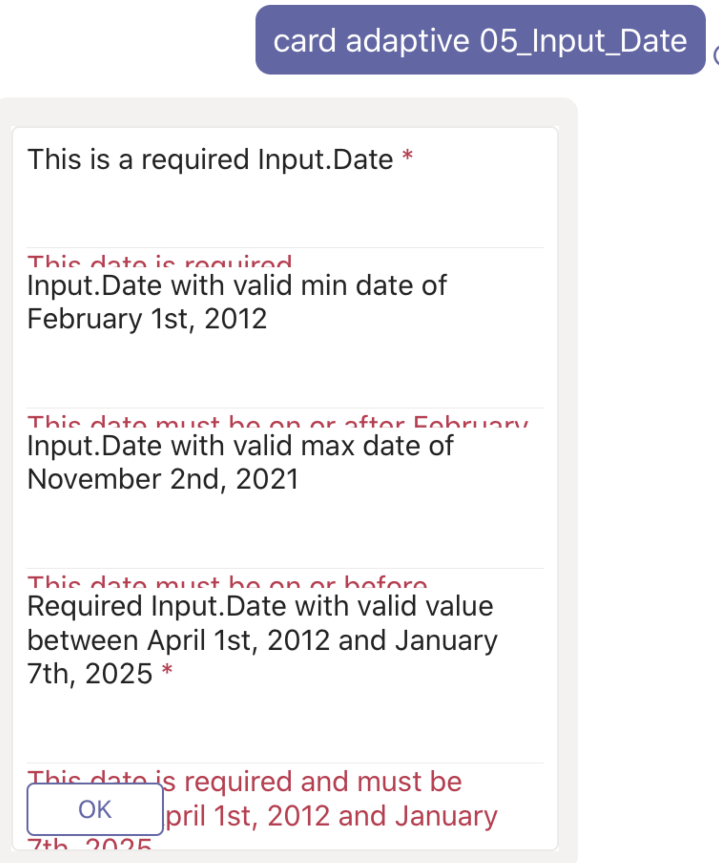
When card is sent by the bot for the first time then error messages are enabled by default and are not visible completely.
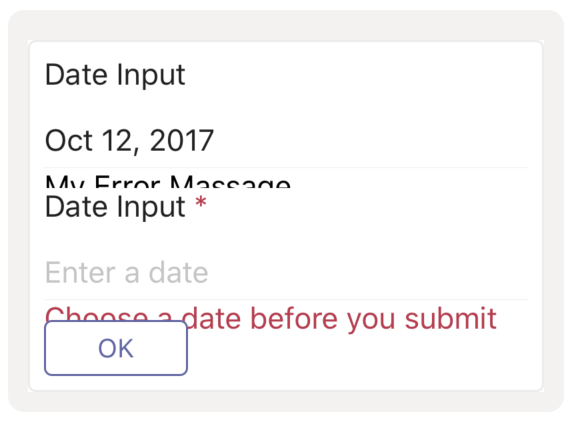
Also, an unknown string "Error Massage" is added for inputs even if that is not present in the card JSON. Seems like SDK is picking it up from the inputLabelView.xib and then, adding it to the card view.
PFA screenshots and cardJson for both scenarios mentioned above:

cardJson1.txt
cardJson2.txt
 jyoti-ms
All 9 comments
please review this issue for target Milestone, Inconsistencies & Priority upon triage.
![msftbot[bot] picture](https://avatars2.githubusercontent.com/in/26612?v=4&s=40) msftbot[bot]
on 28 Sep 2020
msftbot[bot]
on 28 Sep 2020
@shalinijoshi19 @dclaux @jwoo-msft We are facing this issue as we are upgrading to the latest SDK in Teams. Can you please triage and let us know how we can work around this.
FYI: @sowrabh-msft @VikrantSingh01
jyoti-ms
on 28 Sep 2020
Hi @jyoti-ms,
I tried your payload, and it is not reproducible on the sample app. The logic for the visibility of the error message is straightforward. The message is hidden initially, When send event is triggered, the validation logic happens, then the visibility will get changed if necessary.
I would suggest checking first that send event of ACRAggregateTarget was not triggered when the card is received. I would also check initInputLabelView of ACRInputLabelView to ensure that logic is correctly followed in the custom renderers.
Since the AdaptiveCard view is squeezed, I would say send or validate was somehow triggered because if the card initially had its subviews not hidden, your TableView would know how tall the AdaptiveCard view is, and would not squeeze the AdaptiveCard view.
 jwoo-msft
on 29 Sep 2020
jwoo-msft
on 29 Sep 2020
Hi @jyoti-ms. We have acknowledged this issue report. Please continue to follow this issue for updates/progress/questions.
msftbot[bot]
on 30 Sep 2020
@closing, as this is resolved.
jwoo-msft
on 6 Oct 2020
@sowrabh-msft / @jyoti-ms could you please take a look at @jwoo-msft 's explanation above, see if it helps ? Thanks
 shalinijoshi19
on 7 Oct 2020
shalinijoshi19
on 7 Oct 2020
@jwoo-msft As we have discussed, you are going to update the "hidden" prop in InputLabelView.xib in this month's release?
The fix that we tried is just a temporary one to unblock ourselves for testing and we are using cocoa pods approach to update the framework so we can't replace binaries (.nib files).
jyoti-ms
on 7 Oct 2020
@shalinijoshi19 @jwoo-msft - In addition, in the screenshot below the string "My Error Massage" seems to be coming from the SDK too ( This file You may want to remove this).
Would this string also appear on an inadvertent send or validate call?
 sowrabh-msft
on 7 Oct 2020
sowrabh-msft
on 7 Oct 2020
:tada:This issue is now fixed by #4907 and successfully released as part of our [email protected] offering.:tada:
Handy links:
msftbot[bot]
on 31 Oct 2020
Related issues
 sadviramana
·
4Comments
sadviramana
·
4Comments
 schemburkar
·
4Comments
shalinijoshi19
·
5Comments
schemburkar
·
4Comments
shalinijoshi19
·
5Comments
 summertony15
·
3Comments
summertony15
·
3Comments
 jesuspsalas2
·
3Comments
jesuspsalas2
·
3Comments
Most helpful comment
@sowrabh-msft / @jyoti-ms could you please take a look at @jwoo-msft 's explanation above, see if it helps ? Thanks