Adaptivecards: [MSTeams]Unable to reach app. Please try again on Adaptive card
Platform
- .Net
Author or host
- Host - MsTeams
Details
- Hi ,
We are using adaptive card in our bot to fill forms. We are doing postBack on Action.submit to send details filled by users to Bot. After some few seconds we are getting the error on the card saying "Unable to reach app. Please try again on Adaptive card".
I don't want to show that error on the card.

Please help.
Thanks.
 Chekrii
All 78 comments
@chekrii is there a sample card that you can share along with repro steps for us here at all? Is this happening only for that specific card or all action.submit flows for you? @matthidinger /@dandriscoll / @ckkashyap / @siduppal is this an AdaptiveCards issue? In Adaptivecards we don't actually control the actual host app for the post-back do we? Is there any debugging here that we can possibly glean (either post-mortem or live debugging?)
 shalinijoshi19
on 6 Jan 2020
shalinijoshi19
on 6 Jan 2020
Hi Team,
Have raised the same issue https://github.com/microsoft/AdaptiveCards/issues/2924.
Kindly please help as it is a road block for the features now. It is happening for all the cards where all we are interacting with external systems.
 RajaniJillaGit
on 7 Jan 2020
RajaniJillaGit
on 7 Jan 2020
We have triaged this issue report. Please continue to follow the issue for updates/progress/questions. @matthidinger/@dclaux/@rebeccaanne/@paulcam206 FYI.
![msftbot[bot] picture](https://avatars2.githubusercontent.com/in/26612?v=4&s=40) msftbot[bot]
on 7 Jan 2020
msftbot[bot]
on 7 Jan 2020
Assigning to you @ckkashyap for a first look. Thanks!
shalinijoshi19
on 7 Jan 2020
We have triaged this issue report. Please continue to follow the issue for updates/progress/questions. @matthidinger / @dclaux / @rebeccaanne / @paulcam206 FYI.
msftbot[bot]
on 7 Jan 2020
Hi @Chekrii - can you please paste the adaptive card that you are rendering? This will help with diagnosing this issue further. Also, can you please confirm if you see the same error in your fiddler trace as in #2924.
 ckkashyap
on 7 Jan 2020
ckkashyap
on 7 Jan 2020
@Chekrii, @RajaniJillaGit - Thanks for reaching out! Can you make sure Teams channel is added on Azure portal for your bots?
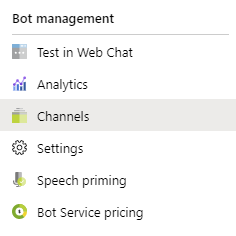
If not, pls add it and let us know if the issue still repros.
If the issue still repros, pls share the bot-id (guid) for your bots which are showing this issue?
 siduppal
on 8 Jan 2020
siduppal
on 8 Jan 2020
Hi @Chekrii - can you please paste the adaptive card that you are rendering? This will help with diagnosing this issue further. Also, can you please confirm if you see the same error in your fiddler trace as in #2924.
Yes its the same issue. Teams channel is enabled on Azure. please share the email to share the bot id for the same.
RajaniJillaGit
on 8 Jan 2020
Hi @RajaniJillaGit - can you please try and follow the instructions at this link and debug the bot locally. You can send over the bot id and some recent conversation id's (that dont work) to botframework AT microsoft.com.
ckkashyap
on 8 Jan 2020
Hey @RajaniJillaGit - can you open Teams in browser (https://teams.microsoft.com), open Developer Tools, and share the console logs you see for your scenario when you get the "Unable to reach app" error?
siduppal
on 9 Jan 2020
Hi @siduppal and @ckkashyap here are the errors logged developer tools.
[BotCardService::onButtonClicked_messageback()] sendInvoke failed: {"statusCode":502,"headers":{"cache-control":"no-store, must-revalidate, no-cache","content-length":"86","content-type":"application/json; charset=utf-8","contextid":"tcid=5882757895929148753,server=SG2PEPF0000045F,cv=ywGwvOiBh0KJbisGmRApkQ.1.0","pragma":"no-cache","set-registrationtoken":"redacted"},"errorMessage":"Error Code: 1008 ","errorCode":1008,"request":{}}
RajaniJillaGit
on 9 Jan 2020
Is this card using FlowBot by chance? If so, Actions do not work with FlowBot/Power Automate yet, but we're actively working on it. No timelines yet but hopefully not much longer.
If you aren't using Flowbot, please continue with the current debugging :)
 matthidinger
on 9 Jan 2020
matthidinger
on 9 Jan 2020
Hi @matthidinger it’s not a flowbot. It is on v4 and using adaptive cards with external systems for conversations.
RajaniJillaGit
on 11 Jan 2020
Hi, I also faced that issue (JS, botframework v4.6.2) I can paste logs from devtools but not sure how much they will help.
I was using core.ActionTypes.OpenUrl type ( which was working on 15th December - now it stopped )
angular.min.js:113 2020-01-16T09:34:27.189Z value not found in enum type. value: 561
(anonymous) @ angular.min.js:113
e.logMessage @ msteams-web-ng1-services.min.js:1
e.error @ msteams-web-ng1-services.min.js:1
E.tryGetEnum @ shared.min.js:1
t.logBiTelemetryOnOpen @ msteams-web-ng1.min.js:1
(anonymous) @ msteams-web-ng1.min.js:1
...
r @ backend.js:6
(anonymous) @ msteams-web-ng1-services.min.js:1
f @ angular.min.js:126
(anonymous) @ angular.min.js:126
...
InputExtensionService: Input extension invoke command failed
(anonymous) @ angular.min.js:113
e.logMessage @ msteams-web-ng1-services.min.js:1
e.error @ msteams-web-ng1-services.min.js:1
(anonymous) @ msteams-web-common.min.js:1
...
 InputExtensionViewModel: Failed to complete command request for loadDefaultItems.
...
 Dzixxx
on 16 Jan 2020
Dzixxx
on 16 Jan 2020
Assigning to you as well @siduppal since Teams seems to be driving it at the moment. @ckkashyap unassigning you for now, FYI. Thanks!
shalinijoshi19
on 17 Jan 2020
I am unable to repro with submit and open urls action types in adaptive card. This error
Invoke agent action failed with status code: BadGateway usually indicates bot is taking too long (> 5 seconds) to respond to the request or bot's endpoint is not reachable.
And error code 1008 always indicate bot failure
@Dzixxx could you please let us know if the bot is able to respond and if the latency for the response is less than 5 seconds?
 pradeepananth
on 17 Jan 2020
pradeepananth
on 17 Jan 2020
Hi @pradeepananth, 5 second timeout was the issue ( my server didn't responded to that time )
Dzixxx
on 18 Jan 2020
Hi ,is there fix to this issue as of yet?
When i click on submit button on my adaptive cards values are passed ,but i do get this warning.
Any way to hide this warning?
 sree00718
on 3 Mar 2020
sree00718
on 3 Mar 2020
Is your code responding to the Submit request within 5 seconds?
 Wajeed-msft
on 3 Mar 2020
Wajeed-msft
on 3 Mar 2020
Is your code responding to the Submit request within 5 seconds?
I believe this is the issue. Its not respoding within 5 sec ,but when it does i see no error messages.
sree00718
on 3 Mar 2020
Hi @pradeepananth, 5 second timeout was the issue ( my server didn't responded to that time )
Is there a way to extend the timeout time ,so that i dont get this error message in my adaptive card?
sree00718
on 6 Mar 2020
@sree00718 - I will check with the team internally and let you know.
pradeepananth
on 6 Mar 2020
@sree00718 - I will check with the team internally and let you know.
Hi ,any update on this?Could it be extended?
sree00718
on 12 Mar 2020
@sree00718 - It looks like there have been recent changes and I am not able to repro the 5 second time-out. Now, I can see the back end retries to get back a response until 15 seconds. Can you check and see if you are able to see messaging extension query result timing out after 15 seconds if your service is not responsive?
pradeepananth
on 12 Mar 2020
@sree00718 - It looks like there have been recent changes and I am not able to repro the 5 second time-out. Now, I can see the back end retries to get back a response until 15 seconds. Can you check and see if you are able to see messaging extension query result timing out after 15 seconds if your service is not responsive?
Yes same error after 15 secs, could the time extended to say 30 sec or something?
sree00718
on 16 Mar 2020
@sree00718 - It looks like there have been recent changes and I am not able to repro the 5 second time-out. Now, I can see the back end retries to get back a response until 15 seconds. Can you check and see if you are able to see messaging extension query result timing out after 15 seconds if your service is not responsive?
Yes same error after 15 secs, could the time extended to say 30 sec or something?
Yes, I think the same as well, We are doing API calls after the button click and Some times API is taking time. So, It would be much better if we extend the time out.
Thanks,
Chekrii
on 16 Mar 2020
@sree00718 / @Chekrii - I discussed with the team internally and this the response.
The 15 second timeout setting is not configurable at the moment and there are no immediate plans to extend it. Extending the timeout has consequences on the entire system which need to be considered.
pradeepananth
on 17 Mar 2020
@pradeepananth what is the current timeout? I knew it was 5 seconds, has it been extended to 15 seconds?
 MaxiPigna
on 18 Mar 2020
MaxiPigna
on 18 Mar 2020
Please can you provide any update on this is it extended to 15 seconds?
 TejaReddy0226
on 27 Mar 2020
TejaReddy0226
on 27 Mar 2020
@TejaReddy0226 - As @pradeepananth mentioned - The 15 second timeout setting is not configurable at the moment and there are no immediate plans to extend it.
Wajeed-msft
on 27 Mar 2020
@TejaReddy0226 - Please let us know if you have any other queries.
Wajeed-msft
on 2 Apr 2020
Hello,
I am encountering this issue, myself. My application is based on the BotFramework v4 SDK, in Python, and I am verbose logging requests before the SDK is called (aiohttp level). There is no logging of requests coming in. Additionally, I've checked TCP level logs from my firewall in front of the API server. When I encounter this, no incoming handshakes or requests took place.
Attached is the error report when I encounter this issue. It is rare, but when this happens, my users would have lost input during a Task Module. My backend almost never takes >3 seconds to respond; and in this case it is never given a request to respond to.
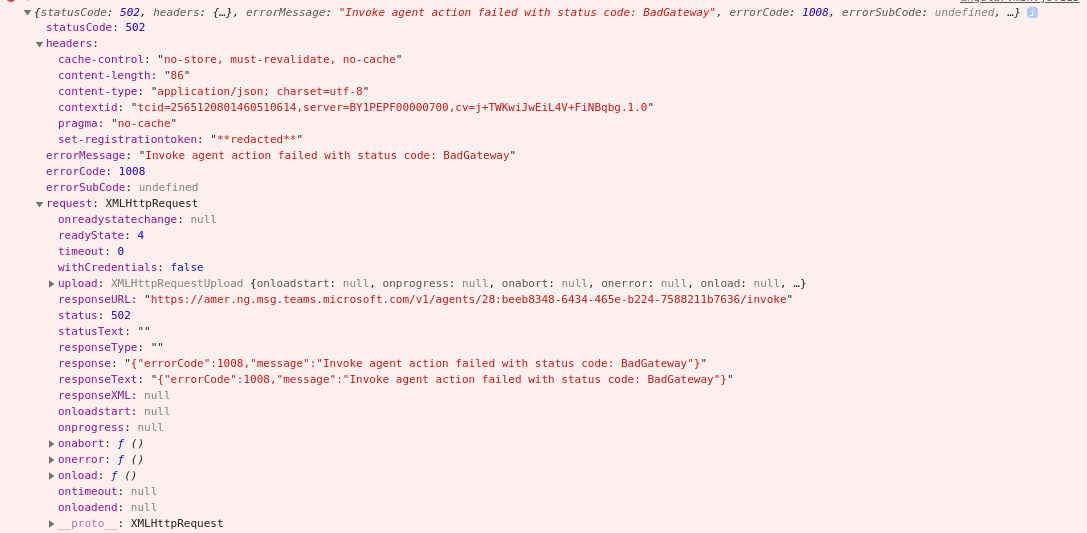
Without having changed anything - just clicking the same AdaptiveCard button a second and-or third time, I receive a request and behaves as expected. Any insights from the Azure team? I can provide more information if needed. Thank you!!
 VCJames
on 7 Apr 2020
VCJames
on 7 Apr 2020
Could you please share the Bot id and timestamp when it happened?
Wajeed-msft
on 9 Apr 2020
Could you please share the Bot id and timestamp when it happened?
Bot ID beeb8348-6434-465e-b224-7588211b7636
Timestamp I do not have but I wrote the post as it had happened.
I made the post at 4/7/20 at 11:25 AM EDT so very close to 4/7/2020 15:15 UTC
(and also a handful of other instances in the ~90 minutes prior to making the post)
Cheers
VCJames
on 10 Apr 2020
@VCJames - Do you have load balancer for your bot endpoint?
Wajeed-msft
on 15 Apr 2020
@Wajeed-msft behind a pfSense firewall there is an HAProxy LB, yes. There is only one bot endpoint.
VCJames
on 15 Apr 2020
Does traffic lands on the firewall before hitting the proxy?
Wajeed-msft
on 17 Apr 2020
@Wajeed-msft correct.
VCJames
on 17 Apr 2020
Excuse my naiveness, I haven't seen a solution or correction to this issue. I am currently posting an adaptive card in teams via power automated and having the same error. 'unable to reach app'. but it does seem to work intermittently. Can some educate me a little on what is happening and a solution to this issue? I am a novice user for these systems.
 eiland89
on 21 Apr 2020
eiland89
on 21 Apr 2020
Excuse my naiveness, I haven't seen a solution or correction to this issue. I am currently posting an adaptive card in teams via power automated and having the same error. 'unable to reach app'. but it does seem to work intermittently. Can some educate me a little on what is happening and a solution to this issue? I am a novice user for these systems.
I cannot speak for the Power platform, but in general you write an add-on for Microsoft Teams and in the file that is installed, you specify the "endpoint" (URL) for your add-on. When a Teams user interacts with the add-on (such as clicking certain buttons on an Adaptive Card, among many other things), Microsoft's servers will send an HTTP request to the endpoint URL in your app.
If your app does not respond properly, you will see "Unable to reach app." The problem I'm experiencing (and have seen a couple others report) is that I never receive that request, as far as I can see. Microsoft's servers fail to get in touch with me, to tell Microsoft what to show the user.
There's more to it, but that's the gist of it. User does something > Microsoft sends a web request > your app's backend replies > Teams shows that response to the user.
VCJames
on 22 Apr 2020
Thank you for the response.
eiland89
on 22 Apr 2020
@VCJames- We are investigating this issue further. Thanks for your patience.
Wajeed-msft
on 22 Apr 2020
I'm experiencing this problem when trying to use invoke in an adaptive card inside of a Teams App.
{
                    "type": "Action.Submit",
                    "title": "Invoke?",
                    "data": {
                        "msteams": {
                            "type": "invoke",
                            "title": "Option 1",
                            "height": "large",
                            "width": "large",
                            "url": "https://docs.microsoft.com/en-us/microsoftteams/platform/task-modules-and-cards/task-modules/task-modules-bots",
                            "value": {
                                "option": "opt1"
                            }
                        }
                    }
                }
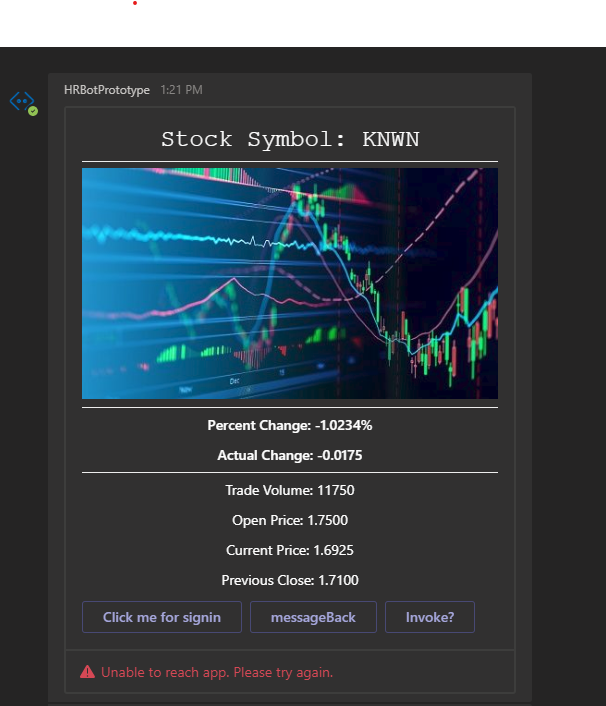
 TylerOdenthal
on 4 May 2020
TylerOdenthal
on 4 May 2020
I understand extending timeout is not feasible. But any workaround to hide the warning message? Any help would be much appreciated.
sree00718
on 6 May 2020
I'm experiencing the same problem when trying to use invoke in an adaptive card inside of a Teams App.
[BotCardService::onButtonClicked_messageback()] sendInvoke failed: {"statusCode":502,"headers":{"cache-control":"no-store, must-revalidate, no-cache","content-length":"86","content-type":"application/json; charset=utf-8","contextid":"tcid=4725083266554107397,server=SG2PEPF0000045A,cv=365yonodIEGqZHx4oDnz9w.1.0","pragma":"no-cache","set-registrationtoken":"redacted"},"errorMessage":"Error Code: 1008 ","errorCode":1008,"request":{}}
 priyakovelakaru
on 15 Jun 2020
priyakovelakaru
on 15 Jun 2020
@priyakovelakaru , Can you please share your bot id and timestamp?
 Subhasish-msft
on 18 Jun 2020
Subhasish-msft
on 18 Jun 2020
Different Bot, same problem. Task Module not connecting to external site. Maybe my button is configured wrong?
Bot was deployed using Microsoft Composer.
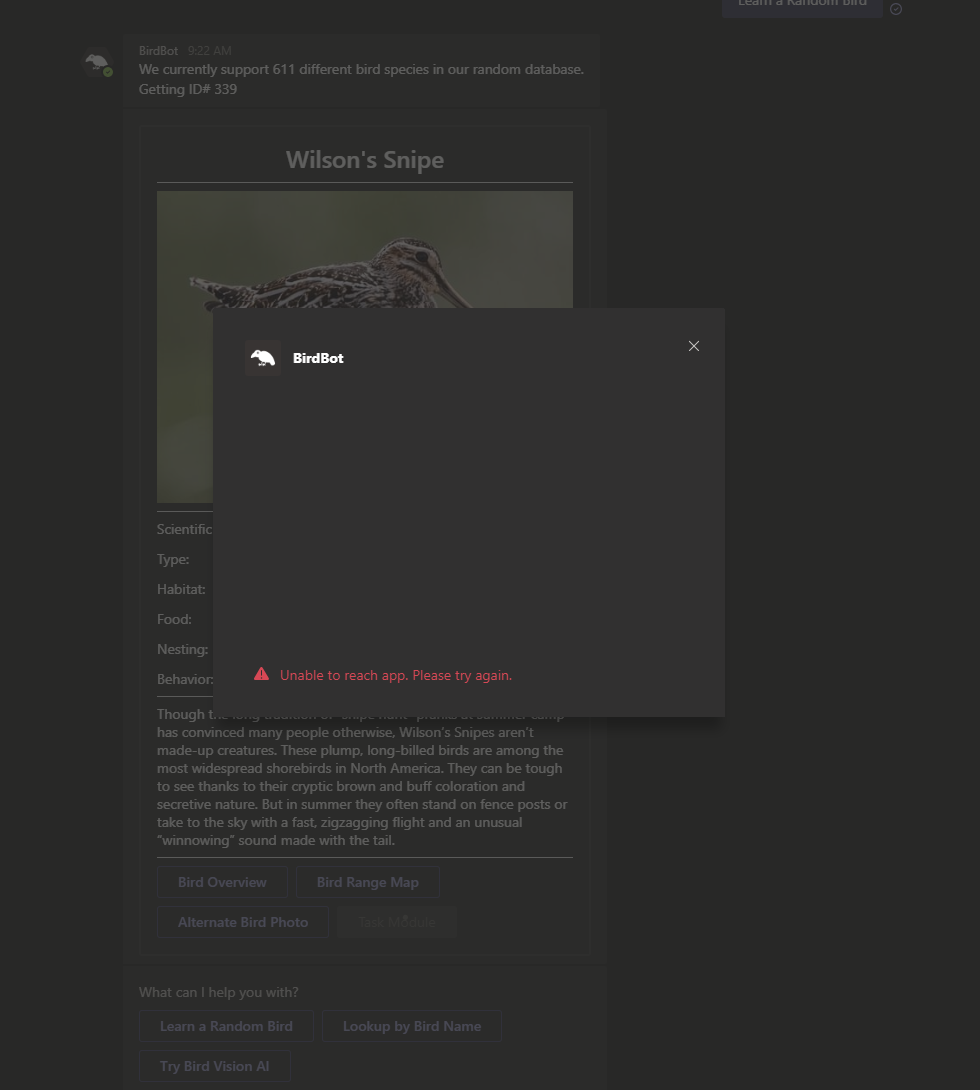
{
                    "type": "Action.Submit",
                    "title": "Task Module",
                    "data": {
                        "task": {
                            "type": "continue",
                            "value": {
                                "title": "${user.BirdData.content[0].birdName} - Overview",
                                "height": 500,
                                "width": "medium",
                                "url": "https://www.allaboutbirds.org/guide/Wilsons_Snipe/overview",
                                "fallbackUrl": "https://www.allaboutbirds.org/guide/Wilsons_Snipe/overview"
                            }
                        },
                        "MenuButton": "late",
                        "msteams": {
                            "type": "task/fetch"
                        }
                    }
                }
Domain is in valid domains manifest.
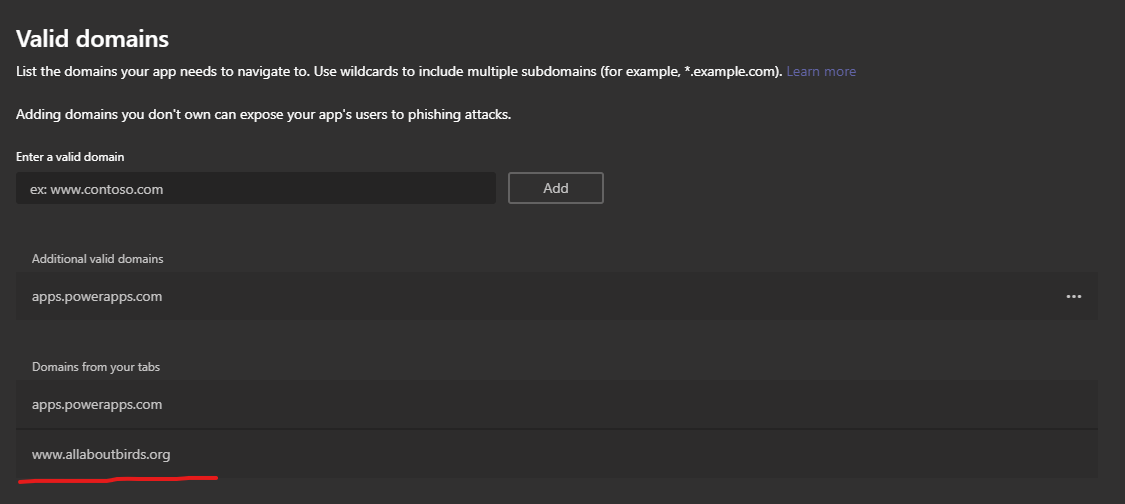
You can have the app, I just really want to add task modules to my bots.
BirdBot (6).zip
TylerOdenthal
on 3 Jul 2020
Could you please change the valid domains to _allaboutbirds.org_ and check? If you are still facing the issue, please share the steps on how I can get to card with Task Module.
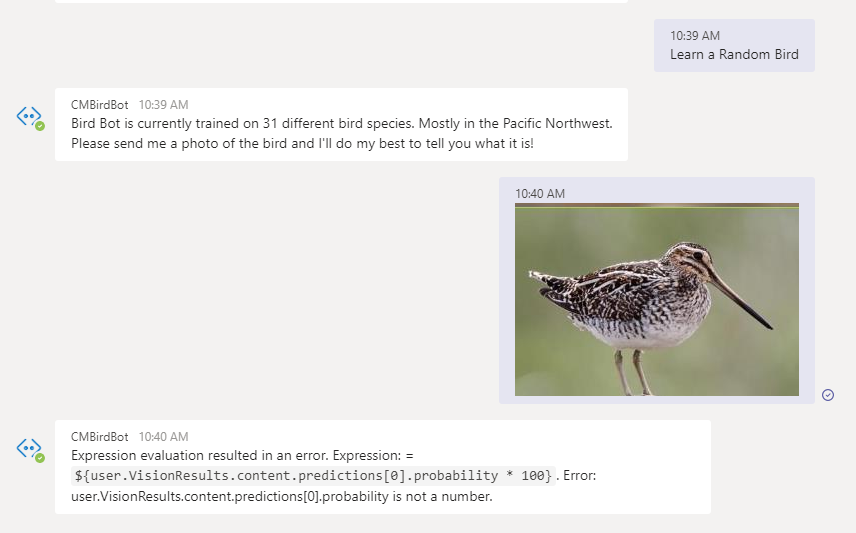
Wajeed-msft
on 6 Jul 2020
@VCJames,We saw the logs and the requests are failing with 503 response. Do you have any telemetry collected on the firewall that you could check? Do you see the same issue when talking with the bot from web chat?
Subhasish-msft
on 6 Jul 2020
@Wajeed-msft
If you have the BirdBot app installed which it looks like you do, just type "menu" and then tap the "Learn a Random Bird" button to get to the "TasK Module" button.
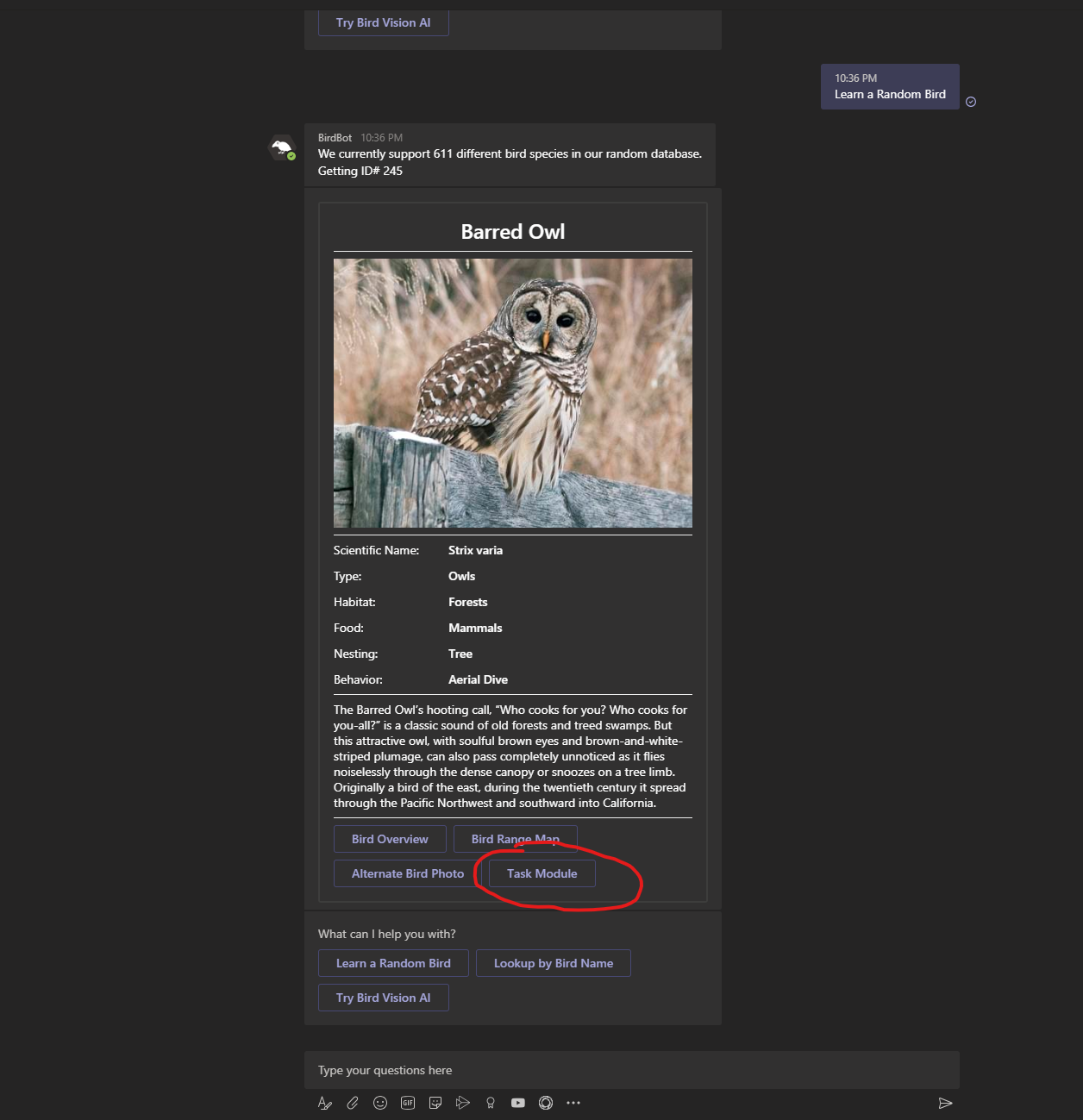
Domain change did not fix the issue.

I do not have any telemetry on the issue. Teams web chat also has same issue.
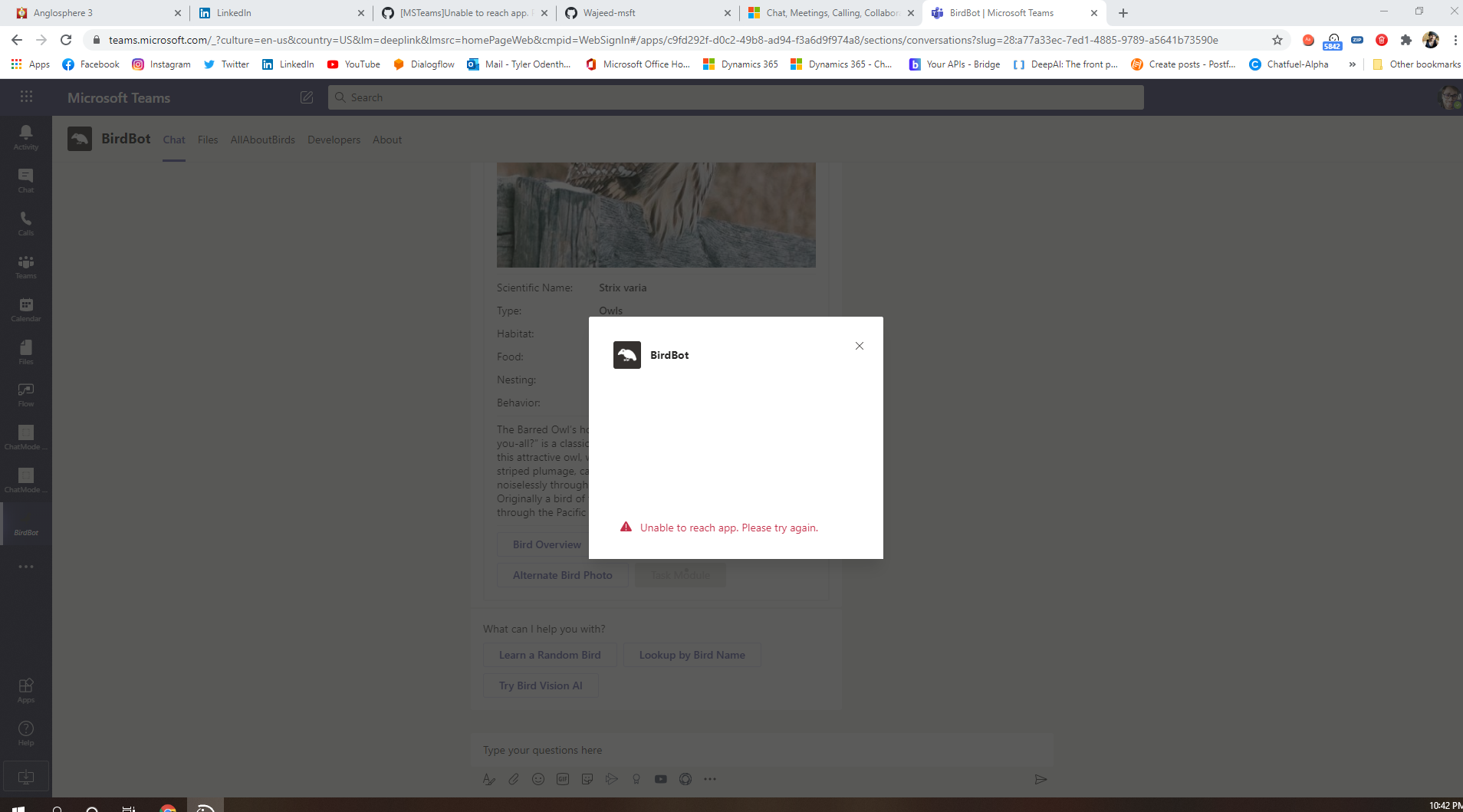
TylerOdenthal
on 6 Jul 2020
You can also access the task module button by sending it this photo at any time in the bot. There should be interruptions built in.
Best of luck!
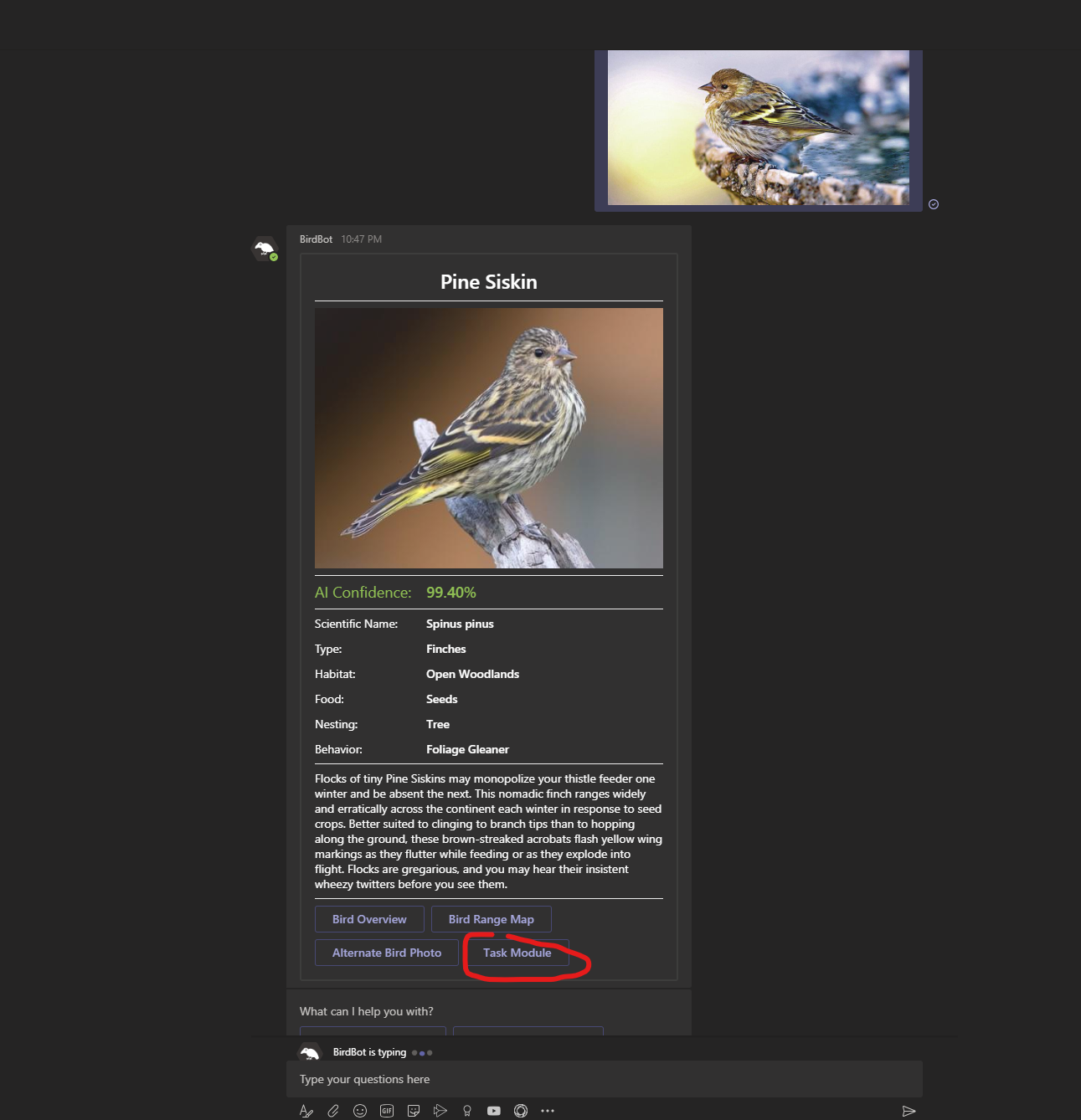
Bird Photo

TylerOdenthal
on 6 Jul 2020
Got it, thanks for details. I could repro it using your app. I see this error in console logs: _Bot returned unsuccessful status code NotImplemented_.
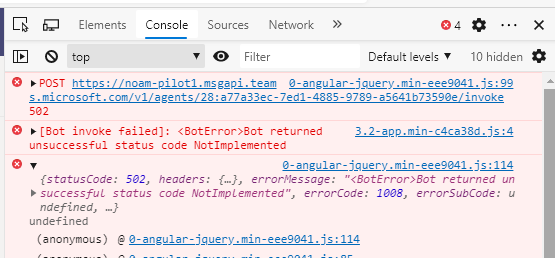
Could you please confirm if you have implemented OnTeamsTaskModuleFetchAsync in your code? Is request reaching to your bot endpoint? Your can debug this at your end by hosting it locally using ngrok.
Please let me know if you are already done this.
Wajeed-msft
on 6 Jul 2020
I'll look into the OnTeamsTaskModuleFetchAsync snippit in the code and run the Ngrok later today. This was Andrew's response since I made the bot in Microsoft Composer, not from scratch. This is from our email thread @Wajeed-msft
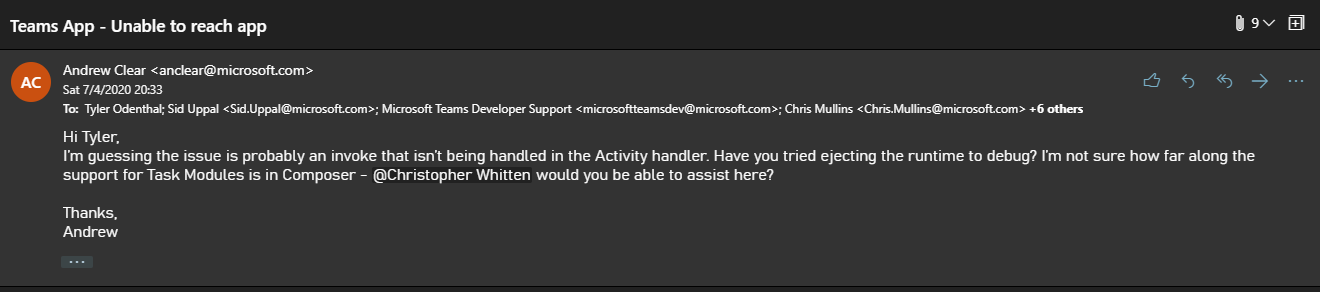
TylerOdenthal
on 6 Jul 2020
Had a discussion with Microsoft Teams App Store, and we decided just to not use Task Modules in order to pass deployment requirements.
I'll add Task Modules back into my bots when they are working with Composer and PVA.
Best of luck!
TylerOdenthal
on 9 Jul 2020
The below are the changes that we have done a part of the stabilization
1.Migration to .Net core 2.2 to 3.1
- we have attached a new cosmos DB
we are using Adaptive card version of "1.0"
We started to keep on getting "Unable to reach".
Not sure what is the issue for this.
It happening in Desktop not in web.
Please help.
Chekrii
on 10 Jul 2020
@Chekrii - Could you please send out an email to Microsoft Teams developer support so that I can setup a call to check this?
Wajeed-msft
on 10 Jul 2020
@shalinijoshi19 , i am facing same issue in V4 Task module.

 upendra1588
on 22 Jul 2020
upendra1588
on 22 Jul 2020
@upendra1588 - Looking into this.
Wajeed-msft
on 22 Jul 2020
I am also getting the same error when using Power Automate - For a selected message (MS Teams connector). When I run the task by clicking on three dots of a message in Teams - More actions - Select my Flow - 50% of the time it works and 50% of the time I get the same error - "Unable to reach app, please try again". I have tried it from a different environment too and got the same result. There is no run in PA or log. This seems to be a bug from MS Teams end. If there was something wrong, it wouldn't have worked on the same message after retrying. Something is wrong with this version of Adaptive Card compatibility with MS Teams or the other way around. Please fix this ASAP!
 helloanurag
on 30 Jul 2020
helloanurag
on 30 Jul 2020
good news about this issue?
 ThorHuno
on 7 Aug 2020
ThorHuno
on 7 Aug 2020
There are two sets of issues on this thread:
- Bot is taking longer than 15 seconds to respond and want the timeout increased or show specific error.
- The request is not being received by the bot.
For both of these we are looking to add more errors logs on client side, also more specific error message in UI. I'll share further updates by next week end (14 Aug).
Meanwhile, if you could provide the Bot Id and Timestamp for failed request I'll take a look at logs. You can also send out an email to Microsoft Teams Developer Alias so that we can have quick call to check it.
Wajeed-msft
on 7 Aug 2020
Bot ID: 18a91f98-a3e5-40b4-bf62-743b8caae574
Timestamp: 8/6/2020 10:20 UTC (approximately)
There are two sets of issues on this thread:
1. Bot is taking longer than 15 seconds to respond and want the timeout increased or show specific error.

2. The request is not being received by the bot.
For both of these we are looking to add more errors logs on client side, also more specific error message in UI. I'll share further updates by next week end (14 Aug).
Meanwhile, if you could provide the Bot Id and Timestamp for failed request I'll take a look at logs. You can also send out an email to Microsoft Teams Developer Alias so that we can have quick call to check it.
ThorHuno
on 7 Aug 2020
@Wajeed-msft
I have reported this on that alias too. This seems ot be an issue with Adaptive card compatibility with Flow/Teams. It's not specific to my Flow or Card values. Me and my colleagues have been testing this on our account by creating simple cards with simple logic for testing and we get this error 20% of the times randomly. I have gone through the documentation and it seems that something on your side is broken.
P.S. The reqeust is being sent one at a time ofcourse!
Thanks again!
helloanurag
on 9 Aug 2020
@upendra1588 - i am facing same issue in V4 Task module.
This issue is fixed. @upendra1588 was using Bot Id to start the conversation instead of creating App Manifest. Any Teams-specific functionality you've added to your bot will not work when using Bot Id to start the conversation.
@helloanurag - Looking into your issue.
Wajeed-msft
on 11 Aug 2020
Bot ID: 18a91f98-a3e5-40b4-bf62-743b8caae574
Timestamp: 8/6/2020 10:20 UTC (approximately)
Hi @ThorHuno - Can we get on call to check this issue? Please send out an email to Microsoft Teams Developer Alias.
Wajeed-msft
on 11 Aug 2020
@upendra1588 - i am facing same issue in V4 Task module.
This issue is fixed. @upendra1588 was using Bot Id to start the conversation instead of creating App Manifest. Any Teams-specific functionality you've added to your bot will not work when using Bot Id to start the conversation.
@helloanurag - Looking into your issue.
@Wajeed-msft That is right, I am using Bot id for conversation, as suggested over call, it is not working on different tenant.
I shown repo steps in call, this is a limitation of task module. is there any possibilities to allow Task module for multiple tenant.
upendra1588
on 11 Aug 2020
@upendra1588 - Talking to your bot by Id is intended for basic testing purposes only. Any Teams-specific functionality you've added to your bot will not work. For Task Module to work, you need to create App Manifest and sideload you app.
Wajeed-msft
on 12 Aug 2020
Hi @ThorHuno - Can we get on call to check this issue? Please send out an email to Microsoft Teams Developer Alias.
@ThorHuno - Did you get chance for this?
@helloanurag - Could you please share the timestamp for the issue? Your flow worked fine me.
Wajeed-msft
on 14 Aug 2020
Hello @Chekrii! We need some additional information from you to process this issue. Please see discussion comments above. Thanks!
msftbot[bot]
on 14 Aug 2020
@Wajeed-msft The last time when the error came up was at 9:47 AM Pacific time on 13 Aug, 2020. Thanks again!
helloanurag
on 14 Aug 2020
@helloanurag - In case of Messaging Extension Task Module scenario we are adding more error details in Console to debug this better.
@ThorHuno - Can we get on a call to check this?
@upendra1588 - Seems like your issue is fixed after manifest. Please let us know if you are still facing this.
Please let me know if anyone else if still facing this issue, if not I'll close this issue.
Wajeed-msft
on 14 Sep 2020
No, Problem is still there, clients don't want to install manifest files
in each tenant. It should deploy in one tenant and work for multiple
tenant as it is working without task module in production.
Thanks
Upendra
On Mon, Sep 14, 2020 at 11:34 AM Wajeed-msft notifications@github.com
wrote:
@helloanurag https://github.com/helloanurag - In case of Messaging
Extension Task Module scenario
https://github.com/MicrosoftDocs/msteams-docs/issues/2062 we are adding
more error details in Console to debug this better.@ThorHuno https://github.com/ThorHuno - Can we get on a call to check
this
https://github.com/microsoft/AdaptiveCards/issues/3701#issuecomment-671735775
?@upendra1588 https://github.com/upendra1588 - Seems like your issue is
fixed after manifest. Please let us know if you are still facing this.Please let me know if anyone else if still facing this issue, if not I'll
close this issue.—
You are receiving this because you were mentioned.
Reply to this email directly, view it on GitHub
https://github.com/microsoft/AdaptiveCards/issues/3701#issuecomment-691832568,
or unsubscribe
https://github.com/notifications/unsubscribe-auth/ADLLW7NCXLAKTYO4LMO4N5DSFWXAFANCNFSM4KDASMAA
.
upendra1588
on 14 Sep 2020
@upendra1588 - Manifest contains a list of valid domains for websites the app expects to load within the Teams client. This is applicable for Task Module as well.
Talking to your bot by Id is intended for basic testing purposes only. Any Teams-specific functionality you've added to your bot will not work.
This is by design and there are no plans to change this behavior.
Wajeed-msft
on 15 Sep 2020
I also faced the 'unable to reach app'-issue when sending adaptive card to teams from power automate. Turns out i had to have Exchange Online Plan 1 on the user who was owner of flow. I guess it uses exchange for the connection between the flow and teams but idk
 avican
on 15 Sep 2020
avican
on 15 Sep 2020
@upendra1588 - Manifest contains a list of valid domains for websites the app expects to load within the Teams client. This is applicable for Task Module as well.
Talking to your bot by Id is intended for basic testing purposes only. Any Teams-specific functionality you've added to your bot will not work.
This is by design and there are no plans to change this behavior.
Closing this out at this point per response above from @Wajeed-msft.
shalinijoshi19
on 21 Sep 2020
Hello,
I have similar issue that every one has posted here. I have adaptive card which calls salesforce API , generate SF case and return SF case URL, which we bind to adaptive card so user can click and navigate to new case on salesforce.
Creating SF case takes about 15 seconds. Teams shows "Unable to reach app. Please try again." when user click on "Create". User will receive final card with SF URL in it after 16 seconds.
I am using typing indicator to let the end user know that BOT is typing instead of showing them no activity at all. In my case, Card shows above message along with typing indicator and this will create more confusion for end user.
Are there any ways to hide this error message? We are good up to 30 seconds timing which I can handle using Show typing indicator code but I just want to get rid of that RED error message.
 pateljay2
on 29 Oct 2020
pateljay2
on 29 Oct 2020
@shalinijoshi19 Can someone take a look into my issue?
pateljay2
on 2 Nov 2020
Any update? I'm getting the error "Something went wrong. Please try again.", using the sample app TeamsTaskModule... But the app works well locally, and the problem occurs only when I publish to Azure. Can anyone give some tip/solution? Thanks in advance.
 carlosfcmendes
on 10 Dec 2020
carlosfcmendes
on 10 Dec 2020
Related issues
 dipja
·
6Comments
dipja
·
6Comments
 sadviramana
·
4Comments
sadviramana
·
4Comments
 Har1pr1ya
·
6Comments
Har1pr1ya
·
6Comments
 lindach167
·
3Comments
lindach167
·
3Comments
 schemburkar
·
4Comments
schemburkar
·
4Comments
Most helpful comment
@VCJames- We are investigating this issue further. Thanks for your patience.