Activitywatch: Can't start aw-qt/aw-server/etc on Linux (v0.9)
After updating to v0.9 I've been unable to start aw-qt, the server, or any of the watchers.
[2255892] Error loading Python lib '/usr/bin/libpython3.6m.so.1.0': dlopen: /usr/bin/libpython3.6m.so.1.0: cannot open shared object file: No such file or directory

Sucks extra much because I just updated the AUR package to v0.9 before testing...
 ErikBjare
All 30 comments
If I run aw-qt directly from the directory (/opt/activitywatch) like so: ./aw-qt it works fine, but for some reason it no longer looks in its own directory first for libraries.
ErikBjare
on 19 Mar 2020
This does really suck...
I manually re-downloaded the releaze .zip for macOS, confirmed to not reproduce on this platform.
Could this be related to the python version? I'm looking into what happened too.
@ErikBjare Can you confirm the libraries in /opt/activitywatch have correct file permissions?
Does the error message differ if you don't give the --testing flag?
 xylix
on 19 Mar 2020
xylix
on 19 Mar 2020
after upgrading to 0.9, I ran aw-qt a few times, but the icon in tray did not appear. It turned out that the service works but there is no icon in tray.
 qcol
on 19 Mar 2020
qcol
on 19 Mar 2020
Does the error message differ if you don't give the --testing flag?
Nope.
Can you confirm the libraries in /opt/activitywatch have correct file permissions?
Looks fine to me.
after upgrading to 0.9, I ran aw-qt a few times, but the icon in tray did not appear. It turned out that the service works but there is no icon in tray.
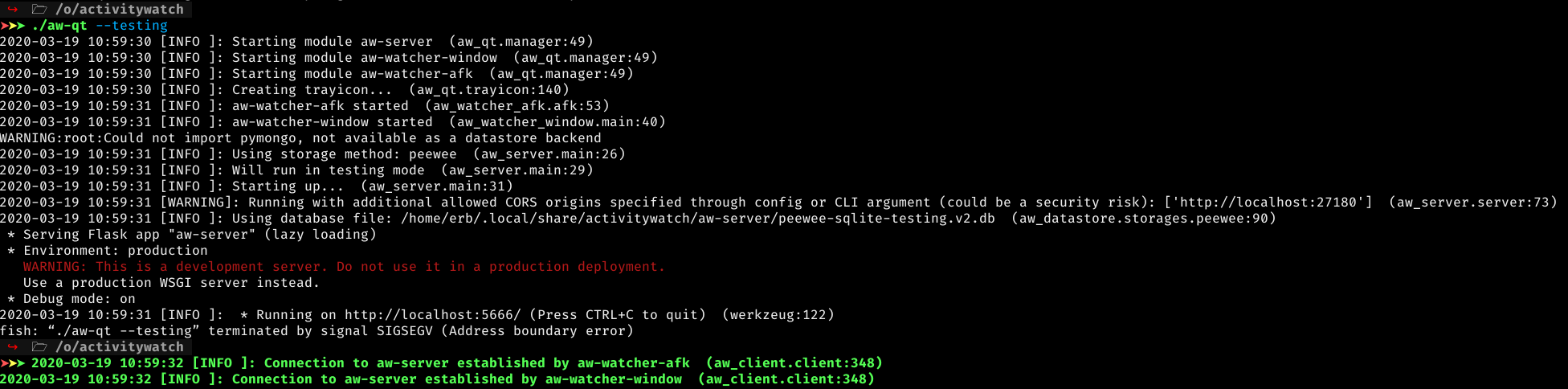
It seems that if you run ./aw-qt the process starts things correctly then suddenly gives a SIGSEGV, probably when it tries to initialize the tray icon.
ErikBjare
on 19 Mar 2020
One major thing that changed between v0.8.4 and v0.9.0 was that PyInstaller was updated from 3.5 to 3.6, maybe that's the culprit?
ErikBjare
on 19 Mar 2020
Yeah actually didn't we go all the way to pyinstaller's develop version to support the macOS combined .app?
xylix
on 19 Mar 2020
No, that's only in the macOS build (see the Makefile).
ErikBjare
on 19 Mar 2020
I can actually find some other issues with the exact same error message on completely different contexts https://www.google.com/search?client=firefox-b-d&q=%5B10834%5D+Error+loading+Python+lib+%27%2Fusr%2Fbin%2Flibpython3.6m.so.1.0%27%3A+dlopen%3A+%2Fusr%2Fbin%2Flibpython3.6m.so.1.0%3A+cannot+open+shared+object+file%3A+No+such+file+or+directory . ~Is it possible arch updated away from some python 3.6 lib between the last version and this one?~ (no actually then the problem arising with this upgrade wouldn't make any sense)
xylix
on 19 Mar 2020
It seems that if you run
./aw-qtthe process starts things correctly then suddenly gives a SIGSEGV, probably when it tries to initialize the tray icon.
when run with --testing flag:
2020-03-19 11:39:28 [INFO ]: Creating trayicon...  (aw_qt.trayicon:140)
Naruszenie ochrony pamięci (zrzut pamięci)
(Memory protection violation (memory dump) in translation)
qcol
on 19 Mar 2020
@ErikBjare on my arch machine, re-building with pyinstaller 3.6 gives this same issue. However trying to make package with manually installed pyinstaller 3.5 gives this error https://gist.github.com/xylix/8a4ad4bdfaa1c02a2a02f691c20148fb.
Were there some required compatibility changes for the pyinstaller 3.6 upgrade or has this happened by accident?
xylix
on 19 Mar 2020
@xylix That error is due to PyInstaller 3.5 not supporting Python 3.8 which is used on Arch.
I'm curious, could you try running make build DEV=true and then run make package again? That uses poetry instead, which might use a different package versions...
I was successfully able to build with it and the dev branch of PyInstaller (which supports Python 3.8)
ErikBjare
on 19 Mar 2020
Alright, so I rebuilt with just make build and now the build fails. So I guess we should just never do pip install . in any of the Makefiles.
ErikBjare
on 19 Mar 2020
For me too make build DEV=true fails with the same error as earlier.
xylix
on 19 Mar 2020
That's weird. I'll try to reproduce the build that I got working.
ErikBjare
on 19 Mar 2020
I'm not reallyy sure how but it seems poetry isnt forcing me to use pyinstaller 3.6. Manually pip installing pyinstaller 3.6 works, as does uninstalling and installing it back. Then the build works, it just has the same issues as the aur version in /opt/
xylix
on 19 Mar 2020
Apparently poetry picks up a PyInstaller 3.5 in aw-watcher-window, I'll fix this.
ErikBjare
on 19 Mar 2020
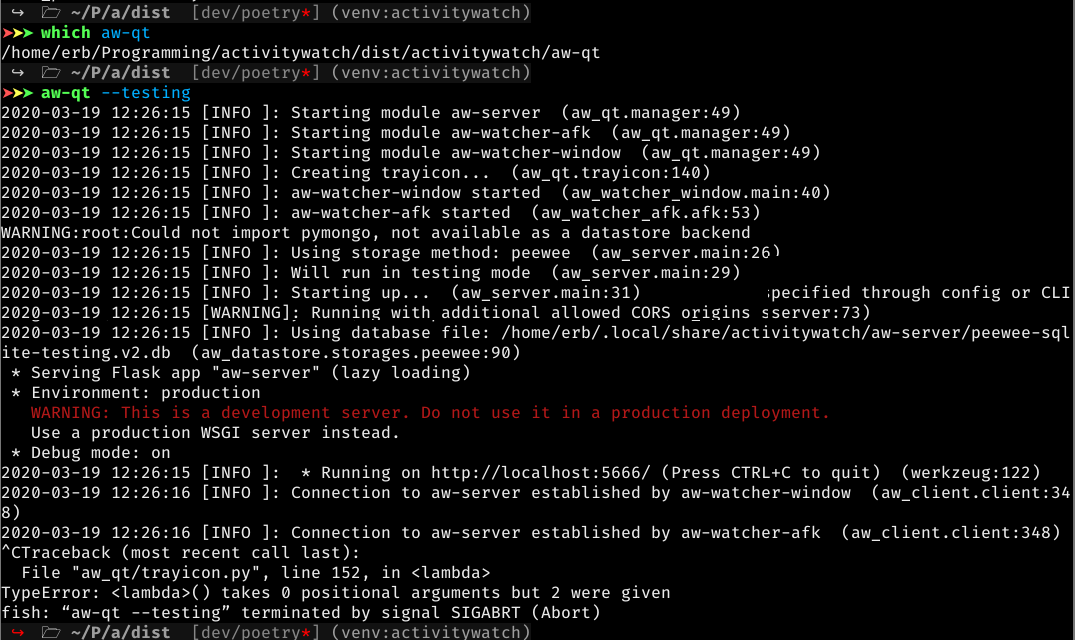
So I'm able to build it and it seems to work fine with PyInstaller develop and using poetry/make build DEV=true. aw-qt has a bug though that makes it exit uncleanly (leaving modules running) when you exit with Ctrl+C:
ErikBjare
on 19 Mar 2020
Travis does indeed not respect the locked versions when pip install . is used:
Successfully installed PyQt5-sip-12.7.1 pyqt5-5.14.1
My build with make build DEV=true has PyQt5 v5.13.2, as it should.
I'm working on fixing it all in https://github.com/ActivityWatch/activitywatch/pull/379
ErikBjare
on 19 Mar 2020
after upgrading to 0.9, I ran aw-qt a few times, but the icon in tray did not appear. It turned out that the service works but there is no icon in tray.
same here on Ubuntu 19.10
 sojusnik
on 19 Mar 2020
sojusnik
on 19 Mar 2020
Same behavior in Manjaro, installed from AUR. Autostart not working after update to v0.9.0. I had to add manually the aw-qt file in my startup list. Also they tray icon never shows up.
Cheers!
 Chuhtra
on 20 Mar 2020
Chuhtra
on 20 Mar 2020
Thought I had fixed it in #379 and the just-released v0.9.1, but it appears it only fixed the Error loading Python lib '/usr/bin/libpython3.6m.so.1.0'.
aw-qt starts modules just fine, but then crashes when it tries to create the tray icon. I have no idea why/how this happens. My locally built builds work just fine... so I'm at odds with what could be going wrong. It's hard to debug SIGSEGV's... but since it fails around the time it should be creating the tray icon we at least know that it's something related to that.
ErikBjare
on 21 Mar 2020
Could the release number bump have broken something in the QT resources files?
I did change change aroudn stuff in aw-qt for this release but also it's working on other platforms so this is pretty weird.
xylix
on 22 Mar 2020
No, this is definitely Travis/PyInstaller related since my local builds work just fine. I'm going to try and downgrade the PyInstaller version for non-macOS builds and see if that fixes it.
ErikBjare
on 22 Mar 2020
Pushed a PyInstaller downgrade to v3.5 (that v0.8.4 was using) in https://github.com/ActivityWatch/activitywatch/commit/8ac35bca0595bb7c7c9a746268803a73ce7af673. We'll see if that fixes it.
ErikBjare
on 22 Mar 2020
That did not fix it, still SIGSEGV. Now I have no idea what it could be.
ErikBjare
on 22 Mar 2020
0.9.1 - still no tray icon
'/home/user/Pobrane/activitywatch/aw-qt'
2020-03-22 10:26:26 [INFO ]: Starting module aw-server  (aw_qt.manager:49)
2020-03-22 10:26:26 [INFO ]: Starting module aw-watcher-window  (aw_qt.manager:49)
2020-03-22 10:26:26 [INFO ]: Starting module aw-watcher-afk  (aw_qt.manager:49)
2020-03-22 10:26:26 [INFO ]: Creating trayicon...  (aw_qt.trayicon:140)
2020-03-22 10:26:27 [INFO ]: aw-watcher-window started  (aw_watcher_window.main:40)
2020-03-22 10:26:27 [INFO ]: aw-watcher-afk started  (aw_watcher_afk.afk:53)
Naruszenie ochrony pamięci (zrzut pamięci)

WARNING:root:Could not import pymongo, not available as a datastore backend
2020-03-22 10:26:27 [INFO ]: Using storage method: peewee  (aw_server.main:26)
2020-03-22 10:26:27 [INFO ]: Starting up...  (aw_server.main:31)
2020-03-22 10:26:27 [INFO ]: Using database file: /home/user/.local/share/activitywatch/aw-server/peewee-sqlite.v2.db  (aw_datastore.storages.peewee:90)
 * Serving Flask app "aw-server" (lazy loading)
 * Environment: production
   WARNING: This is a development server. Do not use it in a production deployment.
   Use a production WSGI server instead.
 * Debug mode: off
2020-03-22 10:26:27 [INFO ]:  * Running on http://localhost:5600/ (Press CTRL+C to quit)  (werkzeug:122)
2020-03-22 10:26:28 [INFO ]: Connection to aw-server established by aw-watcher-window  (aw_client.client:348)
2020-03-22 10:26:28 [INFO ]: Connection to aw-server established by aw-watcher-afk  (aw_client.client:348)
2020-03-22 10:27:27 [INFO ]: 404 (127.0.0.1): GET /img/icons/android-chrome-192x192.png HTTP/1.1  (flask:25)
Alright, I found another potential culprit.
It looks like we actually used PyQt5 v5.10.1 in v0.8.4 and not the v5.13.2 that I locked in aw-qt. Fixing now and pushing to master, we'll see if the artifact works.
ErikBjare
on 22 Mar 2020
That seems to have fixed it, now just need to fix a few other things that broke CI on Windows and macOS and then we're ready for a release that actually fixes things.
ErikBjare
on 22 Mar 2020
Finally fixed in the newly released v0.9.2, enjoy!
Note: if you downloaded v0.9.2 in the first hour you might have an old build (see #389 for details), redownload and it should work.
ErikBjare
on 23 Mar 2020
I still have this in v0.9.2, which I've just downloaded. I am using Debian Buster with KDE. In aw-qt.desktop, I changed Exec=aw-qt, to Exec=/home/myusername/soft/activitywatch/aw-qt, now it works.
 philip-bl
on 5 Sep 2020
philip-bl
on 5 Sep 2020
Related issues
ErikBjare
·
10Comments
ErikBjare
·
9Comments
ErikBjare
·
6Comments
 bawasi
·
8Comments
ErikBjare
·
4Comments
bawasi
·
8Comments
ErikBjare
·
4Comments
Most helpful comment
That seems to have fixed it, now just need to fix a few other things that broke CI on Windows and macOS and then we're ready for a release that actually fixes things.