Activitywatch: Fails to get active window on macOS
Mac OSX 10.12.6 Sierra, running all modules + aw-watcher-spotify + aw-watcher-web
Python 3.6.3 :: Anaconda, Inc.
I added the last heartbeat for debugging purposes
Inserted:{'id': 1148, 'timestamp': datetime.datetime(2018, 9, 11, 6, 15, 45, 412000, tzinfo=datetime.timezone.utc), 'duration': datetime.timedelta(0), 'data': {'url': 'https://chrome.google.com/webstore/detail/chrome-better-history/aadbaagbanfijdnflkhepgjmhlpppbad', 'title': 'Chrome Better History - Chrome Web Store', 'audible': False, 'incognito': False}}  (aw_datastore.datastore.Bucket:120)
/Documents/activitywatch/aw_watcher_window/printAppTitle.scpt: execution error: System Events got an error: Can’t get application process 1 whose frontmost = true. Invalid index. (-1719)
2018-09-11 14:26:19 [ERROR]: Exception thrown while trying to get active window: list index out of range  (aw_watcher_window.main:68)
Traceback (most recent call last):
  File "aw_watcher_window/main.py", line 65, in heartbeat_loop
  File "aw_watcher_window/lib.py", line 46, in get_current_window
  File "aw_watcher_window/lib.py", line 23, in get_current_window_macos
  File "aw_watcher_window/macos.py", line 17, in getTitle
IndexError: list index out of range
/Users/virenmohindra/Documents/activitywatch/aw_watcher_window/printAppTitle.scpt: execution error: System Events got an error: Can’t get application process 1 whose frontmost = true. Invalid index. (-1719)
2018-09-11 15:10:08 [ERROR]: Exception thrown while trying to get active window: list index out of range  (aw_watcher_window.main:68)
and then the same error keeps on getting repeated --
../Documents/activitywatch/aw_watcher_window/printAppTitle.scpt: execution error: sh: -c: lish: -c: line 1: syntax error: unexpected end of file (2)
2018-09-11 22:49:23 [ERROR]: Exception thrown while trying to get active window: list index out of range  (aw_watcher_window.main:68)
Please let me know if you need the log files
 VirenMohindra
All 21 comments
I don't see a crash, do you mean that aw-watcher-window isn't logging properly? Have you given the permission needed on macOS? There should have been a prompt when you first started aw-qt, has been what I've heard anyway (we have done terribly little hallway testing with macOS).
 ErikBjare
on 11 Sep 2018
ErikBjare
on 11 Sep 2018
Sorry, I meant logging. I saw the traceback and IndexError: list index out of range errors and assumed a crash.
I saw and received the prompt and accepted it - I've allowed for accessibility permissions for the terminal.
VirenMohindra
on 11 Sep 2018
That's weird then, can you try running the ./activitywatch/aw_watcher_window/printAppTitle.scpt yourself from the terminal and paste some output for me?
ErikBjare
on 11 Sep 2018
Full logfiles would also be nice (we don't see many for macOS). Make sure there's nothing sensitive in there (and tell us if there is).
ErikBjare
on 11 Sep 2018
Not able to run ./, I get a permission denied - I'll have to use osascript, not sure if thats going to be a problem.
When running Mac$ osascript printAppTitle.scpt
I get
"Terminal","aw_watcher_window — -bash — 92×62"
Also started receiving this error on refreshing from the dashboard -
2018-09-12 19:35:12 [WARNING]: Gap was of negative duration (-0.003s). This error will only show once per batch. (aw_transform.flood:28)
2018-09-12 19:35:12 [WARNING]: Gap was of negative duration (-0.003s). This error will only show once per batch. (aw_transform.flood:28)
2018-09-12 19:35:12 [WARNING]: Gap was of negative duration (-0.003s). This error will only show once per batch. (aw_transform.flood:28)
2018-09-12 19:35:22 [WARNING]: Gap was of negative duration (-203.199987s). This error will only show once per batch. (aw_transform.flood:28)
2018-09-12 19:35:22 [WARNING]: Gap was of negative duration (-0.003s). This error will only show once per batch. (aw_transform.flood:28)
2018-09-12 19:35:22 [WARNING]: Gap was of negative duration (-0.003s). This error will only show once per batch. (aw_transform.flood:28)
2018-09-12 19:35:22 [WARNING]: Gap was of negative duration (-0.003s). This error will only show once per batch. (aw_transform.flood:28)
Logs, from ~/Library/Logs/activitywatch/ - https://www.dropbox.com/s/hf2z3q75urba1lp/activitywatch.zip?dl=0
Didn't have to change much, except a few urls, the username, and my hostname which I purged from the log files.
Please let me know if you need anything else.
VirenMohindra
on 12 Sep 2018
@VirenMohindra Sorry but the logs are not enough, you have to capture stdout/stderr aswell (such as starting it with "aw-watcher-window &> ~/aw-watcher-window.log" or just starting it in the terminal and copying the output. Without stdout/stderr we don't get the actual tracebacks which are essential for crashes as well as additional info of some other errors i saw in your aw-watcher-window logs.
EDIT: Ah. just saw this https://github.com/ActivityWatch/activitywatch/issues/230
 johan-bjareholt
on 12 Sep 2018
johan-bjareholt
on 12 Sep 2018
Started 2018-09-12 21:32:27, here is the resulting output after creating a new file aw_window.log and running $aw-qt/ and $./aw-watcher-window &>aw_window.log in two separate windows:
2018-09-12 21:31:51 [INFO ]: aw-watcher-window started (aw_watcher_window.main:42)
2018-09-12 21:31:52 [WARNING]: Not connected to server, 0 requests in queue (aw_client.client:366)
2018-09-12 21:32:02 [WARNING]: Not connected to server, 2 requests in queue (aw_client.client:366)
2018-09-12 21:32:12 [WARNING]: Not connected to server, 5 requests in queue (aw_client.client:366)
2018-09-12 21:32:22 [WARNING]: Not connected to server, 7 requests in queue (aw_client.client:366)
2018-09-12 21:32:32 [INFO ]: Connection to aw-server established by aw-watcher-window (aw_client.client:334)
osascript: couldn't save changes to script /Applications/activitywatch/aw_watcher_window/printAppTitle.scpt: permissions error (on file open)
I have the same issue, is there already a solution for it? I am using macOS Mojave and ActivityWatch version: v0.8.0b7
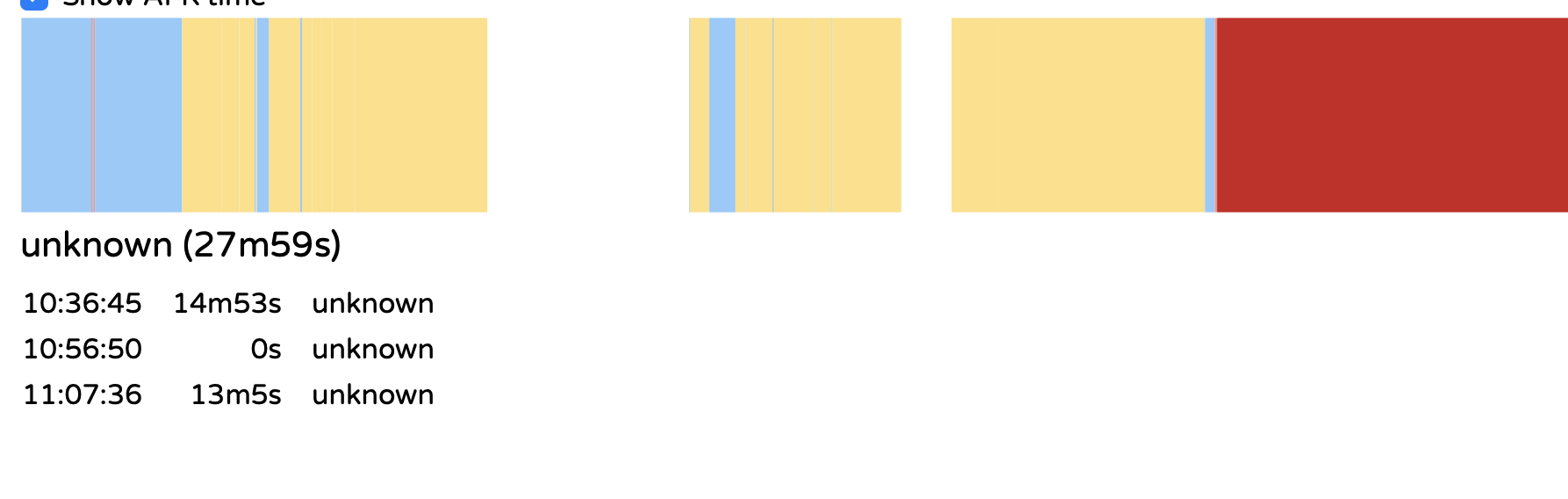
I get unknown activity data.
Logs:
Log:
2018-11-29 20:46:07 [INFO ]: Connection to aw-server established by aw-watcher-window (aw_client.client:344)
2018-11-30 10:36:46 [ERROR]: Exception thrown while trying to get active window: list index out of range (aw_watcher_window.main:68)
2018-11-30 10:36:47 [ERROR]: Exception thrown while trying to get active window: list index out of range (aw_watcher_window.main:68)
2018-11-30 10:36:48 [ERROR]: Exception thrown while trying to get active window: list index out of range (aw_watcher_window.main:68)
2018-11-30 10:36:49 [ERROR]: Exception thrown while trying to get active window: list index out of range (aw_watcher_window.main:68)
2018-11-30 10:36:50 [ERROR]: Exception thrown while trying to get active window: list index out of range (aw_watcher_window.main:68)
osascript: /Users/patrick/Downloads/activitywatch/aw_watcher_window/printAppTitle.scpt: No such file or directory
2018-11-30 11:20:05 [ERROR]: Exception thrown while trying to get active window: list index out of range (aw_watcher_window.main:68)
Traceback (most recent call last):
File "aw_watcher_window/main.py", line 65, in heartbeat_loop
File "aw_watcher_window/lib.py", line 46, in get_current_window
File "aw_watcher_window/lib.py", line 23, in get_current_window_macos
File "aw_watcher_window/macos.py", line 17, in getTitle
IndexError: list index out of range
 Patrick3131
on 30 Nov 2018
Patrick3131
on 30 Nov 2018
@Patrick3131 You seem to have a different cause of the error as suggested by:
osascript: /Users/patrick/Downloads/activitywatch/aw_watcher_window/printAppTitle.scpt: No such file or directory
That file is missing, can you check if it's in the zip you downloaded? It should be.
ErikBjare
on 30 Nov 2018
I checked, the file is there but it keeps happening again. Anything I can try? Should I open a different Issue?
Patrick3131
on 1 Dec 2018
@Patrick3131 Can you run the following in the terminal and check the output?
osascript /Users/patrick/Downloads/activitywatch/aw_watcher_window/printAppTitle.scpt
When I first tried ActivityWatch it was in the Downloads folder, but then I liked it and moved it to the Application folder. Is this maybe the reason this error is appearing from time to time? Running this command tells me there is no such file. Thanks for the help. I know deleted everything and downloaded it again.
Patrick3131
on 1 Dec 2018
@Patrick3131 Yes that's why it's failing. To test the command either move back activitywatch to the Downloads folder or enter the new path to the printAppTitle.scpt in the command.
johan-bjareholt
on 2 Dec 2018
Thanks, it now seems to work :)
Patrick3131
on 3 Dec 2018
Hello all. I experienced this as well, it's not fatal, but it came up when running in the terminal. The context was that Firefox crashed while I was away from the computer and for a while, there might not have actually been an active window? The status messages went back to normal after focusing on other windows. Unfortunately, I have not been able to reproduce the issue despite trying to get into situations with no active window.
/.../activitywatch/aw_watcher_window/printAppTitle.scpt: execution error: System Events got an error: Can’t get application process 1 whose frontmost = true. Invalid index. (-1719)
2019-01-23 22:16:00 [ERROR]: Exception thrown while trying to get active window: list index out of range  (aw_watcher_window.main:68)
Traceback (most recent call last):
  File "aw_watcher_window/main.py", line 65, in heartbeat_loop
  File "aw_watcher_window/lib.py", line 46, in get_current_window
  File "aw_watcher_window/lib.py", line 23, in get_current_window_macos
  File "aw_watcher_window/macos.py", line 17, in getTitle
IndexError: list index out of range
It seems like https://github.com/ActivityWatch/aw-watcher-window/blob/cea4bf048ed9e4af66445bff5015e38c510ec892/aw_watcher_window/macos.py assumes that there will always be an active window.
In the AW gui, the watcher_window shows "unknown" for this time period. That seems reasonable as-is, so perhaps the "solution" here is silence the error?
 5tefan
on 24 Jan 2019
5tefan
on 24 Jan 2019
This seems to be related to some permission issues?
Traceback (most recent call last):
  File "aw_watcher_window/main.py", line 65, in heartbeat_loop
  File "aw_watcher_window/lib.py", line 46, in get_current_window
  File "aw_watcher_window/lib.py", line 23, in get_current_window_macos
  File "aw_watcher_window/macos.py", line 17, in getTitle
IndexError: list index out of range
2019-09-21 22:36:12 [ERROR]: Exception thrown while trying to get active window: list index out of range  (aw_watcher_window.main:68)
/Users/avilpage/projects/apps/activitywatch/aw_watcher_window/printAppTitle.scpt: execution error: Not authorized to send Apple events to System Events. (-1743)
 ChillarAnand
on 21 Sep 2019
ChillarAnand
on 21 Sep 2019
@ChillarAnand yes, you can try
tccutil reset AppleEvents; tccutil reset SystemPolicyAllFiles
Then restart aw-qt, macOS will prompt for permission.
 QuantumGhost
on 5 Dec 2019
QuantumGhost
on 5 Dec 2019
This issue has been automatically marked as stale because it has not had recent activity. It will be closed if no further activity occurs. Thank you for your contributions.
![stale[bot] picture](https://avatars3.githubusercontent.com/in/1724?v=4&s=40) stale[bot]
on 2 Jun 2020
stale[bot]
on 2 Jun 2020
I'm having the same issue on Mojave 10.14.6 (18G5033). But I'm not running the app the normal way. I had issue #380 and I did the work-around of creating a startup script that nohups and backgrounds the aw-qt process.
When I start ActivityWatch normally #229 does not happen (it can access the window names), but I get those permissions popups and choppy window drags. If you fix #380, then I believe #229 will no longer be an issue for me.
This is the script I'm starting with:
nohup /Applications/ActivityWatch.app/Contents/MacOS/aw-qt &
Tailing the latest log in ~/Library/Logs/activitywatch/aw-watcher-window:
2020-06-23 15:19:45 [INFO ]: aw-watcher-window started (aw_watcher_window.main:40)
2020-06-23 15:19:46 [INFO ]: Connection to aw-server established by aw-watcher-window (aw_client.client:348)
2020-06-23 15:19:46 [ERROR]: Exception thrown while trying to get active window: list index out of range (aw_watcher_window.main:66)
2020-06-23 15:19:47 [ERROR]: Exception thrown while trying to get active window: list index out of range (aw_watcher_window.main:66)
2020-06-23 15:19:48 [ERROR]: Exception thrown while trying to get active window: list index out of range (aw_watcher_window.main:66)
...
03:37:57 /Applications/ActivityWatch.app/Contents/MacOS/aw_watcher_window$ osascript ./printAppTitle.scpt
./printAppTitle.scpt: execution error: Not authorized to send Apple events to System Events. (-1743)
@QuantumGhost You suggested above: tccutil reset AppleEvents; tccutil reset SystemPolicyAllFiles.
But I don't want to reset all Automation permissions. I have a lot of them for other apps.
SystemPolicyAllFiles is for Full Disk Access, which Activity Watch shouldn't need, right?
I instead verified visually that in the Security & Privacy/Privacy/Automation tab Activity Watch has System Events.app permission.
 javajustin
on 23 Jun 2020
javajustin
on 23 Jun 2020
@javajustin SystemPolicyAllFiles shouldn't be needed, but it's possible that we're doing something in a weird way that makes us need it anyway. I don't really know macOS well enough to say for sure, but it wouldn't surprise me.
The way forward on this issue still seems to be https://github.com/ActivityWatch/aw-watcher-window/pull/40, and https://github.com/ActivityWatch/aw-watcher-window/pull/41 might help those who simply haven't given accessibility permissions.
ErikBjare
on 16 Jul 2020
Related issues
 austil
·
3Comments
austil
·
3Comments
 mrbox
·
5Comments
mrbox
·
5Comments
 alexriabtsev
·
4Comments
ErikBjare
·
4Comments
alexriabtsev
·
4Comments
ErikBjare
·
4Comments
 robingithub1
·
4Comments
robingithub1
·
4Comments
Most helpful comment
Hello all. I experienced this as well, it's not fatal, but it came up when running in the terminal. The context was that Firefox crashed while I was away from the computer and for a while, there might not have actually been an active window? The status messages went back to normal after focusing on other windows. Unfortunately, I have not been able to reproduce the issue despite trying to get into situations with no active window.
It seems like https://github.com/ActivityWatch/aw-watcher-window/blob/cea4bf048ed9e4af66445bff5015e38c510ec892/aw_watcher_window/macos.py assumes that there will always be an active window.
In the AW gui, the watcher_window shows "unknown" for this time period. That seems reasonable as-is, so perhaps the "solution" here is silence the error?