Activitywatch: Hidden version without tray icon
Is it possible to run a hidden version without tray? Where the data being stored? Possible to to run on normal windows user and check stored data / track time only for administrator user?
 gitty8
All 25 comments
Is it possible to run a hidden version without tray?
Yes, aw-qt is only used to manage the watchers and the server.
By starting aw-server, aw-watcher-afk and aw-watcher-window you will get the same functionality without a tray icon.
Where the data being stored?
In a SQLite database locally. Easiest way to dump it all is to use "Export as JSON" in the WebUI. There is also a REST API and a python client which can be used to get specific time periods etc if you don't want to dump it all.
Possible to to run on normal windows user and check stored data / track time only for administrator user?
Haven't tried, but it should be technically possible with some modifications.
 johan-bjareholt
on 24 Nov 2017
johan-bjareholt
on 24 Nov 2017
Yes, aw-qt is only used to manage the watchers and the server.
By starting aw-server, aw-watcher-afk and aw-watcher-window you will get the same functionality without a tray icon.
First, thanks for this fast response.
Ok I understand this, I will setup an VM where running aw-qt as server manager for the watchers.
On same network I will run some clients and run
aw-server, aw-watcher-afk and aw-watcher-window
Like I understand this managed by buckets? So I need to create at aw-qt an bucket with the client information? Would that be the right way to create a central environment?
Thanks
gitty8
on 24 Nov 2017
You can't currently run the server on one machine and watchers on another since we haven't implemented the security mechanisms necessary for remote communication.
Sorry about that, security is one of those things that take time because you need to get things right.
 ErikBjare
on 24 Nov 2017
ErikBjare
on 24 Nov 2017
You can't currently run the server on one machine and watchers on another since we haven't implemented the security mechanisms necessary for remote communication.
I just want to make it clear that you CAN and it currently works, but it isn't recommended. As long as any computer on the local network isn't already compromised and you trust everyone using the local network you could still do this if you want.
johan-bjareholt
on 25 Nov 2017
How can I reach it with one server and several clients in a local network? Do I have to point the watcher towards the server?
gitty8
on 25 Nov 2017
This is the default aw-server.ini file
[server]
host = 0.0.0.0
port = 5600
storage = peewee

[server-testing]
host = 0.0.0.0
port = 5666
storage = peewee
This is the default aw-client.ini file
[server]
hostname = localhost
port = 5600

[server-testing]
hostname = localhost
port = 5666
By changing "host" to "0.0.0.0" instead of "localhost" in the aw-sever config file will allow remote connections to connect to aw-server.
By changing "hostname" to your servers IP address in the aw-client config file on the computer you want to track will make all watchers report all events to that server.
These config files are located in ~/.config/activitywatch/{aw-client|aw-server} on linux. On Windows I don't fully remember where they are located, but it's in some hidden appdata folder somehwere in your users home directory if i remember correctly.
So after that you just need to start aw-server on your server and aw-watcher-afk and aw-watcher-window on all the computers you want to track.
johan-bjareholt
on 25 Nov 2017
Thanks, that works like a charm. Working with our 3 Ubuntu workstations.
I need only resolve to run the watcher on windows workingstations without dos console.
gitty8
on 25 Nov 2017
I need only resolve to run the watcher on windows workingstations without dos console.
Sorry for that, we are working on it but is not fixed yet
johan-bjareholt
on 25 Nov 2017
Thank you, I subscribed https://github.com/ActivityWatch/aw-qt/pull/31 .
For fast workaround and test purpose I will use hstart from ntwind to start without dos console on 2 Windows machines.
gitty8
on 26 Nov 2017
also @gitty8 please make sure you have the user permission before doing this. Sounds like you want to spy on someone and I am sure that is not the spirit of this tool :)
 manugarri
on 28 Nov 2017
manugarri
on 28 Nov 2017
@manugarri That's been a growing concern over the past days as we've gotten a couple requests along these lines. I'm looking into ways to prevent abuse of our software in this way for future releases, see https://github.com/ActivityWatch/activitywatch/issues/146.
@gitty8 Spying on computer users without their consent is a crime in most jurisdictions and usually carries a heavy penalty. Please don't use ActivityWatch for such malevolent purposes (hopefully that was not your intention).
ErikBjare
on 28 Nov 2017
No,
It is used in addition to Jira Atlassian Time Tracking (which the user has to start and finish each task by himself) and for billing. It comes monthly 4 to 7 hours per employee pays out too much. We also allow to work in our own Projects.
That's why we're tracking together, the only problem at the moment was the DOS consoles, which should not start with user change logically and should be minimized every time.
Hstart is now sooner or later a solution to this problem.
Spying? I don't want to dwell on such a topic but the entire Internet traffic and every movement on the server, every movement of data is logged by default, for security reason.
This means for me, this tool is used to monitor the employees' tasks, projects and then compare the Jira Task Calendar with the specified working time.
gitty8
on 29 Nov 2017
that sounds like something a spy would say...
manugarri
on 30 Nov 2017
@manugarri Please assume good faith. It's actually a common use-case for other time tracking software and is one of the primary sources of revenue for existing services.
@gitty8 Fair enough, as long as your employees are aware of it. You should additionally note that changing the config file as @johan-bjareholt suggested leaves the server completely unprotected from threats on the local network (you could just visit http://<address>:5600 from any machine on the network and get complete access). That includes threats as simple as employees who are curious about what other employees are doing.
This makes me want to urge you to strongly consider the security implications and perhaps look for another way to collect data together. Such as running a local server on each computer and then exporting the data manually when you want to inspect/compare it, but I guess that makes the data more prone to modification before inspection which hurts the reliability of the data.
ErikBjare
on 30 Nov 2017
oh yeah I know, i was totally messing around :rofl:
manugarri
on 30 Nov 2017
Closing due to inactivity.
ErikBjare
on 10 Dec 2017
Thanks, that works like a charm. Working with our 3 Ubuntu workstations.
I need only resolve to run the watcher on windows workingstations without dos console.
@gitty8
Please let me know, are you able to do this on Windows.
@ErikBjare :
Can I install only client on Windows Machine? Thanks!
 rathishkumar
on 2 Apr 2020
rathishkumar
on 2 Apr 2020
@rathishkumar Same thing should work on Windows if you follow the instructions in the thread.
ErikBjare
on 2 Apr 2020
@ErikBjare Thanks for quick response.
I am new to Python and developing usage pattern analytics and suggestions app.
I wanted to make a Windows executable file from the source file after making changes in source code.
Could you please guide me on something where to start? I know it is a basic questions, since it has multiple sub modules, I am not sure, where to begin.
rathishkumar
on 2 Apr 2020
@ErikBjare I am trying to install modules separately in Windows, but getting error:
D:\Productivity\activitywatch>make --directory=aw-core build
make: Entering directory 'D:/Productivity/activitywatch/aw-core'
poetry install
process_begin: CreateProcess(NULL, poetry install, ...) failed.
make (e=2): The system cannot find the file specified.
Makefile:4: recipe for target 'build' failed
make: * [build] Error 2
make: Leaving directory 'D:/Productivity/activitywatch/aw-core'
rathishkumar
on 2 Apr 2020
@rathishkumar You need to first create a virtualenv and install poetry in it with pip install poetry.
ErikBjare
on 2 Apr 2020
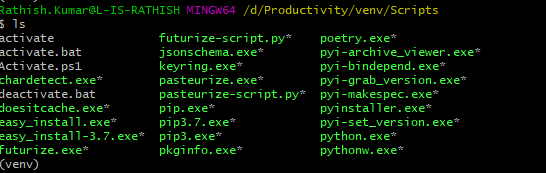
@ErikBjare I have already created venv and installed those dependencies. Have a look, I am missing something, and I am doing this for first time.

rathishkumar
on 2 Apr 2020
@rathishkumar Well for some reason it can't find and run the poetry executable, so you need to troubleshoot that yourself. Have you tried running poetry --help to check that
poetry is in your PATH and can be correctly run?
ErikBjare
on 2 Apr 2020
@ErikBjare Thanks, I got it and it is because of PATH variable, it is working now.
rathishkumar
on 2 Apr 2020
@ErikBjare After making changes, I am planning package it as Windows executable, I am following this:
https://activitywatch.readthedocs.io/en/latest/installing-from-source.html
I am checking makefile and found this:
make --directory=aw-watcher-afk package
cp -r aw-watcher-afk/dist/aw-watcher-afk dist/activitywatch
How do I make it as Windows executable, any guidance will be helpful
rathishkumar
on 2 Apr 2020
Related issues
ErikBjare
·
10Comments
 TheOrigins
·
6Comments
TheOrigins
·
6Comments
 ankushdas9
·
8Comments
ankushdas9
·
8Comments
 robingithub1
·
4Comments
robingithub1
·
4Comments
 austil
·
3Comments
austil
·
3Comments