Acme.sh: Unable to install the Let's Encrypt cert on my Synology
Hello,
I have run for HTTPS certificates for my Synology NAS using acme.sh with dns_ovh.
All is going fine for the certificate and all the files are available in /usr/local/share/acme.sh/
But I cannot install it on the NAS whatever the method used.
/usr/syno/etc/certificate/system/default/ remains unchanged and there is no addition or replacement in the Certificate panel of DSM.
Rebooting the NAS does not make any difference.
What can I do to solve this issue ?
Thanks for your help
 Mic13710
All 49 comments
FYI on Synology DSM 6 you can add the certificate from LE directly within the DSM Control Panel. You don't need to install acme.sh.
 dugwood
on 1 Mar 2018
dugwood
on 1 Mar 2018
Sadly DSM doesn't support dns01 protocol and many of us don't want to
expose port 80 of the NAS
--
Fernando Miguel
On 1 Mar 2018 18:43, "Yvan" notifications@github.com wrote:
FYI on Synology DSM 6 you can add the certificate from LE directly within
the DSM Control Panel. You don't need to install acme.sh.—
You are receiving this because you are subscribed to this thread.
Reply to this email directly, view it on GitHub
https://github.com/Neilpang/acme.sh/issues/1317#issuecomment-369689406,
or mute the thread
https://github.com/notifications/unsubscribe-auth/AAKRrtqlnIUGzSzIEP6PoaVgTT9dME5Hks5taEE1gaJpZM4SYymr
.
 FernandoMiguel
on 1 Mar 2018
FernandoMiguel
on 1 Mar 2018
dugwood, I know that I can do it within DSM control panel. I do it that way for all my Nases. It is not feasible with this one because port 80 is blocked by SIP (videotron).
FernandoMiguel, if you don't want port 80 exposed, you can open it in the firewall only for the Let's Encrypt IP adresses for renewal 66.133.109.36 and 64.78.149.164 with two rules.
It is what I do with all my Nases and it works fine.
Mic13710
on 1 Mar 2018
Just to make things clear,
I have got the API key and API secret from OVH,
then create my certificate for mydomain and its subdomain (xxx.mydomain, yyy.mydomain, etc...) following this procedure https://github.com/Neilpang/acme.sh/wiki/How-to-use-OVH-domain-api
Now I have the following files available in usr/local/share/acme.sh/mydomain/
- ca.ser
- fullchain.cer
- mydomain.cer
- mydomain.conf
- mydomain.csr
- mydomain.csr.conf
- mydomain.key
The next step is to install the cert for mydomain and sub.domain on the NAS.
As per https://github.com/Neilpang/acme.sh/wiki/Synology-NAS-Guide,
$ cd /usr/local/share/acme.sh
$ export CERT_DOMAIN="your-domain.tld"
$ export CERT_DNS="dns_ovh" (the one I have used)
$ ./acme.sh --issue -d "$CERT_DOMAIN" --dns "$CERT_DNS" \
--certpath /usr/syno/etc/certificate/system/default/cert.pem \
--keypath /usr/syno/etc/certificate/system/default/privkey.pem \
--fullchainpath /usr/syno/etc/certificate/system/default/fullchain.pem \
--reloadcmd "/usr/syno/sbin/synoservicectl --reload nginx" \
--dnssleep 20
From here I am little lost.
First, what means "your-domain.tld". Is it the name of the folder "mydomain" created at the first step, or mydomain (which includes all the sub.domain), or is it mydomain with all its sub.domain ?
Owing the fact that I have already the certificat, I don't understand if I have to run again
./acme.sh --issue -d mydomain -d xxx.mydomain -d yyy.mydomain etc... --dns dns_ovh but this time with all the additional stuf.
I have tried this last option as follows
./acme.sh --issue -d mydomain -d xxx.mydomain -d yyy.mydomain etc... --dns dns_ovh \
--certpath /usr/syno/etc/certificate/system/default/cert.pem \
--keypath /usr/syno/etc/certificate/system/default/privkey.pem \
--fullchainpath /usr/syno/etc/certificate/system/default/fullchain.pem \
--reloadcmd "/usr/syno/sbin/synoservicectl --reload nginx" \
--dnssleep 20 --force
note --force was required to renew the existing certificate
Certificate is re-create as in the first step and the final of the process is as follows,
[Fri Mar 2 04:27:50 EST 2018] Installing cert to:/usr/syno/etc/certificate/system/default/cert.pem
[Fri Mar 2 04:27:50 EST 2018] Installing key to:/usr/syno/etc/certificate/system/default/privkey.pem
[Fri Mar 2 04:27:50 EST 2018] Installing full chain to:/usr/syno/etc/certificate/system/default/fullchain.pem
[Fri Mar 2 04:27:50 EST 2018] Run reload cmd: /usr/syno/sbin/synoservicectl --reload nginx
nginx reloaded.
[Fri Mar 2 04:27:50 EST 2018] Reload success
Thus giving the illusion that the cert is properly installed.
But when I go to DSM, default cert is still there.
Restarting the NAS does not change the things.
Going into /usr/syno/etc/certificate/system/default/ I have the three files cert.pem, privkey.pem and fullchain.pem, plus a syno-ca-cert.pem which I believe is the default cert.
Is there anything wrong ?
Mic13710
on 2 Mar 2018
I wrote the 1st version of the wiki page for synology DSM
it has been updated by many ppl since then, and I know some of the times the steps wont work for everyone and every device.
currently i dont have the opportunity to access my NAS and try the current steps (DSM new versions keep changing how to store certs and how to restart DSM).
I think for now, you are on your own trying to better find how to have DSM reload the certs it uses after you install them.
quickly looking at your steps, acme.sh did all it had to do. it's not an issue with DSM itself.
try the synology forums or contacting support. if you figure out what is wrong in the post hook, please let us know here and maybe update the wiki to reflect that.
i would love to see synology DSM support DNS-01 protocol instead of http01 :(
FernandoMiguel
on 2 Mar 2018
Thanks FernandoMiguel
I would love to the support of DNS-01. This port 80 is a shame to validate a cert.
I don't think that the certs storage has changed in the last DSM (6.1.5).
Unfortunatly, my linux knowledge is very limited and I will not be able to make change to what you did, for sure.
I ask myself if it is possible to install the cert.pem, privkey.pem and fullchain.pem manually in DSM, and then, if the crontab for the renewal could work in this case.
Mic13710
on 2 Mar 2018
sadly the way synology works, just having the certs in the disk isnt enough.
we need a post hook that tells DSM to use the new certs
FernandoMiguel
on 2 Mar 2018
Finally, I have installed manually.
I could not give an intermediate cert, but giving the private key and fullchain was enough.
Now the cert is operational.
I will setup the crontab and if not ok, i'll have to update the cert manually every two/three months
Mic13710
on 2 Mar 2018
that's exactly what LE is not meant to be.
maybe try to reach synology support and get an idea how to fix the deployment of cert when not using their UI ?
FernandoMiguel
on 2 Mar 2018
OK, I'll try with the support, but I am not sure they will be of some help because they are not keen to give assistance other than for DSM.
Mic13710
on 2 Mar 2018
I have a return from Synology and as expected, they do not reply to issues others than DSM.
However, there is good news in their feedback as it seems that DSM6.2 will give support to DNS-01.
Their reply,
Good afternoon,
Right now we do not have a way to use a Let's Encrypt certification without access to port 80. What you can do is used a 3rd part SSL certificate, and you can find more information on that here: https://www.synology.com/en-us/knowledgebase/DSM/tutorial/General/How_to_enable_HTTPS_and_create_a_certificate_signing_request_on_your_Synology_NAS
We plan to allow the use of port 443 with Let's Encrypt in DSM 6.2, but I do not currently have a solid release date for that upgrade at this point._
Mic13710
on 2 Mar 2018
Port 443 is tls-sni-01 which is being deprecated by let's encrypt.
Dns01 is a different protocol and doesn't require ports.
I'll try tomorrow, if my NAS is online, to follow the steps to renew the
cert, and update the wiki with any new information.
Hope that helps
--
Fernando Miguel
On 2 Mar 2018 22:11, "Mic13710" notifications@github.com wrote:
I have a return from Synology and as expected, they do not reply to issues
others than DSM.
However, there is good news in their feedback as it seems that DSM6.2 will
give support to DNS-01.Their reply,
Good afternoon,
Right now we do not have a way to use a Let's Encrypt certification
without access to port 80. What you can do is used a 3rd part SSL
certificate, and you can find more information on that here:
https://www.synology.com/en-us/knowledgebase/DSM/tutorial/
General/How_to_enable_HTTPS_and_create_a_certificate_
signing_request_on_your_Synology_NASWe plan to allow the use of port 443 with Let's Encrypt in DSM 6.2, but I
do not currently have a solid release date for that upgrade at this point._—
You are receiving this because you commented.
Reply to this email directly, view it on GitHub
https://github.com/Neilpang/acme.sh/issues/1317#issuecomment-370067671,
or mute the thread
https://github.com/notifications/unsubscribe-auth/AAKRrnMVp3FPs1OSH-uNug-iWfWUvkWlks5tacOigaJpZM4SYymr
.
FernandoMiguel
on 2 Mar 2018
I renewed my NAS cert today using acme.
previously it has a synology issued cert.
i removed the content of /usr/syno/etc/certificate/system/default/
and /usr/syno/etc/certificate/_archive/
followed https://github.com/Neilpang/acme.sh/wiki/Synology-NAS-Guide#creating-the-certificate to issue a new cert and after it reloaded nginx, i reloaded my page, and chrome showed the new cert.
DSM was still showing the old one , and a reboot didnt fix it.
I copied the certs from /usr/syno/etc/certificate/system/default/ to /usr/syno/etc/certificate/_archive/
so I guess https://github.com/Neilpang/acme.sh/wiki/Synology-NAS-Guide#alternative-method-that-preserves-your-synology-nas-system-default-certificate would work fine.
care to try?
FernandoMiguel
on 3 Mar 2018
Sorry for the delay.
Well, what you have done is almost what I did. When I have installed the cert manually, the result was the same as yours : the cert was copied in the ramdom folder of the /_archive.
I cannot retest the wiki because the NAS is in production now and I don't want to disturb the users.
But except the problem I have faced with the installation part of the wiki, the cert is now ok.
I thank you very much for the work you have done. It was of a great help for getting a cert despite the port 80 closed.
On the other side, I have been told the videotron business contract (the one they have) should allow the use of all the ports. I guess that calling them should solve the problem. It would then be possible to revert to standard way of getting a LE cert.
Mic13710
on 5 Mar 2018
@FernandoMiguel
Hello,
I come back to you because the cronjob for auto renewal has run on 02/04 with the following report :
Dear user,
Task Scheduler has completed a scheduled task.
Task: Update Lets Encrypt
Start time: Mon, 02 Apr 2018 11:00:02 GMT
Stop time: Mon, 02 Apr 2018 11:11:25 GMT
Current status: 0
Standard output/error:
sending incremental file list
./
cert.pem
fullchain.pem
privkey.pem
sent 9.46K bytes received 72 bytes 19.06K bytes/sec
total size is 9.25K speedup is 0.97
sending incremental file list
./
cert.pem
fullchain.pem
privkey.pem
sent 9.46K bytes received 72 bytes 19.06K bytes/sec
total size is 9.25K speedup is 0.97
sending incremental file list
./
cert.pem
fullchain.pem
privkey.pem
sent 9.46K bytes received 72 bytes 19.06K bytes/sec
total size is 9.25K speedup is 0.97
sending incremental file list
./
cert.pem
fullchain.pem
privkey.pem
sent 9.46K bytes received 72 bytes 19.06K bytes/sec
total size is 9.25K speedup is 0.97
sending incremental file list
./
cert.pem
fullchain.pem
privkey.pem
sent 9.46K bytes received 72 bytes 19.06K bytes/sec
total size is 9.25K speedup is 0.97
sending incremental file list
./
cert.pem
fullchain.pem
privkey.pem
sent 9.46K bytes received 72 bytes 19.06K bytes/sec
total size is 9.25K speedup is 0.97
sending incremental file list
./
cert.pem
fullchain.pem
privkey.pem
sent 9.46K bytes received 72 bytes 19.06K bytes/sec
total size is 9.25K speedup is 0.97
sending incremental file list
./
cert.pem
fullchain.pem
privkey.pem
sent 9.46K bytes received 72 bytes 19.06K bytes/sec
total size is 9.25K speedup is 0.97
sending incremental file list
./
cert.pem
fullchain.pem
privkey.pem
sent 9.46K bytes received 72 bytes 19.06K bytes/sec
total size is 9.25K speedup is 0.97
sending incremental file list
./
cert.pem
fullchain.pem
privkey.pem
sent 9.46K bytes received 72 bytes 19.06K bytes/sec
total size is 9.25K speedup is 0.97
sending incremental file list
./
cert.pem
fullchain.pem
privkey.pem
sent 9.46K bytes received 72 bytes 19.06K bytes/sec
total size is 9.25K speedup is 0.97
sending incremental file list
./
cert.pem
fullchain.pem
privkey.pem
sent 9.46K bytes received 72 bytes 19.06K bytes/sec
total size is 9.25K speedup is 0.97
sending incremental file list
./
cert.pem
fullchain.pem
privkey.pem
sent 9.46K bytes received 72 bytes 19.06K bytes/sec
total size is 9.25K speedup is 0.97
sending incremental file list
./
cert.pem
fullchain.pem
privkey.pem
sent 9.46K bytes received 72 bytes 19.06K bytes/sec
total size is 9.25K speedup is 0.97
sending incremental file list
./
cert.pem
fullchain.pem
privkey.pem
sent 9.46K bytes received 72 bytes 19.06K bytes/sec
total size is 9.25K speedup is 0.97
sending incremental file list
./
cert.pem
fullchain.pem
privkey.pem
sent 9.46K bytes received 72 bytes 19.06K bytes/sec
total size is 9.25K speedup is 0.97
nginx reloaded.
sending incremental file list
./
cert.pem
fullchain.pem
privkey.pem
sent 9.46K bytes received 72 bytes 19.06K bytes/sec
total size is 9.25K speedup is 0.97
package VPNCenter restart successfully
sending incremental file list
./
cert.pem
fullchain.pem
privkey.pem
sent 9.46K bytes received 72 bytes 19.06K bytes/sec
total size is 9.25K speedup is 0.97
package HyperBackupVault restart successfully
sending incremental file list
./
cert.pem
fullchain.pem
privkey.pem
sent 9.46K bytes received 72 bytes 19.06K bytes/sec
total size is 9.25K speedup is 0.97
package MailServer restart successfully
sending incremental file list
./
cert.pem
fullchain.pem
privkey.pem
sent 9.46K bytes received 72 bytes 3.81K bytes/sec
total size is 9.25K speedup is 0.97
package MailServer restart successfully
sending incremental file list
./
cert.pem
fullchain.pem
privkey.pem
sent 9.46K bytes received 72 bytes 6.35K bytes/sec
total size is 9.25K speedup is 0.97
package CloudStation restart successfully
sending incremental file list
./
cert.pem
fullchain.pem
privkey.pem
sent 9.46K bytes received 72 bytes 6.35K bytes/sec
total size is 9.25K speedup is 0.97
package LogCenter restart successfully
Sincerely,
Synology DiskStation
So obviously something occured.
But looking at the CERT_FOLDER /usr/syno/etc/certificate/_archive/"xxx", the .pem remain unchanged from the previous cert (02/03/2018).
Is it normal, or the cert should have been updated ?
Mic13710
on 4 Apr 2018
i dunno man.
was the install cert set to use the _archive folder?
FernandoMiguel
on 4 Apr 2018
It is maybe where the problem lies.
In the tuto, you use two different pathes,
one for the replacement of the system default certificat
/usr/syno/etc/certificate/system/default/
the other for the alternative method
/usr/syno/etc/certificate/_archive/"xxx"
In the script, you have used the alternative path /usr/syno/etc/certificate/_archive/"xxx"
My active cert is in this last path.
In order to test, I have moved temporary the .pem files in both pathes and try to renew the cert, but no change. The return says
[Wed Apr 4 10:15:37 EDT 2018] Domains not changed.
[Wed Apr 4 10:15:37 EDT 2018] Skip, Next renewal time is: Tue May 1 09:27:49 UTC 2018
That seems to indicate that the cert is created in an other place but I don't know where and how to change this to have the new certs created in the right path.
Mic13710
on 4 Apr 2018
you can use --force to force it issue a new cert
FernandoMiguel
on 4 Apr 2018
Great idea !
It was the right thing to do. I have got a new cert at the right place /usr/syno/etc/certificate/_archive/"RandomFolder"
Final records are as follows
[Wed Apr 4 10:55:48 EDT 2018] Installing cert to:/usr/syno/etc/certificate/_archive/pYZfmg/cert.pem
[Wed Apr 4 10:55:48 EDT 2018] Installing key to:/usr/syno/etc/certificate/_archive/pYZfmg/privkey.pem
[Wed Apr 4 10:55:48 EDT 2018] Installing full chain to:/usr/syno/etc/certificate/_archive/pYZfmg/fullchain.pem
[Wed Apr 4 10:55:48 EDT 2018] Run reload cmd: /usr/syno/sbin/synoservicectl --reload nginx
nginx reloaded.
[Wed Apr 4 10:55:48 EDT 2018] Reload success
And the cert date validity has been updated accordingly in DSM.
Hopefully, the auto renewal will be ok now.
I think the https://github.com/Neilpang/acme.sh/wiki/Synology-NAS-Guide#creating-the-certificate should be corrected because it create a certificat in the default folder while the auto renewal script try to do it in the "RandomFolder" of the _archive.
Or maybe the script should be modified to install in the default if the first cert has been created there. But you says in the same script "# do not change anything beyond this line!"
Last question : the cron is set to renew the cert on the 2nd of each month. I suppose that if the cert does not need renewal (less than 61 days old), it will not be renewed. It shall be done if the cert is older than 60 days. Is it correct ?
Mic13710
on 4 Apr 2018
@Mic13710 it's a wiki
feel free to update it.... too many ppl did already
FernandoMiguel
on 4 Apr 2018
yeah, it will try to renew in the following month
FernandoMiguel
on 4 Apr 2018
Thanks for all.
I am not really good enough to take for myself an update for which I am not sure about.
It seems to me that something is not correct. That is all. So I did it the way it looks good as per my own investigations. I do not pretend it is the proper way, just that it seems to be OK for me.
In an other hand, I do not feel confortable in modifying works done by others. And I don"t even know how to do it.
Sorry but I will not try to modify the wiki to end up with an additional mess.
Mic13710
on 4 Apr 2018
I am unable to get DSM to recognize my cert using the wiki's primary or alternative methods. I can confirm I am successfully issued a cert and that it copies to either the primary or alternative paths.
If this method can't be reproduced, maybe we should consider taking the wiki page down to avoid confusion?
 ghost
on 4 Jan 2019
ghost
on 4 Jan 2019
they keep changing the way to load the certs. i got mine working last time, but it is not always easy
FernandoMiguel
on 4 Jan 2019
Hello,
I have just commited a PHP library that import / update certificates into DSM / SRM.
It is here : https://github.com/sametflo/synoapi
I did it for myself, but I hope it will be useful to others.
Sam
 sametflo
on 14 Mar 2019
sametflo
on 14 Mar 2019
Hello,
I have just commited a PHP library that import / update certificates into DSM / SRM.
It is here : https://github.com/sametflo/synoapi
I did it for myself, but I hope it will be useful to others.
Sam
There is zero documentation in your repo. It would help if you added a description and user manual for how to use it.
 dolphinkite
on 26 Mar 2019
dolphinkite
on 26 Mar 2019
There is zero documentation in your repo. It would help if you added a description and user manual for how to use it.
I made my best to help you. Tell me if you need more.
sametflo
on 26 Mar 2019
@FernandoMiguel @Mic13710 have you got any service (like OpenVPN) who is using the new certificate after update?
I have the problem, that after updating the certificate (Webinterface is using the new certificate and also system settings - security - certificate is showing the new one) OpenVPN is not using the new certificate. Even the in PACKAGECERTROOTDIR (/usr/local/etc/certificate) is the new certificate.
A reboot is also not bringing the desired effect. Only if I reimport the certificate over the DSM everything works.. 😥
 dojo90
on 4 Jun 2019
dojo90
on 4 Jun 2019
@FernandoMiguel @Mic13710 have you got any service (like OpenVPN) who is using the new certificate after update?
No @dojo90
FernandoMiguel
on 4 Jun 2019
That's probably why you should use the Synology API to update your certificates.
It works like you're in the web interfacce.
You can take a look here : https://github.com/sametflo/synoapi
sametflo
on 4 Jun 2019
Because VPN should be avail at all time, I disable renewal for OpenVPN. It is set for Synology default certificate.
To exclude services, it is here : https://github.com/Neilpang/acme.sh/issues/2033
Mic13710
on 5 Jun 2019
@sametflo
It's a little bit unhandy because it needs a webserver. Maybe I'll wrap it into a docker container and give it a try.
@Mic13710
The problem is not, the connection loss if the certificate is renewed. The OpenVPN service gets the new certificate, but is NOT using it after update (and service restart). So this is my problem!
If I update the certificate and night, it doesn't matter if the service is stopped for 5s..
Or is your OpenVPN service using the new certificate after you have updated it?
dojo90
on 5 Jun 2019
@dojo90
I think I have not been clear enough : you don't need any web server. I imagine you renew your certificate directly on your synology. So, when you have retrived your certificates from your current methode in a temporary directory, you simply call my php script (with php cli). This use the local DSM (so activate web server isn't required) to update the certificates.
sametflo
on 5 Jun 2019
@dojo90
I have noticed that despite it is noted as active, the new certificates are not effectives with each of the services. A restart is doing the job.
shutdown -r now
Regarding OpenVPN, I am not keen to change the cert because I use it on a remote NAS and if the cert is renewed, I cannot connect to it any more. Keeping the default Synology cert is the only way I have found to enable connection after the renewal of LE cert.
Mic13710
on 5 Jun 2019
@sametflo omg works like a charm 🥳 Since I do not do much with php, I did not know that it can also be done simply by commandline! 👌
@Mic13710 ok that makes sense! 👍
dojo90
on 5 Jun 2019
Here is my working solution to renew my certificates!
I made a script renew-ssl-certificates.sh which does everything:
- Fetch a new cert from Let's Encrypt
- Import/Update the cert
- copy into public accessable location
- restart all docker container who need the new cert
renew-ssl-certificates.sh
#!/bin/sh

# location of the new certs
CERTDIR="/usr/syno/etc/certificate/_archive/74wc1X/"

# public location for my docker container
TARGETDIR="/volume3/docker/ssl-certs/my-domain.com/"

echo "run acme.sh script.."
/volume3/homes/dojo90/acme.sh-master/acme.sh --cron

# https://github.com/sametflo/synoapi
echo "run php script to update the certificate via webinterface"
php update-certificate.php

echo "copy all certs from $CERTDIR to $TARGETDIR"
cp -r $CERTDIR. $TARGETDIR

# restart all container which uses the certs
echo "restart docker container Radicale"
docker restart Radicale
echo "restart docker container FirefoxSync"
docker restart FirefoxSync

echo "done!"
update-certificate.php (https://github.com/sametflo/synoapi)
<?php

include_once 'api/synoapi.php';

$syno = new synoapi('http://localhost:5000', 'username', 'password');

if($syno->UpdateCertificate('*.my-domain.com', '/usr/syno/etc/certificate/_archive/74wc1X/privkey.pem', '/usr/syno/etc/certificate/_archive/74wc1X/cert.pem', '/usr/syno/etc/certificate/_archive/74wc1X/chain.pem'))
  echo("done!\n");
Nice job dojo90!
Just one thing strange : if you read 'Wildcard Domain Step-By-Step' at letsencrypt, they explain that you must include the domain without wildcard when requiring for a certificate. So the api call should look like this (without wildcard):
if($syno->UpdateCertificate('my-domain.com', ...
That's how I use it and it works fine. Before, I used your method, and I had problems. That's why I'm giving you this information, I think it will help you.
sametflo
on 6 Jun 2019
@sametflo I hope I understood you correctly.
I have the following certs: *.my-domain.com, *.sub.my-domain.com, *.my-domain.org, *.sub.my-domain.org.
The CN of the certificate is now *.my-domain.com.
Your script is looking for the CN (https://github.com/dojo90/synoapi/blob/master/api/synoapi.php#L98; btw. would be nice if you accept my PR 🤓). So I this is the reason I have to insert *.my-domain.com.
dojo90
on 7 Jun 2019
@dojo90 you should use a concrete domain name as CN, not wildcard. You can add wildcard as Alt domain, for example:
acme.sh --issue -d my-domain.com --dns dns_ovh -d *.my-domain.com
or if you don't want a cert for your main domain, then:
acme.sh --issue -d something.my-domain.com --dns dns_ovh -d *.my-domain.com
The CN then is not a wildcard and there are no issues with the webapi script from @sametflo.
 yawor
on 6 Aug 2019
yawor
on 6 Aug 2019
I see here another problem. All the cron scripts posted shouldn't work like that. Cron should only call acme.sh --cron --home /wherever/it/is.
It's acme.sh's responsibility to install the certificates only if the certificate is issued/renewed, not every time the scheduled task runs. This can be done using --cert-file, --key-file etc, --reloadcmd and few different hooks (for example --renew-hook).
In my setup, I've skipped --cert-file, --key-file and --fullchain-file, and instead I've created an install.sh script in $LE_WORKING_DIR/my.domain/ ($LE_WORKING_DIR is set by acme.sh to acme's home and is available from the scripts called by it). I've also put the php files from @sametflo in the same directory. I'm calling the install.sh from --reloadcmd.
Here's my install.sh script:
#!/usr/bin/env bash
$LE_WORKING_DIR/acme.sh --toPkcs -d ${Le_Domain} --password super_secret_export_password
(
    cd $LE_WORKING_DIR/${Le_Domain}
    /usr/bin/php updatecert.php

    cp ${Le_Domain}.pfx /volume1/Plex/
    chown plex /volume1/Plex/${Le_Domain}.pfx
    /usr/syno/sbin/synoservicectl --restart "pkgctl-Plex Media Server"
)
It also includes setting the certificate for Plex Media Server (the path to the pfx file /volume1/Plex/domain-name.pfx needs to be set in the PMS together with the secret password).
The updatecert.php:
<?
require_once('synoapi.php');
$DOMAIN = getenv("Le_Domain");
$KEYFILE = getenv("CERT_KEY_PATH");
$CERTFILE = getenv("CERT_PATH");
$CAFILE = getenv("CA_CERT_PATH");

$HOST = "https://".$DOMAIN.":5001";
$USER = "dsmusername";
$PASS = "userpassword";

$syno = new synoapi($HOST, $USER, $PASS);
if($syno->UpdateCertificate($DOMAIN, $KEYFILE, $CERTFILE, $CAFILE))
    echo("Done!\n");
else
    echo($syno->GetLastError()."\n");
Both scripts use environment variables provided by the acme.sh when it calls install.sh.
yawor
on 6 Aug 2019
the syno task script should check run status, otherwise it won't fail and user won't be notifiied about no action. Needs --force in my case also. It executes some --reloadcmd action which is not specified anywhere and not in logs or files, it's 2nd machine and operating system and can't find out where it collects that command from. -> found it hashed in acme.sh/domain/domain.conf, after 3 months. Completely rewritten the Syno script, it just didn't work. Syno wants certificates in many directories (FQDN also) and in archive and the filenames are of course not same as original.
 gitthangbaby
on 5 Jan 2020
gitthangbaby
on 5 Jan 2020
@gitthangbaby @dojo90 @yawor If you're still interested: A proper deployment hook (also using the Synology web API) was added in #2369. I wrote a post on how to use it here: https://lippertmarkus.com/2020/03/14/synology-le-dns-auto-renew/
 lippertmarkus
on 14 Mar 2020
lippertmarkus
on 14 Mar 2020
@lippertmarkus awesome. Thanks for sharing :). I still need to use additional script to install the certificate for Plex too because it is not updated from DSM. I'll need to play around and integrate it with this hook somehow.
yawor
on 14 Mar 2020
Sadly 80/443 ports assumed to be open is still the business expectation.
I still run the script and it works. Same certificate for LAN and WAN, green check.
Re new script, I don't like plaintext passwords, reminds me of deploy-freenas script.
I'm already have a hard time with weak Synology security, and their plaintext password storing in forcibly unencrypted share MailPlus. Thanks to this I use at least TCG OPAL with manual password entry at boot. Then i use fake users to do some tasks (can't "thank" Synology enough for their amateurish design choices from 90s!). But in this case it has to be admin. Good OTP solution tho!
gitthangbaby
on 14 Mar 2020
@gitthangbaby fully agree with you. About the plaintext passwords: Don‘t you think it‘s enough to make acme.shs directory, where the plaintext password is stored, only accessible by the else fully restricted admin user? I mean, if someone manages to get a shell as this admin user, you’ve a problem anyway, independently of this attacker would be able to leak the password?
On the other hand with the restrictions for the admin user and OTP it should be fairly difficult for an attacker to find other good weak spots around the web interface?
Am I missing something?
lippertmarkus
on 15 Mar 2020
@lippertmarkus the problem is plaintext passwords spread like virus. You will have the file backed up, replicated, then you will have temporary copies on your PC while debugging.. And these files will end up forgotten somewhere.. So i simply reject such scripts until gun points to my head:)
I wonder why a privileged user cannot simply do the job somehow from the command line. Minimal documentation exists, but there are so many internal Synology commands, Anyone knows how to use "synocerttool"? What about temporarily creating admin with "synocredentials --add" or "synouser --add" with junk password to do the job? That'd be much less nasty than showing off static password of any admin.
gitthangbaby
on 15 Mar 2020
i still use ACME without specifying certificate files, and expect them to arrive in ACME folder for each domain.
but i like reload-certs.sh so i made a script update_dsm.sh which informs me about errors via DSM UI. And only proceeds if certificates were updated as i'm not interested in messages before that (as scheduler executes it periodically). I also have the machine read an error aloud in english but it's only for custom machines (?) :)
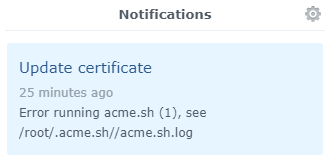
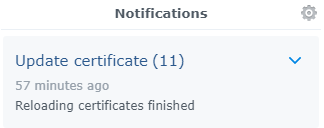
gitthangbaby
on 6 Apr 2020
@gitthangbaby cool, thanks for sharing! Why do you prefer notifications over the emails you're getting from the task scheduler anyway? :)
My Alexas are already talking a lot to me (smart home notifications) so I rather keep the notifications down to the important ones needing my immediate attention, but cool idea!
lippertmarkus
on 6 Apr 2020
@lippertmarkus when certificate upgrade goes wrong, apps start to collapse soon, especially for the users.. don't want to miss it. even with success it's a horror to go through all apps and confirm new codes. often I see UI notification faster than emails as i am running DSM UI as the first tab in browser. for that reason I have a generic script which will harvest errors from DSM emails and speak them loud before I have a chance to look at emails:)
gitthangbaby
on 6 Apr 2020
Related issues
 hxx-fetch
·
4Comments
hxx-fetch
·
4Comments
 stephankn
·
5Comments
stephankn
·
5Comments
 haiopaii
·
3Comments
haiopaii
·
3Comments
 duxiu-chen
·
4Comments
duxiu-chen
·
4Comments
 axiades
·
3Comments
axiades
·
3Comments
Most helpful comment
Sadly DSM doesn't support dns01 protocol and many of us don't want to
expose port 80 of the NAS
--
Fernando Miguel
On 1 Mar 2018 18:43, "Yvan" notifications@github.com wrote: