Accessibility-insights-web: Don't see the aria labels in Custom widget Assessment
Describe the bug
- We are not able to see the visual helper marking the component
- Besides aria-label being in the elements, we are not able to see the labels in the test
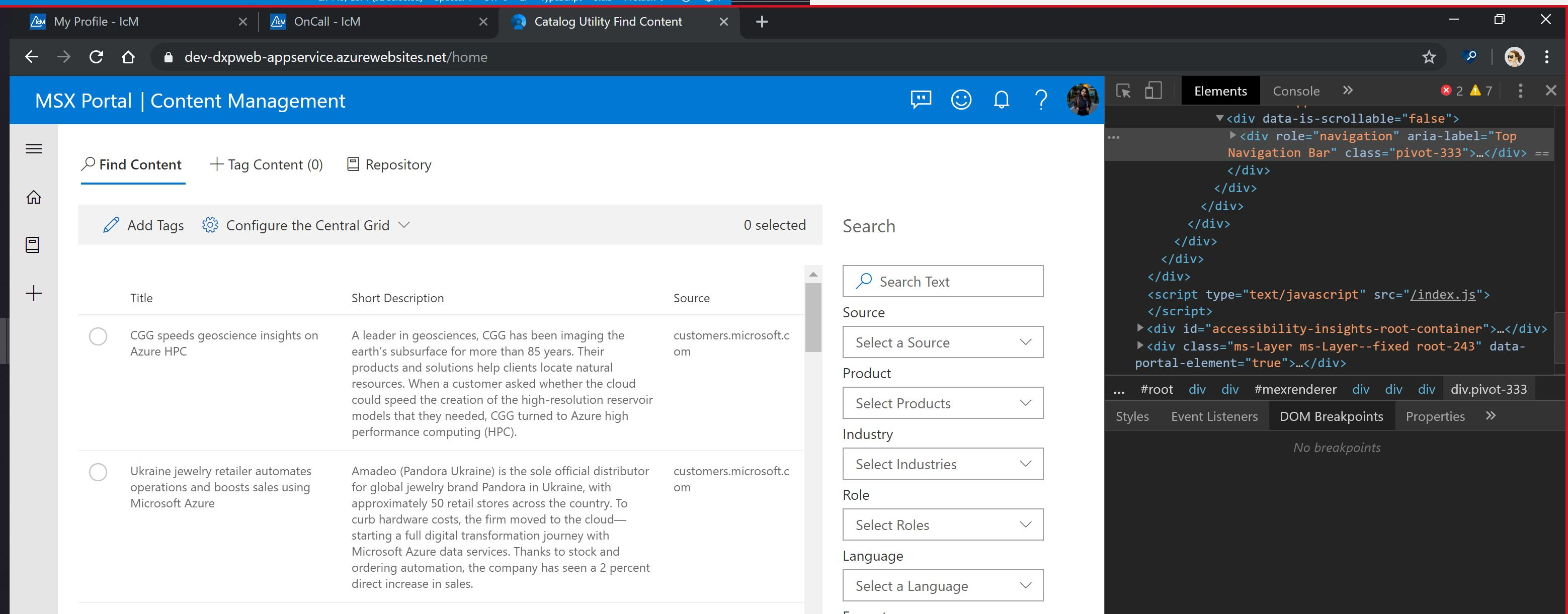
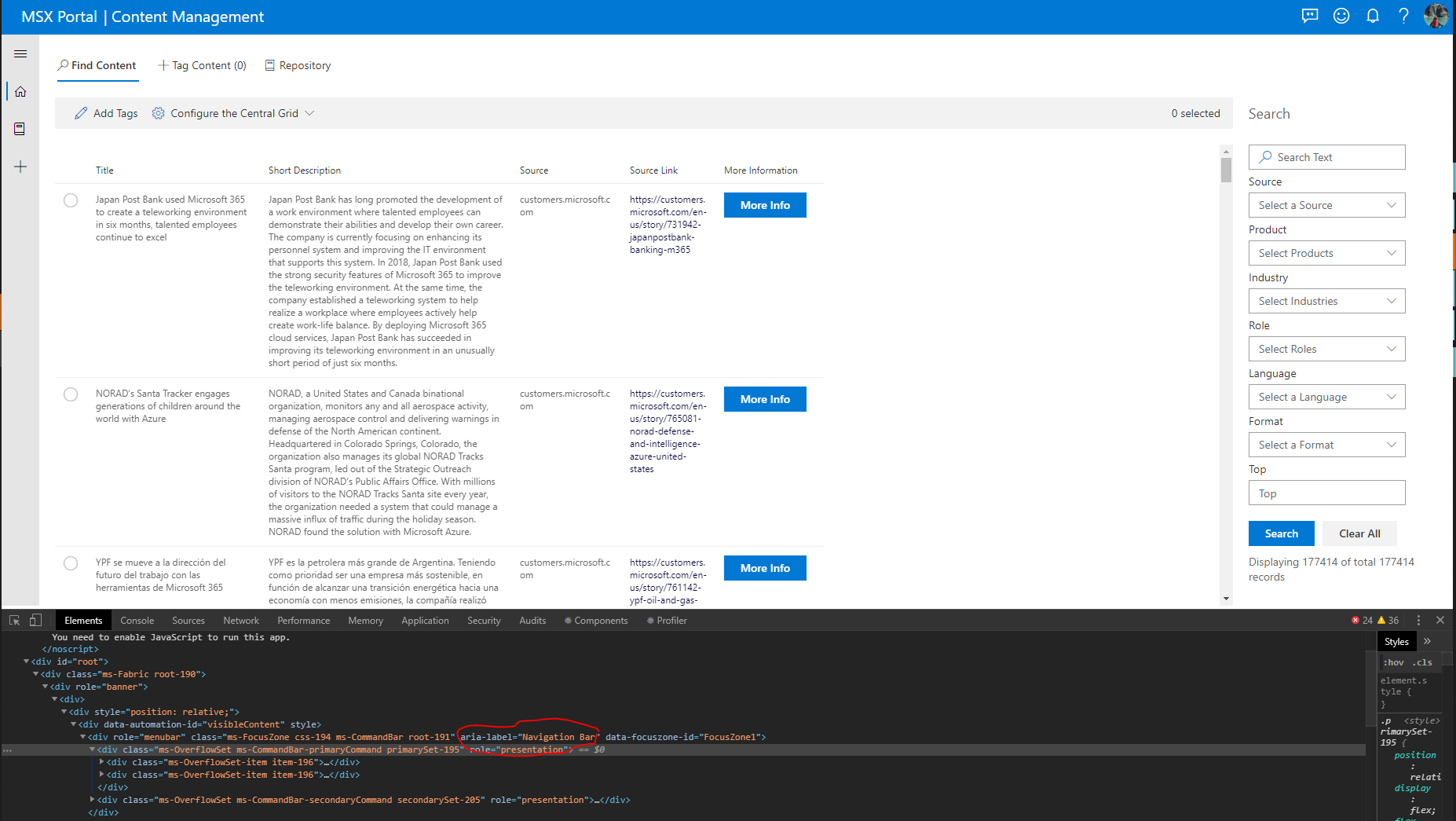
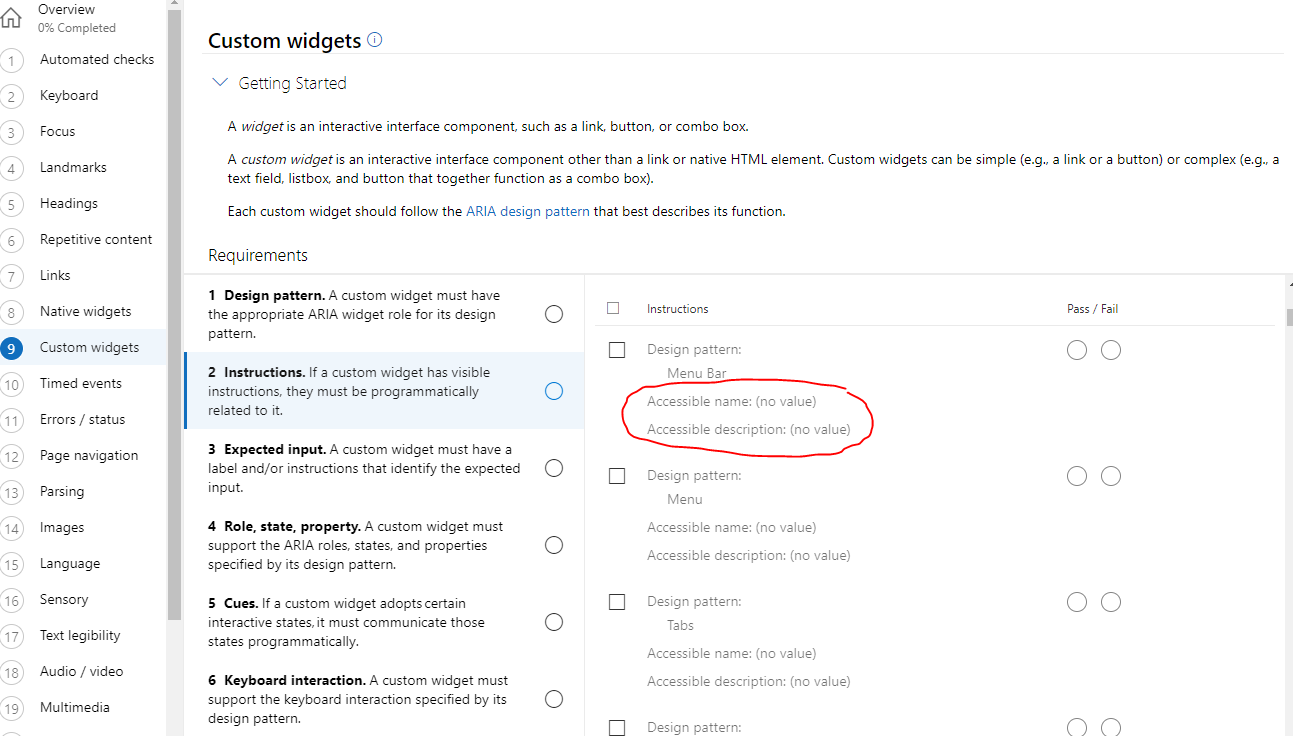
One of the examples is that pivot does not have an accessible name when tested using the Accessibility Insights tool under the Custom Widgets > Design Pattern Test (Assessment) :: We see
When I check in the inspect element I do see the aria-label. Besides there are other components like Menu bar with same issues
Expected behavior
The accessible name should appear.
Screenshots
This information is from the Accessibility Insights tool : A widget is an interactive interface component, such as a link, button, or combo box. A custom widget is an interactive interface component other than a link or native HTML element. Custom widgets can be simple (e.g., a link or a button) or complex (e.g., a text field, listbox, and button that together function as a combo box). Each custom widget should follow the ARIA design pattern that best describes its function.
Below is a screenshot for the issue.

Below is a screenshot showing that aria-label gets applied to the component but still does not show up in the Accessibility insights test.
Other components are failing as well
Extension (please complete the following information)
- Package version(s): 7.8.2
- Browser and OS versions: Chrome Version 77.0.3865.120 (Official Build) (64-bit)
Did you search for similar existing issues?
Yes!
 qazaahir
All 13 comments
@qazaahir - Thanks for reaching out. A code pen to repro wil help us repro / understand the issue much faster.
For issue 1 do you see the element in the instances list and not see the visual helper mark it on the page? In the screenshot that you have shared we can see the element being highlighted at the top.
We are looking into issue 2 where for custom widget > Instructions an aria-label does not show up in the accessible name.
 flyingUnderTheRadar
on 7 Nov 2019
flyingUnderTheRadar
on 7 Nov 2019
issue 1: The red box is inconsistent it does not show up every time
There is a heavy data dependence of the component that is why I couldn't share the code. Happy to hop on a call to give you more detailed perspective
qazaahir
on 7 Nov 2019
Looks like issue 1 is a known issue. We have a fix for the issue but it is not out in production yet. The temporary workaround is mentioned in the issue.
Workaround:

    Enable the visual helper you want to use
    Navigate to a differente requirement
    Navigate back to the requirement with the enabled visual helper
    The visualization should be enabled and visible on the target page
Regarding issue 2, we have identified the cause and we have a fix in the pipeline.
flyingUnderTheRadar
on 8 Nov 2019
Is there any update on this. Our release is dependent on this and we would appreciate a quick help
qazaahir
on 12 Nov 2019
We would appreciate some update on this issue
qazaahir
on 21 Nov 2019
Hi @qazaahir our releases are currently block by #1591 We are working on that issue with high priority. Stay tuned for more updates.
 smoralesd
on 21 Nov 2019
smoralesd
on 21 Nov 2019
Hi @qazaahir this fix is now available in our insider build. It will also be in the next production release. Please take a look and let us know if this looks ok to you.
 ferBonnin
on 4 Dec 2019
ferBonnin
on 4 Dec 2019
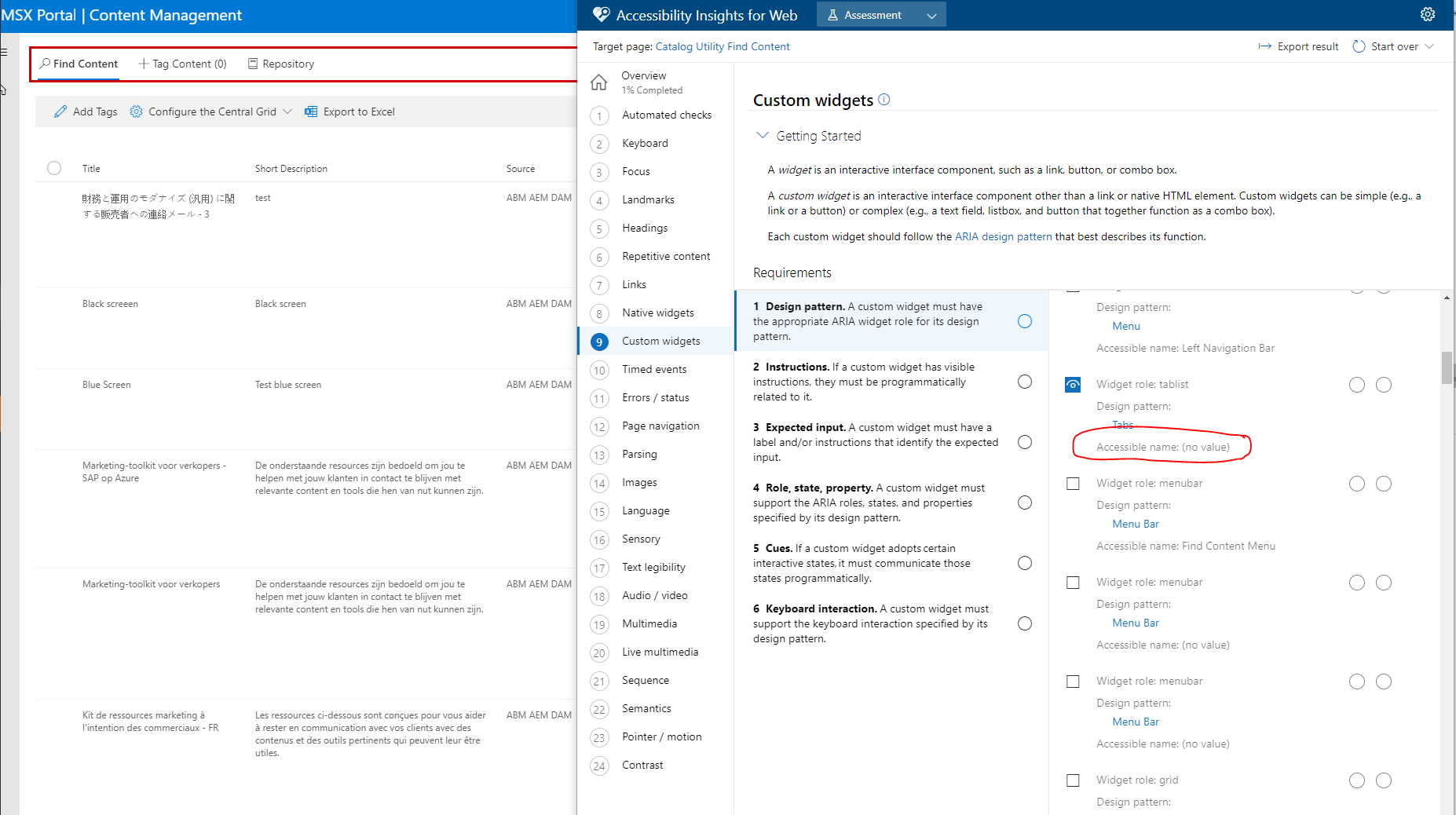
I am not able to see the changes. Here are my screen shots

qazaahir
on 6 Dec 2019
sorry to hear that @qazaahir. Can you provide us with the url you are testing with or a codepen repro so we can investigate this further?
ferBonnin
on 6 Dec 2019
qazaahir
on 6 Dec 2019
@flyingUnderTheRadar could you please take a look?
@qazaahir feel free to jump in with any additional observations.
From the code pen example provided,
Issue 1
I do not see the red highlight on codepen ( I see the red highlight in other pages). I get an error in the console on: "cannot connect to iframe..." This is a different/new issue I have filed a bug for: #1814 .
issue 2
I see the custom widgets test > Design pattern requirement picks up that there is a tablist element, however the tablist doesnt have an aria-label so the accessible name continues to be (no name). When I modify the html and add aria-label = "foo" i see the accessible name appear in the requirement, which I think is the expected requirement. Am I missing something here?
ferBonnin
on 6 Dec 2019
@flyingUnderTheRadar @ferBonnin @qazaahir
Here is the screenshot that shows that the aria-label indeed gets added through the react component “Pivot” : https://developer.microsoft.com/en-us/fabric#/controls/web/pivot
We are passing aria-label=”Top Navigation Bar” as a prop to the Pivot component present in the Office-UI-Fabric Library.

While I am not sure why you cannot see the aria-label in the codepen I provided, I would like to request you to test out the component on the Office Ui Fabric website (https://developer.microsoft.com/en-us/fabric#/controls/web/pivot) and see if the insights tool is able to capture the accessible name. We tried it out and we cannot see a name.
I am happy to hop on call with you to investigate this issue further as there has already been a lot of back and forth on it on the github issue.
 taparikh
on 12 Dec 2019
taparikh
on 12 Dec 2019
Thank you @ferBonnin for hoping on a call and showing me exactly where the issue was. I have written up a follow-up comment on the office-ui fabric bug https://github.com/OfficeDev/office-ui-fabric-react/issues/11072 where I will be continuing the discussion. Closing this issue ! Thank you!
taparikh
on 12 Dec 2019
Related issues
ferBonnin
·
10Comments
 cglong
·
4Comments
cglong
·
4Comments
 vikasgupta18
·
4Comments
vikasgupta18
·
4Comments
 jechols
·
4Comments
ferBonnin
·
3Comments
jechols
·
4Comments
ferBonnin
·
3Comments
Most helpful comment
Thank you @ferBonnin for hoping on a call and showing me exactly where the issue was. I have written up a follow-up comment on the office-ui fabric bug https://github.com/OfficeDev/office-ui-fabric-react/issues/11072 where I will be continuing the discussion. Closing this issue ! Thank you!