Accelerated-mobile-pages: WPRocket CDN is not working properly with the amp pages.
 Laxmikanth2502
All 33 comments
I have raised this issue with ticket number - 1923
I implemented the code changes in 73c5b12 commit but the issue is not solved completely.
- It breaks images in related posts. All related posts images are showing the default placeholder image.
- Images in posts are not completely using CDN. Only the "src" URL is changed to CDN URL. But it has no HTTP/HTTPS protocols added.
Example:
Actual output: cdn.geekdashboard.com/wp-content/uploads/.........
Expected output: https://cdn.geekdashboard.com/wp-content/uploads/.........
Image URLs inside "srcset" are still using non-CDN images.
SD-default-image is still using non-CDN image.
All other images like logos etc are still using non-CDN images.
Please find the below image for more information.

 amarilindra
on 9 Apr 2020
amarilindra
on 9 Apr 2020
Any new updates on this bug?
Fix this issue ASAP.
 MainakMK
on 20 Apr 2020
MainakMK
on 20 Apr 2020
Ready to merge.
 MohammedKaludi
on 11 May 2020
MohammedKaludi
on 11 May 2020
Fixed and pushed in 1.0.50
MohammedKaludi
on 22 May 2020
Ready to merge
MohammedKaludi
on 27 May 2020
Are you sure, in the next update the problem will fix?
MainakMK
on 27 May 2020
Are you sure, in the next update the problem will fix?
yes, and we are pushing the update in a few hours.
MohammedKaludi
on 27 May 2020
Pushed in 1.0.51 update
MohammedKaludi
on 27 May 2020
Pushed in 1.0.51 update
The problem is still showing, in amp noting is loaded from CDN even WP Rocket CDN is enabled.
Kindly check from your end before push any update.
MainakMK
on 27 May 2020
Pushed in 1.0.51 update
The problem is still showing, in amp noting is loaded from CDN even WP Rocket CDN is enabled.Kindly check from your end before push any update.
We have tested it before pushing the update, but is the issue still persists on your end after the update?
MohammedKaludi
on 27 May 2020
Pushed in 1.0.51 update
The problem is still showing, in amp noting is loaded from CDN even WP Rocket CDN is enabled.Kindly check from your end before push any update.
We have tested it before pushing the update, but is the issue still persists on your end after the update?
Yes, the issue still persists after the update. Kindly check once again.
MainakMK
on 27 May 2020
This is strange, can you please share the screenshot of CDN settings from WP Rocket?
or share the export of your settings at [email protected]
So we can import/configure the same in our servers and recreate the issue and fix it and push the update immediately.
MohammedKaludi
on 27 May 2020
{
    $cdn_url = get_option('wp_rocket_settings');
    if($cdn_url['cdn'] == 1){
    $cdn_url = $cdn_url["cdn_cnames"][0];
        .
        .
        .
}
You are getting the first CNAME from WP Rocket Settings with $cdn_url["cdn_cnames"][0];
There is no guarantee you will get the CNAME used for Images.
Users can set multiple CNAMES - one for CSS, one for JS, another for images, (or only 1 CNAME for everything), and IN ANY ORDER they wish.
You should get the CNAME used for Images from WP Rocket Settings OR give a separate option in your own plugin to configure the CNAMES
amarilindra
on 28 May 2020
So that means the implementation of this needs an urgent restructure.
@amarilindra thanks for the info.
We will look into this issue and fix it ASAP
MohammedKaludi
on 28 May 2020
@amarilindra Yes due to that only we have added one isset() condition - https://github.com/ahmedkaludi/accelerated-mobile-pages/commit/62515832381445c62b263b0de61f507a209ad563 and that has fixed the issue.
Will you please send us the url of your website where you are having error so that we will check once and let you know
 Zabi09
on 28 May 2020
Zabi09
on 28 May 2020
@Zabi09 isset() condition will not fix the problem. You are still only validating CNAME in the 0th position.
What if the CNAME of the image is not at 0th position?
I have made temporary changes to my site to explain the scenario. I added 4 CNAMES in this order
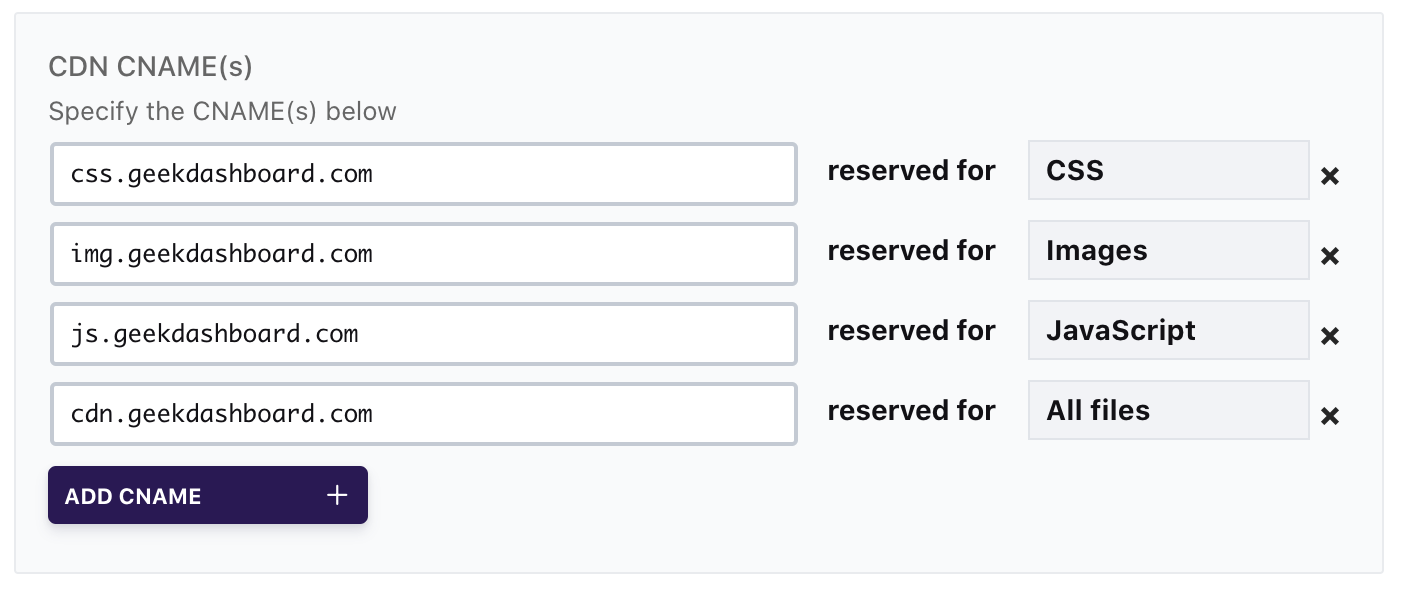
and the WP Rocket Settings will be saved like this
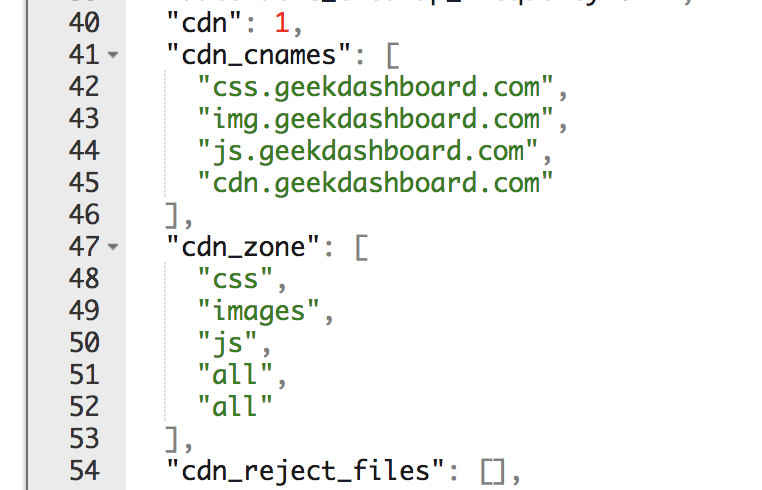
What you have to do is, from "cdn_zone" JSON Array, find the position of either "images" or "all" (Ignore the last "all", WP Rocket is saving extra value for some reason)
From that position, get the CNAME from "cdn_cnames" JSON Array. By doing this, you will get the CNAME which is configured to show images
Note: I have uninstalled AMPforWP plugin permanently last month due to unstable updates and bug fixes.
amarilindra
on 28 May 2020
Ready to merge
MohammedKaludi
on 8 Jun 2020
How many days it will take to Merge?
MainakMK
on 15 Jun 2020
How many days it will take to Merge?
@MainakMK we have merged the code into the new branch and uploaded into WP.org.
Can you test it with the 1.0.53 using WP Rollback plugin and Install 1.0.53 and let us know your feedback if the fix is properly working or not?
- https://monosnap.com/file/uD7xM4QtgTARx5ektqQHk7fsbCuagI
- https://monosnap.com/file/CGYyZrwksECCY28kZHGu3OfdhcA5Bg
Can you do that? It will be a great help if you can test it.
MohammedKaludi
on 15 Jun 2020
Hi,
Working in some cases & other cases not.
First of all Thumbnail image not loading from CDN, still from the main domain.
Also in the post, some images are loading from CDN some of those are not from CDN.
Another thing if some enter https://cdn.example.com in wp rocket CDN Tab., so they facing the error while loading images from https://https://cdn.example.com, conflicting it. But still, perfect when entering cdn.example.com in CDN tab.
Still having issues.
Also not I again roll back to 1.0.52 (Previous version). Waiting for the stable update.
MainakMK
on 15 Jun 2020
Ready to merge
MohammedKaludi
on 16 Jun 2020
Updated the code and tested on multiple scenarios and tested with the above-mentioned use-cases and seems to be working.
MohammedKaludi
on 17 Jun 2020
Sill did not get any update on AMP For WP plugin. Is the bug fixed on Version 1.0.52?
MainakMK
on 20 Jun 2020
Sill did not get any update on AMP For WP plugin. Is the bug fixed on Version 1.0.52?
Hey @MainakMK
Yesterday night we were able to make the update ready and uploaded in wp.org, can you please use rollback and rollback to 1.0.53 and I think it should now fix the issue.
Can you please check it once again? To make sure the update is stable.
Thank you once again for your cooperation.
MohammedKaludi
on 20 Jun 2020
Hey @MohammedKaludi
Having the same issue.
- First of all thumbnail not loading from CDN.
- Which images are cropped by WP system like 696x378, 696x485, 768x486 these images those are not lading from CDN, sill loading from the main domain.
These are the biggest issue still now.
MainakMK
on 20 Jun 2020
This is strange, we have tested and in our test, it was loading fine.
Can you please shed some light on what do you mean by all images not loading from CDN? Exactly which images? Logo, homepage thumbnails, single images or related post images?
also Which images are cropped by WP system like 696x378, 696x485, 768x486 these images those are not lading from CDN, sill loading from the main domain.
if you could share the URL of that page? that would be very helpful and we can fix it in minutes if we have the live example of the issue?
MohammedKaludi
on 20 Jun 2020
Hey @MohammedKaludi
Reply on support email, check that with live issue after solve it.
MainakMK
on 20 Jun 2020
The issue has been fixed and seems to be working.
need some minor more improvement in the code.
once that is done we can close this ticket.
MohammedKaludi
on 22 Jun 2020
Hey, @MohammedKaludi , Sill did not load images from CDN. Kindly check that website which is shared over email and the plugin is updated to latest version.
MainakMK
on 22 Jun 2020
Hey, @MohammedKaludi , Sill did not load images from CDN. Kindly check that website which is shared over email and the plugin is updated to latest version.
I still see that you are using 1.0.53.1 version, can you please update to the latest version.
Issue fixed: all the images are now loading from the CDN servers setup in the WPRocket settings.
Issue Pending: Only sub-images from srcset tags for fallback images are loading from the home server and that is a minor improvement required and will be fixed in the future updates.
MohammedKaludi
on 22 Jun 2020
Hey, @MohammedKaludi , Sill did not load images from CDN. Kindly check that website which is shared over email and the plugin is updated to latest version.
I still see that you are using 1.0.53.1 version, can you please update to the latest version.
Issue fixed: all the images are now loading from the CDN servers setup in the WPRocket settings.
Issue Pending: Only sub-images from
srcsettags for fallback images are loading from the home server and that is a minor improvement required and will be fixed in the future updates.
After the latest update, all images are loading from CDN. Thanks
Let's see how long it last, previous this issue fix then within 2 weeks the same issue comes. I hope that it will last forever. 😀
MainakMK
on 22 Jun 2020
Ready to merge.
MohammedKaludi
on 2 Jul 2020
Pushed in 1.0.58 update
MohammedKaludi
on 7 Jul 2020
Related issues
 daanishd
·
5Comments
daanishd
·
5Comments
 shchedrakov
·
3Comments
shchedrakov
·
3Comments
 satriaenur
·
4Comments
satriaenur
·
4Comments
 pegazee
·
7Comments
pegazee
·
7Comments
 HaripriyaHari
·
7Comments
HaripriyaHari
·
7Comments