Accelerated-mobile-pages: Version 0.9.97.52 Yoast Meta Information not being picked up
On version 0.9.97.52, the plugin does not pull up the yoast meta information such as meta title and meta description, and og information, and tries to create it's own data for these.
 vagu71
All 24 comments
Even after choosing these options as shown below in the backend:
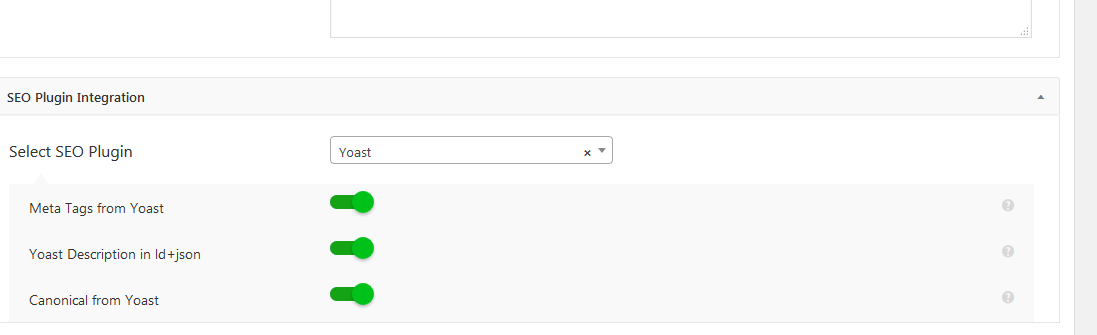
The AMPforWP plugin still tries to create it's own metas and og information and does not pull these from Yoast.
AMPforWP team, SEO is one of the major reasons for a lot of people like us opting to do AMP. And meta information and og information gets lost like this, the purpose of using the plugin is defeated. Request you to kindly fix this issue.
vagu71
on 19 May 2019
Hey @vagu71
Thank you very much for reporting the issue, I assure you that we will fix this issue on a very priority basis
 MohammedKaludi
on 19 May 2019
MohammedKaludi
on 19 May 2019
Thanks @MohammedKaludi! Look forward to seeing this fixed. Again, this is very important for SEO purposes (one of the reasons for doing AMP for a lot of us). Appreciate you getting this fixed.
vagu71
on 19 May 2019
 Rkroy
on 21 May 2019
Rkroy
on 21 May 2019
@vagu71
We have tested a lot with the Yoast and also with the Yoast Premium but unable to recreate it, So I would recommend you to contact us directly on https://ampforwp.com/support/ - I will personally have a look there.
 Zabi09
on 21 May 2019
Zabi09
on 21 May 2019
@Zabi09 well, it's on multiple sites. If it was one, it could be a problem with the theme or any of the other plugins.
Let me run a few tests at my end with twentyeighteen and by disabling all the plugins and get back to you on this in the next couple hours. If the problem persists, it has to be an issue with the latest AMPforWP plugin.
vagu71
on 21 May 2019
@vagu71 Have you tested by disabling the other plugins? Did you find any plugin which is conflicting? Please let us know.
Zabi09
on 22 May 2019
@Zabi09 yes, disabled all plugins except AMPforWP and yoast. The seo information is not pulled up from yoast.
vagu71
on 22 May 2019
@Zabi09 so basically, when you do a new wordpress install, then install the yoast plugin, and the ampforwp plugin, and then make a static homepage, this problem comes up.
The problem is not there for innerpage / posts / archives or anything else. There is a loop in your code for amp custom frontpage. I believe that the code inside that is doing this. When a static homepage is set in wordpress settings and also in the AMPforWP settings, the yoast meta fields are lost from og data and twitter cards.
vagu71
on 22 May 2019
there are no additional plugins or themes on the system I'm testing this on. Just the yoast and AMPforWP plugins and twenty nineteen set up as the active theme. Thoughts?
vagu71
on 22 May 2019
@Zabi09 @pegazee so here's more on the issue:
- The OG data is not getting populated correctly from the yoast data on a static frontpage (please note that this issue is only showing up for a static frontpage, not innerpages).
- The twitter card data is not showing properly from yoast data set up in the backend on a static frontpage (please note that this issue is only showing up for a static frontpage, not innerpages).
This is the file that is causing this: /plugins/accelerated-mobile-pages/templates/features.php
function ampforwp_yoast_opengraph_title($title){
    $new_title = ampforwp_yoast_social_title('og');
    if(!empty($new_title)){
        $title = $new_title;
    }
    return $title;
}
function ampforwp_yoast_twitter_title($title){
    $new_title = ampforwp_yoast_social_title('twitter');
    if(!empty($new_title)){
        $title = $new_title;
    }
    return $title;
}
function ampforwp_yoast_social_title($type) {
    //Added the opengraph for frontpage in AMP #2454
    if(ampforwp_is_front_page() || ampforwp_is_blog() ){
        $title = $page_id = '';
        if ( ampforwp_is_front_page() ) {
            $page_id = ampforwp_get_frontpage_id();
        }
        if ( ampforwp_is_blog() ){
            $page_id = ampforwp_get_blog_details('id');
        }
        if( 'og' == $type ) {
            $title = WPSEO_Meta::get_value( 'opengraph-title', $page_id );
        }
        if( 'twitter' == $type ) {
            $title = WPSEO_Meta::get_value('twitter-title',$page_id );
        }
        if (empty($title) ){
            $title = get_the_title($page_id);
        }
        return esc_attr($title);
    }
    return  esc_attr( get_bloginfo( 'name' ) );
}
function ampforwp_yoast_opengraph_desc($desc){
    if ( ampforwp_yoast_social_desc('og') ){
        $desc = ampforwp_yoast_social_desc('og');
    }
    return $desc;
}
function ampforwp_yoast_twitter_desc($desc){
    if ( ampforwp_yoast_social_desc('twitter') ){
        $desc = ampforwp_yoast_social_desc('twitter');
    }
    return $desc;
}
function ampforwp_yoast_social_desc($type) {
    if(ampforwp_is_front_page() || ampforwp_is_blog()){
        $desc = $page_id = '';
        if ( ampforwp_is_front_page() ) {
            $page_id = ampforwp_get_frontpage_id();
        }
        if ( ampforwp_is_blog() ){
            $page_id = ampforwp_get_blog_details('id');
        }
        if ( 'og' == $type ) {
            $desc = trim( WPSEO_Meta::get_value( 'opengraph-description', $page_id ) );
        }
        if ( 'twitter' == $type ) {
            $desc = trim( WPSEO_Meta::get_value( 'twitter-description', $page_id ) );
        }
        if (empty($desc)){
            $desc = wp_trim_words(get_post_field('post_content', $page_id), 26);
        }
        return esc_attr($desc);
    }
    return  esc_attr( get_bloginfo( 'description' ) );
}
These functions are not getting the correct information from the yoast meta title and the yoast meta description set up for a static homepage in wordpress admin.
vagu71
on 22 May 2019
@Zabi09 @pegazee @MohammedKaludi so here's the bug in the code:
In the file: /wp-content/plugins/accelerated-mobile-pages/templates/features.php
In the function ampforwp_yoast_social_title(), there is a function WPSEO_Meta::get_value( 'opengraph-title', $page_id ) and WPSEO_Meta::get_value('twitter-title',$page_id ). These are not returning any values and hence the fallback which sets up the title as the page title is being rendered.
vagu71
on 22 May 2019
@Zabi09 @pegazee,
For getting the og and twitter titles, there is an issue with the following function:
$title = WPSEO_Meta::get_value( 'opengraph-title', $page_id )
Possible solution: Instead of using the function above, use the function below:
$title = get_post_meta($page_id, '_yoast_wpseo_title', true);
For getting the og and twitter descriptions from yoast, there is an issue with the following function:
$desc = trim( WPSEO_Meta::get_value( 'opengraph-description', $page_id ) )
Possible solution: Instead of using the function above, use the function below:
$desc = get_post_meta($page_id, '_yoast_wpseo_metadesc', true);
Also in case the description field is empty, kindly sanitize the desc generated from the post content. When WPBakery is installed and being used on the homepage, vc tags show up in the og and twitter descriptions. These should be removed and sanitized.
vagu71
on 22 May 2019
I have set up the static page from reading - https://prnt.sc/nru21t and try to recreate the issue by setting up the blog page - https://take.ms/l4jgU and also the front page in AMP - https://take.ms/bGcCz but it is not recreating on my end,
Zabi09
on 22 May 2019
@Zabi09, good, after setting up the static page in wordpress reading settings, you also need to set up the custom front page option to yes in your plugin settings and also select which page to use. This is shown in the screenshot below:
https://ibb.co/kgrMvL4
Once you do this, this is when the code in the function ampforwp_yoast_social_title() and ampforwp_yoast_social_desc() in the file /wp-content/plugins/accelerated-mobile-pages/templates/features.php would come into action. Please read my solution and code above and let me know if it makes sense. The functions you're using WPSEO_Meta::get_value() do not work. And need an alternative approach which I've explained above.
Also, once you select the static frontpage from wp settings - > reading and also select the static front page in your plugin settings (this is what makes the code control enter if(ampforwp_is_front_page() || ampforwp_is_blog())), you'll know what I'm talking about.
vagu71
on 22 May 2019
@Zabi09 you need to set up a static page as the frontpage, not the posts page. These settings need to be done in the wordpress admin under Settings->Reading. And then you also need to set the static frontpage in your plugin settings as shown in the screenshot above.
vagu71
on 22 May 2019
Hi @vagu71, can you make the changes in ampforwp_yoast_social_title function from this commit https://github.com/ahmedkaludi/accelerated-mobile-pages/commit/210c4689f533232579e21f00ecbfb31a1023cf58 and let me know if that resolves your issue?
 MARQAS
on 28 May 2019
MARQAS
on 28 May 2019
@MARQAS thanks for looking into this. I'll be checking this out today.
vagu71
on 29 May 2019
@MARQAS, made the changes to the ampforwp_yoast_social_title() function as per the commit and it seems to work ok. Tested this out on multiple sites. Thanks for getting this sorted out.
vagu71
on 29 May 2019
@MARQAS, as a kind request, please can you add this change to the next update of the plugin.
vagu71
on 29 May 2019
@vagu71, Done.
MARQAS
on 29 May 2019
@MARQAS, when do you reckon this will be pushed onto the plugin update?
vagu71
on 30 May 2019
@MARQAS, when do you reckon this will be pushed onto the plugin update?
Hopefully tomorrow.
MohammedKaludi
on 30 May 2019
Pushed in 0.9.97.57
 pegazee
on 3 Jun 2019
pegazee
on 3 Jun 2019
Related issues
 luan03
·
3Comments
luan03
·
3Comments
 HaripriyaHari
·
7Comments
HaripriyaHari
·
7Comments
 satriaenur
·
4Comments
satriaenur
·
4Comments
 daanishd
·
5Comments
daanishd
·
5Comments
 ghost
·
4Comments
ghost
·
4Comments