Accelerated-mobile-pages: AMP on google lighthouse
Hi guys i use design three on my site, and i was trying to increase my score on google lighthouse. Some issues accused by the tool, is about AMP html , for example on accessibility part:
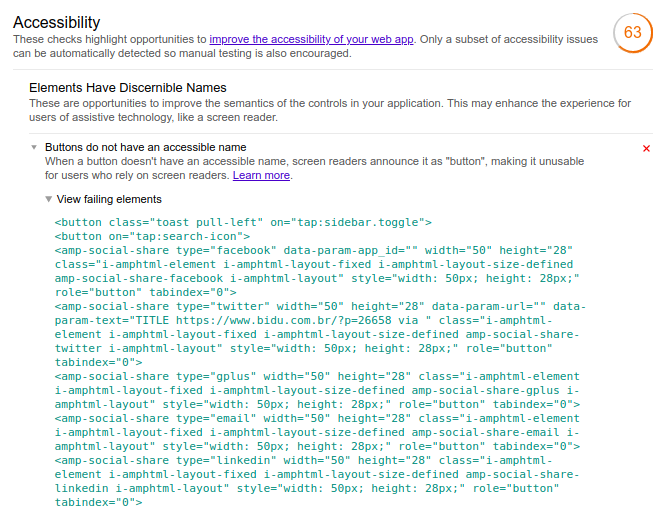
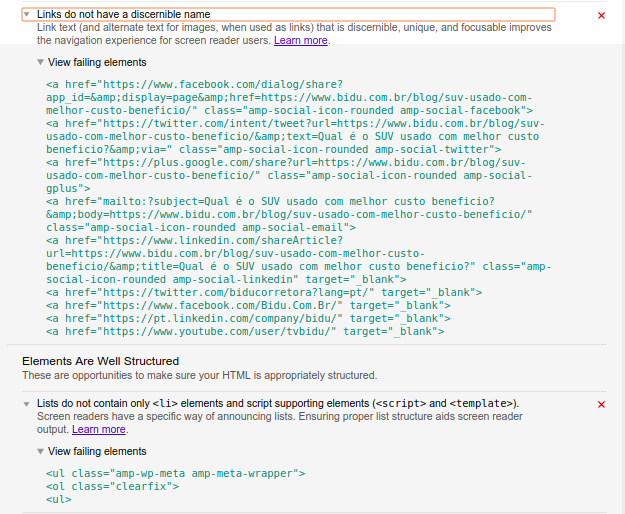
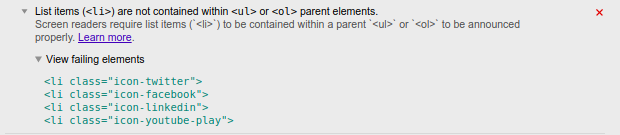
I use this url https://www.bidu.com.br/blog/suv-usado-com-melhor-custo-beneficio/amp/
I don't know exactly what should i do :thinking:
If there is an explanation about it, please tell me, thanks guys ;) !
 carloosamarante
All 6 comments
see wordpress post - accessibility to become WCAG level 2.0 AA compliant is a big issue. It is a learning curve and not just a test using lighthouse. I use this http://wave.webaim.org . You will see that design 2 is almost compliant out of the box if you avoid using social icons (see wordpress post about using your own ones) and follow basic accessibility rules in terms of color contrast, avoiding adjacent links, font-sizes, lists, etc.
 Frenchomatic
on 4 May 2018
Frenchomatic
on 4 May 2018
Part one is the research part which will be done by Asif.
Based on his report, I'll give instructions to Raju
 ahmedkaludi
on 24 Jun 2018
ahmedkaludi
on 24 Jun 2018
to make D3 accessible the following changes needed from our end.
- [x] Name for the menu button
- [x] social-icons links do not have discernable names (footer, sticky and single).
- [ ]
<ul>tags must contains<li>tags (social sharing icons andamp-meta-wrapper). - [ ] color scheme
.amp-wp-meta, .amp-wp-meta a {color: #595959;}
and most of the color contrast can be done from the plugin's color scheme's options for all the part
 Sejiro-Hiko
on 13 Jul 2018
Sejiro-Hiko
on 13 Jul 2018
I have made design 2 accessible to WCAG level 2.0 AA - I use http://wave.webaim.org as a test. Lighthouse throws up things which are just wrong. Accessibility isn't an absolute type of thing. Most of the changes in design 2 are required around the menu with a bit of CSS to make / position a set of bars. I'll share all the changes if anyone wants. Here is the header-bar.php file
<?php global $redux_builder_amp; ?>
<header class="container">
  <div id="headerwrap">
      <div id="header">
        <?php do_action('ampforwp_header_top_design2'); ?>
        <?php amp_logo(); ?>
        <?php do_action('ampforwp_header_search'); ?>
        <?php do_action('ampforwp_call_button');
        do_action('ampforwp_header_bottom_design2'); ?>
      </div>
  </div> <?php if(isset($redux_builder_amp['ampforwp-amp-menu']) && $redux_builder_amp['ampforwp-amp-menu']){ ?>
<div on='tap:sidebar.toggle' role="button" tabindex="0" aria-label="Menu" class="nav_container">
    <div class="menu-line"></div><div class="menu-line"></div><div class="menu-line"></div>
</div>
<?php } ?>
</header>

<amp-sidebar id='sidebar'
    layout="nodisplay"
    side="right">
  <div class="toggle-navigationv2">
      <div role="button" tabindex="0" on='tap:sidebar.close' class="close-nav">X</div>
        <?php // #1229 ?>
        <nav id ="primary-amp-menu" itemscope="" itemtype="https://schema.org/SiteNavigationElement">
         <?php
            $menu_html_content = wp_nav_menu( array(
                                      'theme_location' => 'amp-menu' ,
                                      'link_before'     => '<span itemprop="name">',
                                      'link_after'     => '</span>',
                                      'menu'           =>'ul',
                                      'echo' => false,
                                      'menu_class' => 'menu amp-menu'
                                    ) );
            $menu_html_content = apply_filters('ampforwp_menu_content', $menu_html_content);
            $sanitizer_obj = new AMPFORWP_Content( $menu_html_content, array(), apply_filters( 'ampforwp_content_sanitizers', array( 'AMP_Img_Sanitizer' => array(), 'AMP_Style_Sanitizer' => array(), ) ) );
            $sanitized_menu =  $sanitizer_obj->get_amp_content();
            echo $sanitized_menu; ?>
        </nav>
        <?php do_action('ampforwp_after_amp_menu'); ?>
  </div>
</amp-sidebar>
Then for the footer I embed my own social links with text links on buttons as opposed to icons. It is more accessible and faster too as no icon sets need to be loaded.
The rest is standard stuff around color contrast and the order of Hs tags + use of screenreader css where appropriate. If a webmaster doesn't really know what they are doing in terms of accessibility then they will make mistakes anyway. However, getting the menu and footer in order is a good thing to do.
One thing to note is AMP cannot be 100% compliant because of the use of
Frenchomatic
on 13 Jul 2018
Pushed in 0.9.97.12
 MohammedKaludi
on 27 Aug 2018
MohammedKaludi
on 27 Aug 2018
Fixed a bug: https://github.com/ahmedkaludi/accelerated-mobile-pages/commit/535afe72e9b01dc0646d86a8267c08770210c09c
MohammedKaludi
on 27 Aug 2018
Related issues
 HaripriyaHari
·
7Comments
HaripriyaHari
·
7Comments
 luan03
·
3Comments
HaripriyaHari
·
7Comments
luan03
·
3Comments
HaripriyaHari
·
7Comments
 TMsravan
·
3Comments
TMsravan
·
3Comments
 prayagverma
·
3Comments
prayagverma
·
3Comments
Most helpful comment
see wordpress post - accessibility to become WCAG level 2.0 AA compliant is a big issue. It is a learning curve and not just a test using lighthouse. I use this http://wave.webaim.org . You will see that design 2 is almost compliant out of the box if you avoid using social icons (see wordpress post about using your own ones) and follow basic accessibility rules in terms of color contrast, avoiding adjacent links, font-sizes, lists, etc.