Abp: Using CSRF/XSRF & Anti Forgery System in IIS
Hi.
I have updated ABP Commercial to latest stable version (3.3.1). After that only get methods work. POST and PUT don't.
Let explain my scenario.
- Create new angular project (abp new demo -t app-pro -u angular)
- Configure and build server side and deploy it to IIS server under (https://demo.test.com/ws)
- Configure, build as static js files and deploy angular client to IIS server under (https://demo.test.com/admin)
Those steps are nothing special. Pure ABP templates. Configured to work together.
Both server and client are properly configured and work perfect in 3.2.x version. After upgrade to 3.3.1 post and put not working
anymore. Antiforgery token validation system is blocking post and put execution.
I read document twice. :)
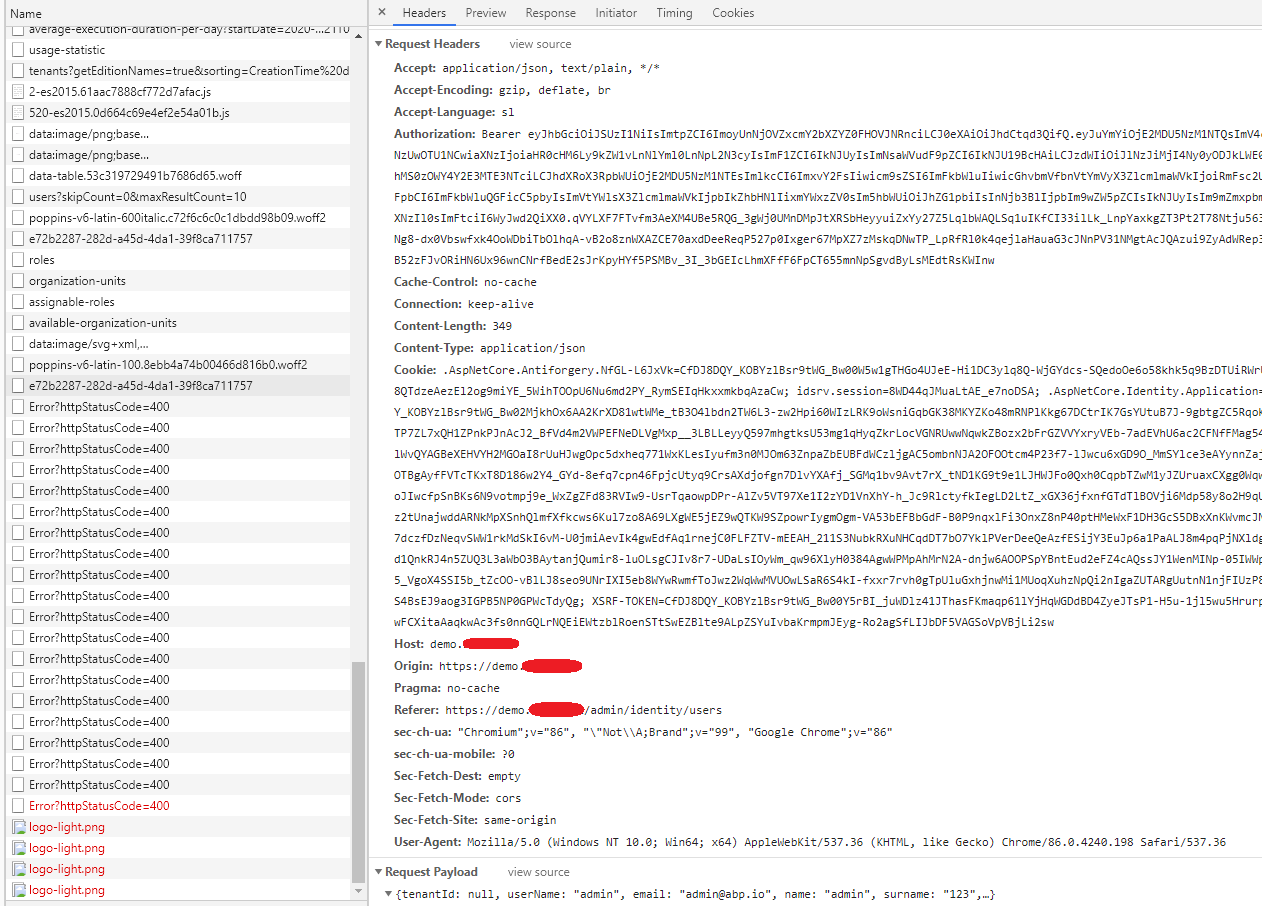
I have noticed angular client doesn't set RequestVerificationToken in header when sending post or put request.
Why ? Is possible reason fact disscussed in this conversation
What additional configuration i should make to work multiple apps at one domain / under subfolders ?
If i disable Anti Forgery System everything works again like in 3.2.x version.
 sebitsi
All 11 comments
hi @sebitsi
Can you share the error log? Include angular and backend.
 maliming
on 21 Nov 2020
maliming
on 21 Nov 2020
Hi @maliming.
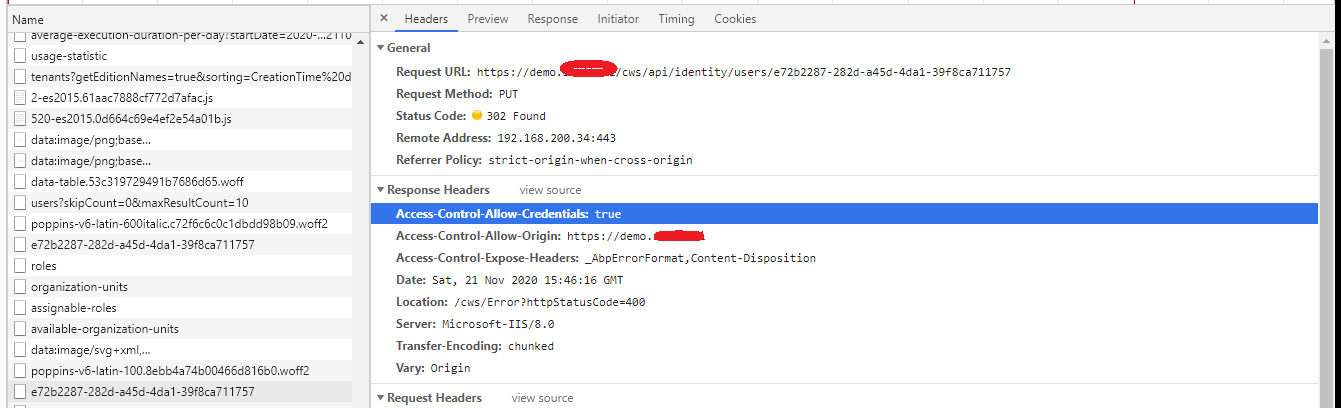
I send you 2 pictures of request (user update).
As you can see server responds with redirection to login page.
On server side there is nothing special:
2020-11-21 16:46:16.893 +01:00 [INF] Request starting HTTP/1.1 PUT https://demo.xxxxx.xx/cws/api/identity/users/e72b2287-282d-a45d-4da1-39f8ca711757 application/json 349
2020-11-21 16:46:16.895 +01:00 [INF] CORS policy execution successful.
2020-11-21 16:46:16.920 +01:00 [INF] No CORS policy found for the specified request.
2020-11-21 16:46:16.921 +01:00 [INF] Executing endpoint 'Volo.Abp.Identity.IdentityUserController.UpdateAsync (Volo.Abp.Identity.Pro.HttpApi)'
2020-11-21 16:46:16.926 +01:00 [INF] Route matched with {controller = "User", area = "identity", action = "Update", page = ""}. Executing controller action with signature System.Threading.Tasks.Task`1[Volo.Abp.Identity.IdentityUserDto] UpdateAsync(System.Guid, Volo.Abp.Identity.IdentityUserUpdateDto) on controller Volo.Abp.Identity.IdentityUserController (Volo.Abp.Identity.Pro.HttpApi).
2020-11-21 16:46:16.927 +01:00 [ERR] The required antiforgery header value "RequestVerificationToken" is not present.
2020-11-21 16:46:16.928 +01:00 [INF] Authorization failed for the request at filter 'Volo.Abp.AspNetCore.Mvc.AntiForgery.AbpAutoValidateAntiforgeryTokenAuthorizationFilter'.
2020-11-21 16:46:16.931 +01:00 [INF] Executing HttpStatusCodeResult, setting HTTP status code 400
2020-11-21 16:46:16.931 +01:00 [INF] Executed action Volo.Abp.Identity.IdentityUserController.UpdateAsync (Volo.Abp.Identity.Pro.HttpApi) in 4.5272ms
2020-11-21 16:46:16.931 +01:00 [INF] Executed endpoint 'Volo.Abp.Identity.IdentityUserController.UpdateAsync (Volo.Abp.Identity.Pro.HttpApi)'
AutoValidateAntiforgeryTokenAuthorizationFilter failed as expected. But why ? Why client doesn't send token ?
There is no issue on my developement machine. Only on staging server.
sebitsi
on 21 Nov 2020
 realLiangshiwei
on 22 Nov 2020
realLiangshiwei
on 22 Nov 2020
@realLiangshiwei
I'm sorry.
What should i look at ?
I'm aware of HttpClientXsrfModule.
I'm using official template from Volosoft and it is included in CodeModule by default.
Client works on local machine but not in scenario i mentioned.
sebitsi
on 22 Nov 2020
hi @bnymncoskuner
Do you have any idea?
maliming
on 23 Nov 2020
Hi all,
I have exactly the same issue after upgrading to Abp 3.3.1.
Get actions work correctly but POST,PUT and DELETE return 400 HttpStatus.
In the Logs file i get :
2020-11-24 13:04:26.326 +01:00 [ERR] The required antiforgery header value "RequestVerificationToken" is not present.
2020-11-24 13:04:26.328 +01:00 [INF] Authorization failed for the request at filter 'Volo.Abp.AspNetCore.Mvc.AntiForgery.AbpAutoValidateAntiforgeryTokenAuthorizationFilter'.
 f-belhocine
on 24 Nov 2020
f-belhocine
on 24 Nov 2020
Hi all,
I resolved the issue by disabling AutoValidateAntiForgeryToken in the REST API module.
Configure<AbpAntiForgeryOptions>(options =>
            {
                options.AutoValidate = false;
            });
f-belhocine
on 24 Nov 2020
Hi @f-belhocine
This is not solution. It's workaround.
The problem is in HttpClientXsrfModule. It has limitations.
Look at this stackoverflow.
I have tried to use url without http or https in front. Then AutoValidateForgeryToken works again.
We will see what guys in Volosoft will say about this.
sebitsi
on 24 Nov 2020
Hello all,
I have seen that there is some confusion about how this token works. First, I'll give you the solution and then talk about the details.
The solution is simple. If you serve both your angular application and APIs from the same domain, you don't give the full path of APIs in environment.ts, instead, you give a relative path.
Let's look at the example given in the post;
Your APIs is hosted at https://demo.test.com/ws
Your angular application is hosted at https://demo.test.com/admin
So if your API request should look like this https://demo.test.com/ws/api/identity/users
your environment.prod.ts has to be as follows:
export const environment = {
  production: true,
  // ....
  apis: {
    default: {
      url: '/ws', // <- just use the context root here
     // ...
    },
  },
} as Config.Environment;
Let's talk about why.
First, take a look at Angular's code
It does not intercept any request that starts with http:// or https://. There is a good reason for that. Any cross-site request does not need this token for security. This verification is only valid if the request is made to the same domain from which the web page is served. So, simply put, if you serve everything from a single domain, you just use a relative path.
I'll update the docs for this particular case. I have seen some other people were having a problem with this as well and it should be addressed in the docs.
 bnymncoskuner
on 25 Nov 2020
bnymncoskuner
on 25 Nov 2020
@bnymncoskuner Thanks for your good explanation.
Everything is logical now to me.
Yes please update docs. This should be fine.
I will left this issue open. Close it freely when documents will be updated.
sebitsi
on 25 Nov 2020
Just updated the docs, it should be available soon. Closing this issue. Thanks for the input
bnymncoskuner
on 26 Nov 2020
Related issues
sebitsi
·
18Comments
 natiki
·
15Comments
natiki
·
15Comments
 stay2be
·
35Comments
stay2be
·
35Comments
 ugurozturk
·
15Comments
maliming
·
33Comments
ugurozturk
·
15Comments
maliming
·
33Comments
Most helpful comment
Just updated the docs, it should be available soon. Closing this issue. Thanks for the input