Abp: Slow ApplicationService Method Invoke
Abp Version : 3.2.1
UI : MVC
Problem : Slow Application Service Method Invoke
Call Stack :
Tooyp.Application.dll!Tooyp.Application.Files.FileAppService.CreateAsync(Tooyp.Application.Contracts.Files.FileUploadInputDto   input) Line 36
-- // Invoked Method
DynamicProxyGenAssembly2!<Unknown   function>
Castle.Core.dll!Castle.DynamicProxy.AbstractInvocation.Proceed()
Castle.Core.dll!Castle.DynamicProxy.AbstractInvocation.ProceedInfo.Invoke()
Castle.Core.AsyncInterceptor.dll!Castle.DynamicProxy.AsyncInterceptorBase.ProceedAsynchronous<Tooyp.Application.Contracts.Files.FileUploadOutputDto>(Castle.DynamicProxy.IInvocation   invocation, Castle.DynamicProxy.IInvocationProceedInfo proceedInfo)
Volo.Abp.Castle.Core.dll!Volo.Abp.Castle.DynamicProxy.CastleAbpMethodInvocationAdapterWithReturnValue<Tooyp.Application.Contracts.Files.FileUploadOutputDto>.ProceedAsync()
Volo.Abp.Auditing.dll!Volo.Abp.Auditing.AuditingInterceptor.InterceptAsync(Volo.Abp.DynamicProxy.IAbpMethodInvocation   invocation)
Volo.Abp.Castle.Core.dll!Volo.Abp.Castle.DynamicProxy.CastleAsyncAbpInterceptorAdapter<Volo.Abp.Auditing.AuditingInterceptor>.InterceptAsync<Tooyp.Application.Contracts.Files.FileUploadOutputDto>(Castle.DynamicProxy.IInvocation   invocation, Castle.DynamicProxy.IInvocationProceedInfo proceedInfo,   System.Func<Castle.DynamicProxy.IInvocation,   Castle.DynamicProxy.IInvocationProceedInfo,   System.Threading.Tasks.Task<Tooyp.Application.Contracts.Files.FileUploadOutputDto>>   proceed)
Castle.Core.AsyncInterceptor.dll!Castle.DynamicProxy.AsyncInterceptorBase.InterceptAsynchronous<Tooyp.Application.Contracts.Files.FileUploadOutputDto>(Castle.DynamicProxy.IInvocation   invocation)
Castle.Core.AsyncInterceptor.dll!Castle.DynamicProxy.AsyncDeterminationInterceptor.HandleAsyncWithResult<Tooyp.Application.Contracts.Files.FileUploadOutputDto>(Castle.DynamicProxy.IInvocation   invocation, Castle.DynamicProxy.IAsyncInterceptor asyncInterceptor)
Castle.Core.AsyncInterceptor.dll!Castle.DynamicProxy.AsyncDeterminationInterceptor.Intercept(Castle.DynamicProxy.IInvocation   invocation)
Castle.Core.dll!Castle.DynamicProxy.AbstractInvocation.Proceed()
Castle.Core.dll!Castle.DynamicProxy.AbstractInvocation.ProceedInfo.Invoke()
Castle.Core.AsyncInterceptor.dll!Castle.DynamicProxy.AsyncInterceptorBase.ProceedAsynchronous<Tooyp.Application.Contracts.Files.FileUploadOutputDto>(Castle.DynamicProxy.IInvocation   invocation, Castle.DynamicProxy.IInvocationProceedInfo proceedInfo)
Volo.Abp.Castle.Core.dll!Volo.Abp.Castle.DynamicProxy.CastleAbpMethodInvocationAdapterWithReturnValue<Tooyp.Application.Contracts.Files.FileUploadOutputDto>.ProceedAsync()
Volo.Abp.Validation.dll!Volo.Abp.Validation.ValidationInterceptor.InterceptAsync(Volo.Abp.DynamicProxy.IAbpMethodInvocation   invocation)
Volo.Abp.Castle.Core.dll!Volo.Abp.Castle.DynamicProxy.CastleAsyncAbpInterceptorAdapter<Volo.Abp.Validation.ValidationInterceptor>.InterceptAsync<Tooyp.Application.Contracts.Files.FileUploadOutputDto>(Castle.DynamicProxy.IInvocation   invocation, Castle.DynamicProxy.IInvocationProceedInfo proceedInfo,   System.Func<Castle.DynamicProxy.IInvocation,   Castle.DynamicProxy.IInvocationProceedInfo,   System.Threading.Tasks.Task<Tooyp.Application.Contracts.Files.FileUploadOutputDto>>   proceed)
Castle.Core.AsyncInterceptor.dll!Castle.DynamicProxy.AsyncInterceptorBase.InterceptAsynchronous<Tooyp.Application.Contracts.Files.FileUploadOutputDto>(Castle.DynamicProxy.IInvocation   invocation)
Castle.Core.AsyncInterceptor.dll!Castle.DynamicProxy.AsyncDeterminationInterceptor.HandleAsyncWithResult<Tooyp.Application.Contracts.Files.FileUploadOutputDto>(Castle.DynamicProxy.IInvocation   invocation, Castle.DynamicProxy.IAsyncInterceptor asyncInterceptor)
Castle.Core.AsyncInterceptor.dll!Castle.DynamicProxy.AsyncDeterminationInterceptor.Intercept(Castle.DynamicProxy.IInvocation   invocation)
Castle.Core.dll!Castle.DynamicProxy.AbstractInvocation.Proceed()
Castle.Core.dll!Castle.DynamicProxy.AbstractInvocation.ProceedInfo.Invoke()
Castle.Core.AsyncInterceptor.dll!Castle.DynamicProxy.AsyncInterceptorBase.ProceedAsynchronous<Tooyp.Application.Contracts.Files.FileUploadOutputDto>(Castle.DynamicProxy.IInvocation   invocation, Castle.DynamicProxy.IInvocationProceedInfo proceedInfo)
Volo.Abp.Castle.Core.dll!Volo.Abp.Castle.DynamicProxy.CastleAbpMethodInvocationAdapterWithReturnValue<Tooyp.Application.Contracts.Files.FileUploadOutputDto>.ProceedAsync()
Volo.Abp.Uow.dll!Volo.Abp.Uow.UnitOfWorkInterceptor.InterceptAsync(Volo.Abp.DynamicProxy.IAbpMethodInvocation   invocation)
Volo.Abp.Castle.Core.dll!Volo.Abp.Castle.DynamicProxy.CastleAsyncAbpInterceptorAdapter<Volo.Abp.Uow.UnitOfWorkInterceptor>.InterceptAsync<Tooyp.Application.Contracts.Files.FileUploadOutputDto>(Castle.DynamicProxy.IInvocation   invocation, Castle.DynamicProxy.IInvocationProceedInfo proceedInfo,   System.Func<Castle.DynamicProxy.IInvocation,   Castle.DynamicProxy.IInvocationProceedInfo,   System.Threading.Tasks.Task<Tooyp.Application.Contracts.Files.FileUploadOutputDto>>   proceed)
Castle.Core.AsyncInterceptor.dll!Castle.DynamicProxy.AsyncInterceptorBase.InterceptAsynchronous<Tooyp.Application.Contracts.Files.FileUploadOutputDto>(Castle.DynamicProxy.IInvocation   invocation)
Castle.Core.AsyncInterceptor.dll!Castle.DynamicProxy.AsyncDeterminationInterceptor.HandleAsyncWithResult<Tooyp.Application.Contracts.Files.FileUploadOutputDto>(Castle.DynamicProxy.IInvocation   invocation, Castle.DynamicProxy.IAsyncInterceptor asyncInterceptor)
Castle.Core.AsyncInterceptor.dll!Castle.DynamicProxy.AsyncDeterminationInterceptor.Intercept(Castle.DynamicProxy.IInvocation   invocation)
Castle.Core.dll!Castle.DynamicProxy.AbstractInvocation.Proceed()
DynamicProxyGenAssembly2!<Unknown   function>
-- //Caller
Tooyp.HttpApi.dll!Tooyp.Controllers.FilesController.UploadImage(Microsoft.AspNetCore.Http.IFormFile   file)
Hello ,
I use Abp Blobstoring FileSystem module,
I copied codes from Blogging Module Cover Image upload page .
The Problem is Calling Tooyp.Application.Files.FileAppService.CreateAsync method takes more than 10seconds to Invoke. If I upload bigger files like 20MB+ , It takes longer time to invoke. I think , the problem is the Interceptors .
I have disabled Auditing Application-Wide.
   Configure<AbpAuditingOptions>(options =>
            {
                options.IsEnabled = false; //Disables the auditing system
            });
But The problem is still going on.
Thanks
 halido
All 5 comments
hi
- Steps needed to reproduce the problem.
 maliming
on 23 Oct 2020
maliming
on 23 Oct 2020
Hello @maliming ,
I have created git repo for this Issue,
https://github.com/halido/Abp_Issue_5876
I have added 2 TODOs inside codes with
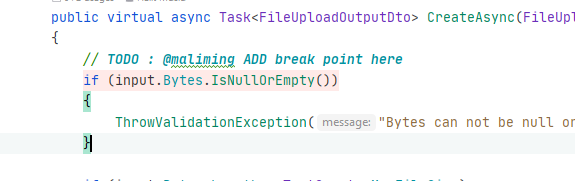
Steps
- Add breakpoint to FilesController Line 61
- Add breakpoint to FileAppService Line 34
- Run DbMigrator Project for Migrations
- Run Web project on Debug mode.
- Click file input and select a file larger than 20MB and less than 50MB ( I have added max file limit 50MB)
You will see performance issue on breakpoints.
I am expecting , FileController should invoke FileAppService_CreateAsync method immediatly. But It takes more than 10 seconds .
halido
on 23 Oct 2020
It seems to be related to the interceptor, I will deal with this problem, thank you
maliming
on 23 Oct 2020
hi
Add [DisableValidation] attribute to Bytes property.
public class FileUploadInputDto
{
    [Required]
    [DisableValidation]
    public byte[] Bytes { get; set; }

    [Required]
    public string Name { get; set; }
}
hi
Add
[DisableValidation]attribute toBytesproperty.public class FileUploadInputDto { [Required] [DisableValidation] public byte[] Bytes { get; set; } [Required] public string Name { get; set; } }
This solves my problem, Thanks for help
halido
on 23 Oct 2020
Related issues
 hikalkan
·
33Comments
hikalkan
·
33Comments
 Stirda
·
17Comments
Stirda
·
17Comments
 natiki
·
15Comments
natiki
·
15Comments
 SLTsoftware
·
15Comments
SLTsoftware
·
15Comments
 crashsol
·
16Comments
crashsol
·
16Comments
Most helpful comment
hi
Add
[DisableValidation]attribute toBytesproperty.