Abp: How to set “.AspNetCore.Identity.Application” cookie expiration?
Hi,
After sign in into my application, I only have to wait for a few days and then it seems that my cookie expire!
It seems it is the ".AspNetCore.Identity.Application" cookie.
I have tried to change it, but no chance... none of the changes I made work :-(
Do you have any idea about how I can extend the expiration delay for this cookie?
Here are the 3 (none working) changes I made:
Solution 1
At login time, I set the ExpiresUtc, but does seem to impact anything. Don't know why!
    public IActionResult OnGetLogin()
    {
        var authProps = new AuthenticationProperties
        {
            IsPersistent = true,
            ExpiresUtc = DateTimeOffset.UtcNow.AddDays(ApplicationConstants.LoginCookieExpirationDelay),
            RedirectUri = Url.Content("~/")
        };
        return Challenge(authProps, "oidc");
    }
Solution 2
In the AddCookie options, I set the ExpireTimeSpan, here again, don't know what it really change.
    context.Services.AddAuthentication(options =>
    {
        options.DefaultScheme = "Cookies";
        options.DefaultChallengeScheme = "oidc";
    })
    .AddCookie("Cookies", options =>
    {
        options.ExpireTimeSpan = TimeSpan.FromDays(ApplicationConstants.LoginCookieExpirationDelay);
    })
    .AddOpenIdConnect("oidc", options =>
    {
        options.Authority = configuration["AuthServer:Authority"];
        options.RequireHttpsMetadata = true;
        options.ResponseType = OpenIdConnectResponseType.CodeIdToken;

        options.ClientId = configuration["AuthServer:ClientId"];
        options.ClientSecret = configuration["AuthServer:ClientSecret"];

        options.SaveTokens = true;
        options.GetClaimsFromUserInfoEndpoint = true;

        options.Scope.Add("role");
        options.Scope.Add("email");
        options.Scope.Add("phone");
        options.Scope.Add("SoCloze");

        options.ClaimActions.MapAbpClaimTypes();
    });
Solution 3
The last solution was to intercept the login event, but this code is not called at all !
    context.Services.ConfigureApplicationCookie(opt => {
        opt.Events.OnSigningIn = async (signinContext) => {
            signinContext.Properties.ExpiresUtc = DateTimeOffset.Now.AddDays(ApplicationConstants.LoginCookieExpirationDelay);
            signinContext.CookieOptions.Expires = signinContext.Properties.ExpiresUtc?.ToUniversalTime();
        };
    });
 vd3d
vd3d
All 7 comments
services.ConfigureApplicationCookie(options =>
{
    options.AccessDeniedPath = "/Identity/Account/AccessDenied";
    options.Cookie.Name = "YourAppCookieName";
    options.Cookie.HttpOnly = true;
    options.ExpireTimeSpan = TimeSpan.FromMinutes(60);
    options.LoginPath = "/Identity/Account/Login";
    // ReturnUrlParameter requires
    //using Microsoft.AspNetCore.Authentication.Cookies;
    options.ReturnUrlParameter = CookieAuthenticationDefaults.ReturnUrlParameter;
    options.SlidingExpiration = true;
});
 maliming
on 16 Jun 2020
maliming
on 16 Jun 2020
@maliming
I have tried adding following line in the MyProjectNameIdentityServerModule inside ConfigureServices. But still the .AspNetCore.Identity.Application showing expiry of a year. I am using abp v3.3.0 with Azure AD as External Authentication. No local sign-in and registration.
context.Services.ConfigureApplicationCookie(x =>
            {
                x.ExpireTimeSpan = TimeSpan.FromDays(1);
            });
I even tried putting the above line inside PreConfigureServices & PostConfigureServices no changes. I am not able to find where the 1 year of cookie expiry is configured.
 sachinarora87
on 14 Dec 2020
sachinarora87
on 14 Dec 2020
@sachinarora87 What's the steps to repro your problem?
maliming
on 14 Dec 2020
@maliming
I am able to reproduce it with simple local login as well. Here are the steps:
- Create a new project with ABP CLI
abp new Company.ProjectName -t app -u angular --separate-identity-server - Add following line in the ProjectNameIdentityServerModule inside ConfigureServices to configure the .AspNetCore.Identity.Application cookie expiry
context.Services.ConfigureApplicationCookie(x => { x.ExpireTimeSpan = TimeSpan.FromDays(1); }); - Run the DbMigrator to seed the database.
- Set the 'Company.ProjectName.IdentityServer.csproj' as startup project and run it.
- Login with 'admin' user in the AuthServer and check the .AspNetCore.Identity.Application cookie expiry.
The .AspNetCore.Identity.Application cookie expiry is still showing expiry of a year
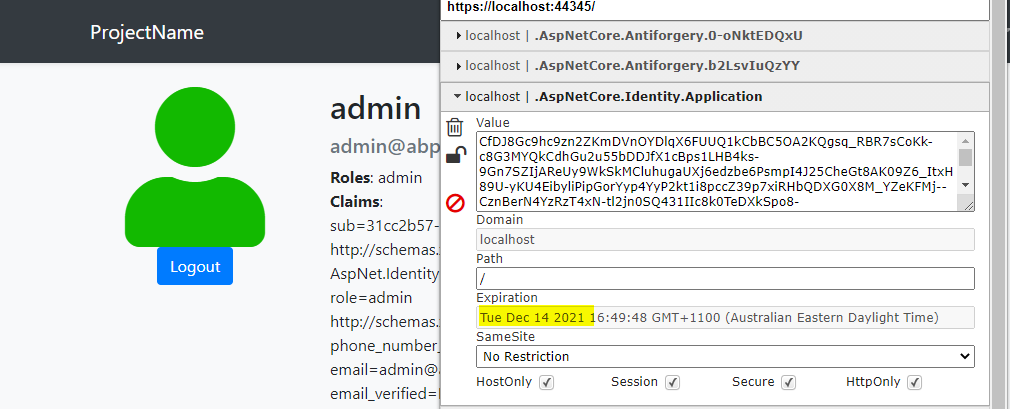
I also tried to configure the expiry in PreConfigureServices and PostConfigureServices but it doesn't work.
sachinarora87
on 14 Dec 2020
hi @sachinarora87
if you do not check Remember me, the cookie life is session.
maliming
on 14 Dec 2020
EditThisCookie is wrong. You can check the cookies via the Chrome Application panel.
maliming
on 14 Dec 2020
@maliming Yes, you are correct EditThisCookie showing it wrong. It is showing expiry as Session in Application panel But strangely cookie is not deleting after closing the browser. Even I checked the settings mentioned in the link https://stackoverflow.com/questions/10617954/chrome-doesnt-delete-session-cookies
https://github.com/IdentityServer/IdentityServer4/issues/4060
This led me to check the expiry. I tested in Chrome and Microsoft Edge both are persisting the session cookie. I think this is the new behaviors of the browsers that it deletes the Session Cookies in Incognito Or InPrivate mode.
Browser session based cookies were not cleared after closing Edge
Also, in order to set the expiry I need to click remember me change IsPersistent to true in case of ExternalLoginSignInAsync.
sachinarora87
on 14 Dec 2020
Related issues
 hikalkan
·
3Comments
hikalkan
·
3Comments
hikalkan
·
3Comments
hikalkan
·
3Comments
 Trojaner
·
3Comments
hikalkan
·
3Comments
Trojaner
·
3Comments
hikalkan
·
3Comments
 wocar
·
3Comments
wocar
·
3Comments
Most helpful comment
@maliming Yes, you are correct EditThisCookie showing it wrong. It is showing expiry as
Sessionin Application panel But strangely cookie is not deleting after closing the browser. Even I checked the settings mentioned in the link https://stackoverflow.com/questions/10617954/chrome-doesnt-delete-session-cookieshttps://github.com/IdentityServer/IdentityServer4/issues/4060
This led me to check the expiry. I tested in Chrome and Microsoft Edge both are persisting the session cookie. I think this is the new behaviors of the browsers that it deletes the Session Cookies in Incognito Or InPrivate mode.
Browser session based cookies were not cleared after closing Edge
Also, in order to set the expiry I need to click remember me change IsPersistent to true in case of ExternalLoginSignInAsync.