Abp: Use the ".Net Standard 2.0" framework for the web module, we will cannot use the VS feature to create "Areas", "Controller" with the "scaffolder".
Use the ".Net Standard 2.0" framework for the web module, we will cannot use the VS feature to create "Areas", "Controller" with the "scaffolder".
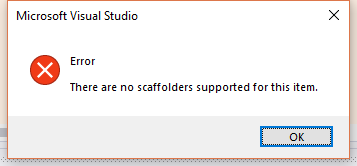
Sometimes we want to use the asp.net core mvc folder structure for web module development. Now if we want to add the "Controller" from the VS 2019 context menu, it will failed.
 jack-gaojz-zz
All 2 comments
My approach is to change the project to Microsoft.NET.Sdk.Web. (<Project Sdk="Microsoft.NET.Sdk.Web">)
Then reference to the relevant package(Microsoft.AspNetCore.Razor.Design, Microsoft.VisualStudio.Web.CodeGeneration.Design) in the project, and finally modify it back, I don't know if there are any other good ways.
 maliming
on 7 Aug 2019
maliming
on 7 Aug 2019
We are doing it for the module template's Web project: https://github.com/abpframework/abp/blob/dev/templates/module/aspnet-core/src/MyCompanyName.MyProjectName.Web/MyCompanyName.MyProjectName.Web.csproj#L1
 hikalkan
on 7 Aug 2019
hikalkan
on 7 Aug 2019
Related issues
 mehdihadeli
·
3Comments
mehdihadeli
·
3Comments
 wocar
·
3Comments
hikalkan
·
3Comments
wocar
·
3Comments
hikalkan
·
3Comments
 hitaspdotnet
·
3Comments
wocar
·
3Comments
hitaspdotnet
·
3Comments
wocar
·
3Comments
Most helpful comment
My approach is to change the project to
Microsoft.NET.Sdk.Web.(<Project Sdk="Microsoft.NET.Sdk.Web">)Then reference to the relevant package(Microsoft.AspNetCore.Razor.Design, Microsoft.VisualStudio.Web.CodeGeneration.Design) in the project, and finally modify it back, I don't know if there are any other good ways.