Abp: SmtpEmailSender error when using gmail
When I try to use SmtpEmailSender to send an e-mail with html body, then i got an error
[Error] Syntax error, command unrecognized. The server response was:
System.Net.Mail.SmtpException: Syntax error, command unrecognized. The server response was:
   at System.Net.Mail.SmtpConnection.ConnectAndHandshakeAsyncResult.End(IAsyncResult result)
   at System.Net.Mail.SmtpTransport.EndGetConnection(IAsyncResult result)
   at System.Net.Mail.SmtpClient.ConnectCallback(IAsyncResult result)
So I have to replace ISmtpEmailSender with my own sender
     context.Services.Replace(
                ServiceDescriptor.Transient<ISmtpEmailSender, MySmtpEmailSender>());
    public class MySmtpEmailSender:SmtpEmailSender
    {

        public MySmtpEmailSender(ISmtpEmailSenderConfiguration smtpConfiguration, IBackgroundJobManager backgroundJobManager) : base(smtpConfiguration, backgroundJobManager)
        {
        }

        protected override async Task SendEmailAsync(MailMessage mail)
        {
            AlternateView textView;
            AlternateView htmlView;
            mail = Fix(mail, out textView, out htmlView);
            try
            {
                using (var smtpClient = await BuildClientAsync())
                {
                    await smtpClient.SendMailAsync(mail);
                }
            }
            catch (Exception e)
            {
                throw;
            }
            finally
            {
                textView?.Dispose();
                htmlView?.Dispose();
                mail.Dispose();
            }

        }

        protected override void SendEmail(MailMessage mail)
        {
            AsyncHelper.RunSync(() => SendEmailAsync(mail));
        }


        protected MailMessage Fix(MailMessage message, out AlternateView textView, out AlternateView htmlView)
        {
            htmlView = null;
            textView = null;
            //force set encoding to utf8
            message.BodyEncoding=Encoding.UTF8;
            if (message.IsBodyHtml)
            {
                var mimeType = new ContentType("text/html");
                htmlView = AlternateView.CreateAlternateViewFromString(message.Body, mimeType);
                message.AlternateViews.Add(htmlView);
            }
            else
            {
                const string mediaType = "text/plain";
                textView = AlternateView.CreateAlternateViewFromString(message.Body, message.BodyEncoding, mediaType);
                textView.TransferEncoding = TransferEncoding.SevenBit;
                message.AlternateViews.Add(textView);
            }
            return message;


        }
So this works for me.
And I notice that MailMessage BodyEncoding will be automatically set after Body set, so part of codes in
EmailSenderBase.cs will never run
 Goxiaoy
All 9 comments
We'll work on that. Thanks.
 hikalkan
on 28 Jun 2019
hikalkan
on 28 Jun 2019
@Goxiaoy Can you share your mail settings? For example, host, port, etc.
I can successfully send html mail at other mail service providers, but gmail seems to have problems. The error you mentioned always appears.
 maliming
on 28 Jun 2019
maliming
on 28 Jun 2019
@maliming I replace ISmtpEmailSenderConfiguration so that I can change all the setting definition names and add a new SettingDefinitionProvider to read default value from injection of IOptions<SmtpClientOptions>
So this is my SmtpClientOptions from config file
  "SmtpClient": {
    "Host": "smtp.gmail.com",
    "Port": 587,
    "From": "[email protected]",
    "CredentialsUserName": "[email protected]",
    "CredentialsPassword": "SUPER_STRONG_PASSWORD",
    "EnableSsl": true,
    "UseDefaultCredentials": false
  }
I live in China which is Internet restricted to gmail but the error metioned happens in my HongKong server before I do those changes.
BTW, is there a convenient way to initial setting values from config file?
Goxiaoy
on 29 Jun 2019
And for anyone who want to use gmail as smtp sender, "Less secure app access" option in your gmail account setting should be turned on . This is gmail stuff but just in case someone get here and looking for help
Goxiaoy
on 29 Jun 2019
Our situation is the same (gfw), I can't connect through the proxy.
maliming
on 29 Jun 2019
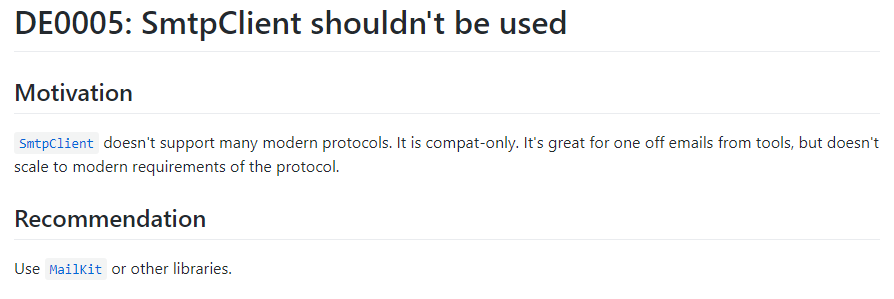
I have this exact same issue with my national provider (EU). I believe the problem is in the underlying SmtpClient implementation because once I switched to MailKit it started working flawlessly with exact same settings.
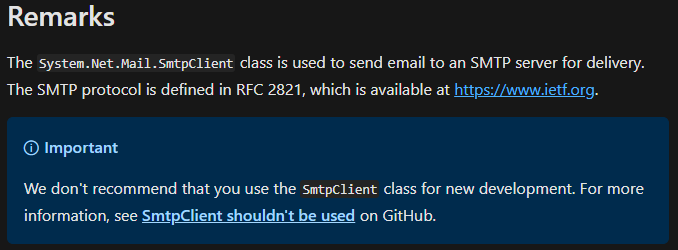
Abp appears to be using the System.Net.Mail.SmtpClient which is marked as Obsolete and it doesn't support modern protocols.
 .
.
 Xeevis
on 2 Jul 2019
Xeevis
on 2 Jul 2019
Maybe we can use MailKit directly.
maliming
on 3 Jul 2019
I have this exact same issue with my national provider (EU). I believe the problem is in the underlying SmtpClient implementation because once I switched to MailKit it started working flawlessly with exact same settings.
Abp appears to be using the
System.Net.Mail.SmtpClientwhich is marked as Obsolete and it doesn't support modern protocols.
Is it possible to set default option - "Ignore SSL certificate check" - for MailKit without overriding the class? I need to use some handmade certificate for testing purposes. And now I can't use it for "Forgot password" functionality, where I don't write any code for sending messages at all by myself.
 alexandis
on 28 Oct 2020
alexandis
on 28 Oct 2020
Is it possible to set default option - "Ignore SSL certificate check" - for MailKit without overriding the class?
This is not good practice. Please create a new issue if you are still other question.
maliming
on 29 Oct 2020
Related issues
 mehdihadeli
·
3Comments
mehdihadeli
·
3Comments
 hitaspdotnet
·
3Comments
hikalkan
·
3Comments
hikalkan
·
3Comments
hitaspdotnet
·
3Comments
hikalkan
·
3Comments
hikalkan
·
3Comments
 derily
·
3Comments
derily
·
3Comments
Most helpful comment
Maybe we can use MailKit directly.