Aad-pod-identity: [Known Issue] nmi returns status 500 with list pod error
Steps To Reproduce
- Follow https://docs.microsoft.com/en-us/azure/aks/limit-egress-traffic to create an AKS cluster with limited egress traffic.
- Deploy aad-pod-identity.
- Wait for a while (10min - 60min) without deploying anything.
- Deploy the demo.
- NMI returns status 500 with the following error
W0902 00:21:15.830037       1 client.go:225] list pod error: pod list is empty. Retrying, attempt number: 1
W0902 00:21:16.130284       1 client.go:225] list pod error: pod list is empty. Retrying, attempt number: 2
W0902 00:21:16.430513       1 client.go:225] list pod error: pod list is empty. Retrying, attempt number: 3
W0902 00:21:16.730887       1 client.go:225] list pod error: pod list is empty. Retrying, attempt number: 4
E0902 00:21:17.031100       1 server.go:343] failed to get pod info from pod IP: 100.64.1.29, error: pod list is empty
I0902 00:21:17.031158       1 server.go:192] status (500) took 1201168517 ns for req.method=GET reg.path=/metadata/identity/oauth2/token req.remote=100.64.1.29
Expected behavior
NMI returns a token with status 200.
Root cause
TCP RST packet sent by the underlying load balancer is dropped by Azure Firewall after a long-living watch originated from our kubernetes client (we use client-go) is closed, causing NMI not able to refresh its cache and retrieve a list of pods.
EDIT (Updated on 11/30): Our understanding of the issue is that Azure firewall is not behaving correctly with FQDN based App rules. This is unexpected, we're working with Azure firewall team to root cause it.
Mitigation
~The ability to send TCP RST to Azure Firewall is planned in the near future (no ETA for now). For now, to mitigate the issue:~
EDIT (Updated on 11/30): As long as we configure a network rule to allow traffic to TCP 443 / 9000 / 22 of API server public IP, this issue should be mitigated.
Specifically this rule should present from this doc: https://docs.microsoft.com/en-us/azure/aks/limit-egress-traffic

Refer to https://github.com/Azure/aad-pod-identity/issues/780#issuecomment-726419874 and https://github.com/Azure/aad-pod-identity/issues/780#issuecomment-726426661 for more details.
 chewong
All 31 comments
FYI, we're experiencing this also. Some of my investigation took me to this k8s issue which relates to the go client library and various related services being unable to recover cleanly from timeouts during long-lived watches.
I notice that a more recent version of the go k8s client library (0.17.5+) includes a potential fix for this (https://github.com/kubernetes/apimachinery/commit/591a38b7a7b7e4f327f8bdbb32dfb8f0247e411e).
Hope this helps in identifying a fix or mitigation.
 mancaus
on 2 Sep 2020
mancaus
on 2 Sep 2020
@mancaus Thank you for the pointer. We came across the same thread too and even tried the latest versions of client-go. However the issue here seems to be because there is no TCP RST, the connection just hangs and the watch never terminates.
FYI, we're experiencing this also.
Are you seeing this issue with aad-pod-identity or with a different app using client-go?
 aramase
on 2 Sep 2020
aramase
on 2 Sep 2020
Thanks. We're seeing errors obtaining tokens when pod identity is deployed. The logs are similar to here: https://github.com/Azure/aad-pod-identity/issues/730#issuecomment-672389971
The NMI's pod informer seems to not see updates for the pods added by our deployment, which I suspect is related to this issue.
We also have issues with Tiller hanging after some time, which we think may have the same or a similar cause.
We have Azure Firewall configured for all outbound traffic from our VNET, including traffic to the master AKS nodes.
mancaus
on 2 Sep 2020
@chewong If I understood things correctly, this looks to be expected behavior where long-lived connections w/o active traffic are hitting TCP Idle timeout on Azure Firewall (which is 4 minutes) and are dropped by firewall. This is documented here: https://docs.microsoft.com/en-us/azure/firewall/firewall-faq#what-is-the-tcp-idle-timeout-for-azure-firewall
Most common way to address this industry standard firewall behavior is to enable TCP keep alives in the application and/or on AKS VMs - use keep alives to send empty ACKs every ~3 minutes or less (to stay below the Idle timeout of 4 minutes). This will make these long-lived connections never expire.
 andreycpp
on 15 Sep 2020
andreycpp
on 15 Sep 2020
Most common way to address this industry standard firewall behavior is to enable TCP keep alives in the application and/or on AKS VMs - use keep alives to send empty ACKs every ~3 minutes or less (to stay below the Idle timeout of 4 minutes). This will make these long-lived connections never expire.
@andreycpp This configuration would need to be in the client-go library which we can't currently tune. The issue however is with not receiving a TCP RST when the connection is dropped. If there is a TCP RST, then the client will reestablish the connection.
aramase
on 15 Sep 2020
@andreycpp
The standard is to drop idle connections, indeed. But with the drop goes a RST, which in our case, isn't being sent while in all other firewalls it does...
 galvesribeiro
on 15 Sep 2020
galvesribeiro
on 15 Sep 2020
Most common way to address this industry standard firewall behavior is to enable TCP keep alives in the application and/or on AKS VMs - use keep alives to send empty ACKs every ~3 minutes or less (to stay below the Idle timeout of 4 minutes). This will make these long-lived connections never expire.
@andreycpp This configuration would need to be in the
client-golibrary which we can't currently tune. The issue however is with not receiving a TCP RST when the connection is dropped. If there is a TCP RST, then the client will reestablish the connection.
Azure Firewall itself does not send RST on idle connections today.
The TCP keep alives can be set up on AKS nodes themselves. Here would be good set of settings:
net.ipv4.tcp_keepalive_time = 120    // send first keep-alive packet after 2 mins of inactivity
net.ipv4.tcp_keepalive_intvl = 30    // keep sending these every 30 secs if there’s no reply to first keep-alive
net.ipv4.tcp_keepalive_probes = 8    // send up to 8 unacked keep-alives before closing client connection
These would go into a file under /etc/sysctl.d/ to preserve these settings during node reboots.
andreycpp
on 18 Sep 2020
The TCP keep alives can be set up on AKS nodes themselves. Here would be good set of settings:
@andreycpp We did try with those values previously as part of our tests, but the issue still persists.
aramase
on 18 Sep 2020
Any info on how to fix this?
 runes83
on 1 Oct 2020
runes83
on 1 Oct 2020
For now, you will have to run kubectl rollout restart daemonsets/aad-pod-identity-nmi -n kube-system
chewong
on 1 Oct 2020
@chewong That did not do the trick I@m afraid :-(
runes83
on 5 Oct 2020
are you constantly spawning new pods? The problem is that the cache that NMI is using is stale. You would need to restart the daemonset every time you encounter such an error.
chewong
on 5 Oct 2020
No not currently, I have restarted all pods multiple times. We are running version
v1.17.11 of K8s on the Nodes and mcr.microsoft.com/oss/azure/aad-pod-identity/nmi:v1.6.3 on the NMI
runes83
on 6 Oct 2020
@aramase based on our investigation, I think we can update this issue with a better, permanent mitigation.
As long as we configure a network rule to allow traffic to TCP 443 / 9000 / 22 of API server public IP, this issue should be mitigated.
Specifically this rule should present from this doc: https://docs.microsoft.com/en-us/azure/aks/limit-egress-traffic
Our understanding of the issue is that Azure firewall is not behaving correctly with FQDN based App rules. This is unexpected, we're working with Azure firewall team to root cause it.
 yangl900
on 13 Nov 2020
yangl900
on 13 Nov 2020
Hello @yangl900
This issue is not related to that. Even with a rule that points directly to the API's FQDN, the behaviour is the same.
It was clear to us that this problem is caused because of Azure Firewall lack of RST support. Other Kubernetes API calls that rely on GET/POST/PATCH/etc just works.
galvesribeiro
on 13 Nov 2020
@galvesribeiro Based on the investigation, if there is a network rule to allow traffic for the API server public IP, we don't see this error. The issue only seems to be happening for FQDN based app rule as @yangl900 posted.
aramase
on 13 Nov 2020
hey @galvesribeiro,
Just provide more background on this. When you use IP+port based network rule, the firewall behavior is different from FQDN based app rule.
One fact is that the client-go these days has TCP keepalive turned on by default, so the firewall has RST or not doesn't matter much now, at least for Go based client. I have more testing in my repo https://github.com/yangl900/knet
if you capture tcpdump from the client, you can see it has keepalive packet between the client and server. In the case of network rule, Azure proxy act as L3 proxy, and you will see you can receive the RST packet sent from AKS API server side. In the case of FQDN rule, it act as L4 proxy, the keepalive will be terminated at firewall side.
yangl900
on 13 Nov 2020
@aramase the problem is that the IP of the API server may change. I know it rarely happens but it can change. So for us, dealing with hardcoded IPs knowing that they may change is not a good option...
Thanks!
Gutemberg
galvesribeiro
on 28 Dec 2020
We also observed this issue, @aramase is there any update ?
Can we ignore this error ? Should we update network rule to allow traffic for the API server public IP ?
What is the best practice you suggest us to take ?
 atiasadir
on 11 Jan 2021
atiasadir
on 11 Jan 2021
@atiasadir That's correct. The issue can be mitigated by configuring network rules to allow traffic for API server.
The fix for app rules is being investigated. @andreycpp can provide more details on that.
aramase
on 11 Jan 2021
@atiasadir That's correct. The issue can be mitigated by configuring network rules to allow traffic for API server.
The fix for app rules is being investigated. @andreycpp can provide more details on that.
Hi @aramase / @andreycpp
I'm not sure exactly how to do that ?
Is there someone who already did it ? Can you elaborate ?
Our cluster deployed by aks-engine and we are using k8s version 1.16.15
atiasadir
on 12 Jan 2021
I can confirm that the networking rule (using the IP of the API server) instead of application rule (which uses the DNS of the API server) mitigated the issue. Even though Azure Firewall team should definitively fix it since relying on the hardcoded IP of a managed service is not a good idea, but at least the problem is gone and we have a fully working cluster.
Is there someone who already did it ? Can you elaborate ?
If you are using Azure Firewall, all you need todo is to create a Network Rule with the following:
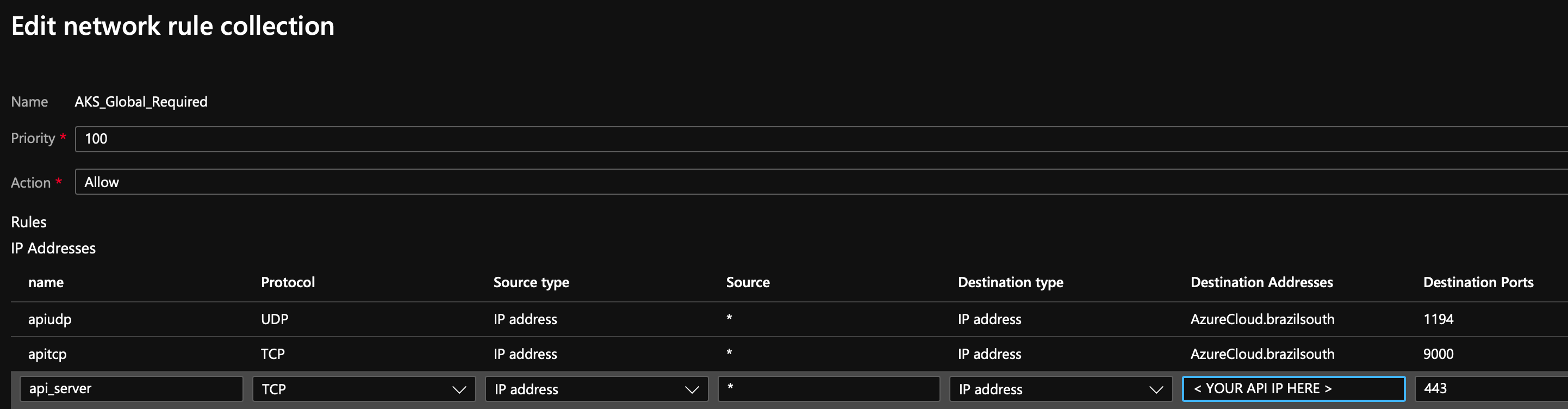
Essentially allow port 443 to your API server IP address (replace < YOUR API IP HERE> accordingly).
Our cluster deployed by aks-engine and we are using k8s version 1.16.15
I'm not sure about aks-engine and if it is related or not to this issue. My case was based on fully managed AKS, where the API server lives outside the VNet boundaries on Microsoft internal backplane.
galvesribeiro
on 12 Jan 2021
I can confirm that the _networking rule_ (using the IP of the API server) instead of _application rule_ (which uses the DNS of the API server) mitigated the issue. Even though Azure Firewall team should definitively fix it since relying on the hardcoded IP of a managed service is not a good idea, but at least the problem is gone and we have a fully working cluster.
Is there someone who already did it ? Can you elaborate ?
If you are using Azure Firewall, all you need todo is to create a Network Rule with the following:
Essentially allow port 443 to your API server IP address (replace
< YOUR API IP HERE>accordingly).Our cluster deployed by aks-engine and we are using k8s version 1.16.15
I'm not sure about aks-engine and if it is related or not to this issue. My case was based on fully managed AKS, where the API server lives outside the VNet boundaries on Microsoft internal backplane.
Hi @galvesribeiro, Thanks for your input
I did some investigation and I find out that all our ports for 443 are open (any to any)
but we still observe the issue, WDYT ? any suggestion ?

atiasadir
on 14 Jan 2021
we are experiencing similar issue with NMI exception "level=warning msg="List pod error: pod list empty. Retrying, attempt number: 4" when trying to use AAD pod identity on several regions. this for example happened to us on Australia East, but non on Central India / UsEast.
We do not use Azure Fire wall and our network security group does not block 443 ports to the cluster IP .
looking forward for mitigation on this issue.
 tshaiman
on 22 Jan 2021
tshaiman
on 22 Jan 2021
I've been hitting this too on a cluster in Australia East without any firewalling in place. So something else is clearly still messing with the connectivity to the API. Lines and lines of this from NMI:
W0318 13:34:01.942501       1 client.go:207] list pod error: <nil>. Retrying, attempt number: 1
W0318 13:34:02.242846       1 client.go:207] list pod error: <nil>. Retrying, attempt number: 2
W0318 13:34:02.543213       1 client.go:207] list pod error: <nil>. Retrying, attempt number: 3
W0318 13:34:02.843481       1 client.go:207] list pod error: <nil>. Retrying, attempt number: 4
E0318 13:34:03.143888       1 server.go:341] failed to get pod info from pod IP: 10.244.7.31, error failed to match pod IP 10.244.7.31 with []
I0318 13:34:03.143938       1 server.go:190] status (500) took 1201465558 ns for req.method=GET reg.path=/metadata/identity/oauth2/token req.remote=10.244.7.31
 bcorijn
on 18 Mar 2021
bcorijn
on 18 Mar 2021
Hello,
Have exactly same issue since 16th March on 3 AKS clusters (No Azure firewall in setup).
W0325 17:19:21.213121 1 reflector.go:424] pkg/mod/k8s.io/[email protected]/tools/cache/reflector.go:156: watch of *v1.AzureAssignedIdentity ended with: an error on the server ("unable to decode an event from the watch stream: http2: client connection lost") has prevented the request from succeeding
W0325 17:21:40.006248 1 client.go:208] list pod error: pod list is empty. Retrying, attempt number: 1
W0325 17:21:40.306824 1 client.go:208] list pod error: pod list is empty. Retrying, attempt number: 2
W0325 17:21:40.607430 1 client.go:208] list pod error: pod list is empty. Retrying, attempt number: 3
W0325 17:21:40.908154 1 client.go:208] list pod error: pod list is empty. Retrying, attempt number: 4
E0325 17:21:41.208758 1 server.go:343] failed to get pod info from pod IP: 172.t.Y.X, error: pod list is empty
I0325 17:21:41.208794 1 server.go:192] status (500) took 1202596226 ns for req.method=GET reg.path=/metadata/identity/oauth2/token req.remote=172.t.Y.X
1.7.5 rc0 had not helped.
Regards,
Arseniy
 Arseigna
on 25 Mar 2021
Arseigna
on 25 Mar 2021
@Arseigna Did you upgrade your Kubernetes cluster or AAD Pod Identity version on March 16th? Trying to isolate the changes which started triggering this behavior? What is your cluster fqdn?
W0325 17:19:21.213121 1 reflector.go:424] pkg/mod/k8s.io/[email protected]/tools/cache/reflector.go:156: watch of *v1.AzureAssignedIdentity ended with: an error on the server ("unable to decode an event from the watch stream: http2: client connection lost") has prevented the request from succeeding
That error is API server terminating the connection and NMI having to reestablish it.
aramase
on 25 Mar 2021
@aramase,
Cluster config had not been touched on 15th-16th March. Apps were deployed.
Since then cluster had been recreated but behavior still persists. Upgrade to version 1.7.5 (RC0) had been done today and had no affect.
We are investigating one other solution and results would be known tomorrow.
Unfortunately I am not allowed to disclose cluster info (such as FQDN) here. How ever there could be a possibility to have a more detailed conversation VIA MS or VIA a closed channel.
Regards,
Arseniy
Arseigna
on 25 Mar 2021
@aramase ,
Today we've fixed issue described: here.
We've implemented solution described in https://github.com/Azure/aad-pod-identity/issues/467. comment that helped is here.
We've never ran nmi pods in kube-system namespace. Reason why it started failing on 16th is not known to us.
Arseigna
on 26 Mar 2021
@Arseigna That comment I posted before was because of a limitation in AKS where the KUBERNETES_SERVICE_HOST was set to fqdn only in the kube-system namespace. However I don't think that should affect you if you don't have a firewall.
We've implemented solution described in #467. comment that helped is here.
So deploying in kube-system namespace resolves the issue for you in AKS? I did see your comment on another thread about I/O throttling. Did that lead to anything?
aramase
on 26 Mar 2021
Hi @aramase,
A small correction: we hadn't deployed nmi pods to kube-system, we've overridden KUBERNETES_SERVICE_HOST variable in azure-system to point to FQDN instead of IP. The issue was not seen since. Now we are trying to dig out the root cause, connection between our issue and solution does not seem obvious yet. Would be happy if you could throw in some ideas =)
Arseigna
on 29 Mar 2021
Related issues
 smartpcr
·
7Comments
smartpcr
·
7Comments
 ritazh
·
5Comments
ritazh
·
5Comments
 amsoedal
·
4Comments
amsoedal
·
4Comments
 joyrex2001
·
3Comments
joyrex2001
·
3Comments
 dudash
·
3Comments
dudash
·
3Comments
Most helpful comment
Thanks. We're seeing errors obtaining tokens when pod identity is deployed. The logs are similar to here: https://github.com/Azure/aad-pod-identity/issues/730#issuecomment-672389971
The NMI's pod informer seems to not see updates for the pods added by our deployment, which I suspect is related to this issue.
We also have issues with Tiller hanging after some time, which we think may have the same or a similar cause.
We have Azure Firewall configured for all outbound traffic from our VNET, including traffic to the master AKS nodes.