Aad-pod-identity: Identity not found
Hello,
I have an AKS cluster with 2 nodes and also with a managed identity.
I am getting the following error:
I0901 14:17:00.875469       1 mic.go:976] Processing node aks-nodepool-97289186-vmss, add [1], del [2], update [0]
E0901 14:17:00.923480       1 vmss.go:99] azure.BearerAuthorizerWithAuthorization: Failed to refresh the Token for request to https://management.azure.com/subscriptions/<sub>/resourceGroups/MC_staging-rg_staging-v2-aks_westeurope/providers/Microsoft.Compute/virtualMachineScaleSets/aks-nodepool-97289186-vmss?api-version=2019-07-01: StatusCode=403 -- Original Error: adal: Refresh request failed. Status Code = '403'. Response body: adal: Refresh request failed. Status Code = '400'. Response body: {"error":"invalid_request","error_description":"Identity not found"}
E0901 14:17:00.923517       1 mic.go:1047] Updating msis on node aks-nodepool-97289186-vmss, add [1], del [2] failed with error azure.BearerAuthorizerWithAuthorization: Failed to refresh the Token for request to https://management.azure.com/subscriptions/<sub>/resourceGroups/MC_staging-rg_staging-v2-aks_westeurope/providers/Microsoft.Compute/virtualMachineScaleSets/aks-nodepool-97289186-vmss?api-version=2019-07-01: StatusCode=403 -- Original Error: adal: Refresh request failed. Status Code = '403'. Response body: adal: Refresh request failed. Status Code = '400'. Response body: {"error":"invalid_request","error_description":"Identity not found"}
E0901 14:17:00.969895       1 vmss.go:99] azure.BearerAuthorizerWithAuthorization: Failed to refresh the Token for request to https://management.azure.com/subscriptions/<sub>/resourceGroups/MC_staging-rg_staging-v2-aks_westeurope/providers/Microsoft.Compute/virtualMachineScaleSets/aks-nodepool-97289186-vmss?api-version=2019-07-01: StatusCode=403 -- Original Error: adal: Refresh request failed. Status Code = '403'. Response body: adal: Refresh request failed. Status Code = '400'. Response body: {"error":"invalid_request","error_description":"Identity not found"}
E0901 14:17:00.969935       1 cloudprovider.go:157] GetUserMSIs: get identity resource failed with error azure.BearerAuthorizerWithAuthorization: Failed to refresh the Token for request to https://management.azure.com/subscriptions/<sub>/resourceGroups/MC_staging-rg_staging-v2-aks_westeurope/providers/Microsoft.Compute/virtualMachineScaleSets/aks-nodepool-97289186-vmss?api-version=2019-07-01: StatusCode=403 -- Original Error: adal: Refresh request failed. Status Code = '403'. Response body: adal: Refresh request failed. Status Code = '400'. Response body: {"error":"invalid_request","error_description":"Identity not found"}
E0901 14:17:00.969950       1 mic.go:1050] Getting list of msis from node aks-nodepool-97289186-vmss resulted in error azure.BearerAuthorizerWithAuthorization: Failed to refresh the Token for request to https://management.azure.com/subscriptions/<sub>/resourceGroups/MC_staging-rg_staging-v2-aks_westeurope/providers/Microsoft.Compute/virtualMachineScaleSets/aks-nodepool-97289186-vmss?api-version=2019-07-01: StatusCode=403 -- Original Error: adal: Refresh request failed. Status Code = '403'. Response body: adal: Refresh request failed. Status Code = '400'. Response body: {"error":"invalid_request","error_description":"Identity not found"}
To set up the AAD Pod Identity I made the flowing steps:
Install helm chart: helm install aad-pod-identity aad-pod-identity/aad-pod-identity --version "1.6.0"
Apply pod_identity_and_binding.yaml
apiVersion: aadpodidentity.k8s.io/v1
kind: AzureIdentity
metadata:
  name: identity_name-agentpool
spec:
  type: 0
  resourceID: /subscriptions/<subs>/resourceGroups/MC_staging-rg_staging-v2-aks_westeurope/providers/Microsoft.ManagedIdentity/userAssignedIdentities/identity_name-agentpool
  clientID: <identity_name-agentpool clientId>
---
apiVersion: aadpodidentity.k8s.io/v1
kind: AzureIdentityBinding
metadata:
  name: azure-aad-identity-binding
spec:
  azureIdentity: identity_name-agentpool
  selector: azure-aad-identity-binding-selector
- When I tried to debug by doing the debug steps it just can not login.
kubectl run azure-cli -it --image=mcr.microsoft.com/azure-cli --labels=aadpodidbinding=azure-aad-identity-binding-selector /bin/bash

within the azure-cli shell
az login -i --debug
- Kubernetes version: 1.16.13
- AAD version: 1.6.0
 sousadax12
All 33 comments
Hi @sousadax12, based on your logs, it looks like MIC wasn't able to authenticate with Azure. Are you using an AKS cluster with a service principal or managed identity?
 chewong
on 1 Sep 2020
chewong
on 1 Sep 2020
@sousadax12 From the logs you posted looks like MIC is unable to assign the identity to the underlying VMSS because it's unable to get a token for the kubelet identity to use for communication with Azure. Can you check the redacted clientID printed at the top of the logs? And then check if that identity does exist on the vmss by running az vmss identity show -g < rg> -n <vmss name>?
 aramase
on 1 Sep 2020
aramase
on 1 Sep 2020
Thanks @aramase
this is what i got:
{
  "principalId": null,
  "tenantId": null,
  "type": "UserAssigned",
  "userAssignedIdentities": {
    "/subscriptions/<sub>/resourcegroups/MC_staging-rg_staging-v2-aks_westeurope/providers/Microsoft.ManagedIdentity/userAssignedIdentities/kubedashboard-staging-v2-aks": {
      "clientId": "*******",
      "principalId": "*******"
    },
    "/subscriptions/<sub>/resourcegroups/MC_staging-rg_staging-v2-aks_westeurope/providers/Microsoft.ManagedIdentity/userAssignedIdentities/omsagent-staging-v2-aks": {
      "clientId": "*****",
      "principalId": "*********"
    }
  }
}
@sousadax12 Could you also post the first few lines of the MIC logs which shows the redact credentials being used for authentication? Is the AKS cluster using service principal or managed identity?
aramase
on 1 Sep 2020
Got the same error.
In my case, I am using MSI Id with name having "
This happens when we create brand new cluster with MSI enabled in Azure Portal and then installing aad-pod-identity HELM chart with Azure Identity and binding created.
When we explicitly added "-agentpool" to user Assigned Identity for VMSS, everything works. What could be the issue here?
 pvmraghunandan
on 10 Sep 2020
pvmraghunandan
on 10 Sep 2020
When we explicitly added "-agentpool" to user Assigned Identity for VMSS, everything works. What could be the issue here?
Are you explicitly assigning the -agentpool user-assigned managed identity to the underlying VMSS? aad-pod-identity uses the underlying agent pool managed identity/ service principal for authentication with Azure. When an AKS cluster is created with managed identity, an identity with <clustername>-agentpool is created and assigned to the agent pool for Azure operations. If that identity is missing during cluster creation, then I would recommend checking with AKS team.
aramase
on 10 Sep 2020
@pvmraghunandan could you try assigning "Managed Identity Operator" instead of "Managed Identity Contributor"?
chewong
on 10 Sep 2020
@aramase / @chewong , after troubleshooting i found that "agent pool" identity is not being added to VMSS under "user assigned". We tried setting the permissions to "Contributor" but still we are seeing error logs as "failed". When we explicitly added to VMSS, it worked.
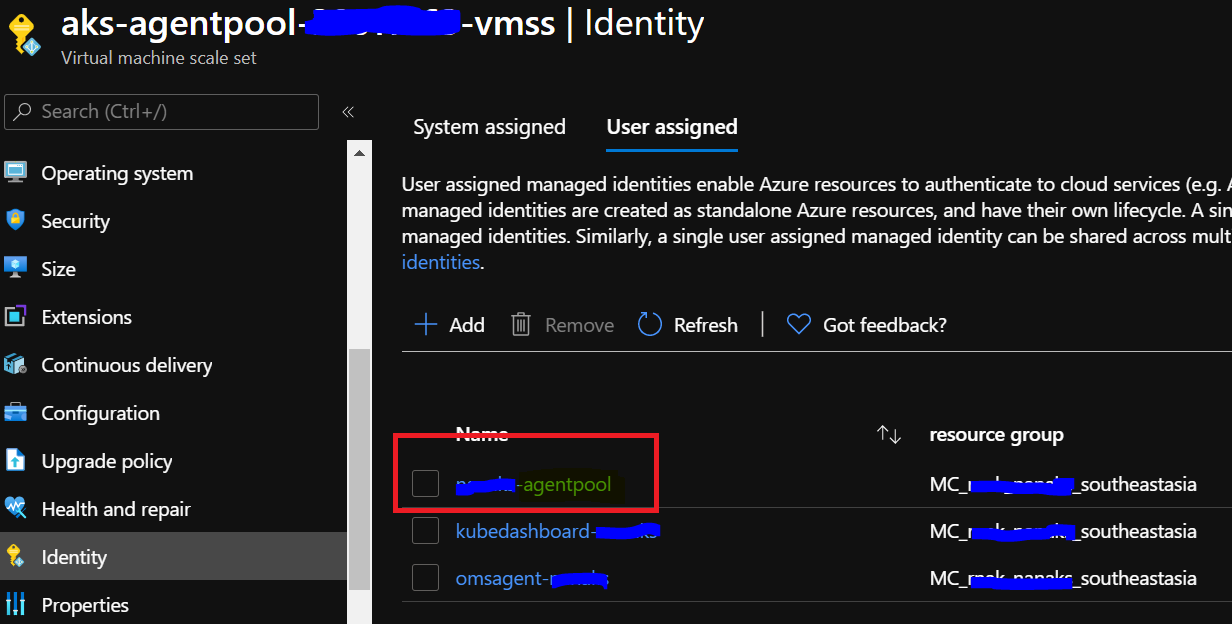
For testing, we tried creating new cluster and just added "Reader" role to the " agent pool" MSI as shown below and everything worked fine. We are confused on the required permissions. Is "Reader" sufficient?

pvmraghunandan
on 11 Sep 2020
@pvmraghunandan as per my previous comment, could you assign your cluster identity/service principal "Managed Identity Operator" role to your user-assigned identity and try again? "Contributor" does not have the permission to perform Microsoft.ManagedIdentity/userAssignedIdentities/*/assign/action (see https://docs.microsoft.com/en-us/azure/role-based-access-control/built-in-roles#managed-identity-operator).
chewong
on 11 Sep 2020
@chewong sure. I will try and update. But wondering how just having "Reader" permissions worked in new cluster. Any idea?
pvmraghunandan
on 11 Sep 2020
Having Reader Permission would not work. You can check out https://github.com/Azure/aad-pod-identity/blob/master/docs/readmes/README.role-assignment.md#performing-role-assignments to see all the necessary role assignments.
chewong
on 11 Sep 2020
@chewong interesting!! it worked in my case. Wondering how..
pvmraghunandan
on 11 Sep 2020
Are you looking at the correct service principal/cluster identity? I can confirm that if the service principal/cluster identity does not have "managed identity operator" role to the user-assigned identity and "virtual machine contributor" to the VM/VMSS instance, it would not work.
chewong
on 11 Sep 2020
Ok. I am checking permissions on MC_ resource group level. Will check once on VMSS level
pvmraghunandan
on 11 Sep 2020
@chewong here is the screenshot from cluster that AAD Pod Identity is working. I confirmed with new cluster also
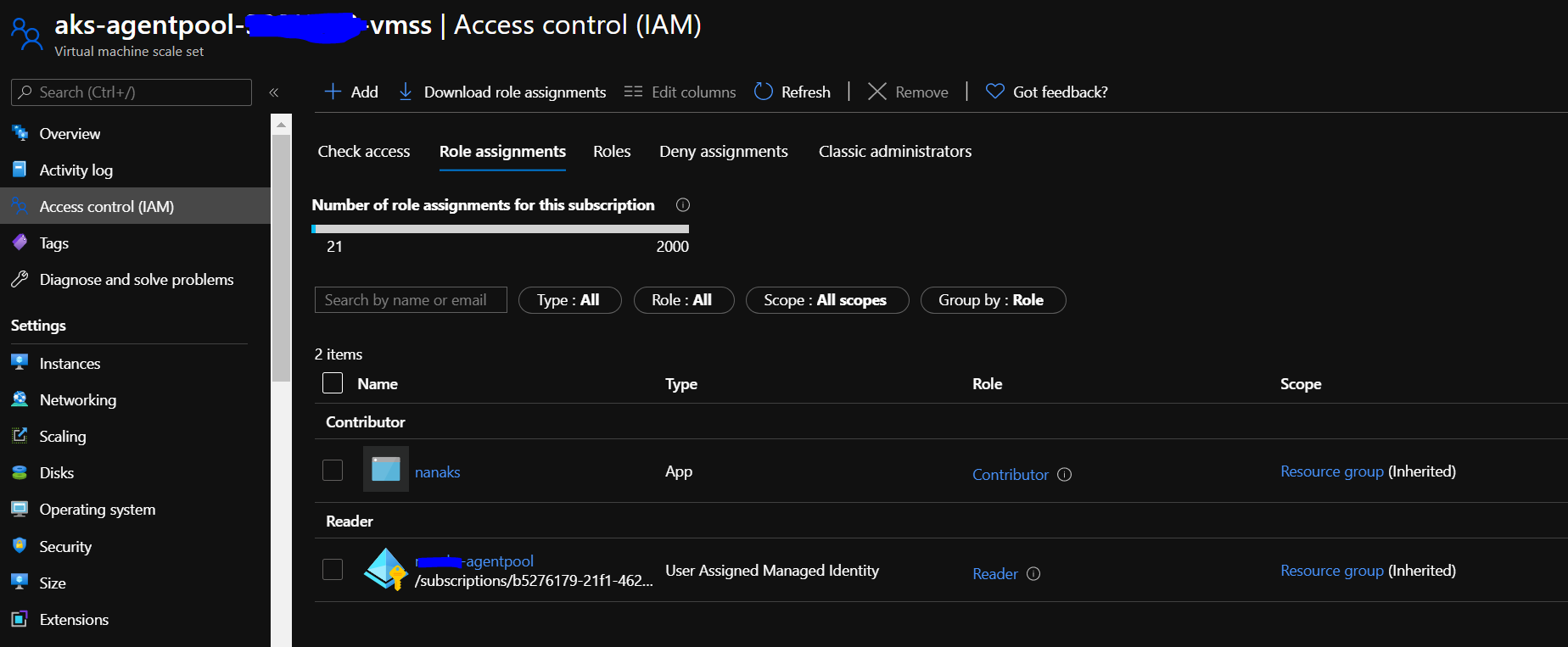
pvmraghunandan
on 14 Sep 2020
It works because the agentpool user-assigned identity is already assigned to your VMSS and there is no action for MIC to take.
I noticed in https://github.com/Azure/aad-pod-identity/issues/778#issuecomment-684973629 that your agentpool identity was not assigned to your VMSS instance initially. Did you manually unassign it? The reason why you are encountering Identity not found error is because MIC uses your agentpool identity (your cluster's managed identity) to authenticate with Azure and assign / unassign identities from the underlying node and it wasn't able to find it. Could you give https://github.com/Azure/aad-pod-identity#demo a try and see if assigning would work?
chewong
on 14 Sep 2020
@chewong Regarding previous comment, i did it as part of troubleshooting. With brand new cluster and just enabling Reader to MSI App, it worked. That's the confusion.
pvmraghunandan
on 14 Sep 2020
when you mentioned it worked, are you referring to the demo, or the error message that you were experiencing above disappeared?
chewong
on 15 Sep 2020
Error Message disappeared.
pvmraghunandan
on 15 Sep 2020
@chewong for clarity, i am re-iterating the steps done.
- Create new AKS Cluster with _"System Assigned Managed Identity"_ enabled from Azure Portal
- Grab the Client Id of MSI using _"az aks show"_ command
- Navigate to "MS_ resource group related to cluster and add _"Reader_ role to the Managed Identity created by default. (Name ends with -agentpool)
- Install AAD Pod Identity and test. Everything works fine without errors.
The confusion is how it worked with Reader Role. Before installing AAD Pod Identity, i verified that Managed Identity is not assigned to VMSS.
pvmraghunandan
on 15 Sep 2020
Have you tried out the demo at https://github.com/Azure/aad-pod-identity#demo? I got the following error when following your steps + demo as expected:
E0915 16:45:58.323305 1 mic.go:1077] failed to update user-assigned identities on node aks-agentpool-20953540-vmss (add [1], del [0], update[0]), error: failed to update identities for aks-agentpool-20953540-vmss in MC_chuwon-msi-test_chuwon-msi-test_eastus2, error: compute.VirtualMachineScaleSetsClient#Update: Failure sending request: StatusCode=403 -- Original Error: Code="AuthorizationFailed" Message="The client 'bbe9ac18-e476-4793-ba69-7b3b552a04b0' with object id 'bbe9ac18-e476-4793-ba69-7b3b552a04b0' does not have authorization to perform action 'Microsoft.Compute/virtualMachineScaleSets/write' over scope '/subscriptions/2d31b5ab-0ddc-4991-bf8d-61b6ad196f5a/resourceGroups/MC_chuwon-msi-test_chuwon-msi-test_eastus2/providers/Microsoft.Compute/virtualMachineScaleSets/aks-agentpool-20953540-vmss' or the scope is invalid. If access was recently granted, please refresh your credentials."
@pvmraghunandan Any updates on the above comment?
aramase
on 8 Oct 2020
Hi @pvmraghunandan, @sousadax12
Did you update your VMSS recently ?
https://docs.microsoft.com/en-us/cli/azure/aks/nodepool?view=azure-cli-latest#az-aks-nodepool-upgrade
if yes it can explain this issue, since the update might cause to the Assigned Identity deletion.
 atiasadir
on 29 Oct 2020
atiasadir
on 29 Oct 2020
Just Change Code :
app.UseEndpoints(endpoints =>
{
endpoints.MapControllerRoute(
name: "default",
pattern: "{controller=Home}/{action=Index}/{id?}");
});
change to :
app.UseEndpoints(endpoints =>
{
endpoints.MapControllerRoute(
name: "default",
pattern: "{controller=Home}/{action=Index}/{id?}");
endpoints.MapRazorPages();
});
 yaserjalilian
on 7 Feb 2021
yaserjalilian
on 7 Feb 2021
I'm having the same issue as @chewong now after converting my cluster from SP to managed identity.
Any hints?
 guitmz
on 10 Feb 2021
guitmz
on 10 Feb 2021
I have run in similar issue today. I have a keyvault which run without any issue, but after adding second identity for cosmosdb (serverless in preview) it breaks. What is procedure for debugging?
MIC using user assigned identity: 0008##### REDACTED #####fa7f for authentication.
This is the the agentpool identity (where I expected it at start to be the assigned identity for the AKS cluster itself). So this agentpool is the identity of the virtual machines.
az vmss identity show -g $RESOURCE_GROUP_INFRA -n aks-nodepool1-1xxxx-vmss
This shows 4 identities:
- the agent pool of above **cc-agentpool
- the user managed identity of keyvault
- the user managed identity of cosmosdb
- the omsagent-** identity
Under (Azureassignedidentities) I get keyvault and cosmosdb assigned in 'default' namespace.
But got this:
Unhandled exception. Azure.Identity.AuthenticationFailedException: ManagedIdentityCredential authentication failed: Service request failed.
Status: 403 (Forbidden)
Content:
failed to refresh token, error: adal: Refresh request failed. Status Code = '400'. Response body: {"error":"invalid_request","error_description":"Identity not found"}
Any ideas?
 V4A001
on 12 Feb 2021
V4A001
on 12 Feb 2021
This is the recommended way of getting a token for accessing cosmos (there is nothing nice like the azure keyvault):
`
///
/// Creates a Cosmos DB database and a container with the specified partition key.
///
///
private static async Task
{
// AzureServiceTokenProvider will help us to get the Service Managed token.
var azureServiceTokenProvider = new AzureServiceTokenProvider();
        // Authenticate to the Azure Resource Manager to get the Service Managed token.
        string accessToken = await azureServiceTokenProvider.GetAccessTokenAsync("https://management.azure.com/");

        // Setup the List Keys API to get the Azure Cosmos DB keys.

        string endPoint = $"https://management.azure.com/{cosmosDbConfiguration.Scope}/listKeys?api-version=2019-12-12";

        // Setup an HTTP Client and add the access token.
        HttpClient httpClient = new HttpClient();
        httpClient.DefaultRequestHeaders.Authorization = new AuthenticationHeaderValue("Bearer", accessToken);

        // Post to the endpoint to get the keys result.
        var result = await httpClient.PostAsync(endPoint, new StringContent(""));

        // Get the result back as a DatabaseAccountListKeysResult.
        DatabaseAccountListKeysResult keys = await result.Content.ReadAsAsync<DatabaseAccountListKeysResult>();

        //CosmosClient client = new CosmosClient(account, key);
        CosmosClient client = new CosmosClient(
            cosmosDbConfiguration.Account,
            keys.PrimaryMasterKey,
            new CosmosClientOptions()
            {
                SerializerOptions = new CosmosSerializationOptions()
                {
                    PropertyNamingPolicy = CosmosPropertyNamingPolicy.CamelCase
                }
            });
        CosmosDbService cosmosDbService = new CosmosDbService(client, cosmosDbConfiguration.DatabaseName, cosmosDbConfiguration.ContainerName);
        DatabaseResponse database = await client.CreateDatabaseIfNotExistsAsync(cosmosDbConfiguration.DatabaseName);
        await database.Database.CreateContainerIfNotExistsAsync(cosmosDbConfiguration.ContainerName, $"/{Company.PartitionKeyPath}");

        return cosmosDbService;
    }
`
V4A001
on 12 Feb 2021
I'm having the same issue as @chewong now after converting my cluster from SP to managed identity.
Any hints?
Could you check out https://azure.github.io/aad-pod-identity/docs/getting-started/role-assignment/ and re-assign the proper roles again?
chewong
on 12 Feb 2021
@V4A001 since you have multiple identities assigned to your VMSS, you might have to specify the client ID somewhere in your code (not too familiar with C#). For example, for azure-sdk-for-go, we set AZURE_CLIENT_ID environment variable as the client ID of the identity you would like to select before creating the authorizer (see https://github.com/Azure/aad-pod-identity/blob/master/test/image/identityvalidator/keyvault.go#L42-L48)
chewong
on 12 Feb 2021
@chewong : thank you. For some strange reason the crash of my container is away and the container started running. I did not change anything so far.
The idea is not to have any infrastructure related stuff in code or through parameters. That is why I like the managed identity stuff. What key to pick for AZURE_CLIENT_ID ? I have a keyvault and a cosmosdb. I only have the key vault name as environment variable, the cosmos db get the encryption key from there.
I see my 2 managed identities assigned under Azureassignedidentities, also before this issue. Can it be that management.azure was down and did not a token to access the cosmos ?
` // AzureServiceTokenProvider will help us to get the Service Managed token.
var azureServiceTokenProvider = new AzureServiceTokenProvider();
        // Authenticate to the Azure Resource Manager to get the Service Managed token.
        string accessToken = await azureServiceTokenProvider.GetAccessTokenAsync("https://management.azure.com/");
`
V4A001
on 12 Feb 2021
Interesting..if I scale out to 2 that is oke. If I scale out to 10 replicas I get half which are not able to authenticate (403).
212 21:54:20.978307       1 stats.go:170] Number of AzureAssignedIdentities created in this sync cycle: 16
I0212 21:54:20.978310       1 stats.go:170] Number of AzureAssignedIdentities updated in this sync cycle: 0
I0212 21:54:20.978312       1 stats.go:170] Number of AzureAssignedIdentities deleted in this sync cycle: 0
I0212 21:54:20.978317       1 stats.go:162] Find AzureAssignedIdentities to create: 1.208709ms
I0212 21:54:20.978320       1 stats.go:162] Find AzureAssignedIdentities to delete: 95.901µs
I0212 21:54:20.978323       1 stats.go:162] Total time to assign or update AzureAssignedIdentities: 6.196426821s
I0212 21:54:20.978326       1 stats.go:162] Total: 6.200149747s
I0212 21:54:20.978329       1 stats.go:212] *********************
I0212 21:54:21.178941       1 mic.go:585] pod xx/xx-xxx-h7z4c has no assigned node yet. it will be ignored
V4A001
on 12 Feb 2021
@V4A001 Can you open a separate issue at https://github.com/Azure/aad-pod-identity/issues and we can discuss this over there? I will go ahead and close this issue since it's outdated.
chewong
on 12 Feb 2021
This whole thing is a car crash
 ekhaydarov
on 18 Mar 2021
ekhaydarov
on 18 Mar 2021
Related issues
 bnookala
·
5Comments
bnookala
·
5Comments
 ritazh
·
8Comments
ritazh
·
5Comments
ritazh
·
8Comments
ritazh
·
5Comments
 phealy
·
6Comments
phealy
·
6Comments
 phillipgibson
·
7Comments
phillipgibson
·
7Comments
Most helpful comment
This whole thing is a car crash