Aad-pod-identity: getting assigned identities for pod default/demo in ASSIGNED state failed after 20 attempts
Hi,
Installing as in guide, getting this error while checking 'demo' pod logs
ime="2020-04-27T19:51:42Z" level=info msg="starting demo pod demo/demo 10.240.0.24"
time="2020-04-27T20:00:07Z" level=error msg="failed list all vm azure.BearerAuthorizer#WithAuthorization: Failed to refresh the Token for request to https://management.azure.com/subscriptions/**********************70/resourceGroups/Cards/providers/Microsoft.Compute/virtualMachines?api-version=2017-12-01: StatusCode=404 -- Original Error: adal: Refresh request failed. Status Code = '404'. Response body: getting assigned identities for pod default/demo in ASSIGNED state failed after 20 attempts, retry duration [5]s. Error: <nil>\n" podip=10.240.0.24 podname=demo podnamespace=demo
time="2020-04-27T20:08:32Z" level=error msg="failed to refresh ServicePrincipalTokenFromMSI using the MSI VM extension, msiEndpoint(http://169.254.169.254/metadata/identity/oauth2/token)" podip=10.240.0.24 podname=demo podnamespace=demo
time="2020-04-27T20:08:32Z" level=error msg="testMSIEndpoint failed, <nil>" podip=10.240.0.24 podname=demo podnamespace=demo
This is the NMI log:
PS C:\Windows\system32> kubectl logs nmi-tggf4
I0427 19:26:32.159630       1 main.go:62] Starting nmi process. Version: 1.6.0. Build date: 2020-04-24-19:19.
I0427 19:26:32.344098       1 crd.go:442] CRD lite informers started
I0427 19:26:32.444595       1 main.go:86] Running NMI in namespaced mode: false
I0427 19:26:32.444622       1 nmi.go:51] Initializing in standard mode
I0427 19:26:32.444643       1 probes.go:42] Initialized health probe on port 8080
I0427 19:26:32.444655       1 probes.go:45] Started health probe
I0427 19:26:32.444761       1 metrics.go:330] Registered views for metric
I0427 19:26:32.444802       1 prometheus_exporter.go:23] Starting Prometheus exporter
I0427 19:26:32.444811       1 metrics.go:337] Registered and exported metrics on port 9090
I0427 19:26:32.444821       1 server.go:96] Listening on port 2579
W0427 19:26:32.449669       1 iptables.go:105] Flushing iptables to add aad-metadata custom chains
E0427 19:47:26.239241       1 client.go:185] pod list empty
W0427 19:47:26.239283       1 client.go:208] List pod error: pod list empty. Retrying, attempt number: 1
E0427 19:47:26.539431       1 client.go:185] pod list empty
W0427 19:47:26.539471       1 client.go:208] List pod error: pod list empty. Retrying, attempt number: 2
E0427 19:47:26.839637       1 client.go:185] pod list empty
W0427 19:47:26.839685       1 client.go:208] List pod error: pod list empty. Retrying, attempt number: 3
E0427 19:48:47.142195       1 server.go:366] failed to get matching identities for pod: default/demo, error: getting assigned identities for pod default/demo in CREATED state failed after 16 attempts, retry duration [5]s. Error: <nil>
I0427 19:48:47.142263       1 server.go:190] Status (403) took 80903128802 ns for req.method=GET reg.path=/metadata/identity/oauth2/token req.remote=10.240.0.15
E0427 19:50:07.145025       1 server.go:366] failed to get matching identities for pod: default/demo, error: getting assigned identities for pod default/demo in CREATED state failed after 16 attempts, retry duration [5]s. Error: <nil>
I0427 19:50:07.145237       1 server.go:190] Status (403) took 80002454864 ns for req.method=GET reg.path=/metadata/identity/oauth2/token req.remote=10.240.0.15
E0427 19:51:33.375369       1 server.go:366] failed to get matching identities for pod: default/demo, error: context canceled
I0427 19:51:33.375409       1 server.go:190] Status (404) took 86229213581 ns for req.method=GET reg.path=/metadata/identity/oauth2/token req.remote=10.240.0.15
E0427 19:51:42.519502       1 client.go:185] pod list empty
Latest AAD Pod, K8S 1.16.7
This K8S cluster is advanced networking, public. Trying to setup an AGIC.
Thanks!
 mnns
mnns
All 23 comments
Hi @mnns. Did you follow https://github.com/Azure/aad-pod-identity#demo and set all the necessary environment variables? Could you also share the MIC logs?
 chewong
on 27 Apr 2020
chewong
on 27 Apr 2020
Yes I did (hopefully).
Btw, I have 2 pods of mic (did I mess something up?)
mic-76dd75ddf9-kp79v 1/1 Running 0 54m
mic-76dd75ddf9-prqq7 1/1 Running 0 54m
I0427 20:16:35.441699 1 mic.go:976] Processing node aks-agentpool-32042527-vmss, add [1], del [0], update [0]
I0427 20:16:35.499190 1 cloudprovider.go:194] Updating user assigned MSIs on aks-agentpool-32042527-vmss, assign [1], unassign [0]
E0427 20:16:35.613388 1 vmss.go:73] Failed to update VM with error compute.VirtualMachineScaleSetsClient#Update: Failure sending request: StatusCode=403 -- Original Error: Code="LinkedAuthorizationFailed" Message="The client '--------------' with object id '-----------------------' has permission to perform action 'Microsoft.Compute/virtualMachineScaleSets/write' on scope '/subscriptions/------------------/resourceGroups/MC_Cards_API-us-east_eastus/providers/Microsoft.Compute/virtualMachineScaleSets/aks-agentpool-32042527-vmss'; however, it does not have permission to perform action 'Microsoft.ManagedIdentity/userAssignedIdentities/assign/action' on the linked scope(s) '/subscriptions/---------------/resourcegroups/Cards/providers/Microsoft.ManagedIdentity/userAssignedIdentities/api-agic-identity' or the linked scope(s) are invalid."
E0427 20:16:35.613463 1 mic.go:1047] Updating msis on node aks-agentpool-32042527-vmss, add [1], del [0] failed with error compute.VirtualMachineScaleSetsClient#Update: Failure sending request: StatusCode=403 -- Original Error: Code="LinkedAuthorizationFailed" Message="The client '-----------------' with object id '------------------' has permission to perform action 'Microsoft.Compute/virtualMachineScaleSets/write' on scope '/subscriptions/----------------------/resourceGroups/MC_Cards_API-us-east_eastus/providers/Microsoft.Compute/virtualMachineScaleSets/aks-agentpool-32042527-vmss'; however, it does not have permission to perform action 'Microsoft.ManagedIdentity/userAssignedIdentities/assign/action' on the linked scope(s) '/subscriptions/-----------------------/resourcegroups/Cards/providers/Microsoft.ManagedIdentity/userAssignedIdentities/api-agic-identity' or the linked scope(s) are invalid."
E0427 20:16:35.666125 1 mic.go:1050] Getting list of msis from node aks-agentpool-32042527-vmss resulted in error identity info is nil
I0427 20:16:35.666358 1 mic.go:475] Work done: true. Found 1 pods, 1 ids, 1 bindings
I0427 20:16:35.666373 1 mic.go:476] Total work cycles: 30, out of which work was done in: 10
I0427 20:16:35.666419 1 stats.go:99] * Stats collected *
And the second:
I0427 19:26:13.631649 1 main.go:95] Starting mic process. Version: 1.6.0. Build date: 2020-04-24-19:19
W0427 19:26:13.631704 1 main.go:100] --kubeconfig not passed will use InClusterConfig
I0427 19:26:13.631715 1 main.go:114] kubeconfig () cloudconfig (/etc/kubernetes/azure.json)
I0427 19:26:13.631893 1 main.go:122] Running MIC in namespaced mode: false
I0427 19:26:13.631905 1 main.go:126] Client QPS set to: 5. Burst to: 5
I0427 19:26:13.631921 1 mic.go:124] Starting to create the pod identity client. Version: 1.6.0. Build date: 2020-04-24-19:19
I0427 19:26:13.663453 1 mic.go:130] Kubernetes server version: v1.16.7
I0427 19:26:13.664567 1 probes.go:42] Initialized health probe on port 8080
I0427 19:26:13.664586 1 probes.go:45] Started health probe
I0427 19:26:13.664676 1 metrics.go:330] Registered views for metric
I0427 19:26:13.664723 1 prometheus_exporter.go:23] Starting Prometheus exporter
I0427 19:26:13.664731 1 metrics.go:337] Registered and exported metrics on port 8888
I0427 19:26:13.664736 1 mic.go:206] Initiating MIC Leader election
I0427 19:26:13.664749 1 leaderelection.go:242] attempting to acquire leader lease default/aad-pod-identity-mic...
E0427 19:26:34.899017 1 leaderelection.go:367] Failed to update lock: Operation cannot be fulfilled on endpoints "aad-pod-identity-mic": the object has been modified; please apply your changes to the latest version and try again
btw, I'm on Windows so I had to change "Export" to $var = data
and I edited the YAMLs manually with the data.
Thank you very much!
mnns
on 27 Apr 2020
Did your cluster service principal have the correct role assignments, specifically Managed Identity Operator - https://github.com/Azure/aad-pod-identity/blob/master/docs/readmes/README.msi.md#pre-requisites---role-assignments?
chewong
on 27 Apr 2020
Not sure.
I'm having a managed cluster with VMSS, not sure what to run, I ran both commands from that link, both came with empty results. Where did I go wrong? and how to fix it? was desperately trying to accurately follow the manual.
Thanks
mnns
on 27 Apr 2020
Based on the following logs from MIC:
The client '--------------' with object id '-----------------------' has permission to perform action 'Microsoft.Compute/virtualMachineScaleSets/write' on scope '/subscriptions/------------------/resourceGroups/MC_Cards_API-us-east_eastus/providers/Microsoft.Compute/virtualMachineScaleSets/aks-agentpool-32042527-vmss'; however, it does not have permission to perform action 'Microsoft.ManagedIdentity/userAssignedIdentities/assign/action' on the linked scope(s) '/subscriptions/---------------/resourcegroups/Cards/providers/Microsoft.ManagedIdentity/userAssignedIdentities/api-agic-identity
It looks like your cluster service principal does not have the permission to assign the user-assigned identity to the VMSS.
Could you try running the following commands to grant your service principal Managed Identity Operator role under your resource group scope.
Could you try running:
az aks show -g <resource group> -n <aks cluster name> --query identityProfile.kubeletidentity.clientId -o tsv
az role assignment create --role "Managed Identity Operator" --assignee <client id from above command>  --scope /subscriptions/<sub id>/resourcegroups/<resource group name>
Thank you for the fast response.
az aks show -g
-n --query identityProfile.kubeletidentity.clientId -o tsv
Gives out nothing. Empty.

mnns
on 27 Apr 2020
@mnns my apologies, the correct command should be az aks show -g <resource group> -n <ask cluster name> --query servicePrincipalProfile.clientId -o tsv. I will open a PR to update the docs.
chewong
on 27 Apr 2020
For the resource group name, try the MC_* one.
chewong
on 27 Apr 2020
Thanks. Did that, the MC group does not include my cluster, my other resource group did.
Got an ID back, ran the command, the pod is now working (I think!)
="succesfully acquired a token, userAssignedID MSI, msiEndpoint(http://169.254.169.254/metadata/identity/oauth2/token) clientID(4454545454545454543b-98e3-1cbeb5bcae1e)"
Now of to trying Application Gateway Ingress Controller.
Thanks a lot!
mnns
on 28 Apr 2020
@mnns the MC resource group is the node resource group that contains all of the infrastructure resources associated with the cluster like VMSS. It is where your user-assigned identity get assigned to.
Closing this issue for now but feel free to re-open it if you have any other issues.
chewong
on 28 Apr 2020
I had the same issue with:
Failed to update VM with error compute.VirtualMachineScaleSetsClient#Update: Failure sending request: StatusCode=403 -- Original Error: Code="LinkedAuthorizationFailed" Message="The client '-----------' with object id '----------' has permission to perform action 'Microsoft.Compute/virtualMachineScaleSets/write' on scope '/subscriptions/*******/resourceGroups/MC_******/providers/Microsoft.Compute/virtualMachineScaleSets/aks-nodepool1-****-vmss'; however, it does not have permission to perform action 'Microsoft.ManagedIdentity/userAssignedIdentities/assign/action' on the linked scope(s) '/subscriptions/*******/resourcegroups/<rg-that-contains-identities>/providers/Microsoft.ManagedIdentity/userAssignedIdentities/****' or the linked scope(s) are invalid."
I had to give rights for my cluster service principal (managed) to the resource group that contains my managed identities and then it worked.
 Olli64
on 6 May 2020
Olli64
on 6 May 2020

I'm getting same error! But when I try to get the Principal Id of the cluster, it's using MSI ! I think this is different on how you are doing it.. any idea?
 jerry-santana
on 14 Jul 2020
jerry-santana
on 14 Jul 2020
@JerrySantana92 The required role assignments along with the commands to get the clientID are documented here - https://github.com/Azure/aad-pod-identity/blob/master/docs/readmes/README.role-assignment.md
 aramase
on 14 Jul 2020
aramase
on 14 Jul 2020
@JerrySantana92 The required role assignments along with the commands to get the
clientIDare documented here - https://github.com/Azure/aad-pod-identity/blob/master/docs/readmes/README.role-assignment.md
I tried but it didn't work.. Been struggling with this for like 3 weeks!
@Olli64 Can you please provide your yaml file? And step by step how you did it?
Thank you!
jerry-santana
on 14 Jul 2020
@Olli64 Can you please provide your yaml file? And step by step how you did it?
I did it according to manual, but just manually had to add rights for the cluster service principal to the resource group that contains the managed identities. Nothing special really there. I have loads of powershell scripts that creates the AKS cluster.
Might be this one:
$aks = az aks show -g <aks rg> -n <aks name> | ConvertFrom-JSON
az role assignment create --role "Contributor" --assignee $aks.identityProfile.kubeletidentity.objectId --scope /subscriptions/d29fa915-70b3-4e11-9e2c-886e8ea242f6/resourcegroups/<name of rg that contains identities>
Try to add permissions with above, if it doesn't work, might not be the same problem that I had.
Olli64
on 14 Jul 2020
Okay, by any chance do you have any idea about this error? @Olli64 @aramase

Please let me know! Otherwise I will post another issue.
Thank you so much!
jerry-santana
on 14 Jul 2020
@JerrySantana92 Can you check the MIC pod logs to see what the error is? If no AzureAssignedIdentity was found in CREATED state, that indicates MIC is unable to assign the identity or the AzureIdentity and AzureIdentityBinding maybe misconfigured.
aramase
on 14 Jul 2020
@JerrySantana92 Can you check the MIC pod logs to see what the error is? If no
AzureAssignedIdentitywas found inCREATEDstate, that indicates MIC is unable to assign the identity or theAzureIdentityandAzureIdentityBindingmaybe misconfigured.
Good point! In the MIC logs I'm seeing this error:

This is the YAML:
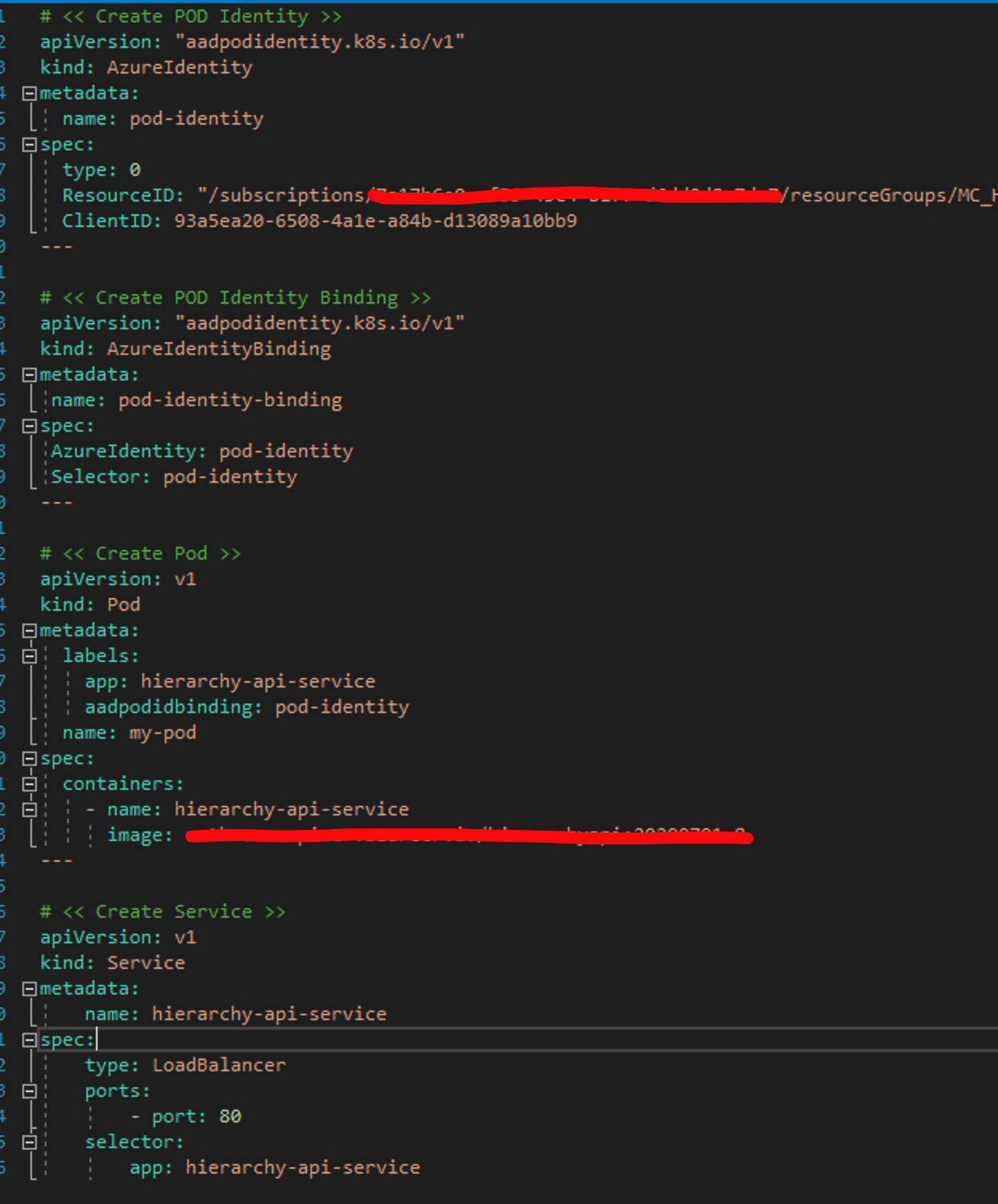
Any inputs will be much appreciated!
Thanks a lot
jerry-santana
on 14 Jul 2020
@JerrySantana92 it looks like you will need to uncapitalize the fields in AzureIdentity and AzureIdentityBinding if you are using v1.6.0. See https://github.com/Azure/aad-pod-identity#v160-breaking-change for more detail. Please let us know if it works after you change the fields.
chewong
on 14 Jul 2020
@JerrySantana92 it looks like you will need to uncapitalize the fields in
AzureIdentityandAzureIdentityBindingif you are using v1.6.0. See https://github.com/Azure/aad-pod-identity#v160-breaking-change for more detail. Please let us know if it works after you change the fields.
Yep, that was the problem! I can't believe that lol.
I had to uncapitalize AzureIdentity and AzureIdentityBinding and it worked!
I was dealing with this since the last 2 or 3 weeks, really appreciate it man! @chewong
jerry-santana
on 14 Jul 2020
In my case, secret for the Service Principal was expired and we reset the secret with new values,
since then we are getting the error for expired secret keys.
Logs from MIC
error: failed to update identities for VMSS in $RG,
error: azure.BearerAuthorizer#WithAuthorization: Failed to refresh the Token for request to
StatusCode=401
-- Original Error: adal: Refresh request failed. Status Code = '401'. Response body:
{"error":"invalid_client","error_description":"AADSTS7000222: The provided client secret keys are expired.
Visit the Azure Portal to create new keys for your app, or consider using certificate credentials for added security:
When I run curl command from one of the pod getting this error.
curl -v 'http://169.254.169.254/metadata/identity/oauth2/token?api-version=2018-02-01&resource=https%3A%2F%2Fvault.azure.net' -H Metadata:true
Error: getting assigned identities for $podName ASSIGNED state failed after 20 attempts, retry duration [5]s, error:
I have uninstalled and installed MIC and NMI both following the documentation for pod-identity but still getting the same error.
 kcdevops46
on 12 Jan 2021
kcdevops46
on 12 Jan 2021
How did you update your service principal? via az aks update-credentials?
chewong
on 12 Jan 2021
@chewong : Problem was SP credential was only reset and update credential command was not ran. Once update-credentials was ran, it started working.
Thank you
kcdevops46
on 12 Jan 2021
Related issues
 jozamp
·
7Comments
jozamp
·
7Comments
 smartpcr
·
7Comments
smartpcr
·
7Comments
 bnookala
·
5Comments
bnookala
·
5Comments
 glcx
·
3Comments
glcx
·
3Comments
 amsoedal
·
4Comments
amsoedal
·
4Comments