A32nx: [BUG] Which is the Right way to insert ZFW/ZFWCG ?
Mod Version
0.4.0
Describe the bug
I create an Flightplan EDDB to EDDT with Simbrief for an A320-200 as u can see here .
I have an ZFW of 60.8 and an Block Fuel of 5246


When i try to insert the ZFW of 60.8 the i become an Format Error .
When i try to insert an ZFW of 60.8 and an ZFWCG of 25.0 i become an Format Error .
To Reproduce
As describe it before .
Expected behavior
When i insert ZFW and ZFWCG the it should work .
Actual behavior
Format Error
Additional context
- Where i become the correct ZFWCG for my ZFW ?
- Is it necessary to setup the Fuel in Game as it was in the Simbrief Flightplan ?
 SM-396
All 28 comments
This issue is fixed with the latest master build.
 ABoldOne
on 16 Oct 2020
ABoldOne
on 16 Oct 2020
This issue is fixed with the latest master build.
Eh , i dont understand . The latest Build is the 0.4.0 right . This is what i have installed .
SM-396
on 16 Oct 2020
This issue is fixed with the latest master build.
Eh , i dont understand . The latest Build is the 0.4.0 right . This is what i have installed .
Do you have the stable or dev build installed? You need the latest dev/master build.
ABoldOne
on 16 Oct 2020
This issue is fixed with the latest master build.
Eh , i dont understand . The latest Build is the 0.4.0 right . This is what i have installed .
Do you have the stable or dev build installed? You need the latest dev/master build.
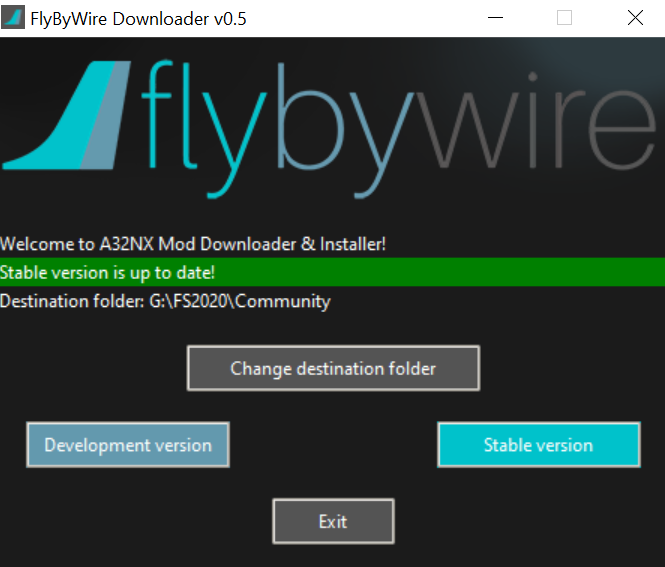
Means i should choose in Installer the Development Version ?
SM-396
on 16 Oct 2020
This issue is fixed with the latest master build.
Eh , i dont understand . The latest Build is the 0.4.0 right . This is what i have installed .
Do you have the stable or dev build installed? You need the latest dev/master build.
Means i should choose in Installer the Development Version ?
Correct :)
ABoldOne
on 16 Oct 2020
This issue is fixed with the latest master build.
Eh , i dont understand . The latest Build is the 0.4.0 right . This is what i have installed .
Do you have the stable or dev build installed? You need the latest dev/master build.
Means i should choose in Installer the Development Version ?
Correct :)
In the Past i have Big Problems with the Development Version . Problems with AP ( Speed, FP follow etc. )
SM-396
on 16 Oct 2020
This issue is fixed with the latest master build.
Eh , i dont understand . The latest Build is the 0.4.0 right . This is what i have installed .
Do you have the stable or dev build installed? You need the latest dev/master build.
Means i should choose in Installer the Development Version ?
Correct :)
In the Past i have Big Problems with the Development Version . Problems with AP ( Speed, FP follow etc. )
Its your decision. The dev version is a wip version of course.
ABoldOne
on 16 Oct 2020
I am using the 0.4.0 master release and I have the same problem. This is not a DEV build, the problem exists in the release.
 ntlgr
on 16 Oct 2020
ntlgr
on 16 Oct 2020
I am using the 0.4.0 master release and I have the same problem. This is not a DEV build, the problem exists in the release.
Please understand. The master build is NOT the stable build. You need to download the latest master/dev build to get it working again NOT the stable build.
ABoldOne
on 16 Oct 2020
I am using the 0.4.0 master release and I have the same problem. This is not a DEV build, the problem exists in the release.
Please understand. The master build is NOT the stable build. You need to download the latest master/dev build to get it working again NOT the stable build.
Got it, sorry new to github, so I have to download latest master build from https://github.com/flybywiresim/a32nx/releases/download/vmaster/A32NX-master.zip ? is that right?
ntlgr
on 16 Oct 2020
I am using the 0.4.0 master release and I have the same problem. This is not a DEV build, the problem exists in the release.
Please understand. The master build is NOT the stable build. You need to download the latest master/dev build to get it working again NOT the stable build.
Got it, sorry new to github, so I have to download latest master build from https://github.com/flybywiresim/a32nx/releases/download/vmaster/A32NX-master.zip ? is that right?
No problem, just saying. Yes thats right. the alternative is to download the flybywire installer and select the dev build.
ABoldOne
on 16 Oct 2020
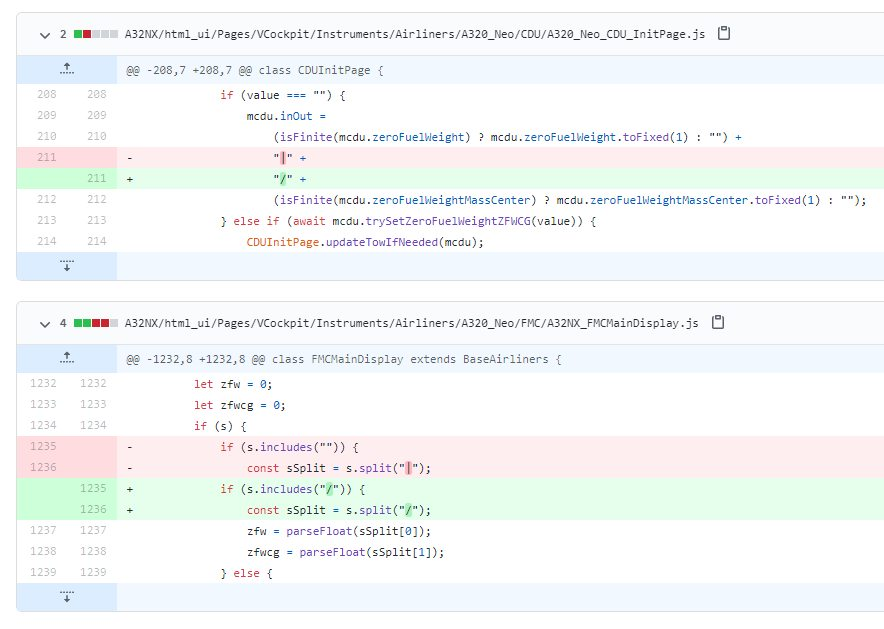
This was resolved, but not yet merged with stable. Simple change to get it working:
 robertmacnair
on 16 Oct 2020
robertmacnair
on 16 Oct 2020
Would it be possible to release a minor patch for this? Seems like a big issue
 desponda
on 16 Oct 2020
desponda
on 16 Oct 2020
@SM-396 those problems are in the base game autopilot, which we don't edit. they are pretty random and unpredictable and I can almost guarantee it was a coincidence that you were using the dev version.
 Benjozork
on 16 Oct 2020
Benjozork
on 16 Oct 2020
Would it be possible to release a minor patch for this? Seems like a big issue
This is planned.
Benjozork
on 16 Oct 2020
Another Question from this Post was where i can find the ZFWCG Value .
Thanks for answering .
SM-396
on 17 Oct 2020
Another Question from this Post was where i can find the ZFWCG Value .
Thanks for answering .
You can find it in the fuel/cargo menu at the same spot where you can find the ATC menu in msfs. If you expand the fuel menu to the right u will see the cg.
ABoldOne
on 17 Oct 2020
Another Question from this Post was where i can find the ZFWCG Value .
Thanks for answering .You can find it in the fuel/cargo menu at the same spot where you can find the ATC menu in msfs. If you expand the fuel menu to the right u will see the cg.
Thanks for the fast answer :-)
Another question . I let Simbrief create my Flightplan because this is very accurate for all Settings.
The Result is the Simbrief Flightplan like u see at the Top of my Post.
When i load this Flightplan in Sim , FS2020 dont know about the calculated ZFW and Block Fuel Values from the Simbrief Plan , right ?
Only the Waypoints from the Flightplan will oad in Sim i think.
Is it right that i now have to change in Game over the Fule Menu the Values so that they match with my Simbrief Flightplan ?
Thanks
SM-396
on 17 Oct 2020
Another Question from this Post was where i can find the ZFWCG Value .
Thanks for answering .You can find it in the fuel/cargo menu at the same spot where you can find the ATC menu in msfs. If you expand the fuel menu to the right u will see the cg.
Thanks for the fast answer :-)
Another question . I let Simbrief create my Flightplan because this is very accurate for all Settings.
The Result is the Simbrief Flightplan like u see at the Top of my Post.
When i load this Flightplan in Sim , FS2020 dont know about the calculated ZFW and Block Fuel Values from the Simbrief Plan , right ?
Only the Waypoints from the Flightplan will oad in Sim i think.
Is it right that i now have to change in Game over the Fule Menu the Values so that they match with my Simbrief Flightplan ?
Thanks
That's up to you. But msfs will not know the values from simbrief. So you need to enter them. The thing is. Simbrief only has an a320 not an a20n so the weight value might be different. I personally look how many fuel I will need for the flight and change the msfs values accordingly. If you are really into this you could create a plane profile that fits the msfs a20n to 100 percent.
ABoldOne
on 17 Oct 2020
Another Question from this Post was where i can find the ZFWCG Value .
Thanks for answering .You can find it in the fuel/cargo menu at the same spot where you can find the ATC menu in msfs. If you expand the fuel menu to the right u will see the cg.
Thanks for the fast answer :-)
Another question . I let Simbrief create my Flightplan because this is very accurate for all Settings.
The Result is the Simbrief Flightplan like u see at the Top of my Post.
When i load this Flightplan in Sim , FS2020 dont know about the calculated ZFW and Block Fuel Values from the Simbrief Plan , right ?
Only the Waypoints from the Flightplan will oad in Sim i think.
Is it right that i now have to change in Game over the Fule Menu the Values so that they match with my Simbrief Flightplan ?
ThanksThat's up to you. But msfs will not know the values from simbrief. So you need to enter them. The thing is. Simbrief only has an a320 not an a20n so the weight value might be different. I personally look how many fuel I will need for the flight and change the msfs values accordingly.
Ok, thanks . How you can find out the necessary Fuel for the Flight . Is there an Online Calculator ?
SM-396
on 17 Oct 2020
Another Question from this Post was where i can find the ZFWCG Value .
Thanks for answering .You can find it in the fuel/cargo menu at the same spot where you can find the ATC menu in msfs. If you expand the fuel menu to the right u will see the cg.
Thanks for the fast answer :-)
Another question . I let Simbrief create my Flightplan because this is very accurate for all Settings.
The Result is the Simbrief Flightplan like u see at the Top of my Post.
When i load this Flightplan in Sim , FS2020 dont know about the calculated ZFW and Block Fuel Values from the Simbrief Plan , right ?
Only the Waypoints from the Flightplan will oad in Sim i think.
Is it right that i now have to change in Game over the Fule Menu the Values so that they match with my Simbrief Flightplan ?
ThanksThat's up to you. But msfs will not know the values from simbrief. So you need to enter them. The thing is. Simbrief only has an a320 not an a20n so the weight value might be different. I personally look how many fuel I will need for the flight and change the msfs values accordingly.
Ok, thanks . How you can find out the necessary Fuel for the Flight . Is there an Online Calculator ?
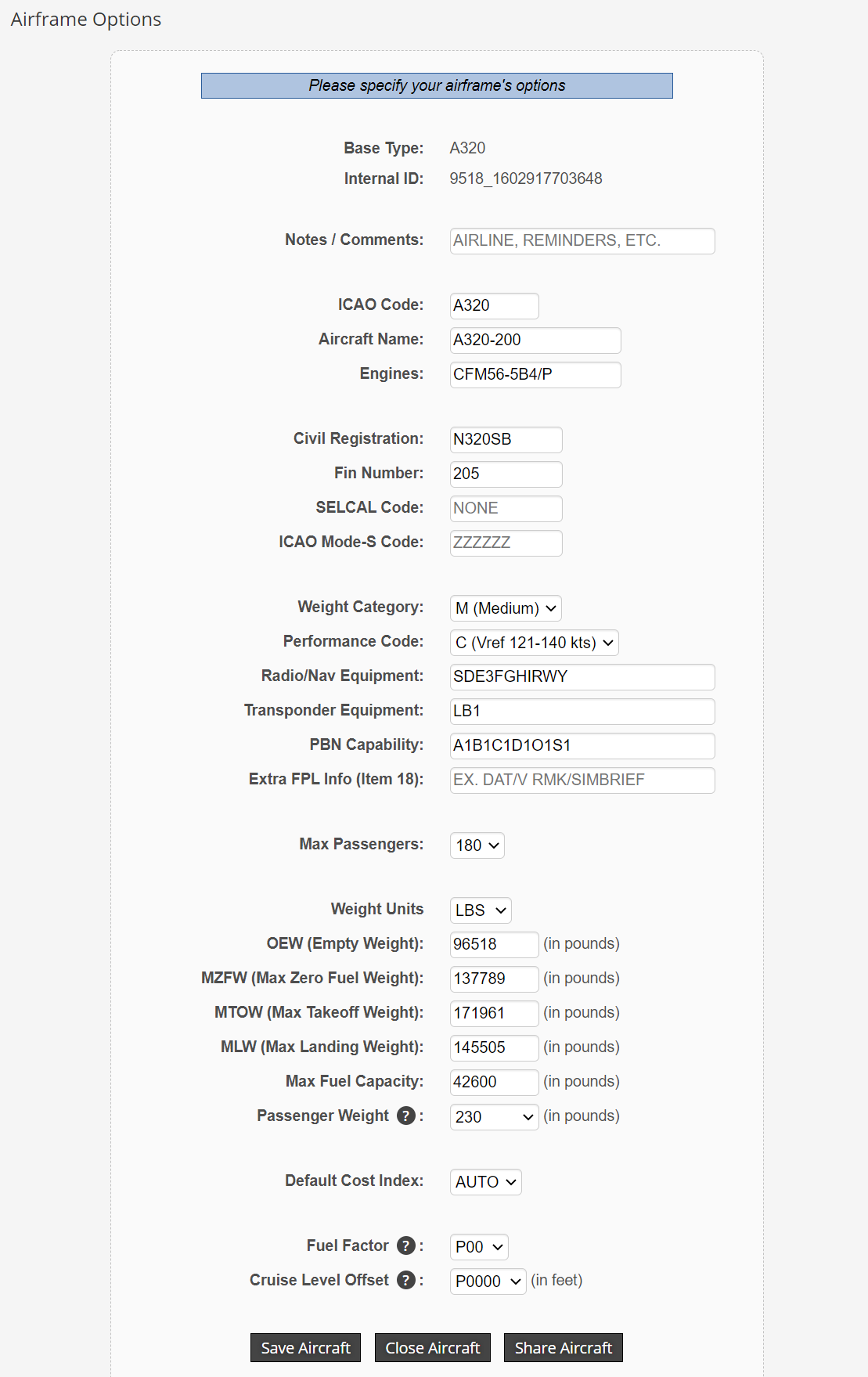
In Simbrief you have the Possibility to create an own Aircraft . Now i need the right values . Can u help me for this ?
SM-396
on 17 Oct 2020
Another Question from this Post was where i can find the ZFWCG Value .
Thanks for answering .You can find it in the fuel/cargo menu at the same spot where you can find the ATC menu in msfs. If you expand the fuel menu to the right u will see the cg.
Thanks for the fast answer :-)
Another question . I let Simbrief create my Flightplan because this is very accurate for all Settings.
The Result is the Simbrief Flightplan like u see at the Top of my Post.
When i load this Flightplan in Sim , FS2020 dont know about the calculated ZFW and Block Fuel Values from the Simbrief Plan , right ?
Only the Waypoints from the Flightplan will oad in Sim i think.
Is it right that i now have to change in Game over the Fule Menu the Values so that they match with my Simbrief Flightplan ?
ThanksThat's up to you. But msfs will not know the values from simbrief. So you need to enter them. The thing is. Simbrief only has an a320 not an a20n so the weight value might be different. I personally look how many fuel I will need for the flight and change the msfs values accordingly.
Ok, thanks . How you can find out the necessary Fuel for the Flight . Is there an Online Calculator ?
In Simbrief you have the Possibility to create an own Aircraft . Now i need the right values . Can u help me for this ?
I actually don't know how to calculate the values. You can find the empty weight in the sim maybe there are other values in the sim too I'm not sure about this. You could Google the values or ask somebody at the flybywire discord. There are many experts maybe they can help you with this.
ABoldOne
on 17 Oct 2020
Another Question from this Post was where i can find the ZFWCG Value .
Thanks for answering .You can find it in the fuel/cargo menu at the same spot where you can find the ATC menu in msfs. If you expand the fuel menu to the right u will see the cg.
Thanks for the fast answer :-)
Another question . I let Simbrief create my Flightplan because this is very accurate for all Settings.
The Result is the Simbrief Flightplan like u see at the Top of my Post.
When i load this Flightplan in Sim , FS2020 dont know about the calculated ZFW and Block Fuel Values from the Simbrief Plan , right ?
Only the Waypoints from the Flightplan will oad in Sim i think.
Is it right that i now have to change in Game over the Fule Menu the Values so that they match with my Simbrief Flightplan ?
ThanksThat's up to you. But msfs will not know the values from simbrief. So you need to enter them. The thing is. Simbrief only has an a320 not an a20n so the weight value might be different. I personally look how many fuel I will need for the flight and change the msfs values accordingly.
Ok, thanks . How you can find out the necessary Fuel for the Flight . Is there an Online Calculator ?
In Simbrief you have the Possibility to create an own Aircraft . Now i need the right values . Can u help me for this ?
I actually don't know how to calculate the values. You can find the empty weight in the sim. But that's all I know. You could Google the values or ask somebody at the flybywire discord. There are many experts maybe they can help you with this.
Many Thanks for your support.
SM-396
on 17 Oct 2020
Another Question from this Post was where i can find the ZFWCG Value .
Thanks for answering .You can find it in the fuel/cargo menu at the same spot where you can find the ATC menu in msfs. If you expand the fuel menu to the right u will see the cg.
Thanks for the fast answer :-)
Another question . I let Simbrief create my Flightplan because this is very accurate for all Settings.
The Result is the Simbrief Flightplan like u see at the Top of my Post.
When i load this Flightplan in Sim , FS2020 dont know about the calculated ZFW and Block Fuel Values from the Simbrief Plan , right ?
Only the Waypoints from the Flightplan will oad in Sim i think.
Is it right that i now have to change in Game over the Fule Menu the Values so that they match with my Simbrief Flightplan ?
ThanksThat's up to you. But msfs will not know the values from simbrief. So you need to enter them. The thing is. Simbrief only has an a320 not an a20n so the weight value might be different. I personally look how many fuel I will need for the flight and change the msfs values accordingly. If you are really into this you could create a plane profile that fits the msfs a20n to 100 percent.
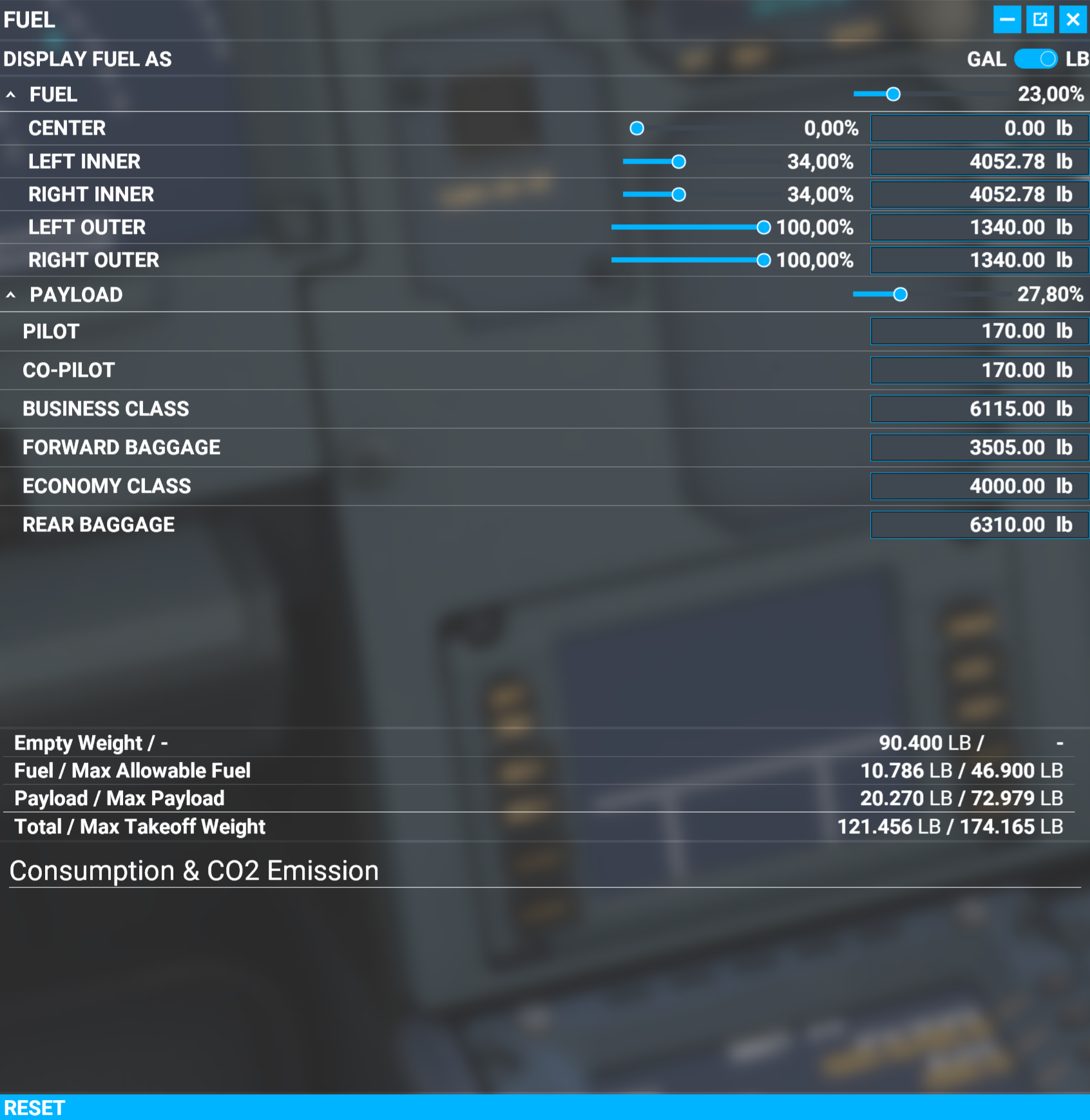
Where i can find here the CG ? Thanks again
SM-396
on 17 Oct 2020
Another Question from this Post was where i can find the ZFWCG Value .
Thanks for answering .You can find it in the fuel/cargo menu at the same spot where you can find the ATC menu in msfs. If you expand the fuel menu to the right u will see the cg.
Thanks for the fast answer :-)
Another question . I let Simbrief create my Flightplan because this is very accurate for all Settings.
The Result is the Simbrief Flightplan like u see at the Top of my Post.
When i load this Flightplan in Sim , FS2020 dont know about the calculated ZFW and Block Fuel Values from the Simbrief Plan , right ?
Only the Waypoints from the Flightplan will oad in Sim i think.
Is it right that i now have to change in Game over the Fule Menu the Values so that they match with my Simbrief Flightplan ?
ThanksThat's up to you. But msfs will not know the values from simbrief. So you need to enter them. The thing is. Simbrief only has an a320 not an a20n so the weight value might be different. I personally look how many fuel I will need for the flight and change the msfs values accordingly. If you are really into this you could create a plane profile that fits the msfs a20n to 100 percent.
Where i can find here the CG ? Thanks again
Sure. Expand this window to the right and you will see it at the top right corner.
ABoldOne
on 17 Oct 2020
The Flybywire Discord would be a better place to have conversations like these, as they will be answered much quicker for you :)
 Aarondodd88
on 17 Oct 2020
Aarondodd88
on 17 Oct 2020
The Flybywire Discord would be a better place to have conversations like these, as they will be answered much quicker for you :)
Thanks , How i can find the Discord ?
SM-396
on 17 Oct 2020
Closing as resolved and going off-topic.
Benjozork
on 17 Oct 2020
Related issues
 AdenFlorian
·
3Comments
AdenFlorian
·
3Comments
 mfnalex
·
4Comments
mfnalex
·
4Comments
 Al-Roker
·
3Comments
Al-Roker
·
3Comments
 noga-aviator
·
4Comments
noga-aviator
·
4Comments
 Snapmatics
·
3Comments
Snapmatics
·
3Comments