A32nx: [BUG] Can't Assign Arrival at Airport Other Than Through Pre-flight Plan Menu
Mod Version
Master (issue manifested before commit a72a977f) (It appeared after the v0.3.1 release in a later merge)
Describe the bug
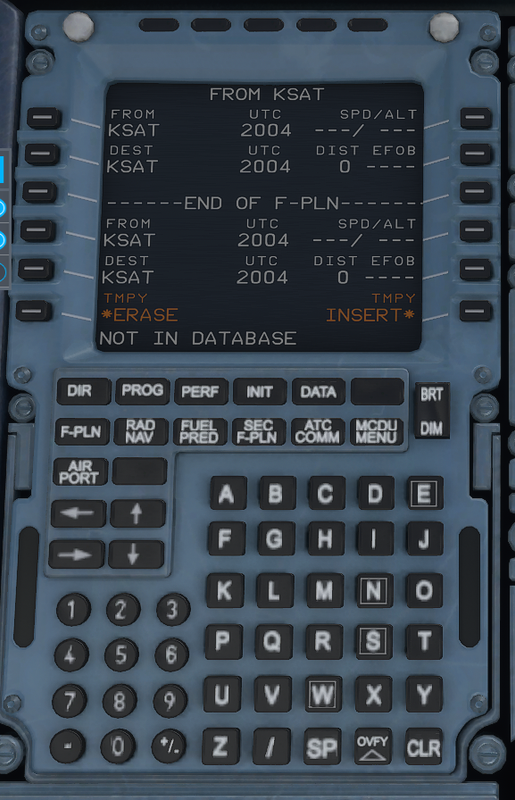
Whenever you try to go into the flight plan page of the CDU and try to set the arrival and approach, instead, the display says "Not In Database" and shows options to insert or delete flight plan. Note: Doing either of these options corrupts the flight plan on the ND and auto pilot becomes erratic in Nav Mode.
To Reproduce
- Spawn C/D or pre-started (you can either set the flight plan in either the pre-flight menu or on the CDU (it seems to be more extensive if you do it through the pre-flight menu.) at any airport with IFR departures and arrivals
- Set an approach at the airport set in the CDU using the CDU.
- Bug manifests itself.
Expected behavior
I should see the approach page as it does in the vanilla version.
Actual behavior
Glitches out as soon as I try to open the approach page as described above.
References
Screenshot taken on commit: a72a977f
Additional context
Was this working before/when did the issue start occurring?
It worked on the v0.3.1 release, but not after.
Is this a problem in the vanilla unmodded game?
No
Discord username (if different from GitHub):
 SCBionicle
All 13 comments
I managed to overcome the problem of accessing the approach by pressing the clear key and reselecting the destination airport. Then I got the list of arrival options as before....
 johnwillimas
on 16 Oct 2020
johnwillimas
on 16 Oct 2020
Hello ,
Thanks for this Post . Same here . Think this is an Bug only in the newest Version 0.4.0 . In the Past it works like charme.
 SM-396
on 16 Oct 2020
SM-396
on 16 Oct 2020
I managed to overcome the problem of accessing the approach by pressing the clear key and reselecting the destination airport. Then I got the list of arrival options as before....
Thanks for the info, I'll see if that works for me.
I've tried looking at the code myself to see if I can track down the glitch, I'm having trouble making heads or tails of the JS code. (I'm largely unfamiliar with Javascript)
SCBionicle
on 16 Oct 2020
I managed to overcome the problem of accessing the approach by pressing the clear key and reselecting the destination airport. Then I got the list of arrival options as before....
This seems to have worked for me as well. I think the issue is caused from the input field on the MCDU having "GPS Primary Lost" shown and you have to clear that before you can select the departure/arrival airport to input SIDs, STARs, etc. I'm not sure if this is expected behavior or a bug.
 dstubbs95
on 17 Oct 2020
dstubbs95
on 17 Oct 2020
I managed to overcome the problem of accessing the approach by pressing the clear key and reselecting the destination airport. Then I got the list of arrival options as before....
This seems to have worked for me as well. I think the issue is caused from the input field on the MCDU having "GPS Primary Lost" shown and you have to clear that before you can select the departure/arrival airport to input SIDs, STARs, etc. I'm not sure if this is expected behavior or a bug.
I have this issue regardless if the ADIRS system is aligned or not. It's worse when I miss an approach and I can't program the navigational system to reroute for another approach and the ND shows disconnected lines and squiggles for the intended flight path.
SCBionicle
on 18 Oct 2020
I have a question: is anyone else having this issue as bad as I am? (I'm only having it on the A320NX mod and not the vanilla plane or any other aircraft) Or do I just have a bad installation?
SCBionicle
on 18 Oct 2020
I have this issue regardless if the ADIRS system is aligned or not. It's worse when I miss an approach and I can't program the navigational system to reroute for another approach and the ND shows disconnected lines and squiggles for the intended flight path.
They mean you have to press the CLR key to remove the message.
 Benjozork
on 18 Oct 2020
Benjozork
on 18 Oct 2020
Ok, I just found a quirk to the glitch. (I do not know if this is intended or not) Setting arrivals work if you have the destination on the bottom line of the MCDU and use the lower left button to activate the arrivals page. The glitch occurs if the destination is not pressed with the bottom left button.
SCBionicle
on 18 Oct 2020
glitch. (I do not know if this is intended or not) Setting arrivals work if you have the destination on the bottom line of the MCDU and use the lower left button to acti
Thank you so very much! Just press the CLR Button at beginning, that GPS Primary Lost disappears, then Departure and Appr is changeable. Worked for me! Thank you dude!
 DLH455
on 18 Oct 2020
DLH455
on 18 Oct 2020
Thanks to the people in this thread who pointed out you need to clear GPS Primary Lost (with CLR) when it appears. If you use TMPY ERASE, you don't clear the error and keep running into the same problem.
 jswidler
on 19 Oct 2020
jswidler
on 19 Oct 2020
@jswidler do you think this is correct behaviour ?
Benjozork
on 19 Oct 2020
@jswidler do you think this is correct behaviour ?
It is doubtful to me; but I wouldn't know.
jswidler
on 19 Oct 2020
@Benjozork If you press the destination with a button other than L6 on the MCDU, then it also complains of not in database regardless of whether the GPS status message was cleared or not and would not show the arrival flight plan page.
SCBionicle
on 21 Oct 2020
Related issues
 Snapmatics
·
3Comments
Snapmatics
·
3Comments
 tareksabet
·
4Comments
tareksabet
·
4Comments
 Shimi1612
·
3Comments
Shimi1612
·
3Comments
 javiiberia
·
3Comments
javiiberia
·
3Comments
 PANAM741
·
3Comments
PANAM741
·
3Comments