A32nx: [BUG] Performance degradation with mod since MSFS 1.9.5.0
Mod Version
master
Describe the bug
I am getting low performance (5-15 fps less) compared to the vanilla; this didn’t happen some days ago.
To Reproduce
Compare fps with mod and without mod
1.
2.
3.
Expected behavior
The mod should not affect performance so much.
Actual behavior
Mod affect performance (5-15 fps less compared to the vanilla)
References
Additional context
Was this working before/when did the issue start occurring?
I noticed it today for the first time.
Is this a problem in the vanilla unmodded game?
No
Discord username (if different from GitHub):
 G4mer0921
All 31 comments
How much FPS did you get before installing the mod ?
 Benjozork
on 14 Oct 2020
Benjozork
on 14 Oct 2020
How much FPS did you get before installing the mod ?
Not less than 30 in worst cases (for example at LFPG during taxi and T.O.).
G4mer0921
on 14 Oct 2020
I also noticed a similar performance degradation after installing the latest MSFS patch.
Around 60 on the ground without mod, 45 with the mod.
 mdionizio
on 15 Oct 2020
mdionizio
on 15 Oct 2020
Since latest MSFS patch bad performance for me too. I guess they broke something :(
 MisterChocker
on 15 Oct 2020
MisterChocker
on 15 Oct 2020
I got 10 - 15 fps less than Vanilla version, unplayable right now for me, the frametime got crazye after that useless double screen update :(
This is what is destroying the fps and the frametime
[MISC] Separated Captian and F/O displays - @tyler58546 (tyler58546)
 Artax04
on 15 Oct 2020
Artax04
on 15 Oct 2020
after that useless double screen update :(
Please refrain from judging people's contributions rudely because you do not agree with them.
We will work on performance optimizations, but keep in mind that the performance loss is currently also caused by some unknown issue due to the 1.9.5.0 MSFS update that we are currently investigating.
Benjozork
on 15 Oct 2020
Additional info:
Performance seems probably related to screens / CoherentGTDraw frametimes, as looking away from the screens or being in outside view dramatically increases FPS
Benjozork
on 15 Oct 2020
Please set display refresh rate to medium or low - high is unnecessary as it uses a significant amount of FPS for only a marginal improvement in display smoothness.
 wpine215
on 15 Oct 2020
wpine215
on 15 Oct 2020
I've used low for a while now. Performance still dropped considerably after the new patch.
mdionizio
on 15 Oct 2020
Switch the First officer's side PFD off (brightness knob to 0) if you have having issues for now. PFDs are known to have the most impact on performance.
 2hwk
on 15 Oct 2020
2hwk
on 15 Oct 2020
Switch the First officer's side PFD off (brightness knob to 0) if you have having issues for now. PFDs are known to have the most impact on performance.
performance is a lot worst than vanilla also with both pfd turned OFF, and with refresh on LOW :(
Artax04
on 15 Oct 2020
Switch the First officer's side PFD off (brightness knob to 0) if you have having issues for now. PFDs are known to have the most impact on performance.
performance is a lot worst than vanilla also with both pfd turned OFF, and with refresh on LOW :(
As stated, we are working on this. Stay tuned.
Your feedback is important and even if we don't shout from the roofs that we are fixing it, we very much care. I have myself a now low end GPU and I am having very bad issues.
Benjozork
on 15 Oct 2020
i have tons of faith in you, you made this game playable, witout this mod flight simulator was unplayable.
I did like five post on ms forum just saying "thank you"
But that double pfd was a modkiller for me, after that i have to play with vanilla, the frametime is crazy :/
Artax04
on 15 Oct 2020
i have tons of faith in you, you made this game playable, witout this mod flight simulator was unplayable.
I did like five post on ms forum just saying "thank you"
But that double pfd was a modkiller for me, after that i have to play with vanilla, the frametime is crazy :/
We understand the degradation is annoying, but keep in mind this is not a final release and we cannot guarantee everything to work all the time.
We are all unpaid developers who dedicate time towards this without being compensated in any way. As I made that comment someone was already investigating how to optimize the performance of the PFD.
We are also considering an option to disable split PFD/ND - stay tuned.
Benjozork
on 15 Oct 2020
Switch the First officer's side PFD off (brightness knob to 0) if you have having issues for now. PFDs are known to have the most impact on performance.
performance is a lot worst than vanilla also with both pfd turned OFF, and with refresh on LOW :(
This indicates the issue is not related to the PFDs being unlinked, but rather some of the other systems that were implemented. Performance will probably improve once we have done a pass to optimise performance.
2hwk
on 15 Oct 2020
Switch the First officer's side PFD off (brightness knob to 0) if you have having issues for now. PFDs are known to have the most impact on performance.
performance is a lot worst than vanilla also with both pfd turned OFF, and with refresh on LOW :(
As stated, we are working on this. Stay tuned.
Your feedback is important and even if we don't shout from the roofs that we are fixing it, we very much care. I have myself a now low end GPU and I am having very bad issues.
Can i ask why is this separate screen feature so important? So many people are saying it's not necessary, it's not worth it, no one asked for it, remove it or release different version for shared cockpit, it causes big fps hit, a lot of stutters even if screens are off and it's a feature for something most people will never use? I'm noy trying to be rude, i'm into flight sims 10 years now, i have a lot of respect for you guys and everything you're doing, this is by far the best plane in msfs, nothing is even close, and i think a year from now, even payware airplanes are gonna have tough time to compete with it.
 c1be
on 15 Oct 2020
c1be
on 15 Oct 2020
@c1be @Artax04 Come on guys. A feature is a feature. No one asks for it.
If you have fps issues, just turn off the FO Displays or delete the following file:
A32NX/SimObjects/AirPlanes/Asobo_A320_NEO/model/A320_NEO_INTERIOR_LOD00.gltf and run 'build.py'
It'll resync both NDs & PFDs.
 myselfaaryan
on 15 Oct 2020
myselfaaryan
on 15 Oct 2020
Can i ask why is this separate screen feature so important? So many people are saying it's not necessary, it's not worth it, no one asked for it, remove it or release different version for shared cockpit, it causes big fps hit, a lot of stutters even if screens are off and it's a feature for something most people will never use? I'm noy trying to be rude, i'm into flight sims 10 years now, i have a lot of respect for you guys and everything you're doing, this is by far the best plane in msfs, nothing is even close, and i think a year from now, even payware airplanes are gonna have tough time to compete with it.
Those are things we are discussing all the time and here is the current plan:
We will improve performance and draw time of the PFD and ND, and if that does not improve performance noticeably we will provide the option to disable that feature.
Benjozork
on 15 Oct 2020
I have also experienced this and a good fix is to turn off the FO PFD.
 armankir
on 15 Oct 2020
armankir
on 15 Oct 2020
Same here with out any significant fps-drop but with permanent stutters ( micro-stutters) even with 2nd PFD/ND turned off. Its getting better when they are off , but still the stuttering is there and destroys the whole immersion.
Maybe has to do with some new systems added ( default A320 is smooth with no issues )
Beside that new update is amazing, you saved MFS Airbus, started to be alive. Thanks for your great work and time.
 Seth-Dark
on 15 Oct 2020
Seth-Dark
on 15 Oct 2020
Hey, i am going to post, a few screenshots of what im having right now....
i got like a 35% perfomance drop when im looking forward, but if i turn to the window, i restore my fps.

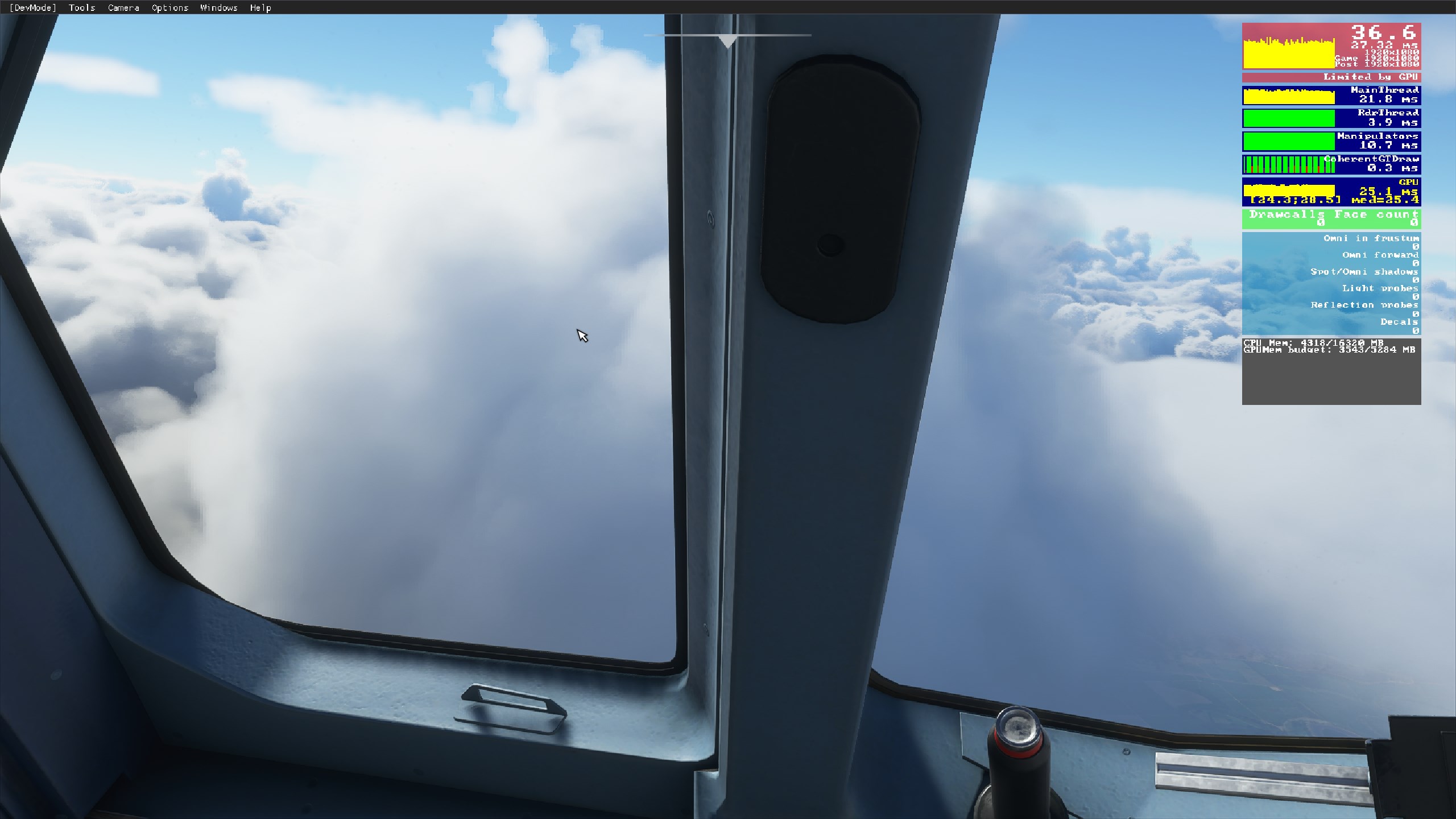
Thank you guys!
 Berniep94
on 15 Oct 2020
Berniep94
on 15 Oct 2020
As you can see I have opened a PR optimizing some of the update code.
I do NOT guarantee significant improvements at the moment - I still have to go through a lot of the code.
Hold tight.
Benjozork
on 17 Oct 2020
For people not daily into software development:
Developers typically proceed in 3 Steps:
- Make it work (aka Prototype)
- Make it work well (so Users can interface with it and it does not break)
- Make it work fast (As you know all cases where you need what kind of data and optimize for that)
A32NX is currently somewhere between 1 and 2, depending on the features being worked on. Yes performance is key, but not the first thing to go for. As much as I am a user and know the pain with frame stutters, I am also a developer and adhere to the steps to avoid lots and lots of duplicate work.
Keep up the good work guys 😊
 jokey2k
on 24 Oct 2020
jokey2k
on 24 Oct 2020
For people not daily into software development:
Developers typically proceed in 3 Steps:
Make it work (aka Prototype)
Make it work well (so Users can interface with it and it does not break)
Make it work fast (As you know all cases where you need what kind of data and optimize for that)
A32NX is currently somewhere between 1 and 2, depending on the features being worked on. Yes performance is key, but not the first thing to go for. As much as I am a user and know the pain with frame stutters, I am also a developer and adhere to the steps to avoid lots and lots of duplicate work.
Keep up the good work guys 😊
And i am agree with you, we want to help as users to get the best performance and looking plane, i download the aircraft everysingle time there is an update, so i can try to find a bug or try to see how its working... but maybe on your PC (high end) you dont see this kind of frame stutters, maybe yes... but we keep up like a team because also users or the final customer gets part in the project!!! Like i always say Keep the work as you know!!!
Cheers from Mexico!
Berniep94
on 25 Oct 2020
Switch the First officer's side PFD off (brightness knob to 0) if you have having issues for now. PFDs are known to have the most impact on performance.
performance is a lot worst than vanilla also with both pfd turned OFF, and with refresh on LOW :(
As stated, we are working on this. Stay tuned.
Your feedback is important and even if we don't shout from the roofs that we are fixing it, we very much care. I have myself a now low end GPU and I am having very bad issues.
Have you been able to see any improvements lately? :)
mdionizio
on 29 Oct 2020
@mdionizio
We are currently exploring a new rendering engine for the displays, in the mean time I will merge my temporary optimization PR soon.
Benjozork
on 29 Oct 2020
@Benjozork Thanks mate appreciate it
mdionizio
on 29 Oct 2020
Thank you so much @Benjozork for your hard work, and the entire team!!
Berniep94
on 29 Oct 2020
@Benjozork Hi there, any update on when your temporary optimization PR will be available? :)
mdionizio
on 4 Nov 2020
I'll merge it soon. However don't expect anything meaningful, we're not gonna do much further optimization on this and we'll instead rewrite the entire PFD and ND since it's a mess inherited from the base game.
Currently that is planned for 0.6.0.
In the mean time, turning off the F/O displays solves the issue. If it doesn't for you, then your problem is unrelated to the displays.
Benjozork
on 4 Nov 2020
I was having like ~42fps when using the external view but when I go back into the cockpit, my fps instantly drops below 30.
I tried to switch off FO’s display but only recieved a few fps gain. My fps finally settled around 27-30 stationary on ground.
I would say the drop in fps is quite significant and I am wondering if there is any solution for this.
 dickbig2
on 13 Nov 2020
dickbig2
on 13 Nov 2020
Related issues
 Snapmatics
·
3Comments
Snapmatics
·
3Comments
 Shimi1612
·
3Comments
Shimi1612
·
3Comments
 Curtis-VL
·
4Comments
Curtis-VL
·
4Comments
 Bernister
·
4Comments
Bernister
·
4Comments
 Al-Roker
·
3Comments
Al-Roker
·
3Comments
Most helpful comment
@c1be @Artax04 Come on guys. A feature is a feature. No one asks for it.
If you have fps issues, just turn off the FO Displays or delete the following file:
A32NX/SimObjects/AirPlanes/Asobo_A320_NEO/model/A320_NEO_INTERIOR_LOD00.gltf and run 'build.py'
It'll resync both NDs & PFDs.