Mod Version
master
Describe the bug
Graphical glitch appeared today
https://www.youtube.com/watch?v=yHe86fFOXGA
To Reproduce
- start flight
2.
3.
Expected behavior
Actual behavior
References
Additional context
Was this working before/when did the issue start occurring?
was fine yesterday
Is this a problem in the vanilla unmodded game?
no
Discord username (if different from GitHub):
 Pross
Pross
All 23 comments
The video is private
 lukecologne
on 12 Oct 2020
lukecologne
on 12 Oct 2020
Your video is set to private
 Pleasure0102
on 12 Oct 2020
Pleasure0102
on 12 Oct 2020
Private video
 ChruutvoLuzi
on 12 Oct 2020
ChruutvoLuzi
on 12 Oct 2020
Try now sorry
Pross
on 12 Oct 2020
What is the problem here ?
Do the controls not work ? Try resizing a window (like ATC, Weather) and / or switching cameras.
Please report whether that fixes it.
 Benjozork
on 12 Oct 2020
Benjozork
on 12 Oct 2020
No he probably refers to the flickering LS Decal
ChruutvoLuzi
on 12 Oct 2020
Yeah I will check it tomorrow might have happened with one of the decal fixes. It's 11pm so checking it tomorrow morning
Pleasure0102
on 12 Oct 2020
Yea I'm referring to the flickering around the buttons text and toggles
Pross
on 12 Oct 2020
Would be nice if someone can confirm. So we can make sure it's not a local issue. But will check it regardless ofc
Pleasure0102
on 12 Oct 2020
I got it as well
lukecologne
on 12 Oct 2020
Okay should not be a big deal to fix (hopefully) so I am expecting to make a pr sometime tomorrow morning
Pleasure0102
on 12 Oct 2020
Mod Version
master
Can you provide the contents of the build-info.txt file so we know when this started ?
Benjozork
on 12 Oct 2020
I dont see that file, I am on commit https://github.com/flybywiresim/a32nx/commit/2f93d9926e7dd56b59aa195e2377905b9716b038 if that helps?
Pross
on 12 Oct 2020
Okay thank you. By the way, the file is located at the root of the package:
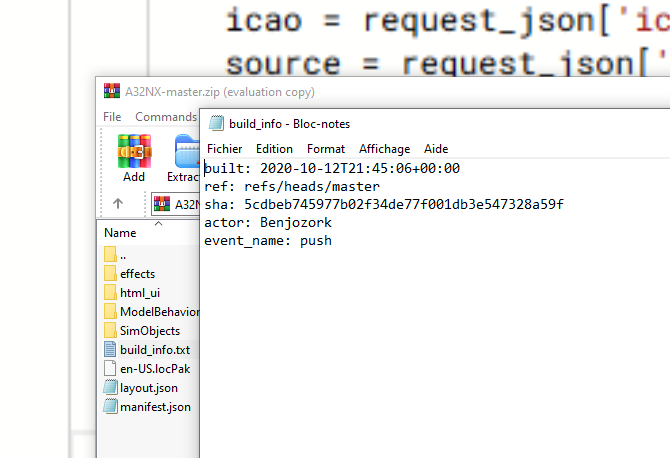
Benjozork
on 13 Oct 2020
Oh well maybe its because I just run git pull; build.py
Pross
on 13 Oct 2020
Oh well maybe its because I just run
git pull; build.py
Probably, yes.
Benjozork
on 13 Oct 2020
So it turns out, it actually is in vanilla as well. I have checked if it has to do with the decal texture, and it does not. I am assuming it has to do with the decal mesh being to close to the glareshield panel mesh
https://streamable.com/rp967m
EDIT
here is the issue, after checking the model:
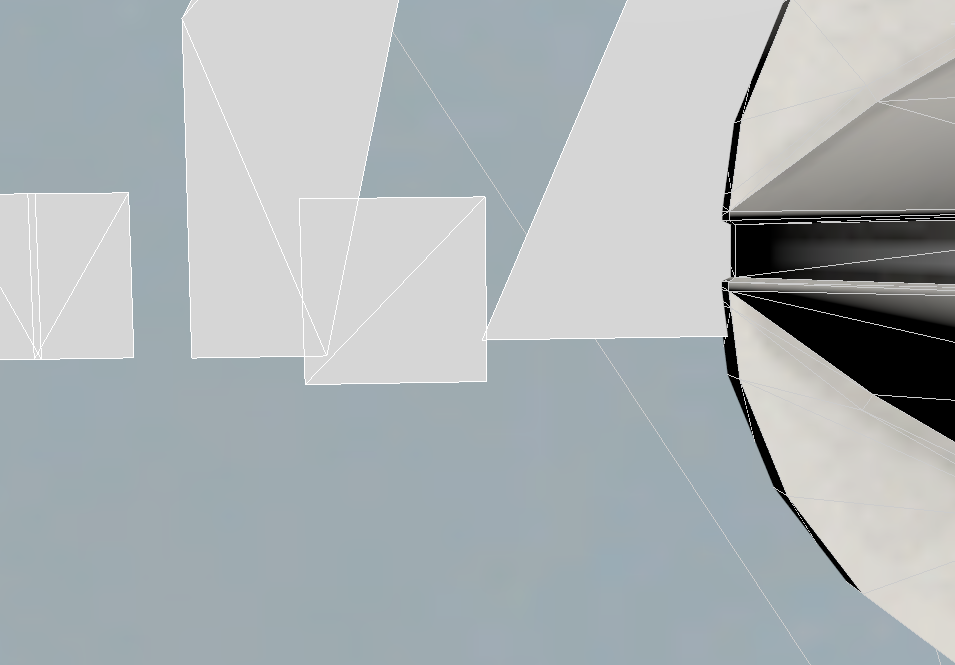
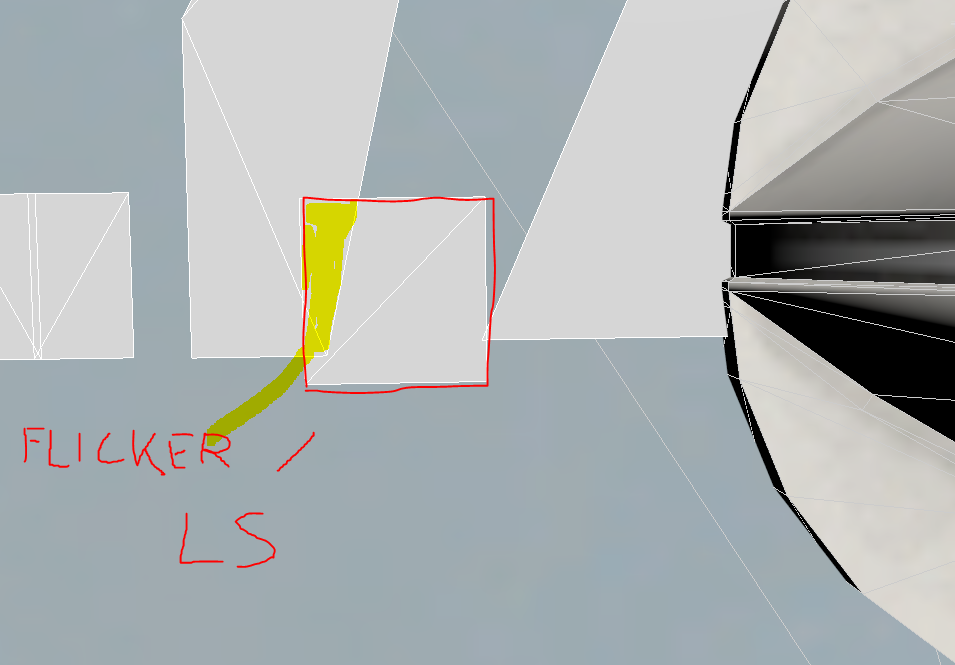
Pleasure0102
on 13 Oct 2020
so the conclusion of my testing is that it is unfortunately something we cannot fix "yet" But it is something i will keep i mind once we can.
EDIT.. maybe i can hack somethig.. but it is a biiiig maybe
EDIT2: Nope, tried to add the letter L to the top decal, to basically stop the transparency overriding the other decal, which did not work though. So we will have to edit the mesh to fix this
Pleasure0102
on 13 Oct 2020
oh this means btw @Pross you did not actually test if it is a problem in vanilla. Please next time test before saying in vanilla it works.. it would have saved me half an hour of searching..
Pleasure0102
on 13 Oct 2020
I have that too. I assume it's some of the graphic/scenery flickering through the cockpit. Have that when on ground or slightly above clouds. Also you can enable "taxi ribbons" (assistance) and check out the main and center panel while driving over the ribbons. There's a lot of flickering going on.
 Watsi01
on 13 Oct 2020
Watsi01
on 13 Oct 2020
@Watsi01 it is not scenery, you can read my explanation above
Pleasure0102
on 13 Oct 2020
To be honest I didn't think I needed to because the issue wasn't there the day before and the only thing I did was pull master and build and it included the updated graphics.
I'll know next time not to open a ticket and waste your valuable time.
oh this means btw @Pross you did not actually test if it is a problem in vanilla. Please next time test before saying in vanilla it works.. it would have saved me half an hour of searching..
Pross
on 13 Oct 2020
@Pross no it is okay to post an issue, but as i said, it is in vanilla, so you must have been mistaken, so if you find an issue, actually test vanilla first before you say it is not in vanilla pls
Pleasure0102
on 13 Oct 2020
Related issues
 L-1011
·
4Comments
L-1011
·
4Comments
 AdenFlorian
·
3Comments
AdenFlorian
·
3Comments
 Shimi1612
·
3Comments
Shimi1612
·
3Comments
 Bernister
·
4Comments
AdenFlorian
·
3Comments
Bernister
·
4Comments
AdenFlorian
·
3Comments