360controller: Don't install on High Sierra without a full system backup!! Hangs on login screen during restart
Type of Controller
Xbox One
OS Version
macOS 10.13.4 High Sierra
Driver Version
0.16.8
Connection Method
Wireless
Device Name and Info
Device Name: MacBook Pro
Product ID: 0x0259
Vendor ID: 0x05ac (Apple Inc.)
Response of Controller
Untested
Response in Preference Pane
Untested
Detailed Explaination of Issue
I installed the drivers (I think the controller might have been already connected? Not sure) and allowed "Drew Mills" in System Preferences then rebooted as instructed. Tried to log in and the progress bar progressively slowed down after ~50% then eventually got all the way to 100% but just got stuck there and wouldn't log me in. Tried force rebooting into safe mode but it wouldn't work so I rebooted into recovery mode and did first aid on the drive (not sure if that did anything). Rebooted again holding shift to try to go into safe mode but it didn't appear to work (didn't say "safe boot" in top right corner, login screen functioned normally). Tried logging in anyways because I was out of ideas, left it alone on the loading screen for a while and when I came back it had magically kicked itself back to the login screen in safe mode. I was then mercifully able to log in and I immediately uninstalled the drivers and now it boots normally. I don't know how it ended up in safe mode but I guess I was lucky that it did because I didn't have enough space on my disk to reinstall macOS. This whole thing took about 2 hours and involved a lot of panic so I wouldn't recommend anyone else install it without a backup or a death wish.
 benblaustein
All 73 comments
Hi, I had the same problem just now and got really scared. After the Safety Mode, resetting the SMC, and resetting the NVRAM didn't help, I managed to run First Aid via Disk Utilities. I managed to log in afterwards normally and deleted the driver. Hope this will help someone else and helps avoid some stress :)
 kittiban
on 11 Jun 2018
kittiban
on 11 Jun 2018
I don't think the Apple documentation is correct since 10.13.4 on how to install kext files.
 doctorpangloss
on 16 Jun 2018
doctorpangloss
on 16 Jun 2018
I had this issue as well!
 Reinkaos
on 11 Aug 2018
Reinkaos
on 11 Aug 2018
As I've said before many times, I'd love to fix this issue but I simply can't reproduce it to find the error and resolve the issue. Is there any other extension or program on your machine that would run as part of the boot process that may be causing some sort of incompatibility with the driver?
 FranticRain
on 11 Aug 2018
FranticRain
on 11 Aug 2018
Has anyone held down Command-V during boot to see where things get stuck?
 d235j
on 11 Aug 2018
d235j
on 11 Aug 2018
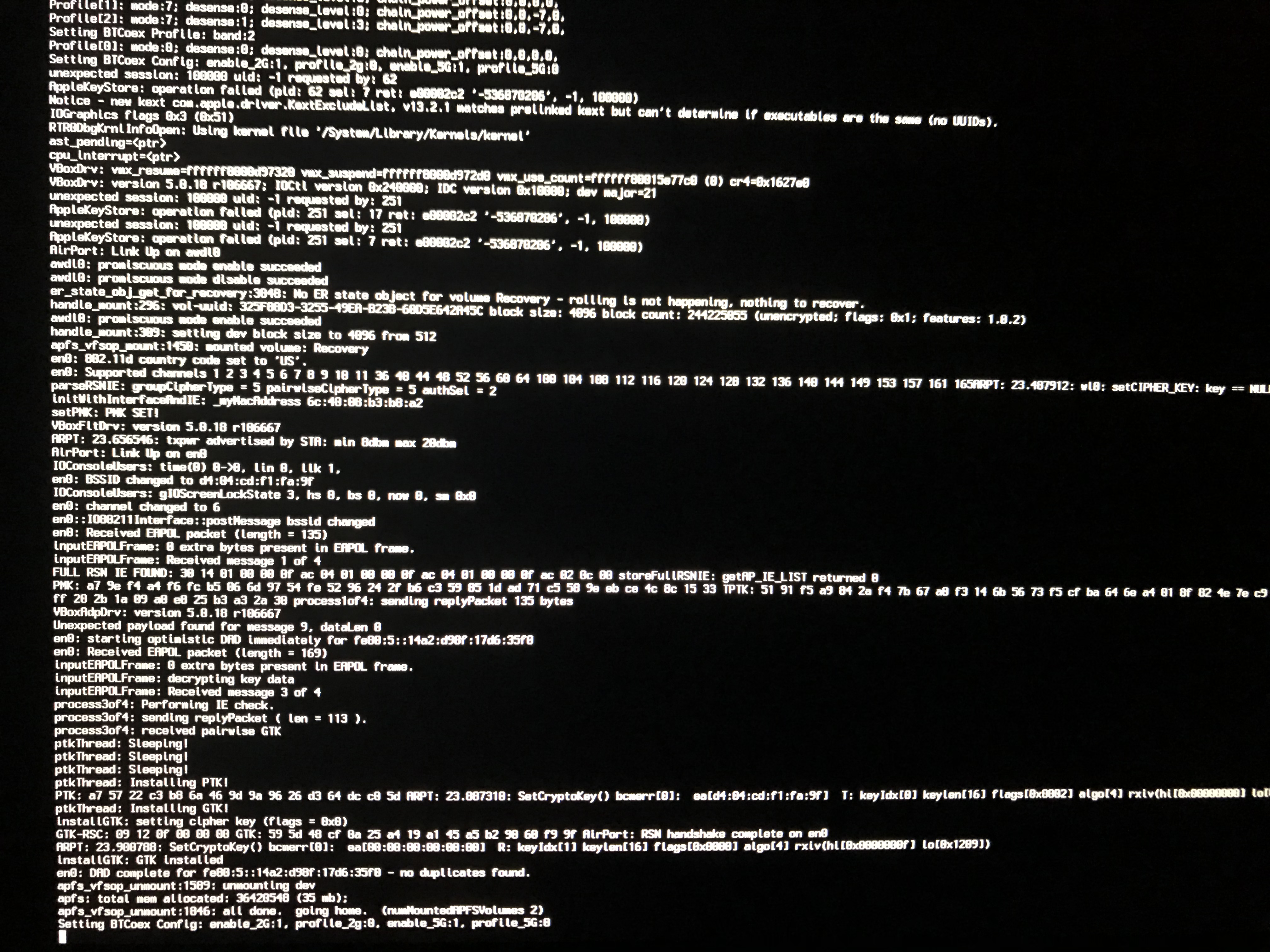
I had the same problem although the only way I could solve it was restoring from backup. I did manage to get a capture of the Command-V output while it was stuck, hopefully that is helpful:
 jznadams
on 31 Aug 2018
jznadams
on 31 Aug 2018
I encountered the same issue. Like @jznadams, it hung on an identical "Seting BTCoex Config" line. I had to remove 360Controller.kext in single user mode in order to boot my system again.
 mistydemeo
on 14 Sep 2018
mistydemeo
on 14 Sep 2018
Since we seem to be failing on the Bluetooth coexistence part of boot, here's a version of the driver with none of the Bluetooth controller hooks in it, just for kicks and giggles. The timelines don't quite add up on this being the solution, but it's worth a shot. Let me know what your results are if you give it a shot.
FranticRain
on 15 Sep 2018
Can confirm that version of the package works for me; my system boots and I'm able to use wired controllers.
mistydemeo
on 15 Sep 2018
Well that's good enough for me. I've been looking for a legitimate reason to strip the Bluetooth code out of the driver for a while and you've given me a wonderful present.
I'm pushing this change and making a new release. I will leave this issue for a short period for feedback on this change.
FranticRain
on 15 Sep 2018
I am having hangs on boot on 0.16.9 on Mojave. I removed 360Controller.kext to restore boot, then reinstalled 0.16.9. It works with my Power A Xbox One controller, which someone else said didn’t work for them in another thread. Detects fine after enabling driver.
 aspenmayer
on 29 Sep 2018
aspenmayer
on 29 Sep 2018
Removing 360Controller.kext isn't enough to prevent the hang on boot. The issue is with the Bluetooth hooks. Those are not in 360Controller.kext. Since you re-installed, you have re-added 360Controller.kext and you are still using the Bluetooth kext left behind by 0.16.8. You need to remove it. That file can be deleted from the terminal with this command:
sudo rm -rf /Library/Extensions/XboxOneBluetooth.kext
Removing 360Controller.kext isn't enough to prevent the hang on boot. The issue is with the Bluetooth hooks. Those are not in 360Controller.kext. Since you re-installed, you have re-added 360Controller.kext and you are still using the Bluetooth kext left behind by 0.16.8. You need to remove it. That file can be deleted from the terminal with this command:
sudo rm -rf /Library/Extensions/XboxOneBluetooth.kext
I know that it was enough to prevent hang on boot, because I did not do anything else, and after I removed 360Controller.kext, boot was restored. On next boot, I re-installed over the top without removing and haven't had boot issues since.
aspenmayer
on 4 Oct 2018
@FranticRain hmm, maybe it would be possible to modify the pre-install script to remove the unwanted kexts?
d235j
on 4 Oct 2018
@aspenmayer So if you run ls /Library/Extensions, is there a XboxOneBluetooth.kext in there?
@d235j Good idea.
FranticRain
on 5 Oct 2018
@FranticRain No, there is 360Controller.kext, Wireless360Controller.kext, and WirelessGamingReceiver.kext. I don't recall removing the XboxOneBluetooth.kext to restore boot. In any case, I re-installed the same 0.16.9 version again over the top, so I would think that would have put the same files back? I haven't tested the 0.16.10 version yet.
aspenmayer
on 11 Oct 2018
0.16.9 doesn't have XboxOneBluetooth.kext, that's the point. It would have carried over from a 0.16.6, 0.16.7, or 0.16.8 install. So installing 0.16.9 over your fixed boot wouldn't have re-added it.
So here's how it went: You had a pre-0.16.9 version installed. You ran the installer, which deleted WirelessGamingReceiver, Wireless360Controller, and 360Controller. If XboxOneBluetooth had been there, it wouldn't have been removed by the 0.16.9 installer. The installer then added new versions of WirelessGamingReceiver, Wireless360Controller, and 360Controller. You then experienced a hang during boot, and removed something, let's assume it was just 360Controller. You boot back in, and then re-install the driver. This process deletes WirelessGamingReceiver, Wireless360Controller, and 360Controller, if you have them, and then adds WirelessGamingReceiver, Wireless360Controller, and 360Controller. These would be identical versions to the ones you just claimed hung in boot. You reboot, and it works.
So there are two cases: 1. A driver was somehow corrupted, or 2. The Bluetooth driver was installed. So here's the issue with number 1. The operating system only loads USB drivers (WirelessGamingReceiver, Wireless360Controller, and 360Controller are all USB drivers) when a device that it recognizes is connected to the machine. So this would only be possible if you had the controller connected during your first install, but not your second.
I can see both being possible, but as you can't re-create it, I'm tempted to believe what I already know. I'm going to continue to operate under the assumption that it works fine, unless we find someone else with a similar issue, at which time I'll revisit this.
And finally, 0.16.10 shouldn't impact you at all. It would have theoretically prevented your first hang on boot, but other than that, it's just some new devices.
FranticRain
on 12 Oct 2018
This just happened to me on Mojave on 0.16.10 and I lost all my work since last backup yesterday 😭 I already restored it but let me know if I can be of any help. I'm on a MacBook Pro Early 2015.
 wbogocki
on 7 Nov 2018
wbogocki
on 7 Nov 2018
@Zauberklavier As noted previously in the thread, hold Command + V on boot when it hangs.
FranticRain
on 7 Nov 2018
Right, so I wanted to do that and reinstalled the driver but this time it didn't hang 😕 Some things that are different from yesterday: I installed some system updates overnight, disabled SIP and the controller wasn't connected during installation.
wbogocki
on 7 Nov 2018
Hi, everyone I just ran into this problem; my Macbookpro with Mojave is hanging at startup and will not boot. (I downloaded the latest version of this plugin). Can someone help this non techi guy with instructions on what to do?! I am in a panic because I need to login to at least backup my files. Please just tell me what to do to log back in. I know how to use command line basically but I need novice instructions. Thank you and much much appreciated!
 CoffeeBookRead
on 4 Jan 2019
CoffeeBookRead
on 4 Jan 2019
If you hold Cmd+R during boot you can get into recovery mode (it will take longer to boot). From there you can either restore an earlier system state with TimeMachine or access the terminal (command line) to remove the kexts iirc. Either of these should work. No need to reinstall the OS.
I think there needs to be a wiki page on what to do when this happens.
edit.
The kexts are in /Library/Extensions
wbogocki
on 5 Jan 2019
This driver probably has to be delisted...
doctorpangloss
on 5 Jan 2019
@doctorpangloss Just curious, what makes you say this? It’s a driver that has some sort of incompatibility with about 1 in 100 users. None of the users follow the advice that would allow us to fix this issue, instead opting to quickly remove the driver. In fact, it’s often the case that a re-install of the driver works perfectly fine after one of these hangs. I’d love to fix the issue, but unless people hold Command + V at startup like I keep telling them to, I can’t fix it. It especially doesn’t help when people just scroll to the bottom and ignore a lot of valuable conversation about fixing an issue.
FranticRain
on 5 Jan 2019
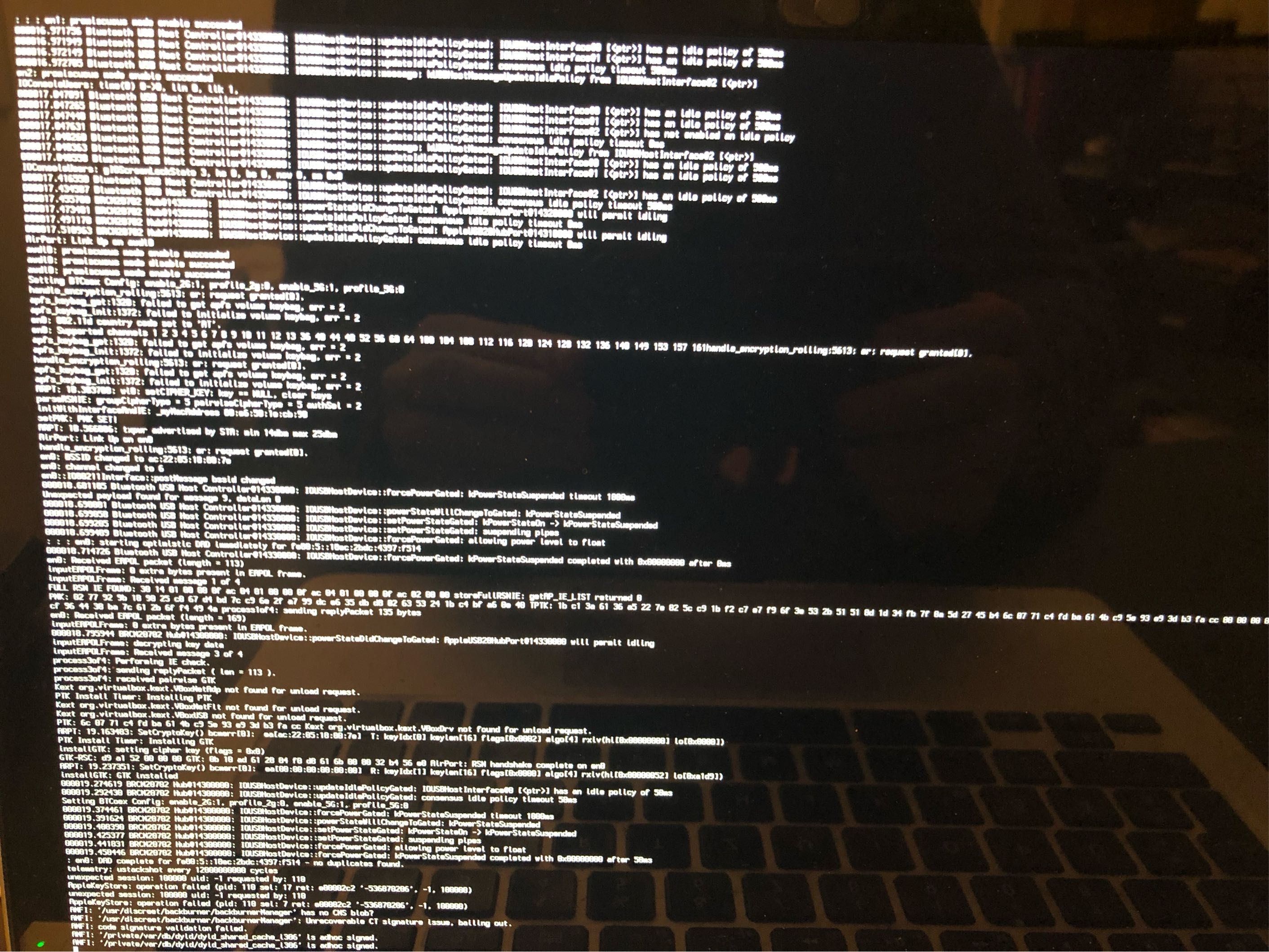
@CoffeeBookRead Here's the complete list of files you would need to remove while in recovery mode, but if you haven't fixed your problem yet, PLEASE hold Command + V during boot to see where it hangs up and then post a picture of your screen in this issue list. I'd love to fix this bug, but I don't know where it's hanging up and I can't reproduce it.
/System/Library/Extensions/360Controller.kext
/System/Library/Extensions/Wireless360Controller.kext
/System/Library/Extensions/WirelessGamingReceiver.kext
/Library/Extensions/360Controller.kext
/Library/Extensions/Wireless360Controller.kext
/Library/Extensions/WirelessGamingReceiver.kext
/Library/Extensions/XboxOneBluetooth.kext
We also had this issue. There were no files to delete in /System/Library/Extensions or /Library/Extensions. We also repaired the disk via disk utility in recovery mode which did not help. Booting in safe mode did not work either.
The only thing that worked was rebooting from recovery mode via choosing a different startup disk from the Apple menu.
Hope this helps anybody encountering this issue.
 mrusa
on 7 Jan 2019
mrusa
on 7 Jan 2019
Hard to tell for sure based on that output, but it looks like the incompatibility may be due to Maya being installed? Will need to see more hang reports from others to know for sure.
FranticRain
on 8 Jan 2019
When this happened to me I never had Maya installed. The only Adobe product I had installed at the time was Flash. Perhaps this will be useful.
wbogocki
on 8 Jan 2019
I just installed 0.16.10 on High Sierra without any issue. I came across this thread while researching the "Drew Mills" permissions prompt. Granted- I haven't allowed that software in System Preferences yet. Maybe that saved me? IDK
 DerekFoulk
on 10 Jan 2019
DerekFoulk
on 10 Jan 2019
@DerekFoulk The driver works fine for most users in High Sierra just fine. There is a small subset of people that have issues with it, which we are trying to resolve. If you were going to encounter it, then yes, you probably avoided it by not accepting the permissions prompt, as the kext can't be loaded unless you accept it. There are a few people who have had this issue that claim they have never accepted my developer license, but I find those claims dubious at best.
FranticRain
on 10 Jan 2019
Hi @FranticRain I have the same boot problem on High Sierra and tried to delete /Library/Extensions/360Controller.kext on Single User Mode, but I get the message "Read-only filesystem". Do you maybe know how to fix this? I'm a total mac noob and need to urgently fix my machine. I appreciate any help on this
 pokeahontas
on 21 Jan 2019
pokeahontas
on 21 Jan 2019
Ok very interesting, I didn't really do anything besides booting in recovery mode a couple of times and now it booted up again successfully
pokeahontas
on 21 Jan 2019
@pokeahontas Generally, you solve this problem by running this command in the terminal in the recovery mode:
mount -uw /
But I'm glad that you got it fixed.
FranticRain
on 22 Jan 2019
Hello, I'm new on this Forum on I am not a software developer, but I am having some troubles ever since I installed the 360Controller driver on my MacBook Pro last oktober. Because I also installed Mojave the same day, I gave Apple all the credit that my system didn't start.
After 2 hours of trying several ways to restart my system it just started. But ever since then had some graphic glitches. ( Like: After typing in my password, the Apple Start screen with the stuck loading bar would glitch in. Also my screen sometimes has some vide tape like glitches while starting, or opening a programm.)
I also had problems with Mojave, so 2 weeks ago I needed to set it back to the Factory Presetting. ( I had a back up. But after I tried to use a Time Machine Backup my Mac got stuck with the starting bar again. )
Even after this hard reset I have problems with the glitches.
I found this forum yesterday, because I was reinstalling the 360Controller driver.
I tried to look up the kext files and deleting them. But I couldn't find none.
Is there anything I can do to get rid of the glitches ?
 Crayon1
on 28 Jan 2019
Crayon1
on 28 Jan 2019
P.S. My system started after I installed it yesterday. I tried it a couple of times.
Crayon1
on 28 Jan 2019
If the driver isn't on your machine, then the driver isn't at fault. I can't help you.
FranticRain
on 28 Jan 2019
Is the driver causing graphic glitches on other Machines ?
Is it possible that there are parts of the driver left after I did set it to Factory preset ? ( I just did the factory preset that apple explained on their website. )
Thanks for the answer. :) And thanks a lot for the driver. It is awesome that I can use the xbox controller with my Mac.
Crayon1
on 28 Jan 2019
Is the driver causing graphic glitches on other Machines ?
No one has reported this behavior.
Is it possible that there are parts of the driver left after I did set it to Factory preset ?
No.
FranticRain
on 28 Jan 2019
Had the same problem.
What can help you with it?
macOS 10.13.6
360ControllerInstall_0.16.10.dmg
I ran installer.
I allowed requested permission in system prefs.
I allowed requested reboot.
PC shut down, hung while rebooting [30+ minutes]. I shut off manually.
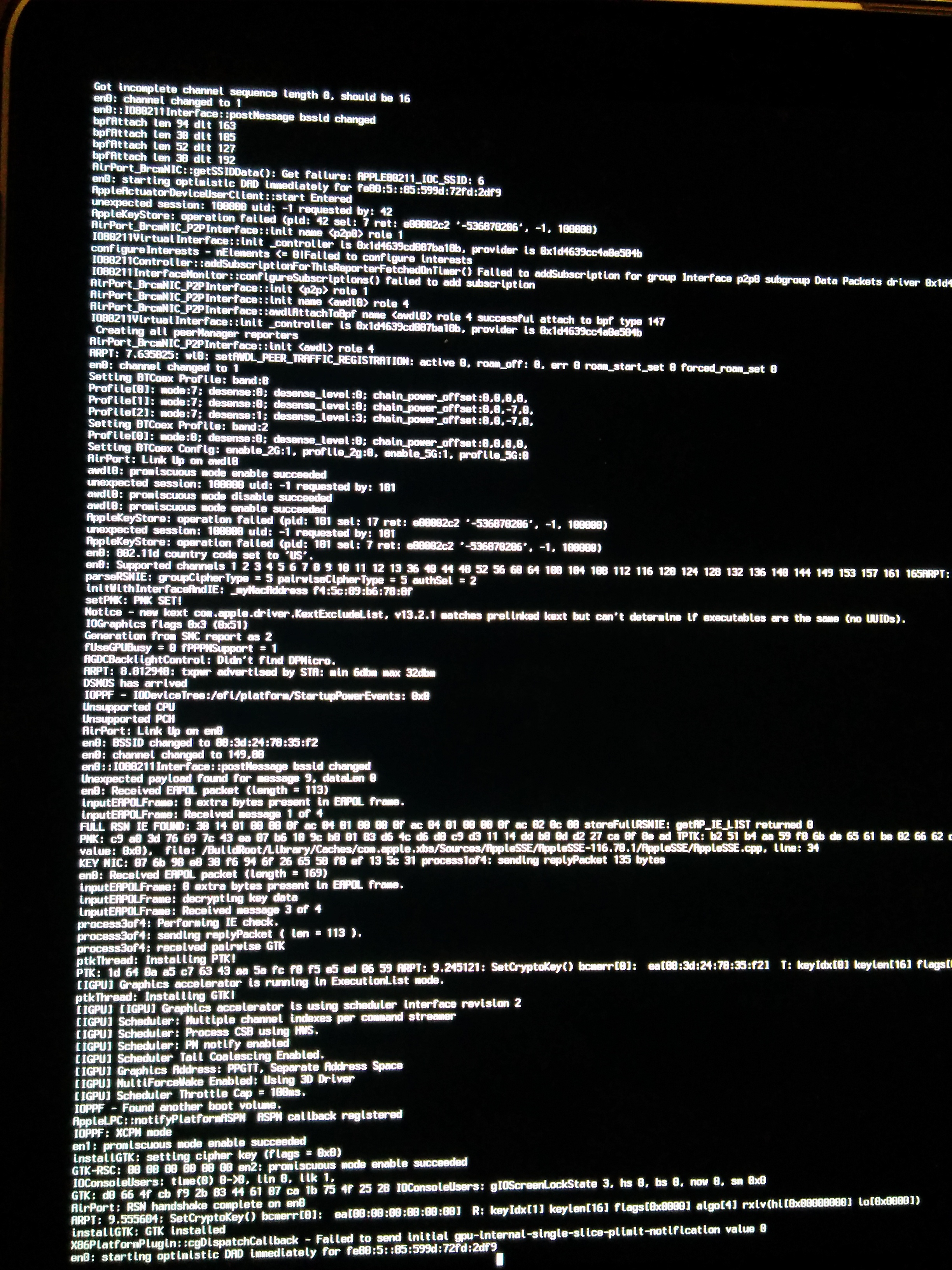
I started in verbose mode [Command + V].
It hung [20+ minutes]. I didn't take pic. I shut off manually.
I started in verbose mode [Command + V].
It hung [15+ minutes]. Different info appeared. I took pic. I shut off manually.
I reboot into single user mode [Command + S]:
(command line appeared):
ls /Library/Extensions/
Saw 360Controller.kext
sudo rm -rf /Library/Extensions/360Controller.kext
ls System/Library/Extensions/
Saw too many files.
ls System/Library/Extensions/3 (hit tab to autocomplete):
ls System/Library/Extensions/360Controller.kext
It existed.
mount -uw /
sudo rm -rf System/Library/Extensions/360Controller.kext
reboot
It rebooted.
Reran driver installer.
It didn't ask for permission allow this time.
It rebooted. No hang. Need to test.
When I get a free second, will get:
• Screenshot of verbose mode [Edit: Added.]
• Confirmation of controller detection
 itskando
on 15 Feb 2019
itskando
on 15 Feb 2019
What I'm getting out of this is that you forced a shutdown in the middle of the install, and that caused the hang. So maybe there's come issue with the installer program and later versions of macOS?
FranticRain
on 15 Feb 2019
What I'm getting out of this is that you forced a shutdown in the middle of the install, and that caused the hang. So maybe there's come issue with the installer program and later versions of macOS?
Edited original response for clarity.
Added screenshot of single user mode.
itskando
on 16 Feb 2019
So based on these two screenshots, it looks like this is some sort of device initialization bug in the IOUSB shim code. Unfortunately, that's Apple's code. The only way to fix this problem would be to upgrade to the new IOUSBHost implementation of their IOKit stack. Unfortunately, as documented in other issues, we can't do that because there is a critical memory leak in that code. Which 1. Makes it a MASSIVE pain to develop, because it means that you have to fully reboot your computer between debugging tests, which I am not going to be doing for free. That sounds like a circle of hell that I'd rather not plumb the depths of in my free time. And 2. Make it VERY likely that users will experience kernel panics when using the driver, and quite frankly that is an untenable stance. That renders the driver inoperable. So I don't know what to say to this other than: Apple continues to be Apple and does not give a crap about us.
FranticRain
on 16 Feb 2019
Follow-up: Xbox One controllers functioned as intended.
itskando
on 18 Feb 2019
@itskando's steps worked for me - Booting into single user mode and manually removing the 360Controller.kext files, rebooting and then rerunning the installer.
 johnmcollier
on 22 Feb 2019
johnmcollier
on 22 Feb 2019
I had the same problem today. Restarted after install and find this issue. Booted in Single User Mode and never found the Kext files. After my third restart and holding Command V I was able to boot in and the controller works. I looked in the /Library/Extensions/360Controller.kext and found that 360Controller.kext was a shortcut.
 maxhayim
on 4 Apr 2019
maxhayim
on 4 Apr 2019
@maxhayim Is it a shortcut from /Library/StagedExtensions?
FranticRain
on 6 Apr 2019
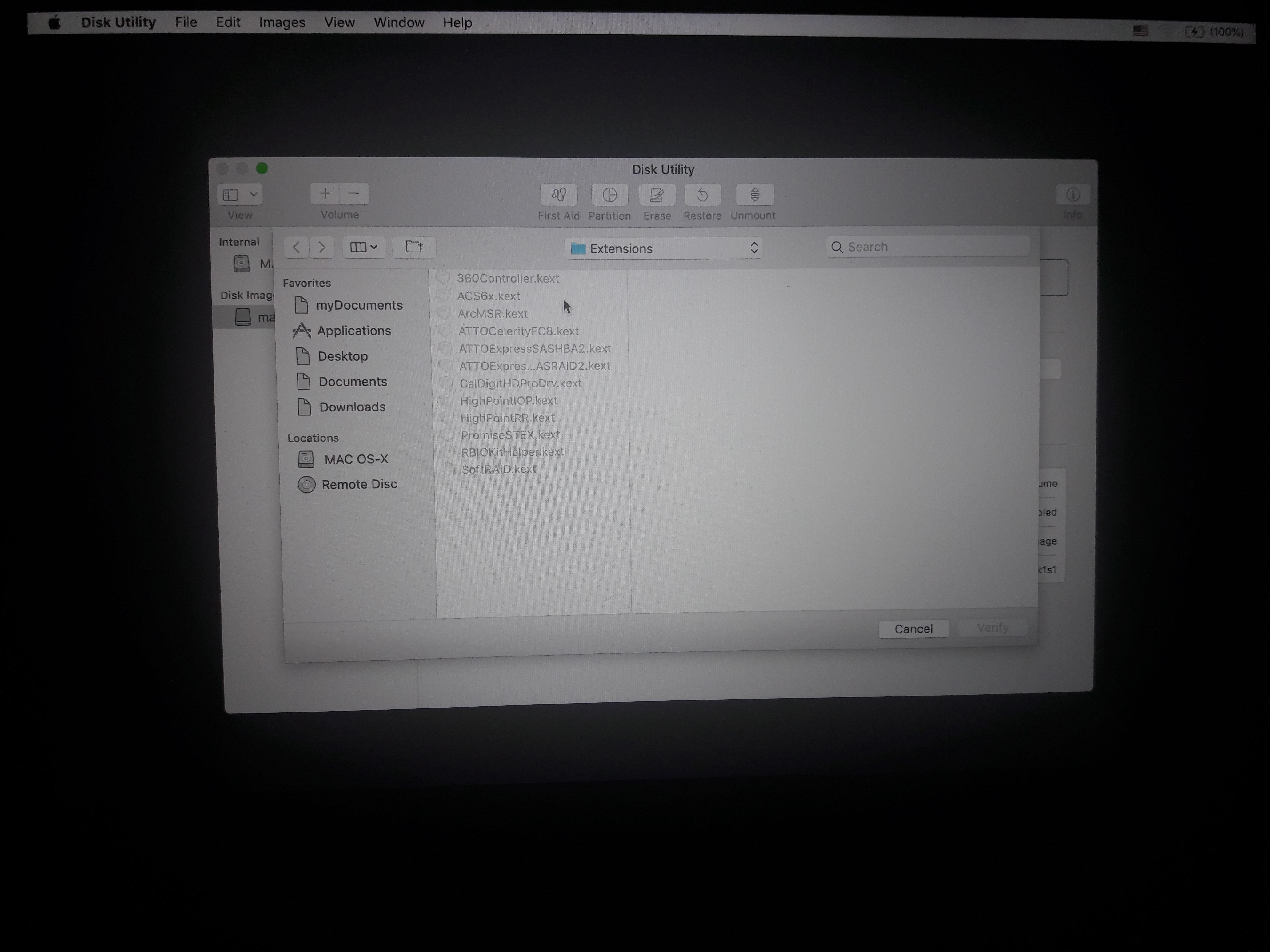
Hey, so I installed the package and when it was done it asked me to restart the computer and so I did. It turned on but got stuck at the Apple logo, it didn't show the loading bar and it's been stuck there since. I have tried the terminal thing but when I go to library/extensions I can't find the 360controller.kext. I don't know what to do and I'm stuck now my laptop won't start. Recovery won't go through, I am forced to go through the network recovery. I've tried the verbose thing (I am going to send the picture I'm going to attached the picture with this message). I literally have tried everything I've seen here and nothing helped. I use Mojave OS When I'm in terminal I can't see kext but when I'm in disk utility and I click on the option bar on top, images, verify and I go to Library/Extensions/ the kext file appears there.

)

 KGSLR
on 11 Apr 2019
KGSLR
on 11 Apr 2019
@KGSLR Can you also check /System/Library/Extensions/ and /Library/StagedExtensions
FranticRain
on 11 Apr 2019
@FranticRain There's no such directory
KGSLR
on 12 Apr 2019
@KGSLR Those are the only directories that kernel extensions will ever possibly be loaded from. If they aren't in there, then the driver doesn't exist on your machine. You can check /Library/PreferencePanes, but as far as I can tell, a product from IO Spirit is what is crashing your machine right now.
FranticRain
on 12 Apr 2019
@FranticRain Do you know what product it could be?
KGSLR
on 12 Apr 2019
I don't know why I haven't written this up before, but I just realized why you can't see it. You're looking at the /Library/Extensions/ of the recovery partition, not the real thing.
First, when you get into the recovery partition, open up the disk utility, and find the drive that contains your operating system and files. In most cases, it's Macintosh HD. Click on that disk, and in the top bar, press the "Mount" button. It should prompt you for a password so it can unlock the disk. If you don't remember what it is, it probably is the same as your user login password. Now your disk is mounted.
Now open up the terminal. But instead of going to /Library/Extensions, you need to cd into /Volumes/Macintosh HD/Library/Extensions. Don't forget to swap Macintosh HD with your disk name, if it is different. Now you should see all of those files that you see.
Or once the disk is mounted, you can just access these files properly in the finder and delete them.
As for IO Sprit, a quick google search, it looks like it comes from a tool called Remote Buddy. It may have some sort of incompatibility with 360Controller. So pop in there and delete 360Controller.kext and you should be able to boot.
FranticRain
on 12 Apr 2019
Sorry I couldn't get back to you much earlier, anyway I just restarted the laptop and it magically turned on, then I used finder to located the file and deleted it. My problem now is that I still can't use my controller, isn't there something else I could try?
KGSLR
on 13 Apr 2019
Did you try your controller before you just went and deleted it? It could have been working. Honestly, the best advice I can give you is to just do it again. Unless you want to manually install all of the components, which is just a really boring way of doing exactly what the installer is doing.
FranticRain
on 13 Apr 2019
I deleted it without trying it. I later on in week turned my laptop off and it didn't wanna turn on again it, basically still has the same problem. I've given up really..
KGSLR
on 20 Apr 2019
Well if you fully removed all of the files from 360Controller in /Library/Extensions, then I would hazard a guess that your issue isn't related to 360Controller at all, and is instead related to that "Remote Buddy" tool.
FranticRain
on 21 Apr 2019
To anyone in this thread:
If you've had issues with the driver in the past and are feeling lucky, please try the latest pre-release version of the driver and let me know if it has resolved the issue, or if nothing has changed.
You can find the latest version here: https://github.com/360Controller/360Controller/releases/tag/v1.0.0-alpha.1
FranticRain
on 26 Apr 2019
To anyone in this thread:
If you've had issues with the driver in the past and are feeling lucky, please try the latest pre-release version of the driver and let me know if it has resolved the issue, or if nothing has changed.
You can find the latest version here: https://github.com/360Controller/360Controller/releases/tag/v1.0.0-alpha.1
I was getting restart hang issues on a 2018 Mac Mini running 10.14.4 and kept having to restore from a Time Machine backup. The 1.0.0 alpha fixed that completely. Installed, allowed access in Security & Privacy, and restarted. Original Xbone controller wired with a normal microUSB works now!
 TEPhillips
on 27 Apr 2019
TEPhillips
on 27 Apr 2019
Updated to 0.16.11.
Had same error, followed my guide above.
Removed 360Controller.kext from both locations and verified.
Freezes at login after entering password still.
Reverified files were removed in command line.
Definitely gone.
itskando
on 16 May 2019
@itskando Check your staged extensions. /Library/StagedExtensions/Library/Extensions/360Controller.kext
FranticRain
on 16 May 2019
Nothing there either
itskando
on 16 May 2019
If you're confident that you've removed the driver from all of those locations, then the driver doesn't exist on your system and therefore isn't the problem preventing you from booting. The only places the driver is stored is in:
/Library/Extensions
/System/Library/Extensions
/Library/StagedExtensions/Library/Extensions
If it isn't in any of those places, then it's not installed.
FranticRain
on 16 May 2019
For logkeeping only:
I installed the update without uninstalling the previous version.
I didn't see anywhere in the documentation stating whether or not to uninstall an older version
before installing a newer version.
The PC restarted fine and logged in fine.
All prior windows opened up, including the System Preferences on the 360controller pane.
I attempted to close it, but it was frozen and listed as Not Responding, so I force closed it.
This did nothing and the Finder also stopped functioning.
I forced closed the Finder too, but it did not reopen (although the top OS bar did not disappear).
I performed a normal reboot, which made it to the login screen, but could not login past that point.
Removed the files from all of the above locations with no luck.
Ahh well, I'll start transferring files out and do a wipe and OS reinstall.
On the bright side, this will get me to the latest version of macOS and
I can try out the 360controller alfalpha from there : j
itskando
on 17 May 2019
I wonder if your issue might be the preference pane itself. Try and delete it from /Library/PreferencePanes/. That would make more sense as something blocking you at login.
FranticRain
on 17 May 2019
Yeah, there's a Pref360Control.prefPane. will remove.
Edit: No dice.
itskando
on 18 May 2019
Also exists:
/Library/StagedExtensions/System/Library/Extensions/360Controller.kext
But:
mount -uw /
sudo rm -rf /Library/StagedExtensions/System/Library/Extensions/360Controller.kext
rm: /Library/StagedExtensions/System/Library/Extensions/360Controller.kext: Operation not permitted.
[Sorry about bad formatting, using mobile to communicate..]
itskando
on 18 May 2019
I'm afraid that single user mode might still be loading some kexts. Might be wise to do this work from the recovery partition. Just remember to mount your hard drive and not mess with the kexts in the recovery partition.
FranticRain
on 18 May 2019
Interestingly, these files aren't appearing in the recovery mode terminal. I'm in the correct hard done and I checked all layers of the various volumes directories
itskando
on 18 May 2019
Well that means one of two things:
- The driver is uninstalled and isn't the cause of your problems
- You are confused and weren't actually looking at
/Volumes/Macintosh HD/Library/Extensions/
Either way, I don't think there's anything else I can do for you.
FranticRain
on 18 May 2019
For anyone unable to fix the login with no readily available backup,
I performed the following to get back up to speed without needing to wipe:
• Create new (temporary) admin account from scratch.
• Get sudo powers in Finder.
— Answer for macOS 10.11 worked in at least 10.13..
• Change name of home folder for broken user account (add a single character or something).
• Change Full Name, account name, and home directory of broken account.
— Home directory path must match newly-named home directory from last step
— Account name must match bottom level directory of new home directory path
• Create new admin account from scratch.
— This time, use the credentials of your original account.
• Get sudo powers in Finder.
• Open the sudo-access Finder and press CMD + SHIFT + . to show hidden files.
• Drag files from the old, renamed account to the new account.
• In a terminal (NOT signed in as root from the sudo-powers Finder process), in your current-user home folder, recursively change all home folder folder/file permissions to the current user using:
sudo chown -R $(whoami) .
• Personally I made copies when I shifted files,
only did a subset of the total list of files at a time, and
performed a restart after each transfer + changing of permissions,
to see if anything broke the account. (I did not run into issues.)
itskando
on 19 May 2019
Either way, I don't think there's anything else I can do for you.
Thank you for all of your help, I really appreciated it.
itskando
on 19 May 2019
Same issue for me with the latest released version (1.0.0-alpha.3 from 2019 May 13) with macOS Mojave (version 10.14.5) running on a 2017 MacBook Pro. After installation and restarting, macOS hangs on login. Removing 360Controller.kext in recovery mode solved the issue.
 shdnx
on 13 Jul 2019
shdnx
on 13 Jul 2019
Is there something you need help with to fix this issue or is the "unable to boot" thing just how it is (AKA we can't use this driver on a MacBook)? I hate my PS4 controller, but I'm stuck with it for now :(
DerekFoulk
on 10 Aug 2019
Related issues
 urbanman2004
·
14Comments
urbanman2004
·
14Comments
 justplainmark
·
8Comments
justplainmark
·
8Comments
 JohnGillanders
·
15Comments
JohnGillanders
·
15Comments
 KorvinSzanto
·
4Comments
KorvinSzanto
·
4Comments
 SolivaTechClub
·
5Comments
SolivaTechClub
·
5Comments