360controller: Xbox One Wireless Adapter for PC Support
Microsoft have released the wireless dongle for Xbox One controllers (I don't know if it's compatible with 360 controllers). Support for this guy would be great, as you can have 8 controllers connected to it.
I have bought one if anyone wants to see any info from it.
 mejamiewilson
All 138 comments
We are definitely going to need to product and vendor IDs for that thing. Also, it doesn't support 360 controllers. Just Xbox One controllers.
Edit: Ideally, you could sniff the packets being sent to that thing, but I don't know if you are up to that.
 FranticRain
on 24 Oct 2015
FranticRain
on 24 Oct 2015
Here's the result of running system_profiler -detailLevel full on Mac OS X.
Good to know that it doesn't support 360. Is the scope of this project locked down to 360 controllers? Or is it ok to have Xbox One specific functionality?
``````
XBOX ACC:
      Product ID: 0x02e6
      Vendor ID: 0x045e  (Microsoft Corporation)
      Version: 1.00
      Serial Number: 310241
      Speed: Up to 480 Mb/sec
      Manufacturer: Microsoft Inc.
      Location ID: 0x14200000 / 7
      Current Available (mA): 1000
      Current Required (mA): 500
      Extra Operating Current (mA): 0```
``````
mejamiewilson
on 24 Oct 2015
Xbox One is welcome, I'm the guy that does all of the Xbox One work for this driver.
FranticRain
on 24 Oct 2015
Fantastic! If this issue gets to the top of the pile, let me know what I can do to help. Driver related stuff is definitely over my head.
mejamiewilson
on 24 Oct 2015
FranticRain: I have a lab full of Macs, an Xbox One controller and the new wireless USB dongle for Xbox One controllers if you want/need me to test anything. You may contact me at "geowar 1 @ mac . com" (without spaces).
 geowar1
on 29 Oct 2015
geowar1
on 29 Oct 2015
i haven't yet been able to get through the XBox One dongle's initial handshake to talk through as works with XBox One wired. anybody else have ideas/leads? @FranticRain - ditto, happy to send you a dongle and/or controller if you don't have yet: natbro-at-gmail-dot-com.
 natbro
on 2 Nov 2015
natbro
on 2 Nov 2015
My thought was to use a beagle (USB packet sniffer) on a windows PC and record USB traffic to the dongle 1st sans the controller and then with.
Sent from my iPad
On Nov 1, 2015, at 3:34 PM, Nat Brown [email protected] wrote:
i haven't yet been able to get through the XBox One dongle's initial handshake to talk through as works with XBox One wired. anybody else have ideas/leads? @FranticRain - ditto, happy to send you a dongle and/or controller if you don't have yet: natbro-at-gmail-dot-com.
—
Reply to this email directly or view it on GitHub.
geowar1
on 2 Nov 2015
You really don't even need the beagle. You can just do it with Wireshark and USBPcap, but a beagle would probably work best. If you're interested in the Wireshark method, you can check it out here. These are instructions for sniffing the Xbox One controller itself. Once you figure out the packets, its basically just an exercise in figuring out what means what and then you're good to go. Or if you don't want to figure it all out, just send me the info and I'll try and piece it together for you. I can't guarantee it'll work though. I've never looked at the 360 wireless adapter code before.
FranticRain
on 2 Nov 2015
FranticRain has already got the 360 dongle working on OS X. We need to do the same for the Xbox One. (I'll assume that's what you meant).
Sent from my iPad
On Nov 1, 2015, at 4:48 PM, Drew Mills [email protected] wrote:
You really don't even need the beagle. You can just do it with Wireshark and USBPcap, but a beagle would probably work best. If you're interested in the Wireshark method, you can check it out here. These are instructions for sniffing the Xbox One controller itself. Once you figure out the packets, its basically just an exercise in figuring out what means what and then you're good to go. Or if you don't want to figure it all out, just send me the info and I'll try and piece it together for you. I can't guarantee it'll work though. I've never looked at the 360 wireless adapter code before.
—
Reply to this email directly or view it on GitHub.
geowar1
on 2 Nov 2015
No, I was a little vague there. I would need to extend the 360 wireless adapter code to make it work with the Xbox One code. I've just never looked at the code this driver uses to make wireless adapters work. That's what I meant.
FranticRain
on 2 Nov 2015
Ahem, I did the original wireless 360 dongle support ;P
I just used the Windows driver + some USB snooper app (no idea what it was at this point, but its icon may have been Snoopy). This didn't give me any functionality the Windows driver didn't have though (and I did use a Beagle for some things, such as to deduce wired ChatPad support).
Some people with more XBox 360s to lose than me used a Beagle on the wireless dongle inside the real console to work out the off command (and perhaps Wireless chatpad support, I think someone sent the required magic code to me to make that work) as the 360 basically just contains the same thing that the dongle does to speak to the controllers. To get XBone wireless support working nicely may also require someone to disassemble (and perhaps permanently modify - assuming the same dongle is in there and USB) a real console and Beagle it, too.
 electric-monk
on 2 Nov 2015
electric-monk
on 2 Nov 2015
My bet is that Windows 10 is tied close enough to the Xbox One controller that disassembly will not be required. With stuff like the Xbox app, and the app to rebind controller buttons as part of Win 10, we should be able to get everything we need.
FranticRain
on 2 Nov 2015
yes, seems likely that crazy disassembly won't be required. but hopefully no irritating signed handshake or other nonsense :( i'll try to capture the new Win10<->new-dongle handshake in USBPcap on Monday and share, my home Windows machine is currently in a sad state, can't do tonight.
natbro
on 2 Nov 2015
too busy today to cap, hopefully asap this week.
natbro
on 3 Nov 2015
Any update on this progress?
 oxycoder
on 21 Nov 2015
oxycoder
on 21 Nov 2015
I have a mac running windows 10 on a virtual machine -- I have successfully connected the adapter to my windows 10 but have not been able to get my xbox one controller to pair with it -- any ideas on how to get this working ? thanks for any help
 marzman
on 21 Nov 2015
marzman
on 21 Nov 2015
@electric-monk We have a sniff of the packets going to and coming from the wireless adapter with USBPcap. You can find it over here: https://github.com/360Controller/360Controller/issues/160#issuecomment-159952216
The file works with Wireshark.
FranticRain
on 26 Nov 2015
I'll take a look when I find a bit of time ;)
electric-monk
on 1 Dec 2015
@electric-monk @FranticRain I'm willing to contribute a dongle if that would help get wireless xbox one controllers working.
On a side note, when I plug my brand-new Xbox One controller via the USB cable, it gets detected, but the keys are very wrong. I was able to mostly remap the keys, except for the analog sticks. Is there some trick to getting the analog sticks remapped correctly?
 CleanCut
on 19 Jan 2016
CleanCut
on 19 Jan 2016
please check this version @CleanCut , the mappings are fixed https://drive.google.com/file/d/0B5PLCKoMd4zGNy15NFR1TTRxVkE/view?usp=sharing
 RodrigoCard
on 19 Jan 2016
RodrigoCard
on 19 Jan 2016
@RodrigoCard That fixed the mappings, but there's other problems. In order to not hijack this thread I created issue #207 to discuss it.
CleanCut
on 21 Jan 2016
Are you guys having any luck with this? We aren't having much success on the Linux side
 Queuecumber
on 11 Feb 2016
Queuecumber
on 11 Feb 2016
No one has been working on it as far as I know. I haven't bothered to buy a wireless adapter yet, and @electric-monk hasn't said much of anything.
FranticRain
on 11 Feb 2016
Tried SnoopyPro as electric-monk suggested but nothing shows up. No data at all.
http://i.imgur.com/nlxm6bq.png
 drejjmit
on 12 Feb 2016
drejjmit
on 12 Feb 2016
USBPcap + Wireshark is a way better way of capturing data. We already have a sniff though, it really just needs to be tested and implemented. From #160, https://drive.google.com/file/d/0B381VMfcesrlNWZwRkpoTXJBaDA/view?usp=sharing
FranticRain
on 12 Feb 2016
Did 2 caps with USBPcap and 1 with Wireshare. Maybe they will help
https://drive.google.com/file/d/0B3-WQPnZBRZhRmlNZjltU1pWTms/view?usp=sharing
drejjmit
on 12 Feb 2016
Finally got a wireless adapter. Will take a shot at it later this week and over spring break. Word on the street is that it is encrypted. Sounds like this is going to be fun.
FranticRain
on 29 Feb 2016
@FranticRain Good Luck
 TyanColte
on 3 Mar 2016
TyanColte
on 3 Mar 2016
I just bought the adapter and wanted to see how the progress on this is going? Thanks!
 maxiedaniels
on 29 Mar 2016
maxiedaniels
on 29 Mar 2016
Going nowhere fast. I'm by no means well informed with the USB spec, but that whole thing is a complete mess. I can't just fake it until I make it like I did with the wired controller. I doubt I'll ever figure it out, and I'm pretty busy with school anyway.
FranticRain
on 29 Mar 2016
I just bought a wireless adaptor for my Xbox One controllers as well. Disappointed that I have to use the included USB cables. Anxious for a new release!
 stevenvachon
on 4 Apr 2016
stevenvachon
on 4 Apr 2016
So if I was to invest some sleepless nights trying to write the driver, can anyone give me a crash course into the libraries and at what should I be looking?
@FranticRain are you positive it's encrypted? any links?
 haiduc32
on 6 Apr 2016
haiduc32
on 6 Apr 2016
@haiduc32 As far as I know we have no idea if it's encrypted or not, it might just be complicated
I should mention though that these guys seem to think it is encrypted, or at least one of their employees mentions it in a forum post
Queuecumber
on 6 Apr 2016
@haiduc32 For driver documentation, its basically nonexistent. Any that exists is poorly written and outdated. The best documentation you can get on IOKit drivers is here. Other than that, your best bet is to just study the wireless driver code currently in this driver. That is how I wrote the Xbox One wired driver.
As for documentation on the actual packets, I recommend my own documentation because, as far as I know, its the only documentation. It has information on how to capture packets from devices, the format of the Xbox One wired packet, and some various stuff I have discovered about the wireless packets.
Now, as for USB packet documentation. The driver _probably_ follows the USB HID guidelines, but I can't honestly prove that. For that documentation, you are going to need to look at the USB website.
I wish you the best of luck, and if you have any questions, let me know.
(I just pushed the wireless documentation to my website, it usually takes a couple minutes to update the github.io page for no apparent reason.)
FranticRain
on 6 Apr 2016
Thanks, I was more interested in getting a fast understanding of the project libraries, how it works for the 360 wireless adapter so I could try to get a fast start at the One. Starting the driver from scratch doesn't sound very tempting..
haiduc32
on 6 Apr 2016
The only documentation I know about the wireless 360 controller adapter is the original Tattiebogle stuff. http://tattiebogle.net/index.php/ProjectRoot/Xbox360Controller/WirelessUsbInfo
FranticRain
on 6 Apr 2016
Thanks. Will try to sniff it tonight, see if I get any patterns. I'm concerned about the encryption, as it would be a show stopper. Will keep you posted if I make any progress.
haiduc32
on 6 Apr 2016
HELP! So far my experience was like going to a bar, getting wasted, then getting on a motorcycle and driving blind folded up hill through the woods.
I got to the point where I think I know what I should be sending on the bus, but I have no idea what I'm actually sending and where.. so.. does anyone know how to intercept USB traffic on OSX El Capitan? It's ridiculous but I haven't found any tools..
I'd also appreciate more sniffs especially with 2 controllers.
p.s. it doesn't look like it's encrypted, but there's a shitload of chatter on the bus and hard to figure out what really matters.
another p.s. I suspect it's running on 5.4G, and for some reason the controller is sending network names (from the list looks like for 5.4G ones) to the OS.
haiduc32
on 9 Apr 2016
Wow, you know a lot more about these packets than I do! Awesome!
As for intercepting traffic on El Cap, there is no good way, but if you are working with the driver, the driver should let you know every time its gotten data. You can use IOLog to output that data into whatever format you want. It will show up in your "system.log" in the Console.app. I recommend adding a prefix to all of your data so you can quickly do a search in the log for your prefix and filter out all non-essential packets. That's what I'd do at least. I don't know if anyone has any better suggestions.
FranticRain
on 9 Apr 2016
@FranticRain thanks, but I did that already. I need to check exactly how the packets are formatted, especially the headers. I am trying to get a vm up with 10.10, people have reported that USB interception works on that version.
haiduc32
on 9 Apr 2016
@haiduc32 Good luck then. I'm super excited to hear you have a plan!
FranticRain
on 9 Apr 2016
@haiduc32 Hey, I have a small request, when you get a chance how hard would it be for you to document some of the thing you found out w.r.t. the protocol for the wireless driver? I'm working with the Linux side of things are we are having a lot of trouble as well.
Queuecumber
on 9 Apr 2016
@Queuecumber I'm not a "documentation" person.. I think code will be the best documentation. But let's see first if I manage to get it working, or let's have a chat if you want to try things in parallel. Drop me a private message if you want to share contact info (skype etc).
@FranticRain thanks..
haiduc32
on 9 Apr 2016
Anyway I can help with the wireless support?
 tomlube
on 10 Apr 2016
tomlube
on 10 Apr 2016
@tomlube if you have 2 controllers, I'd appreciate a sniff of the USB traffic.
haiduc32
on 10 Apr 2016
Turns out I only had 3 AA batteries, so in my sniffs, Controller 1 was powered from the wall, while Controller 2 was running batteries. Hope that's not a problem. I captured on Windows 8.1 using a 2015 controller (Controller 1) and a 2013 controller (Controller 2).
twoControllerInitial - Activate sniff, plug in adapter, Windows does some USB driver installing garbage like it always does, two previously paired controllers connect.
twoControllerIdle - Just an idle of the two connected controllers, started sniffing after connected
twoControllerAPress - I pressed A on Controller 1 and then A on Controller 2.
Note that these controller numbers may not be accurate, they may be swapped. I only know what I believe to be 1 and 2 since there is no LED ring.
File was zipped using 7-Zip on Windows 8.1, should be perfectly safe: Two Controller Sniffs.zip
FranticRain
on 11 Apr 2016
Use the HID Manager to register a Get Report callback and then (hex) dump everything that it receives.
Sent from my iPad
On Apr 9, 2016, at 11:09 AM, Drew Mills [email protected] wrote:
Wow, you know a lot more about these packets than I do! Awesome!
As for intercepting traffic on El Cap, there is no good way, but if you are working with the driver, the driver should let you know every time its gotten data. You can use IOLog to output that data into whatever format you want. It will show up in your "system.log" in the Console.app. I recommend adding a prefix to all of your data so you can quickly do a search in the log for your prefix and filter out all non-essential packets. That's what I'd do at least. I don't know if anyone has any better suggestions.
—
You are receiving this because you commented.
Reply to this email directly or view it on GitHub
geowar1
on 11 Apr 2016
hey guys, wanted to drop by and say hello.. also I managed to get the wireless adapter into pairing mode (led blinking) but the SoB is stubborn and doesn't want to pair with anything.. any way, I got 2000 lines of code just to get to this stage, and my eyes hurt.. I'll have time only next weekend to continue and will release the code once I manage to pair with the controller so other people can try it out if it works with their adapters.
haiduc32
on 17 Apr 2016
hi guys, I need a few more sniffs, as for pairing I need a specially constructed packet, which is different in 3rd party scans and I still haven't figured out exactly how to build it.
so far I got sniffs from FranticRain and drejjmit, more sniffs especially while pairing, will be highly appreciated!
haiduc32
on 25 Apr 2016
Hey Haiduc, how could I sniff these for you? Do you need multiple controllers/adapters/Windows/OSX/what are the requirements and how could I help?
tomlube
on 25 Apr 2016
@tomlube This should get you on the right track for how to sniff. Sniffs need to be on Windows. OS X ones won't help. https://franticrain.github.io/sniffing/index.html
FranticRain
on 25 Apr 2016
@haiduc32 Here is a sniff I ran on a USB Hub with only a keyboard and the wireless adapter connected. It contains packets of the adapter searching for a device, finding the device and pairing, then about 5-10 seconds of traffic after a successful pair.
OS: Windows 10 x64
Devices: XBox Wireless Adapter for Windows (v21.50.45.656), XBox One Controller (v6.2.11059.0)
pcap: https://db.tt/36tawx5e
let me know if you need any more packet dumps, and if it helps @rpcastagna has posted some useful information on the wireless pattern here, with more detailed info available here.
 looterz
on 28 Apr 2016
looterz
on 28 Apr 2016
Thanks, I've seen the linux thread and plan to use their sniffs for checking as well. I am kind of busy with life at the moment and not sure how much time will be able to afford on spending on this project, so things might go slower. I'll try to post my current work tonight so if anyone is available, to be able to chip in.
haiduc32
on 28 Apr 2016
OS: Windows 10 Pro x64
Devices Xbox One Wireless adapter for Windows/Xbox One Controller
USBPcap: http://www35.zippyshare.com/v/Lz32B1fS/file.html
Started the capture, paired the controller, A B X Y Left bumper Right bumper Up Down Left Right Start Select Xbox Button.
tomlube
on 28 Apr 2016
Hey @haiduc32 if you start a repo/branch with the code you have so far I might be able to help get it a little further; I've been pretty busy with life stuff too but I spent long enough pulling these packets apart that I feel obligated to try to make some meaningful contribution out of it, haha. I'll post the captures I'd made while playing with it, also.
 ghost
on 30 Apr 2016
ghost
on 30 Apr 2016
Various captures:
OS: Windows 10 Student x64
https://www.dropbox.com/s/fwvqdj3cdz7hdcj/Xbox%20One%20Wireless%20Caps.zip?dl=0
ghost
on 30 Apr 2016
Hi, so this is my fork: https://github.com/haiduc32/360Controller
I'd appreciate if someone could try it out (I mean developers that know how to run it) and check if their wireless adapters are entering into pairing mode (led blinking). It does for me.
For those that want/have time to contribute to the effort, the class is OneWirelessGamingReceiver. There are checkpoint comments with line numbers that correspond to sniffs from drejjmit: download here the 1.pcap
I started a doc for my investigation: xbox investigation doc if anyone wants to contribute let me know and I'll provide read&write permissions.
p.s. it's not like I'm giving up, just don't have that much time right now to work on it and probably things will go slower..
BIG P.S> YOU ARE TRYING IT ON YOUR OWN RISK, AND YOUR COMPUTER CAN GO INTO PANIC MODE!!!
haiduc32
on 1 May 2016
I went ahead and made a signed build of this so people can try it out without having to go through the trouble of building it. You can get that here. PLEASE NOTE THAT THIS WILL NOT MAKE YOUR WIRELESS CONTROLLER WORK AND IS HIGHLY UNSTABLE. IT IS HIGHLY PROBABLY THAT IT WILL GIVE YOU A DANGEROUS KERNEL PANIC. IF YOU COMPLAIN ABOUT THIS NOT WORKING I WILL COME TO YOUR HOUSE AND SNAP ALL OF YOUR XBOX ONE CONTROLLERS IN HALF.
I got my wireless adapter into pairing mode by pressing the button on the adapter. This caused the light to blink. I then took a 2013 controller and put it into a sync mode. 10-20 seconds later, I received a kernel panic. I didn't expect the controller to pair, but I definitely didn't expect a kernel panic.
FranticRain
on 1 May 2016
@FranticRain thanks for trying it out. don't know why it panicked, did not happen for me. maybe highlight the RISK OF KERNEL PANIC!!! so people are trying it on their own risk.
But that means that at least going into pairing mode I got right.
haiduc32
on 1 May 2016
@haiduc32 It's important to note that I still kernel panic whether or not I activate the pairing mode. Based on your console outputs, its doing an awful lot of idle talking, and then it panics. I can't get anything specific out of it, but I definitely won't be messing around with it for a couple weeks. Hooray for finals.
FranticRain
on 1 May 2016
Have tried it out and I can confirm that in indeed works to start pairing and then kernel panics.
tomlube
on 3 May 2016
@FranticRain it's not idle talking, just Microsoft overthinking it..
@FranticRain and @tomlube, can you look into the panic report what is the panic reason?
based on the fact that I can't reproduce it, I can only guess that it's because it depends on some controller/adapter Id that I missed/ignored. I can't debug it on my side so if any dev is willing to investigate I'd be happy to give some pointers, if not ... it will be a question of when and if I get a second set of controller/adapters to try it out. look me up on skype haiduc32 if you want to help.
I'm going forward with my controller at the moment, trying to get it working, to see if I can get it done. Once it's working I'll focus on making it compatible but until then any help is appreciated.
haiduc32
on 3 May 2016
Try to reproduce it via the guest account and/or a non-development machine.
The development user/environment often allows thing to work (for debugging purposes) that cause a crash in a non-privileged environment.
Sent from my iPad
On May 3, 2016, at 5:32 AM, Radu Pascal [email protected] wrote:
@FranticRain it's not idle talking, just Microsoft overthinking it..
@FranticRain and @tomlube, can you look into the panic report what is the panic reason?
based on the fact that I can't reproduce it, I can only guess that it's because it depends on some controller/adapter Id that I missed/ignored. I can't debug it on my side so if any dev is willing to investigate I'd be happy to give some pointers, if not ... it will be a question of when and if I get a second set of controller/adapters to try it out. look me up on skype haiduc32 if you want to help.
I'm going forward with my controller at the moment, trying to get it working, to see if I can get it done. Once it's working I'll focus on making it compatible but until then any help is appreciated.
—
You are receiving this because you commented.
Reply to this email directly or view it on GitHub
geowar1
on 3 May 2016
Can confirm it kernel panics on a guest account.
tomlube
on 3 May 2016
Here's a link to all of my panic logs I got while trying to debug the issue: https://drive.google.com/file/d/0B5PLCKoMd4zGckdoNjItNExkVjA/view?usp=sharing
FranticRain
on 3 May 2016
https://mega.nz/#!Vwo1VZpT!30pF-p9aqw_iHH-P0lkQjCPn3zZL4P-Iya77hQpsy5Q there are mine
tomlube
on 3 May 2016
Any progress at all with this? I see there is 8 commits since this build has been released :)
tomlube
on 21 May 2016
hey guys, I'ver been pretty busy with other projects, but now I'm refocusing on this one, so fingers crossed. can't promise anything for the next two weeks as I have to figure out where i got stuck and continue from there.
in other news, you're probably all aware that a new xbox one gamepad has been announced and that although i suspect they use the same hardware, it's very possible they will be updating the communication protocols and that might be rolled out even to older xbox one gamepads through updates. that probably means trouble.
haiduc32
on 2 Jul 2016
Ugh, the new Xbox One S controllers are bluetooth-based 😕
stevenvachon
on 3 Jul 2016
Oh really? Where did you find that out? Actually that could make life a lot
easier depending on _how_ it's using Bluetooth.
On Saturday, July 2, 2016, Steven Vachon [email protected] wrote:
Ugh, the new Xbox One controllers are bluetooth-based 😕
—
You are receiving this because you commented.
Reply to this email directly, view it on GitHub
https://github.com/360Controller/360Controller/issues/156#issuecomment-230124707,
or mute the thread
https://github.com/notifications/unsubscribe/AAVsX5sXKIbv-mt-pwniv2Hhlc0khlKQks5qRuP9gaJpZM4GU7aB
.
natbro
on 3 Jul 2016
I think they mentioned it in their press conference.
And even then they may update the comm protocols as haiduc32 has said which is going to be a bitch.
Regardless the whole Bluetooth thing would make it a lot more accessible to people, buuuut I bought a freaking adapter so I'm pissed xD.
 ProjectSynchro
on 3 Jul 2016
ProjectSynchro
on 3 Jul 2016
Yes, I'm annoyed that I just bought new controllers and an adapter three months ago.
stevenvachon
on 3 Jul 2016
Well the new controllers will apparently need to work with older Xboxes so they should still work.
I'm literally going to use mine as much as possible.
Microsoft is always golden with timing. NOT!
ProjectSynchro
on 3 Jul 2016
Please keep in mind that Microsoft's implementation will always get better performance and lower latency than Bluetooth. Bluetooth is a usable option, but it is inferior to Microsoft's implementation. More discussion about the Bluetooth implementation of this driver can be found in #291
FranticRain
on 5 Jul 2016
I got my controller sending button press messages with the wireless dongle. before you start celebrating there are a few issues that are still pending:
- looks like it works only for me.. probably some codes were device specific. don't know yet how to figure it out (3rd party scans don't help).
- currently it works with a controller and a wireless dongle that have been paired previously on windows. I don't know how to unpair my controller to test with a brand new pairing.
- if you remove the adapter and plug it back in the same usb port, it doesn't work at all - unless a more advanced os x dev can help me out on that, it'll be that way..
- now I have to figure out what code needs to be added to make it actually work with games.. help from devs is welcomed.
- sometimes the adapter does not initialize correctly. no idea why
- i have only one controller so no idea how it will behave with 2
all the code is checked in into my fork. it's ugly but it works (at least for me).
haiduc32
on 9 Jul 2016
I'll see what I can do regarding 4, but I busted my wireless adapter trying to tear it open (whoops) so I can't help with anything else unless I decide to buy another one, which I'd really rather not.
FranticRain
on 9 Jul 2016
I did open the adapter but stopped at the RF shield. if you went further mind sharing a few high res photos of the board? maybe try to read the markings off the chips and post it? i'd be curious to know what they used.
haiduc32
on 9 Jul 2016
The chip in the middle of the previously shielded area is marked as such:
WT7600UAN
1537-BMAL
ETP3CY23
Those white rectangle things from the top are marked "HX NX HX NX"
Nothing else under the shield really has any markings. You'll notice where I ripped off two resistors just below the bottom right corner of the Mediatek chip, as well as the busted sync button.


And yes, I did take these pictures on top of an original Xbox for no apparent reason other than it was convenient at the time.
I also quickly realized that my plan for helping you out really wasn't going to work particularly well if I couldn't test it myself, so I'll tell you what my thought process was. The stuff you are looking for is going to be receivedUpdate and receivedHIDUpdate in WirelessHIDDevice. I don't know how you are going to need to change them to work with the Xbox One packet order, but XboxOneControllerClass::convertFromXboxOne will probably be of help.
FranticRain
on 9 Jul 2016
Hello! First off, thank you for the work on this driver, I've used the wired Xbox One controller implementation in the past and it has worked flawlessly. I came back today to install it again on my Macbook and was curious about the wireless implementation. It looks like you've put a lot of effort into it, but you are still not there.
Anyways, I was curious if there was anything else I could do to help. Do you need more USB captures from various configurations, and has anyone figured out if it is possible to dump the USB capture straight from the Xbox?
 Candunc
on 12 Jul 2016
Candunc
on 12 Jul 2016
Nice work!
FYI, once I connect the controller to Windows 10 using wire, I will need to do manual pairing again to get it working wireless. Not sure if this is a brand new pairing though.
 eligao
on 16 Jul 2016
eligao
on 16 Jul 2016
@FranticRain Ping me an email (it's on my github profile page) if you'd like a new wireless adapter. No pressure on working on this (it's secondary to other wired issues) but I'm happy to send one your way.
mejamiewilson
on 8 Aug 2016
Hey folks, any news on this issue?
If someone (in canada or us) needs a dongle to work let me know :)
 jmfranz
on 9 Sep 2016
jmfranz
on 9 Sep 2016
If this needs hardware throwing at it, I'm happy to donate some. Devs linked to the GH, post an amazon wishlist or something and I'll send pads/dongles/whatever's needed.
 jaspertandy
on 26 Sep 2016
jaspertandy
on 26 Sep 2016
If I'd only bought my controllers 3 months later I coulda got Bluetooth 😢
stevenvachon
on 9 Dec 2016
Bumping @jmfranz question any news on this issue?
 renarsvilnis
on 20 Dec 2016
renarsvilnis
on 20 Dec 2016
Any update on this? This would be amazing!!
 dannyharding10
on 11 Apr 2017
dannyharding10
on 11 Apr 2017
Is there a place that we can donate for this feature?
stevenvachon
on 16 Aug 2017
I noticed this issue sort of lost steam over the last 2 years or so, so I set up a bounty through BountySource here: https://www.bountysource.com/issues/27658018-xbox-one-wireless-adapter-for-pc-support
Hopefully this is enough to get someone to tackle this issue head-on finally! A few resources I've seen that may be useful to anyone looking to take this on:
- The conversations in this thread as well in the sister issues at paroj/xpad#14 and paroj/xpad#25 have included lots of discussions and dissections of the Wireless Adapter and the protocol
- From @FranticRain I found an analysis of a packet dump from the Wireless Adapter: https://vestigl.com/packetformat/wirelesspacketformat.html
- Some people have provided various packet dumps from their Wireless Adapters: [1][2][3]~[4]~~[5]~~[6]~~[7]~~[8]~
- @haiduc32 had a fork of 360Controller that seemed to get the Wireless Adapter into pairing mode, as well as a document with another analysis of the packet dumps (mentioned earlier up in this issue): https://github.com/360Controller/360Controller/issues/156#issuecomment-216017112
- @Adubbz gave a really good summary of the known technical information about the adapter here: https://github.com/paroj/xpad/issues/14#issuecomment-318029036. The most important one being that the Wireless Adapter is based on the MediaTek MT7216US NIC, but the device has no persistent storage. So. their theory is that the firmware is written to the device when it is initialized. Luckily, there is already an open-source firmware for the MT76xx family here: https://github.com/openwrt/mt76/tree/master/firmware (which should be compatible with the Wireless Adapter's chipset?)
 kylewlacy
on 17 Sep 2018
kylewlacy
on 17 Sep 2018
In light of this, I'm going to share some concerns I have over cracking the encryption on the wireless adapter. This doesn't appear to just be a byte packet that we are cracking, but rather an encryption scheme. I'm all for bringing support to devices on other platforms, but cracking encryption may very well put us on Microsoft's bad side. With an exposed protocol, we open the door for knock-off controllers in a way that Microsoft was clearly trying to avoid. I would rather not put this repository in jeopardy, if at all possible. Leaving the wireless code closed source may be the best option. I don't know for sure, that's just my two cents on the subject.
Edit: This isn't to say that knockoffs are impossible. It's highly likely that Microsoft builds all of these in China, and if the firmware is indeed written on to the board at runtime, it's likely not terribly hard to make a knockoff wireless adapter.
FranticRain
on 18 Sep 2018
Microsoft has since moved to Bluetooth, so I don't think they would care as much anymore.
stevenvachon
on 18 Sep 2018
 atar-axis
on 18 Sep 2018
atar-axis
on 18 Sep 2018
@FranticRain First, it's not necessarily the case that there is any need to "crack" the encryption. I did not see any reference to cryptography in the linked analyses and dumps. If there were, from my experience with encrypted protocols (but not this one), I would assume that the adapter and controller perform a handshake that results in a shared secret. Re-implementing this handshake algorithm would not constitute "breaking" the cipher.
It's important to know that there is no restriction against reverse engineering and re-implementing a wireless protocol or cryptographic algorithm in the United States (where both Microsoft and GitHub are located). The Digital Millennium Copyright Act specifically provides safeguards for reverse engineering for "interoperability" purposes, as well as for analyzing cryptographic methods. (I am not a lawyer.)
There is a long history of Microsoft's cryptography being broken, from LM hashes to broken Xbox crypto to poorly designed wireless keyboards. Security researchers routinely publish works about reverse-engineered Windows internals, etc. Yet I do not know of any instance where Microsoft has threatened any developer or project over this content.
 rgov
on 20 Sep 2018
rgov
on 20 Sep 2018
Okay, I'm fine with this then. I just ask that if someone does implement this feature, they be ready to support it. I don't want someone to chase down that bounty and then abandon it for me to support.
FranticRain
on 20 Sep 2018
@FranticRain just wanten to chime in and say that there is already Xbox One wireless controllers knockoffs for v1 controllers (no bluetooth) and they work with the Xbox One and with the wireless adapters.
There is also knockoff receivers adapters beign sold, both of this (controllers and adapters) has been on the market for months now... (I've got one of this controllers and it works)
Here is one of this controllers reviewed in youtube:
https://www.youtube.com/watch?v=JKmXE2UmGxs
Here is the link to one of aliexpress vendors, with controllers in black,white and the receiver, in case the link stop working, just look in aliexpress for "xbox one wireless controller"
https://es.aliexpress.com/store/product/For-Xbox-One-Wireless-Remote-Controller-Jogos-Mando-Controle-For-Xbox-One-PC-Gamepad-Joypad-Game/1092020_32814926791.html?spm=a219c.search0604.3.54.249e41755OOzNK&ws_ab_test=searchweb0_0,searchweb201602_2_10065_10068_10547_10546_10059_10884_10548_10887_10696_100031_309_10084_10083_10103_10618_10307_10820_10303_525_449,searchweb201603_60,ppcSwitch_3&algo_expid=885723d4-a2da-4e19-a9fb-414fd0626a29-10&algo_pvid=885723d4-a2da-4e19-a9fb-414fd0626a29&priceBeautifyAB=0
 rubenjavier
on 23 Sep 2018
rubenjavier
on 23 Sep 2018
@twinaphex
Could you please retweet this info so we can find a developer for this bounty?
thanks in advance
Best regards
rubenjavier
on 24 Sep 2018
$15 added to bounty
 go0ro0
on 20 Dec 2018
go0ro0
on 20 Dec 2018
Just adding a little reminder here that as of 10.15, this driver will most likely be deprecated due to the introduction of Apple's kext notarization scheme. Long and short of the issue is that drivers will have to be built with Xcode 10 or later and then validated by Apple in order to be used. The main problem with that is that this driver is still built against Xcode 6.4. It is unclear whether we will be able to build against an outdated SDK with Xcode 10 or later since that isn't officially supported. And then it is unclear if we can still get notarization using that scheme. The solution is a full re-write of the driver, but the new USB code Apple added in 10.11 has a memory leak in it, so I have not upgraded the driver and have no intention to until the memory leak is resolved. Therefore, if someone DOES implement this support, they will likely also be on the hook for re-writing the driver.
FranticRain
on 20 Dec 2018
https://gist.github.com/devkid/4b3bd50760504d1b93ea684cfd3ed895
May be of interest...
go0ro0
on 20 Dec 2018
I personally am hoping for Linux and eventual android support, I'd like to use the dongle on the Nvidia Shield.
go0ro0
on 28 Dec 2018
I have good news for you guys 😃. During the past few weeks I implemented a custom driver for the Xbox Wireless Dongle based on libusb. Although it is currently Windows only, the basic functionality could be ported to macOS quite easily. Here's a short GIF to show you that it's already working very well:
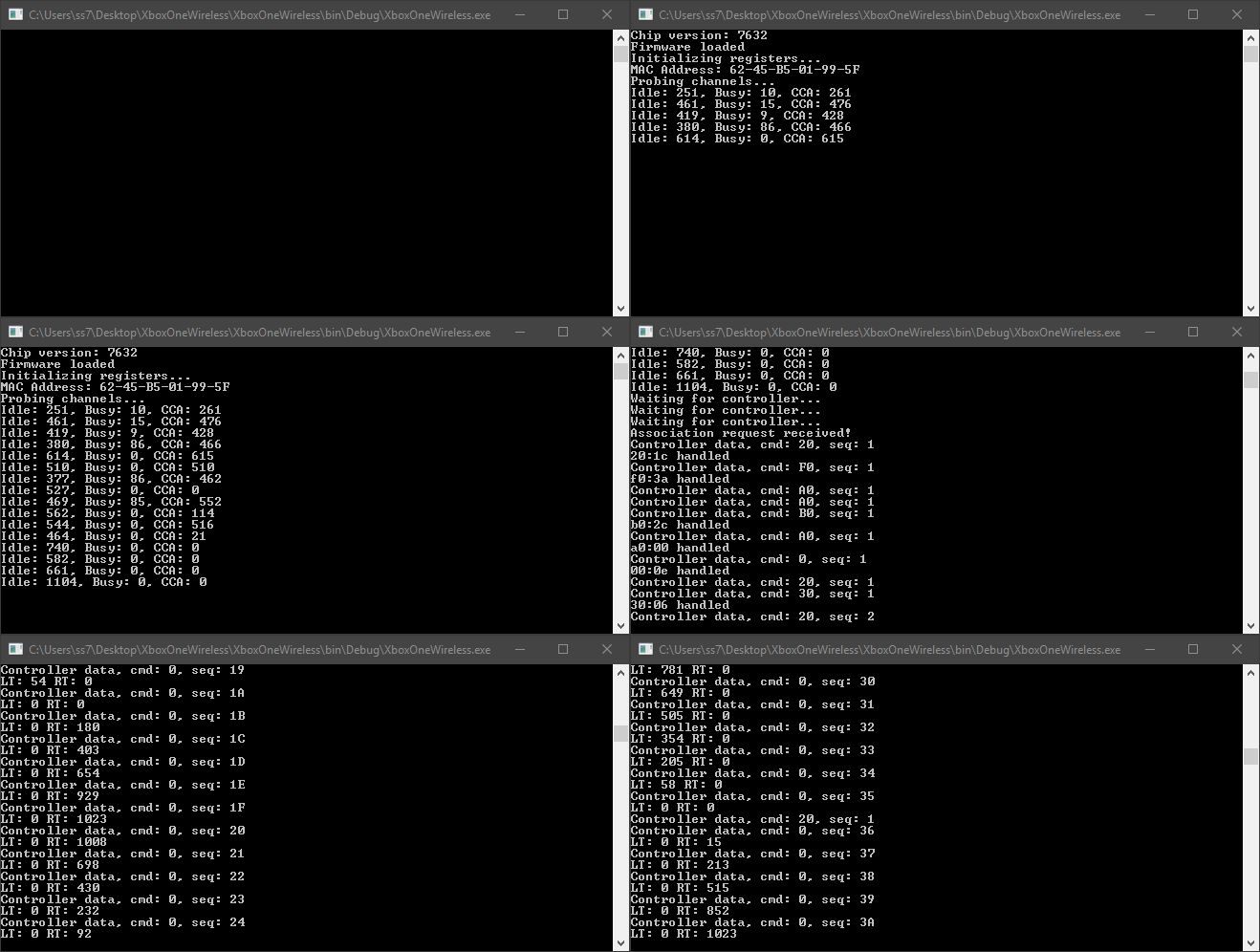
There's still a few things I haven't figured out, such as the automatic channel selection. This is why I need _YOUR HELP_: If you have the newer and smaller Xbox Wireless Adapter for Windows 10 or the older and clunkier version of the dongle, you can help me by providing an up-to-date USBPcap capture of the communication between your PC and the dongle. The data has to be captured from start to finish, so please start the recording BEFORE you plug in the dongle and stop the recording after you have done some actual button presses on your controller.
Once I'll have collected enough data I will provide a testing version of my Windows driver so you can try it out on your own PCs. Maybe we will finally have an open driver for the wireless dongle 😄.
 medusalix
on 21 Aug 2019
medusalix
on 21 Aug 2019
@medusalix that is just awesome, sadly I just have the bigger older version, I'll try to get someone with the newer version to help or borrow one when I get back from vacations. Tweeted this to libretro, batocera, retropie and recalbox in hopes of finding more users with that dongle
@twinaphex Could you please tweet this info to try to get help from the libretro users? thanks in advance
rubenjavier
on 21 Aug 2019
@rubenjavier Thanks for tweeting, that might get the attention of a few more users. I'll need captures for both the old and the new dongle, so I'm interested in your capture as well. According to my experimentation the old dongle uses the Mediatek MT7612 while the new one is based on the MT7632.
medusalix
on 21 Aug 2019
Just read this, I have 3 of the new smaller dongles, need instructions to make the capture and where to send upload it.
Get Outlook for Androidhttps://aka.ms/ghei36
From: Medusalix notifications@github.com
Sent: Wednesday, August 21, 2019 6:44:27 PM
To: 360Controller/360Controller 360Controller@noreply.github.com
Cc: go0ro0 rowe.simon@hotmail.co.uk; Comment comment@noreply.github.com
Subject: Re: [360Controller/360Controller] Xbox One Wireless Adapter for PC Support (#156)
@rubenjavierhttps://github.com/rubenjavier Thanks for tweeting, that might get the attention of a few more users. I'll need captures for both the old and the new dongle, so I'm interested in your capture as well. According to my experimentation the old dongle uses the Mediatek MT7612 while the new one is based on the MT7632.
—
You are receiving this because you commented.
Reply to this email directly, view it on GitHubhttps://github.com/360Controller/360Controller/issues/156?email_source=notifications&email_token=AK7EEOEDJCUCY3OQ2TQP2X3QFV5HXA5CNFSM4BSTW2A2YY3PNVWWK3TUL52HS4DFVREXG43VMVBW63LNMVXHJKTDN5WW2ZLOORPWSZGOD42RKUY#issuecomment-523572563, or mute the threadhttps://github.com/notifications/unsubscribe-auth/AK7EEOHUELF5AMO6NXPHVVDQFV5HXANCNFSM4BSTW2AQ.
go0ro0
on 21 Aug 2019
I also have the chatpad so I can capture with and without, would a capture with headset plugged into the controller be any use also?
Get Outlook for Androidhttps://aka.ms/ghei36
From: Simon Rowe
Sent: Wednesday, August 21, 2019 10:59:17 PM
To: 360Controller/360Controller reply@reply.github.com; 360Controller/360Controller 360Controller@noreply.github.com
Cc: Comment comment@noreply.github.com
Subject: Re: [360Controller/360Controller] Xbox One Wireless Adapter for PC Support (#156)
Just read this, I have 3 of the new smaller dongles, need instructions to make the capture and where to send upload it.
Get Outlook for Androidhttps://aka.ms/ghei36
From: Medusalix notifications@github.com
Sent: Wednesday, August 21, 2019 6:44:27 PM
To: 360Controller/360Controller 360Controller@noreply.github.com
Cc: go0ro0 rowe.simon@hotmail.co.uk; Comment comment@noreply.github.com
Subject: Re: [360Controller/360Controller] Xbox One Wireless Adapter for PC Support (#156)
@rubenjavierhttps://github.com/rubenjavier Thanks for tweeting, that might get the attention of a few more users. I'll need captures for both the old and the new dongle, so I'm interested in your capture as well. According to my experimentation the old dongle uses the Mediatek MT7612 while the new one is based on the MT7632.
—
You are receiving this because you commented.
Reply to this email directly, view it on GitHubhttps://github.com/360Controller/360Controller/issues/156?email_source=notifications&email_token=AK7EEOEDJCUCY3OQ2TQP2X3QFV5HXA5CNFSM4BSTW2A2YY3PNVWWK3TUL52HS4DFVREXG43VMVBW63LNMVXHJKTDN5WW2ZLOORPWSZGOD42RKUY#issuecomment-523572563, or mute the threadhttps://github.com/notifications/unsubscribe-auth/AK7EEOHUELF5AMO6NXPHVVDQFV5HXANCNFSM4BSTW2AQ.
go0ro0
on 22 Aug 2019
Instructions for making the capture:
- Install Wireshark. Make sure to tick the option to install USBPcap in the installer.
- At the bottom of the Wireshark window you should see multiple USBPcap entries.
- You have to identify which one is the correct one by clicking on one of them to start the capture.
- Now plug in the dongle. If you see lots of messages appearing, then it's probably the correct one. Otherwise you have to repeat the procedure with one of the other USBPcap entries.
- Turn on the controller and wait for it to pair (light stays on). Press any random buttons on the controller (A, B, LT, RT, etc.).
- Stop the capture and save the captured data. Upload the created *.pcapng file to any file hoster you like and post the link.
Thank you.
@go0ro0 My focus right now is on the basic functionality of the controller. I might add support for the chatpad and the headset in the future. Feel free to make captures using all kinds of accessories attached, but please provide one without any extensions plugged in.
medusalix
on 22 Aug 2019
@medusalix
You might want to get in touch with the developer of the xpadneo driver: https://github.com/atar-axis/xpadneo. The developer has done a great job getting the Bluetooth version of the XBox One S controller working on Linux. I believe there was some desire to get the wireless adapter working as well.
 ugly95
on 25 Aug 2019
ugly95
on 25 Aug 2019
@ugly95 That sounds like a good idea 😃. My top priority would be a driver for macOS, especially because the bounty is targeting 360Controller, but I'm more than willing to provide a Linux driver too. I'm just not entirely sure if this project is even maintained anymore (see comment by @FranticRain). Maybe I should do a first implementation using xpadneo? @atar-axis
medusalix
on 25 Aug 2019
@medusalix You'd be correct in your assumption that 360Controller currently does not have an active maintainer. If you'd like to get a request merged in, ping me because I no longer follow the repository. However, I also won't be signing anything anymore, so you'll have to get your own certificate to get it actually released. So 360Controller will probably be the most difficult version to actually get released. Sorry about that.
But I've gone ahead and gotten a sniff for you, as I know getting these can be a huge pain in the butt. Everyone starts out excited about it and then either gives you a crappy quality sniff or doesn't at all. But I got you one on a clean port. Xbox One S-type controller. New dongle. Sniff includes dongle connection, then I hit A, B, X, Y, LB, and then RB. Let me know if you want other controller types with the same dongle, as I have every iteration of the mainline Xbox One controller just sitting around here.
It's marked as a "txt" because GitHub is a well made and intelligently managed service, but I promise you it's a pcap. :P
FranticRain.txt
FranticRain
on 26 Aug 2019
@FranticRain Thanks a lot for the nice capture 👍. There were a few minor things I added to my driver, although it didn't differ very much from the captures I already did, which is a good thing (as it means that my driver should also work with somebody else's controller). Though there are still many things I haven't figured out:
- [ ] Automatic channel selection (hard)
- [ ] Controller rumble (should be easy)
- [ ] Auto-off when computer is shut down (need a WiFi capture for that)
- [x] First-time pairing (can't do this, my controller is already paired)
- [x] Support for multiple controllers (should be easy)
- [ ] Extensions (chatpad, headset)
I would really appreciate if you could do a capture with multiple controllers connected to one dongle 😃.
medusalix
on 27 Aug 2019
@medusalix wow, i am impressed 😊 and i would be very interested to get in touch with you. The biggest problem in linux always was the missing dongle/chipset support. They added that last year or so. Before that I made some progress using tthe low level monitoring mode but I never successfully decrypted the data sent.
I documented a little bit at xpadneos wiki page.
atar-axis
on 28 Aug 2019
@medusalix Looks like I only have 3 sitting around, so you'll have to settle for that, unfortunately. You can connect up to 8 controllers to one of these things, so hopefully this shows you a pattern that you can use to get up to 8. Sniff is:
Turn on 1. Turn on 2. Turn on 3. 1: ABXY, 2: ABXY, 3: ABXY
Let me know if you need anything else. I don't have any headsets/chatpads so I'm out on that one. And it looks like all of my stuff was already paired when I turned it on. I can get you some rumble sniffs from something like Forza, which will include trigger and main rumble. Might be a bit noisy though.
@PokeCaptain You should probably link people to the pinned post where I talk about the reasoning behind leaving 360Controller, #895. But y'know. You do you, I guess.
FranticRain
on 28 Aug 2019
@atar-axis Your documentation and devkid's gist were really helpful! I actually started by investigating how the linux driver works. I added the missing VID & PID and recompiled the kernel driver (or should I rather say the whole kernel because of signature enforcement lol). Then I found out that the driver only supports the MT7612 (probably used in the older dongle) and not the MT7632 that is actually inside the new dongle. I still got basic WiFi functionality working by making the driver think it's a MT7612 (though I got lots of errors in the logs). That's basically why I decided to implement my own driver from scratch.
Some more information about the protocol:
These are the only things required to get the controllers to pair:
Beacon frames -> Association request -> Association response -> Handshake
You need no probe requests, no probe responses and no QoS null frames. Those things may only be necessary for the initial pairing. As far as I know the data is not encrypted at all.
Another interesting thing is that half of the handshake can actually be skipped. The controller starts sending the button actions after a certain point where you can stop responding to the handshake messages.
medusalix
on 29 Aug 2019
@medusalix Encountered a show-stopper bug in my Windows install, so I nuked it, and re-installed. Turns out that makes Windows forget all of the controller pairings. So here's a sync sniff.
FranticRain
on 30 Aug 2019
xbox_one_controller.pcapng.gz
I am not sure if this is the correct capture, let me know in case it isn't and I'll try another usbpcap id.
 belegdol
on 30 Aug 2019
belegdol
on 30 Aug 2019
@belegdol Yes, that's it 😃. Thank you very much.
@FranticRain Thanks, with your help I got the pairing figured out 🎉. It's actually pretty straightforward and simple.
I'm working on the driver for macOS right now, I'll let you guys know when it's ready for testing 💻.
medusalix
on 1 Sep 2019
Hey medusalix, would you mind sharing what you found out? :) Maybe we could use that for xpadneo too, furthermore I would gladly invite you to collaborate on xpadneo with me in general :grin:
atar-axis
on 1 Sep 2019
@atar-axis Sure, I'm actually planning on writing a blog post after I publish the driver, where I summarise all the findings I made and share some protocol details. The driver for xpadneo would definitely be the next thing I'd like to work on. I recently finished school, so I need to find a healthy balance between programming and enjoying my free time. Anyway, here's how the pairing works:
The MT7632 contains a section in memory where the beacon frames are stored. You can write multiple different beacons to that memory. When the button on the backside of the dongle is pressed or released, the driver creates an additional beacon with a 802.11 frame type of 0111 (Reserved). Additionally, the data of the actual beacon frame gets slightly modified: 00, 00, dd, 10, 00, 50, f2, 11, 01, 10, 01, 95, 2c, 99, 00, 00, 00, 00, 00, 00.
Following that, the dongle receives a response from the controller, still with a frame type of 0111, the dongle answers with a similar packet.
After those steps, the association flow continues as usual.
medusalix
on 1 Sep 2019
@medusalix I have adapter for windows10 and two controller(one without bluetooth other one with bluetooth and 3.5 mm in-diameter),and I have installed win10 and manjaro. how can I help you.
 spphinslove
on 5 Sep 2019
spphinslove
on 5 Sep 2019
@medusalix
xbox.zip
- I open the wireshark and start cap
2.plug in adapter and press search button
3.turn on the controller (the one with bluetooth) and press search button.then paired success.
4.press any button on controller.
5.use old controller to repeat 3.
6.press any button on old controller.
7.stop cap and save file.
Wish you can make the driver for linux.
update:It seems I have used the old controller search adapter twice.
spphinslove
on 5 Sep 2019
@belegdol Yes, that's it . Thank you very much.
@FranticRain Thanks, with your help I got the pairing figured out . It's actually pretty straightforward and simple.
I'm working on the driver for macOS right now, I'll let you guys know when it's ready for testing .
Any news?
spphinslove
on 23 Sep 2019
@spphinslove I'm still working on it 😄. Thank you for the capture. USB is causing problems on macOS, I'm unable to do bulk transfer with >512 bytes (maybe I'm missing some kind of auto-fragmentation option). The firmware upload requires the firmware to be sent in large chunks, so that's the kind of thing that currently prevents me from continuing my work. I might publish the unfinished source code later this week.
medusalix
on 23 Sep 2019

@FranticRain @atar-axis @belegdol @spphinslove
medusalix
on 29 Sep 2019
Is that on a Mac? I ask because the repo is Mac focused but that interface looks like GNOME 3 as there isn't a standard title bar.
 Two-Tone
on 30 Sep 2019
Two-Tone
on 30 Sep 2019
@Two-Tone That's 360Controller on macOS. It's dark mode with orange accent color. He's in the System Preferences menu, which has a different title bar style than most apps. Plus, the camera shot is just so low on the screen that you don't see any menu bar.
FranticRain
on 30 Sep 2019
@medusalix Is the source available?
 13MaxG
on 30 Sep 2019
13MaxG
on 30 Sep 2019
@13MaxG I will publish the source code soon. The handshake between the dongle and controller is still not 100% reliable, so I'll have to get that fixed before I release it.
medusalix
on 30 Sep 2019
You don't have to get it 100% reliable before releasing it. Drivers are
worked on out in the open all the time and with this many people and
developers interested in this having more eyes on the code is better.
If you're worried about bad drivers circulating around, just don't provide
an installable binary version. Anyone who is honestly interested in working
on this will be able to compile the code themselves, assuming it doesn't
require some crazy build environment.
On Mon, Sep 30, 2019, 4:33 PM Medusalix notifications@github.com wrote:
@13MaxG https://github.com/13MaxG I will publish the source code soon.
The handshake between the dongle and controller is still not 100% reliable,
so I'll have to get that fixed before I release it.—
You are receiving this because you were mentioned.
Reply to this email directly, view it on GitHub
https://github.com/360Controller/360Controller/issues/156?email_source=notifications&email_token=ABBEIS6YJIMN6UIHQVXB5NTQMJWC3A5CNFSM4BSTW2A2YY3PNVWWK3TUL52HS4DFVREXG43VMVBW63LNMVXHJKTDN5WW2ZLOORPWSZGOD77FQMA#issuecomment-536762416,
or mute the thread
https://github.com/notifications/unsubscribe-auth/ABBEIS7NAKEZZW6ZD76I6I3QMJWC3ANCNFSM4BSTW2AQ
.
Two-Tone
on 30 Sep 2019
Wireless Xbox One controller support has now been merged into ~master~ modern-rewrite. I don't know what the process is for claiming bounties, so I'll leave this open until I get further word from @medusalix on what he needs to receive payment.
FranticRain
on 14 Oct 2019
This is so great. What do we do to upgrade?
dannyharding10
on 14 Oct 2019
You'll need to disable SIP on your machine and build the modern-rewrite branch from source using build.sh. Then you can run the installer and you should be good to go.
FranticRain
on 14 Oct 2019
@FranticRain Unfortunately this issue needs to be closed for me to claim the bounty. Do you mind if I open up a new one where people can discuss issues and suggest new features?
medusalix
on 14 Oct 2019
@medusalix By all means!
FranticRain
on 14 Oct 2019
Was it explicitly clear that the bounty could be claimed with the implementation of a "new device" only? I had ignorantly assumed that the remaining features in #944 would have been included.
stevenvachon
on 16 Oct 2019
Please take a look at this issue. Same story, rumble wasn't implemented at first. The new device tag is usually used for a first, not necessarily feature-complete implementation.
Claiming the bounty however implies that I maintain the new device (dongle and controller), therefore it's my duty to add new features and fix upcoming bugs. Certain features (e.g. chatpad) require testers, as I haven't got the required accessories. Others require the code to be signed (e.g. rumble). I need the assistance of volunteers like you to make sure the device works for all people. I repeatedly asked for testers and as nobody except for @FranticRain responded to my requests I made the decision to release the source code and claim the bounty. I hope this makes my point of view a little bit clearer 😃.
medusalix
on 16 Oct 2019
what about the linux implementation? I thought that the biggest use case would be for linux and unix like systems that doesnt have this drive, for distros like retropie, recalbox, batocera or android... suddenly I saw a focus on mac on the last leg of the driver creation, which have a very small gaming community (probably the smallest)
rubenjavier
on 16 Oct 2019
@rubenjavier This is a macOS repo for a macOS driver. Linux is out of scope, and off-topic.
FranticRain
on 16 Oct 2019
@rubenjavier This is a macOS repo for a macOS driver. Linux is out of scope, and off-topic.
sorry mate, my bad
rubenjavier
on 16 Oct 2019
These changes are now released as part of alpha 4
FranticRain
on 19 Oct 2019
Related issues
 Powne
·
14Comments
Powne
·
14Comments
 mchlbowyer
·
8Comments
mchlbowyer
·
8Comments
 justplainmark
·
8Comments
justplainmark
·
8Comments
 lewlepton
·
8Comments
lewlepton
·
8Comments
 danielfox
·
3Comments
danielfox
·
3Comments
Most helpful comment
I noticed this issue sort of lost steam over the last 2 years or so, so I set up a bounty through BountySource here: https://www.bountysource.com/issues/27658018-xbox-one-wireless-adapter-for-pc-support
Hopefully this is enough to get someone to tackle this issue head-on finally! A few resources I've seen that may be useful to anyone looking to take this on: